1. Product Overview
The OURANTOOLS X95 is a multi-functional GPS speedometer and digital car inclinometer designed for various vehicles, including off-road applications. It integrates a high-precision GPS system and a multi-axis gyroscope to provide real-time data on vehicle speed, location coordinates, altitude, pitch angle, and roll angle. The device features an automatic light sensor for optimal display visibility and a comprehensive alarm system for enhanced safety.

Image 1.1: Overview of the X95's multi-function display, showing icons for vehicle roll angle, pitch angle, coordinates, satellite speed, altitude, speed display, supply voltage, breathing light button, clock, driving distance, number of positioning satellites, automatic light sensor, tilt angle danger alarm, pitch angle hazard alarm, and overspeed alarm.

Image 1.2: The X95 device mounted on a vehicle dashboard, illustrating its ability to display multiple data points simultaneously, including pitch angle, GPS coordinates, current time, speed, driving time, distance, and voltage.
2. Setup and Installation
Follow these steps to properly install and set up your X95 GPS Speedometer Inclinometer:
- Step 1: Connect to Power. Plug the cigarette lighter adapter into your vehicle's 12V power outlet.
- Step 2: Route the Cable. If desired, carefully hide the power cord along the seams of your car's interior for a tidy installation.
- Step 3: Connect to X95. Plug the small end of the power connector into the designated port on the X95 device.
- Step 4: Placement. Place the X95 on a stable, level surface on your dashboard where it does not obstruct your view of the road. Ensure the device is securely mounted.

Image 2.1: Visual guide for the three-step installation process: connecting the power adapter to the car's cigarette lighter, routing the cable, and plugging the connector into the X95 unit.
What's in the Box:
- X95 GPS Speedometer Inclinometer Unit
- Power Cable with Cigarette Lighter Adapter
- User Manual (this document)

Image 2.2: The components included in the X95 product package: the X95 unit, its power cable, and a user manual.
3. Operating Instructions
3.1 Power On/Off
The device powers on automatically when connected to the vehicle's power supply and the ignition is turned on. To power off, simply disconnect the device from the power source.
3.2 GPS Functionality
Upon startup, the X95 will search for GPS satellites. This process may take up to a minute, especially in areas with limited satellite visibility. Once connected, it will display:
- Vehicle Speed: Displays current speed in KM/H or MPH (user selectable).
- Altitude: Current elevation.
- Coordinates: Real-time latitude and longitude.
- Satellite Time: High-precision real-time clock synchronized via satellite.

Image 3.1: The X95 displaying the current time and date, synchronized automatically via satellite, indicating 'Satellite Time 0 error' for accuracy.
3.3 Inclinometer Functionality
The built-in multi-axis gyroscope measures your vehicle's pitch and roll angles:
- Pitch Angle: Displays the vehicle's inclination (uphill/downhill) from -40° to +40°.
- Roll Angle: Displays the vehicle's side-to-side tilt from -40° to +40°.

Image 3.2: Detailed explanation of pitch angle (uphill/downhill) and roll angle (left/right inclination) displays on the X95, with visual examples of vehicles on slopes.
3.4 Alarm System
The X95 includes several safety alarms:
- Roll Angle Danger Alert: Activates if the roll angle exceeds 30 degrees.
- Pitch Angle Hazard Alert: Activates if the pitch angle exceeds 30 degrees.
- Over-speed Warning: Alerts you when your vehicle exceeds a preset speed limit.
- Battery Anomaly Notifications: Informs you of unusual battery voltage.
- Vehicle Fault Code Alarms: Provides alerts for detected vehicle issues.
To disarm an alarm, unplug the device from the power source.

Image 3.3: The X95 showing an over-speed warning, with the current speed displayed in red and an exclamation mark icon.
3.5 Automatic Brightness Adjustment
The X95 features a sensitive light sensor that automatically adjusts the screen brightness to suit ambient light conditions, ensuring clear visibility during both day and night driving.

Image 3.4: Illustration of the automatic light sensor feature, demonstrating how the X95 display adapts its brightness for optimal visibility in both bright daytime and dark nighttime environments.
3.6 Real-time Data Monitoring
The device continuously monitors and displays various driving data:
- Driving Speed: Current vehicle speed.
- Driving Time: Elapsed time of the current journey.
- Driving Distance: Distance covered during the current journey.
- Power Supply Voltage: Real-time vehicle battery voltage.
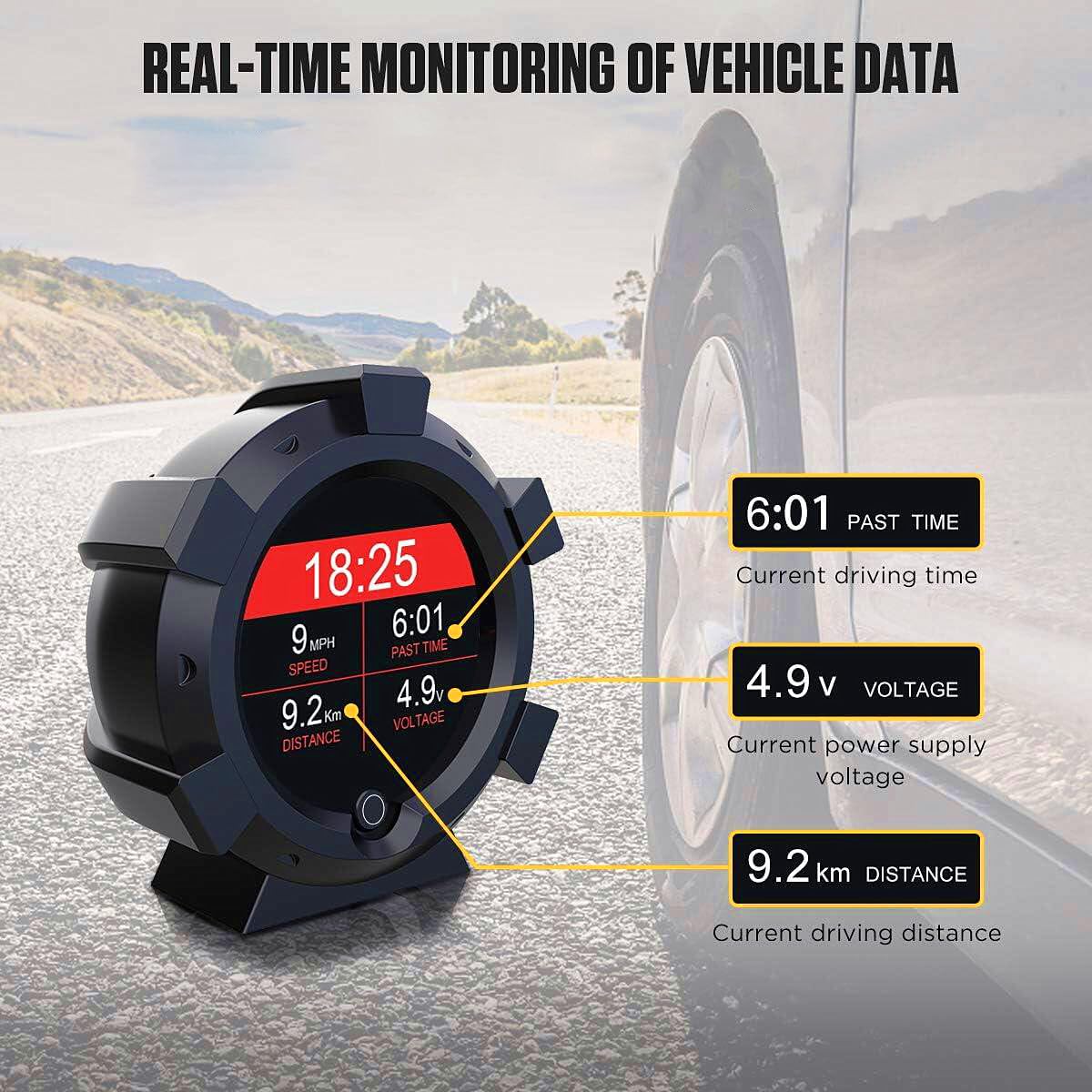
Image 3.5: The X95 showing real-time vehicle data, including current driving time (6:01), power supply voltage (4.9V), and driving distance (9.2 km).
4. Maintenance
To ensure the longevity and optimal performance of your X95 GPS Speedometer Inclinometer, follow these maintenance guidelines:
- Cleaning: Use a soft, dry cloth to clean the device. Avoid using abrasive cleaners, solvents, or harsh chemicals, as these can damage the screen and casing.
- Storage: When not in use for extended periods, store the device in a cool, dry place away from direct sunlight and extreme temperatures.
- Handling: Handle the device with care. Avoid dropping it or subjecting it to strong impacts, which can damage internal components.
- Power Connection: Ensure the power cable is not kinked or strained. Always pull from the plug, not the cable, when disconnecting.
5. Troubleshooting
If you encounter issues with your X95, refer to the following troubleshooting tips:
| Problem | Possible Cause | Solution |
|---|---|---|
| Device does not power on. | No power supply; faulty cable; vehicle power outlet issue. | Check if the cigarette lighter adapter is fully inserted. Test the power outlet with another device. Inspect the power cable for damage. |
| GPS signal acquisition is slow or absent. | Poor satellite visibility (e.g., in tunnels, dense urban areas, heavy tree cover); initial startup. | Move to an open area with a clear view of the sky. Initial satellite lock can take up to a minute. Ensure no metallic objects are blocking the GPS antenna. |
| Speed reading is inaccurate. | Temporary GPS signal loss; interference. | Ensure a stable GPS signal. Compare with another GPS-based speed source (e.g., phone app) in an open area. |
| Inclinometer readings seem erratic. | Device not level; extreme vehicle movement. | Ensure the device is placed on a stable, level surface. Avoid using the inclinometer during rapid or extreme vehicle maneuvers. |
| Screen is too dim or too bright. | Automatic light sensor interference; extreme lighting conditions. | Ensure the light sensor (usually a small dot on the device) is not obstructed. The automatic adjustment may take a few moments to adapt. |
6. Specifications
| Feature | Detail |
|---|---|
| Model Number | MCD13045-9-382-1646304091 (X95) |
| Brand | OURANTOOLS |
| Material | Plastic |
| Dimensions (L x W x H) | 4.53 x 4.92 x 2.56 inches (11.5 x 12.5 x 6.5 cm) |
| Item Weight | 8.5 ounces (241 grams) |
| Working Voltage | DC 5-28V |
| Max Working Current | 50mA |
| Operating Temperature | -20°C to 70°C (-4°F to 158°F) |
| Pitch/Roll Angle Range | -40° to +40° |
| Display | High-resolution color HD LCD |
| Compatibility | Universal for sedans, urban SUVs, MPVs, vans, touring cars, off-road vehicles. |

Image 6.1: Dimensional drawing of the X95 unit, indicating its width, height, and depth in both millimeters and inches.
7. Warranty Information
This product is covered by a standard manufacturer's warranty. Please refer to the warranty card included with your purchase or contact OURANTOOLS customer support for specific details regarding warranty duration and terms. Keep your proof of purchase for warranty claims.
8. Customer Support
For any questions, technical assistance, or support regarding your OURANTOOLS X95 GPS Speedometer Inclinometer, please contact OURANTOOLS customer service. Contact information can typically be found on the product packaging or the official OURANTOOLS website.