1. Introduction
This manual provides comprehensive instructions for the installation, operation, and maintenance of your SouthMarine Engine Coolant Thermostat. Proper installation and regular maintenance are crucial for optimal engine performance and longevity. This thermostat is designed to regulate engine temperature efficiently, ensuring your vehicle operates within its ideal thermal range.
The thermostat opens and closes to control the flow of coolant between the engine and the radiator, maintaining the engine's operating temperature. A malfunctioning thermostat can lead to engine overheating or underheating, both of which can cause significant damage.
Video 1: Product Overview. This video provides a general overview of the thermostat's appearance and basic function.
2. Product Specifications
- Brand: SouthMarine
- Model: Engine Coolant Thermostat
- Part Numbers: 90916-03075, 90916-A3003, 90916-03129, 90916-03084, 90916-03133, 16325-62010
- Item Weight: 4.6 ounces
- Package Dimensions: 2.56 x 2.52 x 2.48 inches
- Opening Temperature: 82℃ (179.6℉)
- Exterior: Machined
- What's in the Box: Thermostat
3. Vehicle Compatibility
This thermostat is compatible with a wide range of Toyota and Lexus vehicles. Please verify part numbers before purchasing to ensure proper fitment.
Compatible with Toyota:
- Camry 4 Cyl 2.5L, 6 Cyl 3.0L (1988-1994)
- Celica 4 Cyl 2.0L, 4 Cyl 2.2L (1990-1993)
- MR2 4 Cyl 2.0L, 4 Cyl 2.2L (1990-1995)
- T100 6 Cyl 3.4L (1994-1998)
- Tacoma 6 Cyl 3.4L (1995-2004)
- 4Runner 6 Cyl 3.4L (1996-2002)
- Tundra 6 Cyl 3.4L (2000-2005)
- Avalon (1998-2014)
- Corolla (1998-2013)
- Highlander (2001-2013)
- Matrix (2003-2013)
- MR2 Spyder (2000-2005)
- RAV4 (2002-2014)
- Sienna (1998-2014)
- Solara (2001-2008)
- Venza (2009-2014)
Compatible with Lexus:
- ES250 4 Cyl 2.5L (1990-1991)
- ES300 6 Cyl 3.0L (1992-1994, 1996-2003)
- ES330 Base (2004-2006)
- ES350 Base (2007-2012)
- GS350 Base / F (2007-2013)
- GS450h Base (2007-2011)
- IS250 IS350 Base/ C (2006-2010)
- LS400 Base (1996-1997)
- RX300 Base (1999-2003)
- RX330 Base (2004-2006)
- RX350 Base (2007-2012)
- RX400h Base (2006-2008)
- RX450h Base (2010-2013)
Compatible with Scion:
- tC Base (2010-2014)
- xB Base (2008-2013)
4. Installation Instructions
This section outlines the general steps for replacing an engine coolant thermostat. Specific procedures may vary slightly depending on your vehicle model. Always ensure the engine is cool before beginning any work on the cooling system.
4.1. Initial Access and Coolant Preparation
- Ensure Engine is Cold: Never open the coolant reservoir cap or work on the cooling system when the engine is hot, as pressurized hot coolant can cause severe burns.
- Remove Air Intake Assembly: Remove the air intake extension to gain better access to the thermostat. This typically involves unclipping and sliding out the component.
- Open Coolant Reservoir Cap: Carefully open the coolant reservoir cap to release any pressure.
- Access Radiator Drain: Lift the vehicle safely using a jack and jack stands. Remove any engine undercovers (usually held by 10mm bolts/screws) to access the radiator drain plug, typically located on the passenger side.
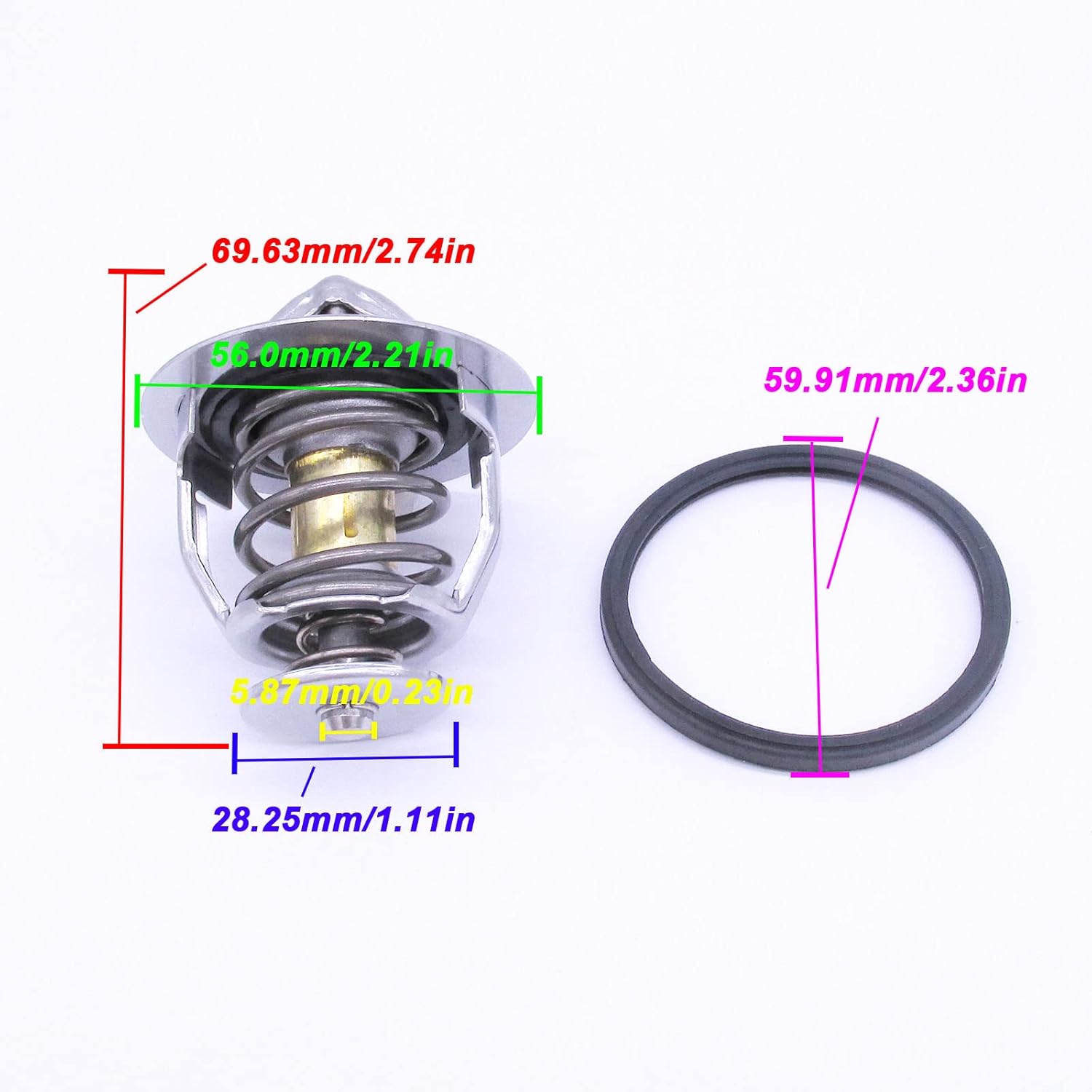
Image 1: View of the engine undercover from beneath the vehicle.
- Drain Coolant: Place a drain pan beneath the radiator drain plug. Slowly open the drain plug and allow the coolant to drain. You may only need to drain a couple of quarts if only replacing the thermostat, but a full drain and refill is recommended for fresh coolant.

Image 2: Coolant draining from the radiator drain plug.
4.2. Thermostat Removal and Cleaning
- Remove Thermostat Housing Nuts and Old Thermostat: Locate the thermostat housing. Remove the two 12mm nuts securing the thermostat housing cover. Carefully remove the cover and then gently pry out the old thermostat. Note its orientation.

Image 3: The old thermostat removed from its housing.
- Clean Sealing Surfaces: Thoroughly clean the thermostat housing and cover sealing surfaces using a Scotch-Brite pad. Ensure no old gasket material or corrosion remains.
4.3. New Thermostat Installation and System Reassembly
- Install New Thermostat with Gasket: Place the new gasket onto the new thermostat. Insert the new thermostat into the housing, ensuring the jiggle valve (a small pin or ball) is pointing vertically upwards for proper air bleeding.

Image 4: New thermostat with its gasket, ready for installation.
- Reinstall Thermostat Cover and Tighten: Place the thermostat cover back onto the housing. Reinstall and tighten the two 12mm nuts to 13 foot-pounds.
- Set Heater Controls: Turn the vehicle's ignition to the "ON" position (engine off). Turn the heater blower on and set the temperature to maximum heat. This opens the heater core valve, aiding in air bleeding.
- Slowly Refill Coolant: Place a funnel into the coolant fill hole. Slowly pour the recommended Toyota Super Long Life Antifreeze/Coolant into the system. Pouring slowly helps prevent airlocks. Continue filling until the coolant level reaches the top of the fill hole.

Image 5: Slowly refilling the engine with coolant.
- Install Filler Plug: Clean the filler plug and replace its gasket. Thread the filler plug back into place and tighten to 33 foot-pounds.
- Fill Reservoir: Fill the coolant reservoir until it reaches the "FULL" mark.
- Reinstall Air Intake: Reattach the air intake assembly.
- Idle and Rev Engine for Air Bleeding: Start the engine and let it idle for 10 minutes with the coolant reservoir cap open, topping up as needed. Then, install the cap and rev the engine between 2000-3000 RPM for 5 minutes.
- Final Coolant Level Adjustment: Shut off the engine and allow it to cool completely (several hours). Once cool, open the coolant reservoir cap and check the level. Top up the coolant to the "FULL" mark on the cold reservoir.
5. Operating the Thermostat
The thermostat is an automatic valve that regulates the flow of engine coolant. When the engine is cold, the thermostat remains closed, preventing coolant from flowing to the radiator. This allows the engine to reach its optimal operating temperature quickly. Once the engine reaches approximately 82°C (179.6°F), the thermostat opens, allowing coolant to circulate through the radiator to dissipate heat and maintain a stable engine temperature. It will continuously adjust its opening to keep the engine within the desired temperature range.
Video 2: Motorad High Performance Thermostat. This video explains the function and importance of a high-performance thermostat in the cooling system.
6. Maintenance
- Regular Coolant Checks: Periodically check your coolant level in the reservoir when the engine is cold. Ensure it is between the "LOW" and "FULL" marks.
- Coolant Quality: Follow your vehicle manufacturer's recommendations for coolant type and replacement intervals. Using the correct coolant (e.g., Toyota Super Long Life Antifreeze/Coolant) is vital for system health.
- Gasket Replacement: Always replace the thermostat gasket and any associated filler plug gaskets whenever the thermostat is serviced or replaced to prevent leaks.
- System Inspection: Regularly inspect hoses, clamps, and the radiator for any signs of leaks, cracks, or corrosion.
Video 3: Radiator Cap Maintenance. This video highlights the importance of maintaining your radiator cap as part of overall cooling system health.
7. Troubleshooting
- Engine Overheating: If your engine is overheating, the thermostat might be stuck closed. Check the coolant level and ensure the cooling fan is operating.
- Engine Underheating: If your engine takes a long time to warm up or runs consistently cold, the thermostat might be stuck open. This can lead to reduced fuel efficiency and increased engine wear.
- Coolant Leaks: Inspect the thermostat housing and hoses for any signs of leaks. Ensure all clamps are tight and gaskets are properly seated.
- Erratic Temperature Gauge: An erratic temperature gauge can sometimes indicate a faulty thermostat or an air pocket in the cooling system.
If you suspect a thermostat issue, it is recommended to have it inspected by a qualified mechanic.
8. Warranty and Support
For warranty information or technical support, please refer to the contact details provided with your purchase or visit the official SouthMarine website. Keep your proof of purchase for any warranty claims.


