1. Introduction
This manual provides detailed instructions for the operation and maintenance of the CNYST Handheld Colorimeter Spectrophotometer, Model 2022120801. This device is designed for precise color measurement and analysis, featuring dual optical path design for improved accuracy, innovative nano-integrated optics, and support for various software platforms. Please read this manual thoroughly before using the instrument to ensure correct operation and to maximize its performance and lifespan.
2. Safety Information
To prevent damage to the instrument or injury to the user, please observe the following safety precautions:
- Do not expose the instrument to extreme temperatures, humidity, or direct sunlight.
- Avoid dropping or subjecting the instrument to strong impacts.
- Keep the measurement aperture clean and free from dust or debris.
- Use only the provided charging accessories.
- Do not attempt to disassemble or repair the instrument yourself. Contact qualified service personnel for assistance.
- Ensure the instrument is calibrated regularly as per instructions to maintain accuracy.
3. Package Contents
Verify that all items listed below are present in the package:
- CNYST Handheld Colorimeter Spectrophotometer
- Charging Base
- Charging Head (Power Adapter)
- Data Cable
- Black Calibration Cylinder
- Fixed Base
- Measurement Apertures (11mm, 6mm, 3mm)
- User Manual and Certificates
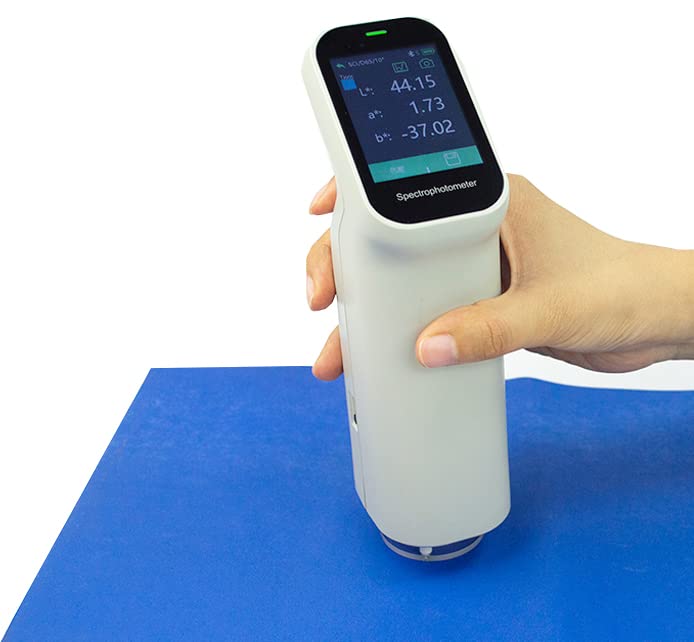
Figure 3.1: The CNYST Handheld Colorimeter Spectrophotometer in use, demonstrating its ergonomic design and digital display.

Figure 3.2: The colorimeter placed in its charging base, with the screen displaying measurement data.
Video 3.1: An unboxing and overview of the CNYST Colorimeter, showing the included components such as the device, charging base, power adapter, data cable, calibration cylinders, and various measurement apertures.
4. Product Overview
The CNYST Handheld Colorimeter Spectrophotometer is a precision instrument designed for accurate color measurement. It features a compact, ergonomic design with a clear display and intuitive controls.
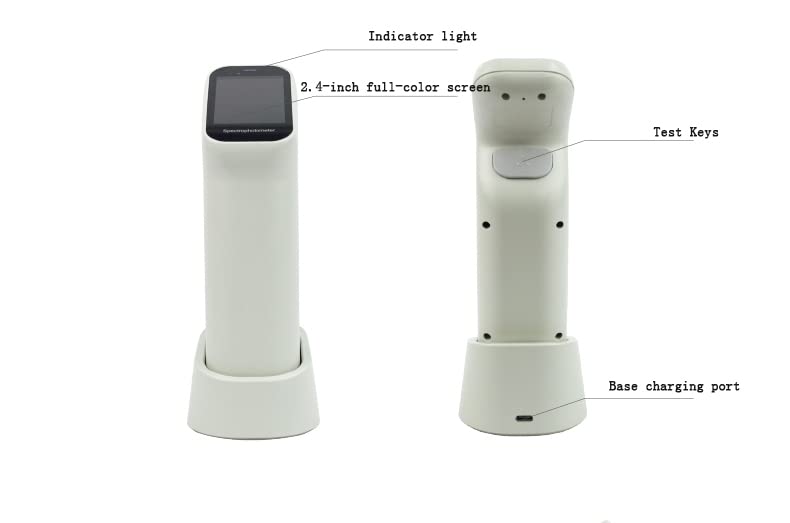
Figure 4.1: Labeled diagram illustrating the key components of the colorimeter, including the indicator light, 2.4-inch full-color screen, test keys, and base charging port.

Figure 4.2: Front and side views of the CNYST Colorimeter, showcasing its design and how it sits in the charging base.
5. Setup and Calibration
5.1 Initial Power On
- Press the power button located on the back of the instrument to turn it on.
- The display will illuminate, showing the main interface.
5.2 Calibration
Regular calibration is crucial for maintaining measurement accuracy. The instrument requires both white and black calibration.
- White Calibration: Place the instrument securely in its charging base. Follow the on-screen prompts for white calibration.
- Black Calibration: Remove the instrument from the charging base. Place the instrument into the black calibration cylinder. Follow the on-screen prompts for black calibration.
5.3 Changing Measurement Apertures
The colorimeter supports multiple measurement apertures (11mm, 6mm, 3mm) for different sample sizes.
- To change the aperture, gently remove the currently attached aperture plate from the bottom of the instrument.
- Locate the small switch on the side of the instrument. Slide this switch to the 'S' position for smaller apertures (6mm, 3mm) or to the 'L' position for the larger 11mm aperture.
- Attach the desired aperture plate (e.g., 6mm) by aligning it with the instrument's base and twisting gently until secure.
- Verify the selected aperture size on the instrument's display in the measurement setup menu.
6. Operating Instructions
6.1 Basic Color Difference Measurement
- Ensure the instrument is calibrated and the correct aperture is selected.
- Place the instrument's aperture firmly against the standard sample you wish to measure.
- Press the measurement button. The instrument will display the standard sample's color values (L*, a*, b*).
- Next, place the instrument's aperture firmly against the sample whose color difference you want to compare.
- Press the measurement button again. The display will show the color difference (dE*ab) and color deviation between the standard and the sample.
6.2 Connecting to the Mobile Application
The CNYST Colorimeter supports connection to a mobile application (Android, iOS) and PC software (Windows) for enhanced color management and analysis.
- Download and install the "ColorExpert" application from your device's app store or the manufacturer's website.
- Ensure Bluetooth is enabled on your mobile device.
- Open the ColorExpert app and navigate to the connection screen.
- Locate the Serial Number (SN) on the bottom of your colorimeter's base.
- In the app, select the device matching your instrument's SN and tap "Connect".
- Once connected, you can perform measurements, view color data, and access built-in Pantone color cards directly from the app.

Figure 6.1: The colorimeter demonstrating connectivity with both a smartphone application and PC software for comprehensive color management.
6.3 Using the App for Color Matching and Libraries
The ColorExpert app allows for advanced color analysis, including finding similar colors from built-in libraries and creating personal color collections.
- After connecting the instrument to the app, perform a measurement on your sample.
- The app will display the measured color. You can then use the "Find Similar Color" function to compare it against various color libraries, such as Pantone.
- The app will present the closest matching color numbers from the selected library.
- You can also create and save your own custom color libraries within the app, allowing you to store and manage specific colors for future reference.
Video 6.1: A detailed demonstration of the colorimeter's operation, including white and black calibration, switching between 11mm and 6mm apertures, performing color difference measurements, connecting to the mobile app, and utilizing the app's features for Pantone color matching and creating personal color libraries.
7. Maintenance
Proper maintenance ensures the longevity and accuracy of your CNYST Colorimeter.
- Cleaning: Use a soft, dry cloth to clean the exterior of the instrument. For the measurement aperture, use a lens cleaning cloth or a soft brush to remove dust. Do not use abrasive cleaners or solvents.
- Storage: Store the instrument in its original packaging or a protective case when not in use. Keep it in a cool, dry place away from direct sunlight and extreme temperatures.
- Battery Care: Charge the instrument regularly, even if not in frequent use, to maintain battery health. Avoid fully discharging the battery for extended periods.
8. Troubleshooting
If you encounter issues with your colorimeter, refer to the following common problems and solutions:
| Problem | Possible Cause | Solution |
|---|---|---|
| Instrument does not power on. | Low battery or power button not pressed correctly. | Charge the instrument using the provided adapter and cable. Ensure the power button is pressed firmly. |
| Inaccurate measurements. | Instrument not calibrated, dirty aperture, or incorrect aperture selected. | Perform white and black calibration. Clean the measurement aperture. Verify the correct aperture is attached and selected. |
| Cannot connect to mobile app. | Bluetooth off, incorrect device selected, or app not updated. | Ensure Bluetooth is enabled on your phone. Verify the SN matches the device in the app. Update the app to the latest version. |
| Display is dim or unresponsive. | Low battery or software issue. | Charge the instrument. If the issue persists, try restarting the device. |
If the problem persists after attempting these solutions, please contact CNYST customer support for further assistance.
9. Specifications
| Feature | Detail |
|---|---|
| Model Number | 2022120801 |
| Product Dimensions | 5.08 x 2.99 x 8.54 inches |
| Weight | 11.02 Pounds |
| Batteries | 1 Lithium Ion battery (included) |
| Repeatability Accuracy | dE*ab < 0.03 |
| Measurement Apertures | Φ11mm, Φ6mm, Φ3mm |
| Display | 2.4-inch full-color screen |
| Connectivity | Bluetooth (Android, iOS App), PC Software (Windows) |
| Optical Design | Dual optical path, 5 micron thick nano-integrated optics |
| Additional Features | Built-in HD camera, over 30 measurement indicators |
10. Warranty and Support
The CNYST Handheld Colorimeter Spectrophotometer is manufactured by CNYST. For warranty information, technical support, or service inquiries, please refer to the contact information provided with your purchase documentation or visit the official CNYST website.
Manufacturer: CNYST