
Introduction
Thank you for choosing the Aubess 10A Mini WiFi Smart Plug with Energy Monitoring. This smart plug allows you to control your electronic devices remotely, monitor energy consumption, and automate your home using the VeSync app, Amazon Alexa, or Google Assistant. This manual provides essential information for safe operation, setup, and troubleshooting.

Image: The Aubess 10A Mini WiFi Smart Plug, a compact white device designed to fit into standard wall outlets.
Safety Information
- Do not exceed the maximum load of 10 Amps or 1200 Watts.
- Use only in dry indoor locations. Avoid damp environments.
- Ensure the smart plug is fully inserted into the wall outlet.
- Do not disassemble or modify the device.
- Keep out of reach of children.
- If the plug feels excessively hot, discontinue use and contact support.
Package Contents
- Aubess 10A Mini WiFi Smart Plug
- User Manual
Product Overview
The Aubess Smart Plug is a compact device designed to make your home smarter. It features a power button/indicator light and a standard 3-prong outlet.
Key Features:
- Energy Monitoring: Track power consumption of connected devices.
- Remote Control: Control devices from anywhere via the VeSync app.
- Voice Control: Compatible with Amazon Alexa and Google Assistant.
- Scheduling & Timer: Set custom schedules and timers for automation.
- Compact Design: Mini size ensures it does not block adjacent outlets.
Setup
1. Download the VeSync App
Search for "VeSync" in the Apple App Store or Google Play Store and download the app. Create an account or log in if you already have one.
2. Prepare for Connection
- Plug the Aubess Smart Plug into a wall outlet.
- Ensure your smartphone is connected to a 2.4GHz Wi-Fi network. The smart plug does not support 5GHz Wi-Fi.
- Place the smart plug within range of your Wi-Fi router.

Image: Diagram illustrating the smart plug's connection to a Wi-Fi router.
3. Pair the Device with VeSync App
- Open the VeSync app.
- Tap the "+" icon or "Add Device" to add a new device.
- Select "Aubess Smart Plug" from the device list.
- Follow the in-app instructions to connect the smart plug. This typically involves pressing and holding the power button on the plug for 5 seconds until the Wi-Fi indicator blinks, then entering your Wi-Fi password in the app.
- Once connected, you can name your smart plug and assign it to a room.

Image: A four-step visual guide showing the process of adding the smart plug to the VeSync app, from selecting 'Add Device' to successful pairing.
Operating Instructions
Basic On/Off Control
- Manual Control: Press the power button on the smart plug to manually turn the connected device on or off.
- App Control: Open the VeSync app, select your smart plug, and tap the power icon to toggle its status.

Image: A user plugging in the smart plug and then connecting it via the VeSync app on a smartphone.
Energy Monitoring
The VeSync app provides real-time and historical data on the power consumption of devices connected to your smart plug. This feature helps you track usage and manage energy costs.
- In the VeSync app, select your smart plug.
- Navigate to the energy monitoring section to view statistics such as current voltage, energy usage (kWh), and power (Watts).

Image: A graph illustrating energy consumption data over several days, demonstrating the energy monitoring feature.
Scheduling and Timer Functions
Automate your devices by setting schedules or timers through the VeSync app.
- Schedule: Set specific times for the smart plug to turn on or off daily or on selected days of the week.
- Timer: Set a countdown timer for the smart plug to turn off after a specified duration.
- Away Mode: Simulate occupancy by randomly turning devices on and off.

Image: A smart plug in use with an espresso machine and toaster, showing a customizable schedule with auto-on at 07:30 and auto-off at 08:00.
Voice Control with Alexa and Google Assistant
Integrate your Aubess Smart Plug with Amazon Alexa or Google Assistant for hands-free control.
- Ensure your Alexa or Google Assistant device is set up and connected to the internet.
- In the Alexa or Google Home app, enable the VeSync skill/action.
- Link your VeSync account to your Alexa/Google account.
- Discover devices. Your smart plug should appear.
- Use voice commands such as:
- "Alexa, turn on the lamp."
- "Google, turn off the coffee machine."
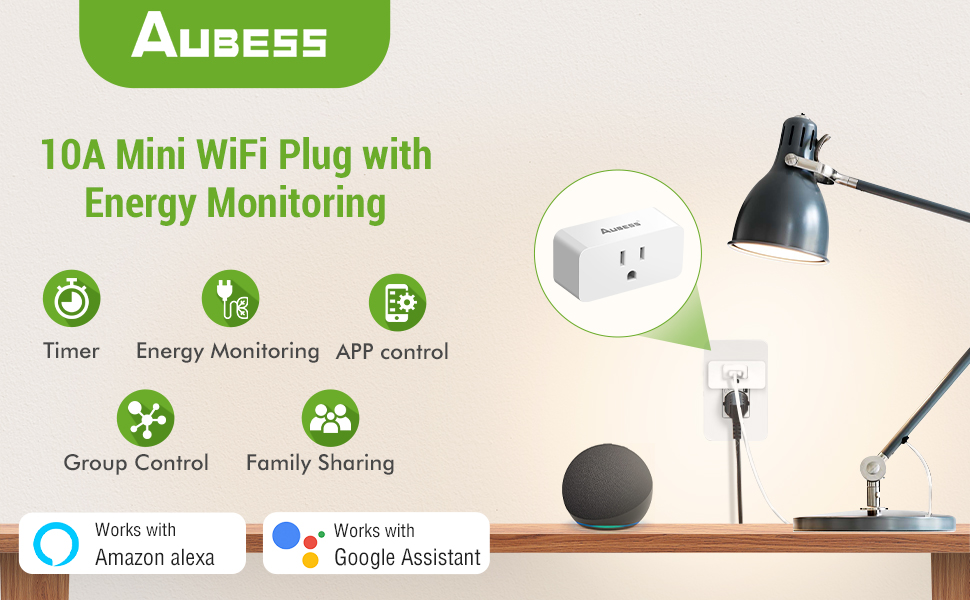
Image: A person using voice commands with an Amazon Echo Dot and Google Home speaker to control a lamp connected to a smart plug.
Device Sharing and Group Control
- Device Sharing: Share control of your smart plugs with family members through the VeSync app.
- Group Control: Create groups of smart plugs in the app to control multiple devices simultaneously with a single command.

Image: An illustration of a house with various smart devices connected to the VeSync app, demonstrating the group control feature.
Maintenance
- Cleaning: Disconnect the smart plug from the power outlet before cleaning. Wipe with a dry, soft cloth. Do not use liquid cleaners.
- Storage: Store the smart plug in a cool, dry place when not in use.
Troubleshooting
Common Issues and Solutions:
- Smart Plug not connecting to Wi-Fi:
- Ensure your Wi-Fi network is 2.4GHz.
- Check if the Wi-Fi signal is strong enough at the plug's location.
- Restart your Wi-Fi router and try pairing again.
- Reset the smart plug by holding the power button for 5-10 seconds until the indicator light blinks rapidly.
- Device not responding to app/voice commands:
- Verify the smart plug is connected to Wi-Fi and the indicator light is solid.
- Check your internet connection.
- Ensure the VeSync app is updated to the latest version.
- For voice control, confirm the VeSync skill/action is enabled and linked correctly in your Alexa/Google Home app.
- Smart Plug feels warm:
- It is normal for smart plugs to generate some heat during operation.
- If the plug feels excessively hot to the touch, unplug it immediately and discontinue use. Contact customer support.
- Ensure the connected appliance does not exceed the maximum wattage (1200W) or current (10A).
- Energy monitoring data is inaccurate:
- Ensure the smart plug is properly connected and the appliance is drawing power.
- If persistent issues occur, contact customer support.
Specifications
| Model Number | 10A Abuess Smart Plug |
| Current Rating | 10 Amps |
| Operating Voltage | 120 Volts |
| Wattage | 1200 Watts Max |
| Connectivity Protocol | Bluetooth, Wi-Fi (2.4GHz only) |
| Control Method | App, Remote, Voice |
| Controller Type | Amazon Alexa, Android, Google Assistant, iOS |
| Dimensions (L x W x H) | 2.56 x 1.26 x 1.06 inches |
| Item Weight | 7.9 ounces |
Warranty and Support
Aubess provides a 30-day worry-free return policy and a 12-month warranty for this product.
Customer Support:
If you encounter any issues or have questions regarding your Aubess Smart Plug, please contact us through the following methods:
- Amazon Mail: Contact us directly via the Amazon messaging system.
- Customer Q&A: Post your question on the product's customer Q&A section on Amazon.
- Aubess Official Website: Visit the official Aubess website for further support options.