1. Product Overview
The Zoop Unisex Digital Watch Model WZPNP26017PP02 is designed for daily use, featuring a clear digital display and multiple functions. It includes dedicated push buttons for easy control over features such as time, date, alarm, stopwatch, and backlight. The watch is constructed with a durable plastic case and a comfortable silicone strap, offering 30 meters of water resistance for protection during various activities.
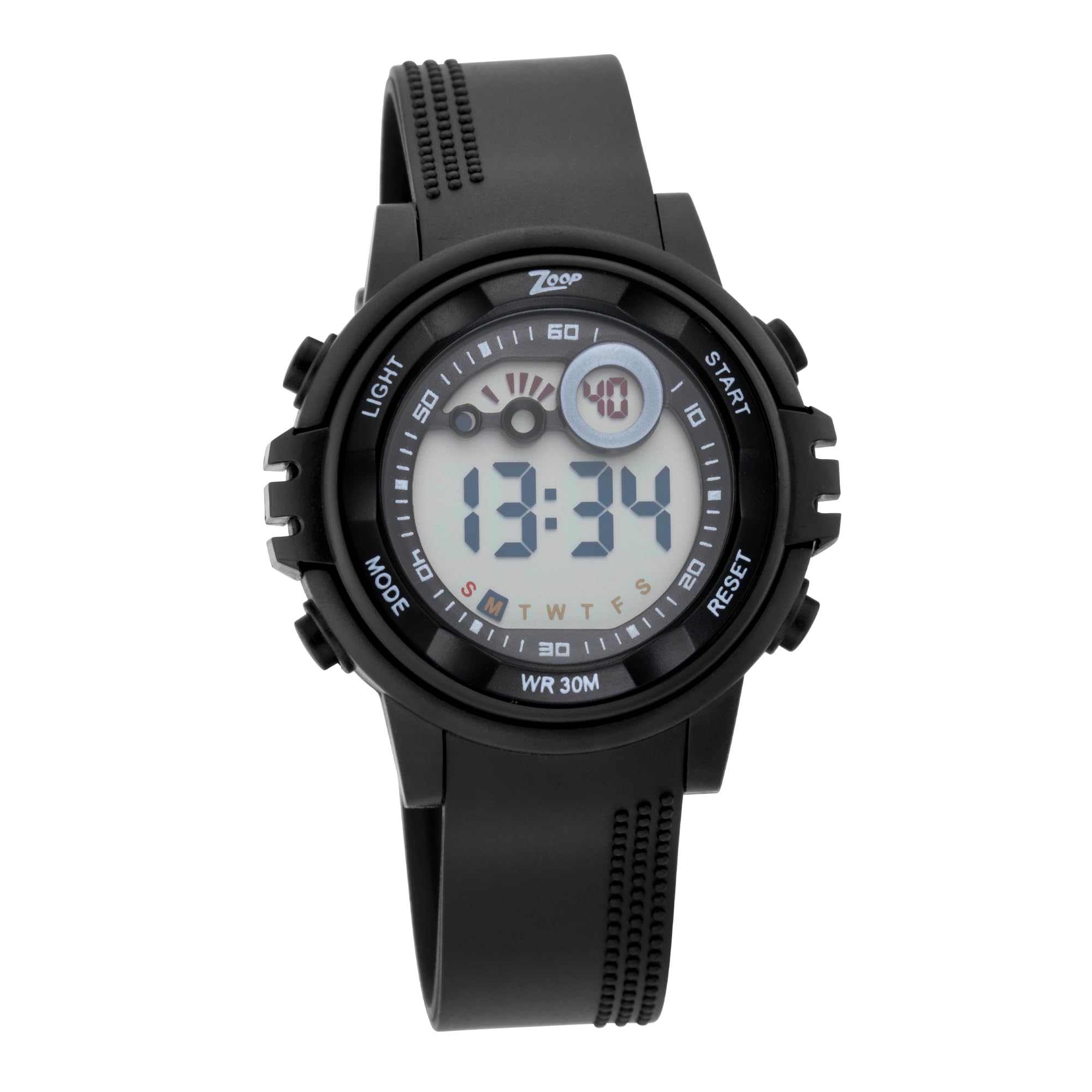
Figure 1: Front view of the Zoop Digital Watch, highlighting the display and button layout.
Key Features:
- Digital Display: Clear readout for time, day, and date.
- Dedicated Push Buttons: Separate buttons for Light, Mode, Start, and Reset functions.
- Water Resistance: Rated for 30 meters (3 ATM), suitable for splashes or brief immersion.
- Durable Construction: Plastic case with an acrylic crystal and a silicone strap.
- Additional Functions: Includes stopwatch and timer features.

Figure 2: Key features of the Zoop Digital Watch.
2. Setup
2.1 Initial Time and Date Setting
Upon first use or after a battery change, you may need to set the time and date. Refer to the 'Operating Instructions' section for detailed steps on navigating through the watch modes and adjusting settings using the 'Mode', 'Start', and 'Reset' buttons.
2.2 Wearing the Watch
Adjust the silicone strap to ensure a comfortable and secure fit on your wrist. The buckle clasp allows for easy adjustment. Avoid wearing the watch too tightly, which can restrict circulation, or too loosely, which may cause it to move excessively.

Figure 3: Proper way to wear the Zoop Digital Watch.
3. Operating Instructions
3.1 Button Functions
The watch features four primary buttons:
- LIGHT (Top Left): Activates the backlight for visibility in low-light conditions.
- MODE (Bottom Left): Cycles through different display modes (Time, Date, Alarm, Stopwatch, Timer).
- START (Top Right): Used to start/stop functions (e.g., stopwatch) or increment values during setting.
- RESET (Bottom Right): Used to reset functions (e.g., stopwatch) or select values during setting.

Figure 4: Location and labels of the watch control buttons.
3.2 Setting Time and Date
- From the normal time display, press the MODE button repeatedly until the time digits begin to flash. This indicates you are in setting mode.
- Press the RESET button to select the digit or setting you wish to adjust (e.g., hours, minutes, 12/24-hour format, month, day, year).
- Use the START button to increment the selected value. Hold START to advance rapidly.
- Once all settings are adjusted, press the MODE button to exit the setting mode and return to the normal time display.
3.3 Using the Alarm Function
- Press the MODE button until the alarm display appears (usually indicated by 'AL' or a bell icon).
- Press the RESET button to select the hour or minute digits for the alarm.
- Use the START button to adjust the alarm time.
- Press MODE to confirm and exit. To turn the alarm on/off, typically press START while in the alarm display mode.
3.4 Using the Stopwatch
- Press the MODE button until the stopwatch display appears (usually 'ST' or 'STOP').
- Press START to begin timing.
- Press START again to pause timing.
- Press RESET to clear the stopwatch to zero.
- Press MODE to exit the stopwatch function.
3.5 Using the Timer
If your watch model includes a timer function (countdown timer):
- Press the MODE button until the timer display appears (usually 'TR' or 'TIMER').
- Press RESET to select the hour, minute, or second digits to set the countdown duration.
- Use the START button to adjust the values.
- Press START to begin the countdown.
- Press START again to pause the countdown.
- Press RESET to reset the timer to its initial set value.
- Press MODE to exit the timer function.
3.6 Backlight Function
Press the LIGHT button (top left) to illuminate the display for a few seconds, allowing you to read the time in dark environments.
4. Maintenance
4.1 Water Resistance
This watch is water resistant to 30 meters (3 ATM). This means it is suitable for everyday use and can withstand splashes, rain, or brief immersion in water. It is not suitable for swimming, diving, or showering with hot water, as steam and direct water pressure can compromise the seals.
4.2 Cleaning
To clean your watch, wipe it gently with a soft, damp cloth. Avoid using harsh chemicals, solvents, or abrasive cleaners, as these can damage the case, strap, or display. For the silicone strap, mild soap and water can be used, ensuring it is thoroughly rinsed and dried.
4.3 Battery Replacement
The watch is powered by 1 Lithium Polymer battery (included). When the display dims or functions become erratic, the battery may need replacement. Battery replacement should ideally be performed by a qualified watch technician to ensure proper sealing and water resistance integrity. Attempting to replace the battery yourself may void the warranty.

Figure 5: Rear view of the watch, showing the stainless steel back.
5. Troubleshooting
- Display is blank or dim: The battery may be low or depleted. Replace the battery.
- Buttons are unresponsive: Ensure the watch is not in a locked mode (if applicable, though this model typically does not have a lock). If unresponsive, a battery issue or internal fault may be present.
- Time is incorrect: Re-set the time following the 'Setting Time and Date' instructions. Check if the 12/24-hour format is correctly set.
- Water inside the display: Immediately stop using the watch and seek professional service. This indicates a breach in the water resistance seal.
6. Specifications
| Feature | Detail |
|---|---|
| Model Number | WZPNP26017PP02 |
| Display Type | Digital |
| Movement Type | Quartz |
| Case Material | Plastic |
| Case Diameter | 39.7 mm |
| Case Thickness | 11.9 mm |
| Crystal Material | Acrylic |
| Band Material | Silicone |
| Band Width | 20 mm |
| Band Length | 22.5 cm |
| Clasp Type | Buckle |
| Water Resistance Depth | 30 Meters (3 ATM) |
| Special Features | Light Up, Timer |
| Battery Type | 1 Lithium Polymer (included) |
| Item Weight | 76.5 Grams |

Figure 6: Additional specifications and features.
7. Warranty
This Zoop Digital Watch Model WZPNP26017PP02 comes with a 2-year warranty from the date of purchase. The warranty covers manufacturing defects under normal use. It does not cover damage resulting from misuse, accidents, unauthorized repairs, or normal wear and tear. For warranty claims, please retain your proof of purchase and contact the seller or manufacturer.
8. Support
For further assistance, technical support, or service inquiries regarding your Zoop Digital Watch, please contact the manufacturer or seller:
- Manufacturer: Titan Co Ltd No -03 Sipcot Industries Complex Hosur 635126, Zoop
- Packer: Titan Company Limited, Sipcot Industrial Complex, Hosur, Tamil Nadu - 635129
- Warranty Type: Contact Seller of Record
Please have your watch model number (WZPNP26017PP02) and proof of purchase available when contacting support.


