
1. Product Overview
This manual provides instructions for the TCL RC902N FMR1 Remote Control, designed for use with compatible TCL televisions. This remote features dedicated hotkeys for popular streaming services, offering convenient access to your favorite content.
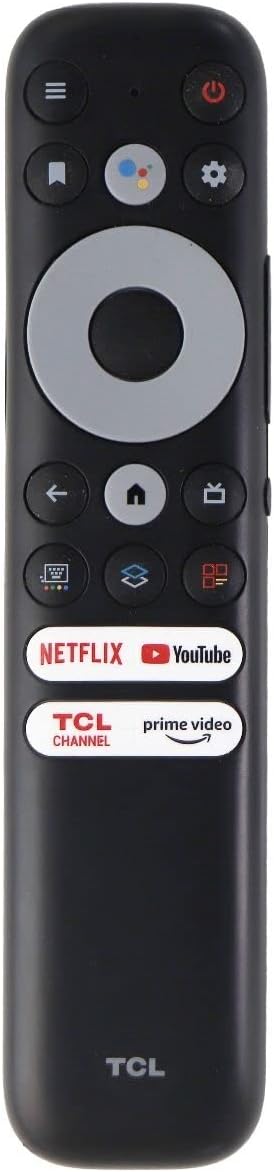
Figure 1: TCL RC902N FMR1 Remote Control
2. Setup
2.1 Battery Installation
The TCL RC902N FMR1 remote control requires two (2) AAA batteries (not included).
- Locate the battery compartment on the back of the remote control.
- Slide the battery cover downwards to open it.
- Insert two AAA batteries, ensuring the positive (+) and negative (-) terminals align correctly with the indicators inside the compartment.
- Slide the battery cover back into place until it clicks securely.
Video 1: Demonstration of battery installation and basic remote functions for a similar TCL Google TV remote control. This video is provided by the seller, Excellen.Corp.
2.2 Initial Pairing
This remote control is designed for immediate use with compatible TCL Google TVs. Typically, no programming is required. Simply insert the batteries, and the remote should automatically pair with your TV. If the remote does not respond, ensure there are no obstructions between the remote and the TV's infrared receiver.
3. Operating Instructions
Familiarize yourself with the buttons and their functions:
| Button | Function |
|---|---|
| Power (Ⓞ) | Turns the TV on or off. |
| Google Assistant | Activates voice commands for searching content or controlling the TV. |
| Settings (⚙) | Accesses the TV's settings menu. |
| Navigation Pad (Up/Down/Left/Right) | Navigates through menus and content. |
| OK | Confirms selections. |
| Back (←) | Returns to the previous screen or menu. |
| Home (⌂) | Goes to the TV's home screen. |
| TV/Input | Switches between TV inputs (HDMI, AV, etc.). |
| Volume Up/Down (VOL +/-) | Adjusts the volume level. |
| Channel Up/Down (CH +/-) | Changes TV channels. |
| Mute (🔇) | Mutes or unmutes the TV audio. |
| Netflix Hotkey | Directly launches the Netflix application. |
| YouTube Hotkey | Directly launches the YouTube application. |
| Prime Video Hotkey | Directly launches the Prime Video application. |
| TCL Channel Hotkey | Directly launches the TCL Channel application. |
Video 2: Overview of the TCL Google TV remote control, highlighting its lightweight design, ergonomic feel, and dedicated shortcut buttons for streaming services. This video is provided by the seller, YOSUN Direct.
4. Maintenance
4.1 Cleaning
To clean the remote control, use a soft, dry cloth. Do not use liquid cleaners or abrasive materials, as these may damage the remote's surface or internal components.
4.2 Battery Replacement
Replace batteries when the remote's responsiveness decreases or it stops functioning. Always replace both batteries at the same time with new AAA batteries. Do not mix old and new batteries or different types of batteries.
5. Troubleshooting
- Remote not responding:
- Check if the batteries are inserted correctly and have sufficient charge. Replace if necessary.
- Ensure there are no obstructions between the remote control and the TV's infrared sensor.
- Try re-pairing the remote if your TV supports Bluetooth pairing for remotes (refer to your TV's user manual for specific instructions).
- Hotkeys not working:
- Ensure your TV is connected to the internet.
- Verify that the respective applications (Netflix, YouTube, Prime Video, TCL Channel) are installed and updated on your TV.
6. Specifications
- Model Number: RC902N FMR1
- Brand: TCL
- Color: Black
- Compatible Devices: TCL Televisions (specifically TCL Google TV models)
- Power Source: 2 x AAA Batteries (not included)
- Special Feature: Ergonomic design, Dedicated streaming service hotkeys
7. Warranty and Support
For warranty information, technical support, or further assistance, please refer to the documentation provided with your TCL television or visit the official TCL support website. Keep your purchase receipt for warranty claims.


