
1. Introduction
This manual provides essential instructions for the safe and efficient operation of your Rigol DHO1074 Digital Oscilloscope. The DHO1074 is a 4-channel, 70 MHz digital oscilloscope featuring a 12-bit resolution and a 2 GSa/s real-time sample rate, designed for precise signal analysis in various applications. Please read this manual thoroughly before using the device to ensure proper functionality and to prevent damage.
2. Safety Information
Observe the following safety precautions to prevent injury and damage to the instrument:
- Use only the power cord specified for this instrument.
- Ensure the instrument is properly grounded to prevent electric shock.
- Do not operate the instrument in wet or damp conditions.
- Avoid operating in explosive atmospheres.
- Do not remove the instrument cover. Refer servicing to qualified personnel.
- Use appropriate probes and accessories.
- Disconnect power before cleaning.
3. Package Contents
Verify that all items listed below are included in your package:
- Rigol DHO1074 Digital Oscilloscope (1 unit)
- Power Cord (1 unit)
- Passive Probes (4 units, one for each channel)
- USB Cable (1 unit)
- Quick Guide (1 unit)
- Resource CD (1 unit)
4. Setup
4.1 Connecting Power
- Ensure the oscilloscope's power switch is in the OFF position.
- Connect the provided power cord to the AC power input on the rear panel of the oscilloscope.
- Plug the other end of the power cord into a grounded AC power outlet.
4.2 Connecting Probes
- Connect the BNC connector of a passive probe to one of the input channels (CH1, CH2, CH3, or CH4) on the front panel.
- Attach the probe ground clip to a common ground point in your circuit.
- Connect the probe tip to the test point in your circuit.
- For accurate measurements, compensate the probe before use. Refer to the "Probe Compensation" section in the full user manual for detailed instructions.
4.3 Initial Power-On
- Press the power switch on the front panel to turn on the oscilloscope.
- The instrument will perform a self-test and display the startup screen.
- Once the main interface appears, the oscilloscope is ready for use.
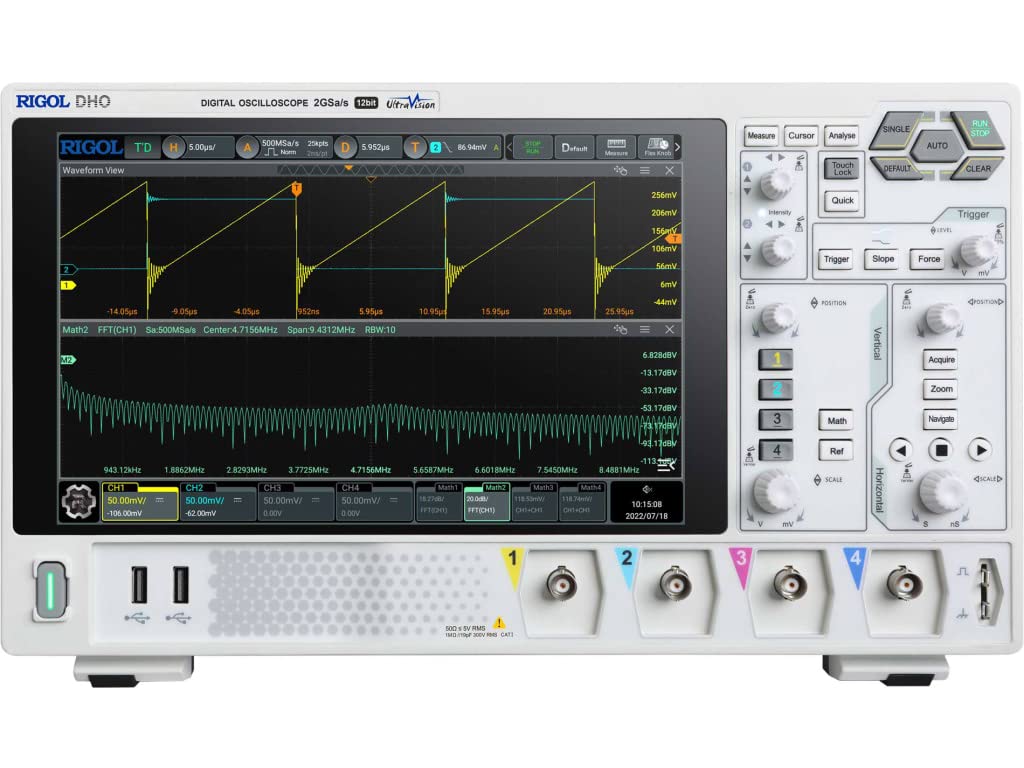
Figure 4.1: Front view of the Rigol DHO1074 Digital Oscilloscope, showing the display, control panel, and input channels.
5. Operating the Oscilloscope
The Rigol DHO1074 offers a user-friendly interface for capturing and analyzing waveforms. Key features include 4 analog channels, 70 MHz bandwidth, and a 12-bit vertical resolution for enhanced signal fidelity.
5.1 Basic Waveform Acquisition
- Power On: Ensure the oscilloscope is powered on as described in Section 4.3.
- Connect Signal: Connect your signal source to an input channel using a compensated probe.
- Auto Setup: Press the AUTO button on the front panel. The oscilloscope will automatically adjust vertical, horizontal, and trigger settings to display a stable waveform.
- Manual Adjustments:
- Use the VERTICAL knobs (VOLTS/DIV) to adjust the vertical scale (voltage per division) for each channel.
- Use the HORIZONTAL knob (SEC/DIV) to adjust the horizontal scale (time per division).
- Use the TRIGGER controls to set the trigger level and mode for stable waveform capture.
5.2 Advanced Features
- High Resolution: Benefit from the 12-bit vertical resolution, providing 16 times more quantization levels than standard 8-bit oscilloscopes, which improves measurement accuracy and reduces quantization noise.
- Deep Memory: The DHO1074 features a 50 Mpts maximum memory depth (expandable to 100 Mpts with option DHO1000-RLU-01), allowing for longer waveform captures at high sample rates.
- Serial Decoding: Standard serial decoding capabilities include SPI, I2C, RS232/UART, CAN, and LIN, simplifying the analysis of common serial bus communications.
- Measurement Functions: Access various automatic measurement functions (e.g., Vpp, Vrms, Frequency, Period) via the MEASURE menu.
- Math Functions: Utilize built-in math functions (e.g., Add, Subtract, Multiply, Divide, FFT) to perform waveform analysis.
6. Maintenance
6.1 Cleaning the Instrument
- Always disconnect the power cord before cleaning.
- Use a soft cloth dampened with a mild detergent solution to clean the exterior surfaces.
- Do not use abrasive cleaners or solvents that could damage the plastic parts.
- Avoid spraying liquids directly onto the instrument.
6.2 Storage
- Store the oscilloscope in a clean, dry environment, away from direct sunlight and extreme temperatures.
- Protect the screen from scratches.
6.3 Calibration
For optimal performance and measurement accuracy, periodic calibration by qualified service personnel is recommended. Refer to Rigol's official support channels for calibration services.
7. Troubleshooting
| Problem | Possible Cause | Solution |
|---|---|---|
| No power when turned on. | Power cord not connected; power outlet faulty; instrument fuse blown. | Check power cord connection; test power outlet; contact service for fuse replacement. |
| No waveform displayed. | Probe not connected; signal source off; vertical/horizontal scale incorrect; trigger not set correctly. | Verify probe connection; check signal source; adjust VOLTS/DIV and SEC/DIV; adjust trigger level or use AUTO button. |
| Unstable waveform. | Trigger settings incorrect; noisy signal. | Adjust trigger mode, source, and level; ensure proper grounding of the probe. |
| Incorrect measurements. | Probe compensation incorrect; wrong measurement settings. | Compensate probes; verify measurement parameters. |
If the problem persists after attempting these solutions, please contact Rigol customer support.
8. Specifications
| Parameter | Value |
|---|---|
| Model | DHO1074 |
| Bandwidth | 70 MHz |
| Analog Channels | 4 |
| Vertical Resolution | 12-bit |
| Max Sample Rate | 2 GSa/s (real-time) |
| Memory Depth | 50 Mpts (100 Mpts with DHO1000-RLU-01 option) |
| Serial Decoding | SPI, I2C, RS232/UART, CAN, LIN |
| Product Dimensions | 18 x 11 x 12 inches |
| Item Weight | 12 pounds |
| Manufacturer | RIGOL TECHNOLOGIES USA INC |
9. Warranty and Support
Rigol products are designed for reliability and performance. This instrument is covered by a standard manufacturer's warranty. For specific warranty terms and conditions, please refer to the warranty card included with your product or visit the official Rigol website.
For technical support, service, or inquiries regarding your Rigol DHO1074 Digital Oscilloscope, please contact Rigol Technologies USA Inc. customer service through their official website or the contact information provided in your product documentation.
Online resources and additional documentation may be available on the Rigol website.


