
1. Introduction
The WILLED WJP-018 LED Puck Light is a versatile, rechargeable, and dimmable lighting solution designed for various indoor applications. Its compact size and wireless design allow for easy installation in areas such as cabinets, closets, hallways, and bedrooms. The light features intuitive touch control for operation and brightness adjustment, along with a milky cover for soft, eye-friendly illumination.
Key features include:
- Dimmable Brightness: Easy touch control for ON/OFF and stepless brightness adjustment.
- 5V USB Rechargeable: Built-in 1000mAh battery for extended use.
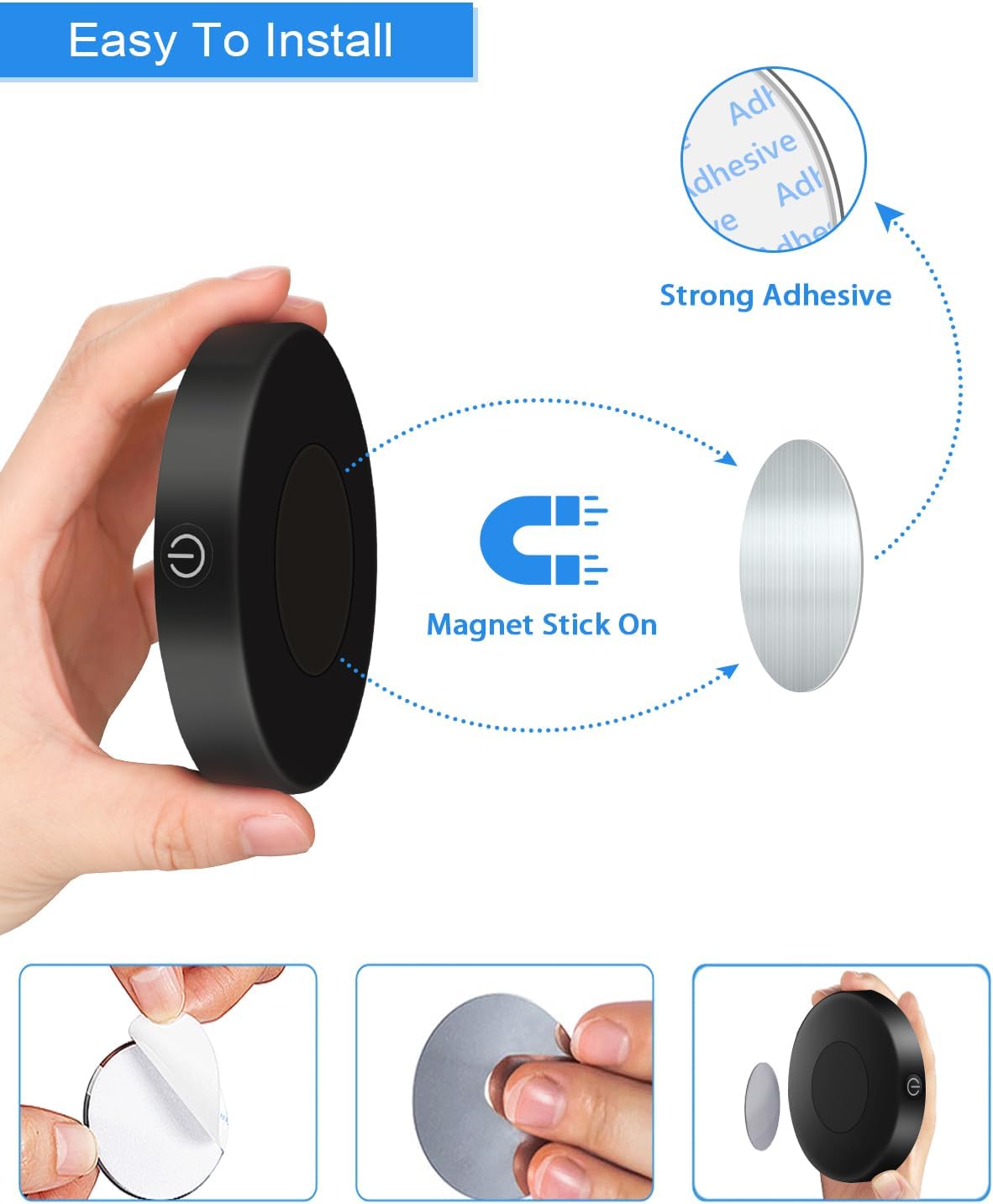
- Convenient Installation: Magnetic back with included 3M adhesive iron sheets for versatile placement.
- Milky Cover: Provides soft, diffused light.
2. Package Contents
Please verify that all items are present in your package:
- 2 x WILLED WJP-018 LED Puck Lights
- 2 x USB Charging Cables
- 4 x 3M Adhesive Iron Sheets (for non-metal surfaces)
3. Specifications
| Feature | Specification |
|---|---|
| Model Number | WJP-018 |
| Brand | WILLED |
| Power | 3W |
| Lumens | Max. 60 Lumen |
| Battery Capacity | 1000mAh Lithium Polymer (rechargeable) |
| Battery Life | 5 hours (brightest), 100 hours (darkest) |
| Color Temperature | 6000K (Pure White) |
| Dimensions | 8.5 cm (diameter) x 1.7 cm (depth) |
| Item Weight | 180 g |
| Material | Acrylonitrile Butadiene Styrene, Iron, Metal |
| Power Source | Battery Powered |
| Voltage | 5 Volts |
| Special Features | Dimmable, Portable, Rechargeable |
| Switch Style | Touch |
4. Setup and Installation
The WILLED WJP-018 LED Puck Light offers flexible installation options:
- Prepare the Surface: Ensure the desired installation surface is clean, dry, and smooth.
- Attach Adhesive Plate: If installing on a non-metal surface, peel the protective film from one side of a 3M adhesive iron sheet. Firmly press the adhesive side onto the clean surface for a few seconds.
- Mount the Light: The puck light has a built-in magnet. Simply align the magnetic back of the light with the installed iron sheet (or directly onto a metal surface) until it securely attaches.

5. Operating Instructions
The WILLED WJP-018 LED Puck Light is operated via its touch-sensitive surface:
- Power ON/OFF: Short touch the center of the light's surface to turn it ON or OFF.
- Adjust Brightness (Dimming): While the light is ON, long touch the center of the light's surface. The brightness will gradually increase or decrease. Release your finger when the desired brightness level is reached. The light will remember your last brightness setting.

6. Charging
The puck light features a built-in rechargeable battery:
- Charging Port: Locate the USB charging port on the side of the light.
- Connect Charger: Use the provided USB charging cable to connect the light to a 5V USB power source (e.g., computer, wall adapter).
- Charging Indicator: A red light will illuminate during charging. Once fully charged, the red light will turn off or change to green (depending on the specific model indicator).
- Battery Life: A full charge provides approximately 5 hours of illumination at the brightest setting and up to 100 hours at the darkest setting.

6.1. Product Video: Why choose WILLED Light Night Light?
7. Maintenance
To ensure the longevity and optimal performance of your WILLED WJP-018 LED Puck Light, follow these simple maintenance guidelines:
- Cleaning: Gently wipe the surface of the light with a soft, dry cloth. Avoid using abrasive cleaners, solvents, or harsh chemicals, as these can damage the finish or internal components.
- Storage: When not in use for extended periods, store the light in a cool, dry place away from direct sunlight and extreme temperatures.
- Battery Care: To maintain battery health, avoid fully discharging the battery frequently. Recharge the light when the brightness noticeably diminishes.
8. Troubleshooting
If you encounter any issues with your WILLED WJP-018 LED Puck Light, please refer to the following common troubleshooting steps:
- Light Not Turning On:
- Ensure the battery is charged. Connect the light to a USB power source and check if the charging indicator illuminates.
- Verify that the light is not in a very dim setting. Short touch the surface to turn it on, then long touch to increase brightness.
- Dimming Not Working:
- Ensure you are performing a long touch (press and hold) on the light's surface, not a short tap.
- Battery Life Shorter Than Expected:
- Battery life is significantly reduced when the light is used continuously at its brightest setting. For longer battery life, use lower brightness levels.
- Ensure the light is fully charged before use.
- Adhesive Not Sticking:
- Ensure the installation surface is clean, dry, and smooth before applying the adhesive iron sheet. Avoid porous or uneven surfaces.
9. Warranty and Support
The WILLED WJP-018 LED Puck Light comes with a 12-Month Warranty from the date of purchase. This warranty covers manufacturing defects and issues arising from normal use.
For warranty claims, technical support, or any questions regarding your product, please contact WILLED customer service through the retailer's platform or the official WILLED website. Please have your purchase receipt and product model number (WJP-018) ready when contacting support.