
DOOGEE S99
DOOGEE S99 Rugged Smartphone User Manual
Model: S99
1. Introduction
The DOOGEE S99 is a rugged smartphone designed for durability and high performance. It features advanced camera capabilities, a powerful processor, and a long-lasting battery, making it suitable for various demanding environments and daily use. This manual provides essential information for setting up, operating, maintaining, and troubleshooting your device.

Front and rear view of the DOOGEE S99 Rugged Smartphone, highlighting its robust design and camera module.
2. Getting Started
2.1 Package Contents
Verify that all items are present in your DOOGEE S99 package:
- DOOGEE S99 Smartphone
- Charging Cable (USB-C to USB-C)
- Power Adapter
- SIM Ejector Tool
- User Manual (this document)
2.2 SIM Card & Storage Installation
The DOOGEE S99 supports dual 4G SIM cards and expandable storage via a TF card.
- Locate the SIM card tray on the side of the device.
- Insert the SIM ejector tool into the small hole next to the tray and push gently until the tray pops out.
- Place your Nano-SIM cards and/or TF card into the designated slots on the tray, ensuring correct orientation.
- Carefully push the tray back into the device until it clicks into place.

The SIM card tray supports two Nano-SIM cards and one TF (microSD) card for expanded storage up to 1TB.
2.3 Initial Power On & Setup
To power on your device, press and hold the Power button located on the side until the DOOGEE logo appears. Follow the on-screen prompts to complete the initial setup, including language selection, Wi-Fi connection, and Google account setup.
2.4 Charging the Device
Before first use, it is recommended to fully charge the device. The DOOGEE S99 supports 33W fast charging and 15W wireless charging.
- Wired Charging: Connect the USB-C cable to the phone's charging port and the other end to the power adapter. Plug the adapter into a wall outlet.
- Wireless Charging: Place the phone on a compatible 15W wireless charging pad. Ensure the phone is centered on the pad for optimal charging.

The DOOGEE S99 features a 6000mAh battery with support for 33W fast charging, allowing for quick power replenishment.

The phone supports both 33W super fast charging via USB-C and 15W wireless charging.
3. Key Features & Operation
3.1 Display
The DOOGEE S99 features a large 6.3-inch FHD+ Waterdrop Screen with a resolution of 1080x2340 pixels and a 18:9 aspect ratio. It offers 409 PPI pixel density and 480 nits brightness for clear and vibrant visuals. The display is protected by Corning Gorilla Glass for enhanced durability.

Detailed specifications of the 6.3-inch FHD+ display, including resolution, pixel density, brightness, and aspect ratio.

The 6.3-inch FHD+ display provides a brilliant visual experience with robust protection.
3.2 Camera System
The DOOGEE S99 is equipped with a versatile triple camera system on the rear and a high-resolution front camera.
- 108MP AI Main Camera: Capture stunning, high-resolution photos with the flagship-grade 108MP main sensor, featuring F/1.89 aperture, 90° FOV, and two rear flashes.
- 64MP Night Vision Camera: The advanced 64MP night vision camera, supported by two infrared lights, allows for vivid image and video capture in extremely low-light conditions, with a visual range of up to 20 meters.
- 32MP Front Camera: For high-quality selfies and video calls.
- 16MP Ultra Wide Angle & Macro Camera: Expand your photographic possibilities with wide-angle shots and detailed close-ups.

Overview of the DOOGEE S99's camera capabilities, including the 108MP main, 32MP front, and 16MP ultra-wide cameras.

The 64MP Dark Ultra Clear IR Night Vision camera with F/1.89 aperture, 80° FOV, and two infrared lights for clear night imaging.
Official product video demonstrating the 64MP Night Vision camera capabilities of the DOOGEE S99 Rugged Smartphone.
3.3 Performance
The DOOGEE S99 is powered by the MediaTek Helio G96 Octa-core processor (2.05 GHz CPU speed) and ARM Mali G57 GPU, ensuring smooth performance for demanding applications and multitasking. It comes with 15GB of RAM (8GB physical + 7GB extended) and 128GB of internal storage, expandable up to 1TB with a TF card.

The DOOGEE S99 offers 15GB RAM (8GB+7GB Extended) and 128GB ROM, powered by the Helio G96 Octa-Core processor for efficient performance.

The MediaTek Helio G96 Octa-Core processor provides robust performance for the device.
3.4 Durability
The DOOGEE S99 is built to withstand harsh conditions, meeting several industry standards for ruggedness:
- IP68 Waterproof: Submersible in up to 1.5 meters of water for 30 minutes.
- IP69K Dustproof: Provides complete protection against dust ingress and high-pressure, high-temperature water jets.
- MIL-STD-810H: Complies with military standard for resistance to drops, shocks, and extreme temperatures.

The DOOGEE S99 is designed to be tough, with IP68, MIL-STD-810H, and IP69K ratings for water, drop, and dust resistance.
3.5 Connectivity
The device offers comprehensive connectivity options:
- Dual 4G SIM: Supports two 4G SIM cards simultaneously for flexible network usage.
- Wi-Fi: Supports 2.4 GHz and 5 GHz Wi-Fi bands.
- NFC: For contactless payments and quick pairing with other NFC-enabled devices.
- GPS: Integrated GPS for navigation and location services.

The phone supports dual 4G SIM cards and dual-band Wi-Fi for reliable connectivity.
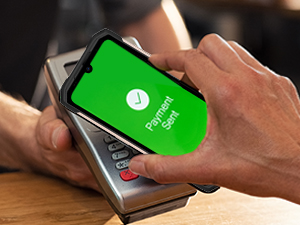
The DOOGEE S99 supports NFC for convenient mobile payments.
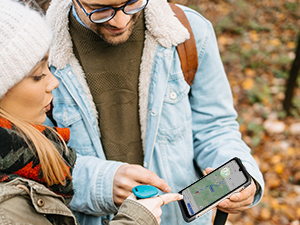
Integrated GPS allows for accurate navigation and location tracking.
3.6 Operating System & User Interface
The DOOGEE S99 runs on Android 12.0, providing a user-friendly interface and access to a wide range of applications through the Google Play Store. The system offers various customization options and security features.
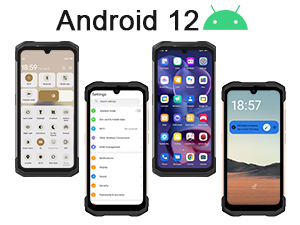
The DOOGEE S99 operates on Android 12, offering a modern and intuitive user experience.
3.7 Integrated Tools
The DOOGEE S99 includes a suite of practical tools for outdoor and professional use:
- Compass
- Flashlight
- Pic Hanging
- Gradienter
- Height Meter
- Magnifier
- Protractor
- Plumb Bob
- Warning (SOS)

The DOOGEE S99 comes with a pre-installed toolbox featuring useful utilities for various situations.
4. Maintenance & Care
To ensure the longevity and optimal performance of your DOOGEE S99, follow these maintenance guidelines:
- Cleaning: Use a soft, damp cloth to clean the device. Avoid harsh chemicals or abrasive materials. Ensure the charging port cap is securely closed before cleaning with water.
- Temperature: Avoid exposing the phone to extreme temperatures (very hot or very cold) for extended periods.
- Storage: When not in use for a long time, store the device in a cool, dry place.
- Software Updates: Regularly check for and install system updates to ensure your device has the latest security patches and performance improvements.
- Port Protection: Always ensure the charging port cap is properly sealed to maintain water and dust resistance.
5. Troubleshooting
This section addresses common issues you might encounter with your DOOGEE S99.
| Problem | Possible Cause | Solution |
|---|---|---|
| Device won't turn on | Low battery; System crash | Charge the device for at least 10 minutes. Press and hold the Power button for 10-15 seconds to force restart. |
| Poor network signal | Weak signal area; SIM card issue | Move to an area with better signal. Reinsert the SIM card. Check with your carrier for network status. |
| Camera not working | App conflict; Software glitch | Restart the phone. Clear cache/data of the camera app (Settings > Apps > Camera > Storage). Check for system updates. |
| Battery drains quickly | Background apps; High brightness; Network usage | Close unused apps. Reduce screen brightness. Disable Wi-Fi/Bluetooth when not in use. Check battery usage in Settings. |
| Phone is slow/lagging | Too many apps; Low storage | Close background apps. Free up storage space. Restart the device. |
6. Specifications
Detailed technical specifications for the DOOGEE S99 Rugged Smartphone:
| Feature | Specification |
|---|---|
| Model Name | DOOGEE S99 smartphone |
| Operating System | Android 12.0 |
| CPU | MediaTek Helio G96 Octa-core (2.05 GHz) |
| RAM | 15 GB (8GB physical + 7GB extended) |
| Internal Storage | 128 GB |
| Expandable Storage | Up to 1 TB via TF card |
| Screen Size | 6.3 Inches |
| Resolution | 1080 x 2340 (FHD+) |
| Main Camera | 108 MP AI Triple Camera |
| Night Vision Camera | 64 MP IR Night Vision |
| Front Camera | 32 MP |
| Battery Capacity | 6000 mAh |
| Charging | 33W Fast Charging, 15W Wireless Charging |
| Durability Ratings | IP68, IP69K, MIL-STD-810H |
| Connectivity | Dual 4G SIM, Wi-Fi (2.4/5 GHz), NFC, GPS |
| Weight | 11.1 ounces (315 Grams) |
| Dimensions | 7.64 x 4.13 x 3.31 inches |
7. Warranty & Support
Your DOOGEE S99 Rugged Smartphone comes with a standard manufacturer's warranty. For specific warranty terms and conditions, please refer to the warranty card included in your product packaging or visit the official DOOGEE website.
For technical support, troubleshooting assistance, or service inquiries, please contact DOOGEE customer support through their official channels. You can typically find contact information on the DOOGEE website or within the device's 'About Phone' settings.
Related documentsS99


Ask a question about this manual
Ask about setup, troubleshooting, compatibility, parts, safety, or missing instructions. Manuals+ will review the question and use this page’s manual context to help answer it.