Introduction
This manual provides detailed instructions for the installation, operation, and maintenance of your VIVOSUN VSFD6500 LED Grow Light. This 650W full-spectrum grow light features a patented design, detachable light bars, and a dimmable function with 6 intensity options, including UV/IR light, to support all stages of plant growth. Please read this manual thoroughly before use to ensure proper function and safety.
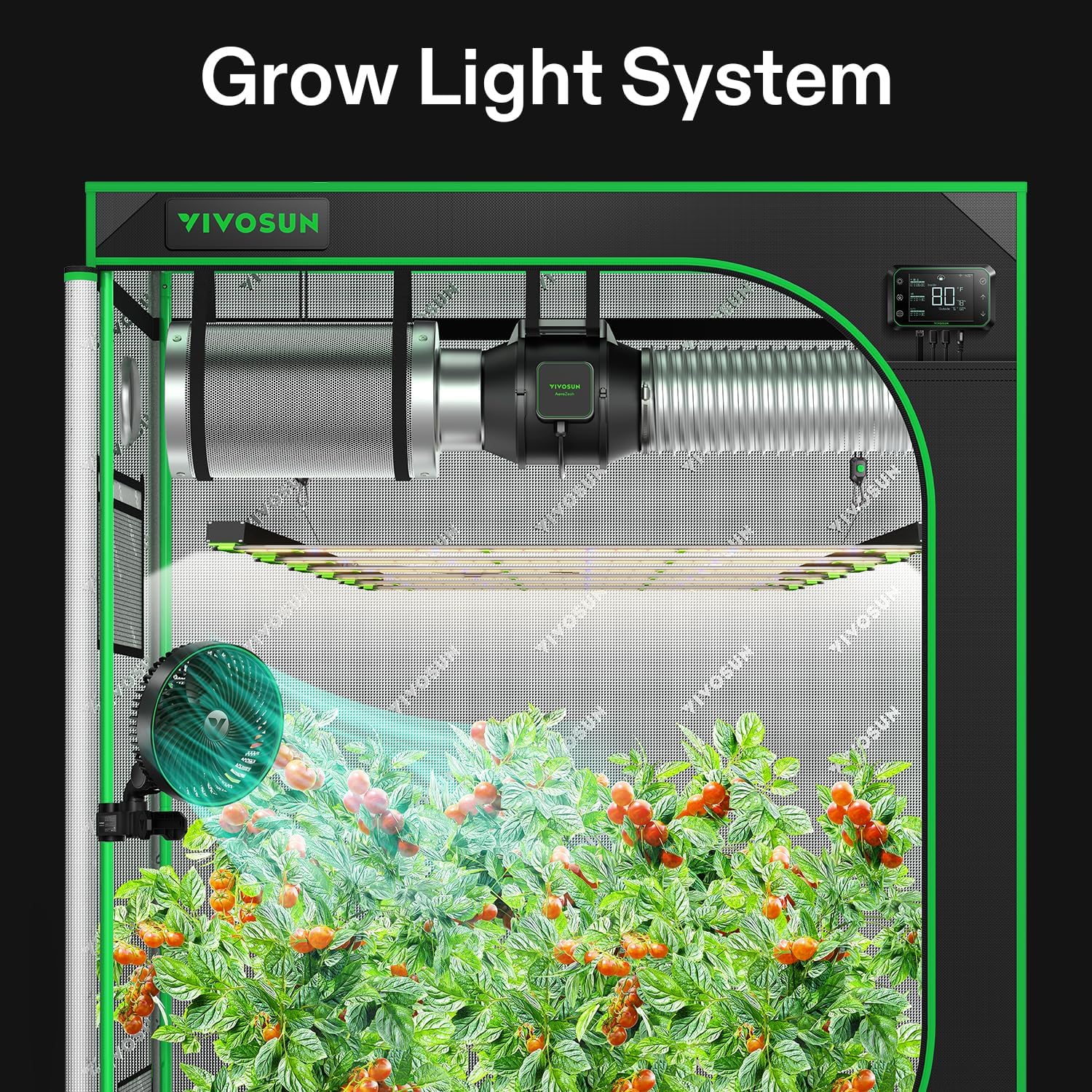
Image: The VIVOSUN VSFD6500 LED Grow Light integrated into a complete grow tent system, illuminating plants.
Setup and Installation
1. Unpacking
Carefully remove all components from the packaging. Verify that all parts are present according to the packing list. Inspect the light for any signs of damage during transit. If any damage is found or parts are missing, contact VIVOSUN customer support.
2. Assembling the Light Bars
The VSFD6500 features a detachable design for easy assembly and storage. Insert each light bar into its designated slot on the main frame until it clicks securely into place. Ensure all connections are firm.

Image: Step-by-step visual guide demonstrating how to attach the removable light bars to the main frame of the grow light.
3. Mounting the Grow Light
The VSFD6500 is designed for ceiling mount installation. Use the provided hanging kits to suspend the light securely above your plants. Adjust the hanging height according to the recommended distances for different growth stages (refer to the Operating section).
4. Connecting Power and Controller
Connect the power cord to the light's power input. The light features a built-in driver for a slim profile. If using an external controller (e.g., VIVOSUN GrowHub E42A), connect it to the 'IN' and 'OUT' RJ11 ports on the light's control panel using an RJ11 cable.

Image: A detailed view of the VSFD6500's integrated control panel, showing the dimming knob, power input, and controller ports.
Operation
1. Dimming Control
The VSFD6500 is equipped with a dimming knob that allows you to adjust light intensity from 0% to 100% in 6 levels: 0%, 25%, 50%, 75%, 100%, and EXT. The 'EXT' setting allows external control via a compatible VIVOSUN GrowHub controller (sold separately).

Image: The dimming control knob on the grow light, showing the 6 intensity options, alongside a depiction of the VIVOSUN GrowHub controller and its app interface.
2. Full Spectrum with UV/IR
The light provides a full spectrum from 380-780nm, including specific wavelengths for different plant needs:
- 4000K (Warm White): Promotes germination and overall plant growth.
- 390nm (UVA): Boosts blooming and resin production.
- 660nm (Deep Red): Improves yields and enhances flowering.
- 730nm (Far Red/IR): Accelerates growth and promotes flowering initiation.
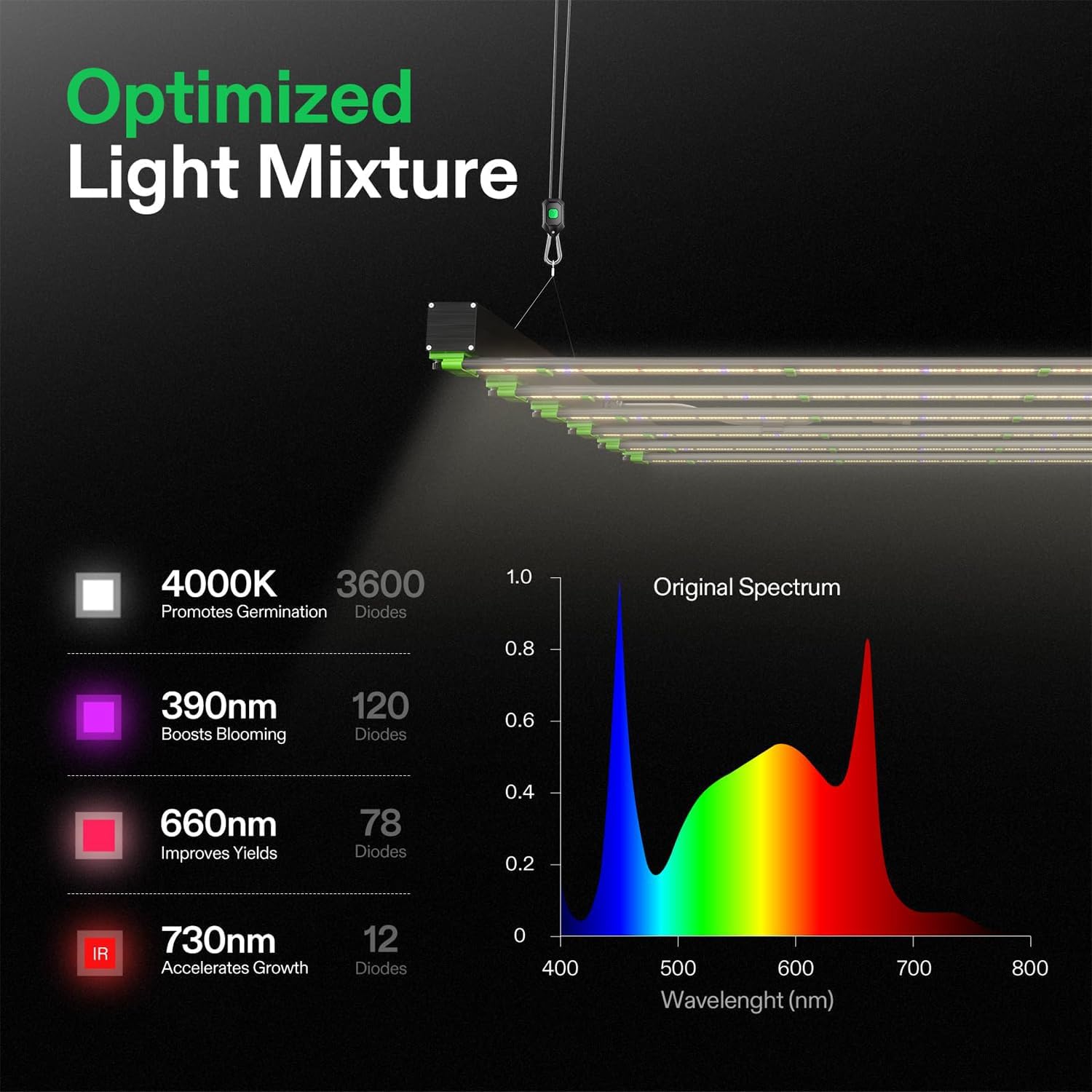
Image: A graphical representation of the VSFD6500's optimized light spectrum, highlighting the contribution of different wavelengths to plant development.
3. Daisy Chain Capability
The VSFD6500 supports daisy-chaining up to 4 lights. This feature allows multiple lights to be controlled simultaneously from a single VIVOSUN GrowHub controller, simplifying management for larger grow setups.

Image: A diagram illustrating how multiple VSFD6500 grow lights can be connected in a daisy chain and controlled by a single VIVOSUN GrowHub controller.
4. Recommended Growing Tips
Optimal light distance, dimming, and light cycle vary depending on the plant's growth stage. The following table provides general recommendations:

Image: A table outlining suggested light distances, dimming percentages, and light cycles for seedling, vegetative, early flowering, and late flowering stages.
The VSFD6500 provides uniform and dense PAR distribution for deep light penetration, promoting healthy plant development.
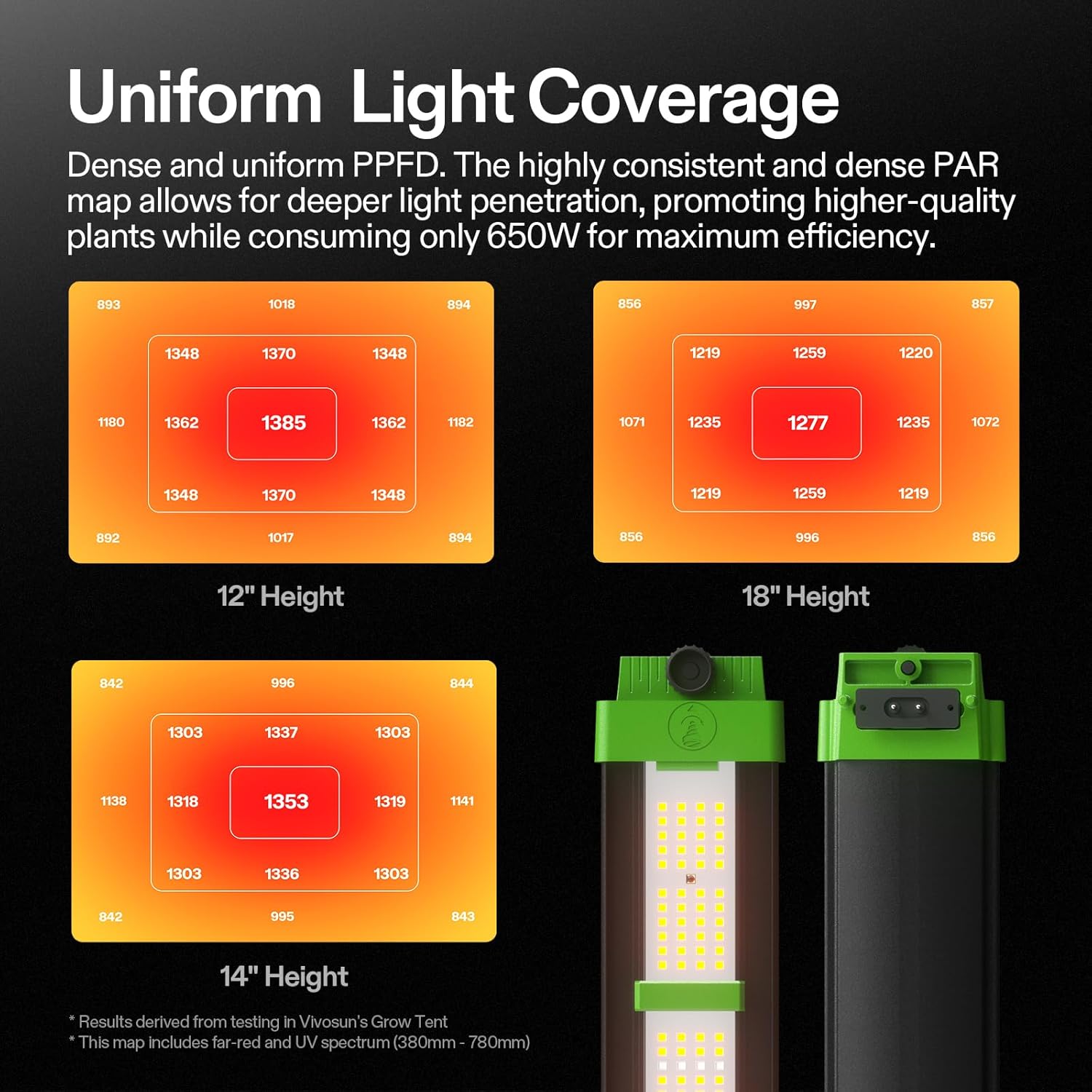
Image: PAR (Photosynthetically Active Radiation) maps illustrating the consistent and dense light coverage provided by the VSFD6500 at various hanging heights (12, 14, and 18 inches).
Maintenance
1. Cleaning
Ensure the grow light is unplugged and completely cool before cleaning. Use a soft, dry cloth to gently wipe the surface of the light bars and frame. Do not use abrasive cleaners or solvents, as these can damage the LEDs or finish. Keep the light free from dust and debris to maintain optimal performance and heat dissipation.
2. Inspection
Periodically inspect the power cord, hanging cables, and connections for any signs of wear, fraying, or damage. If any damage is observed, discontinue use immediately and contact VIVOSUN customer support for assistance. Ensure all light bars are securely seated in their slots.
Troubleshooting
1. Light Not Turning On
- Check if the power cord is securely plugged into both the light and a working power outlet.
- Ensure the dimming knob is not set to 0% or 'OFF'.
- If using an external controller, verify its connection and settings.
- Test the power outlet with another device to confirm it is functional.
2. Dimming Malfunction
- If using the manual dimming knob, ensure it rotates smoothly and clicks into each setting.
- If using an external controller, check the RJ11 cable connection and the controller's settings. Refer to your controller's manual for specific troubleshooting steps.
3. Uneven Light Output
- Verify that all detachable light bars are fully and correctly inserted into their respective slots.
- Inspect for any physical damage to individual LED diodes.
If you encounter issues not covered here or require further assistance, please contact VIVOSUN customer support.
Specifications
| Model Number | VSFD6500 |
| Input Power | 650 Watts |
| Efficiency | 2.8 µmol/J |
| PPF | 1820 µmol/s |
| Dimming Options | 25%, 50%, 75%, 100%, OFF, EXT |
| Input Voltage | 120-277V |
| Frequency | 50/60Hz |
| Product Dimensions | 43.5"L x 41.3"W x 3.2"H |
| Item Weight | 25 pounds |
| Light Source Type | LED |
| Mounting Type | Ceiling Mount |
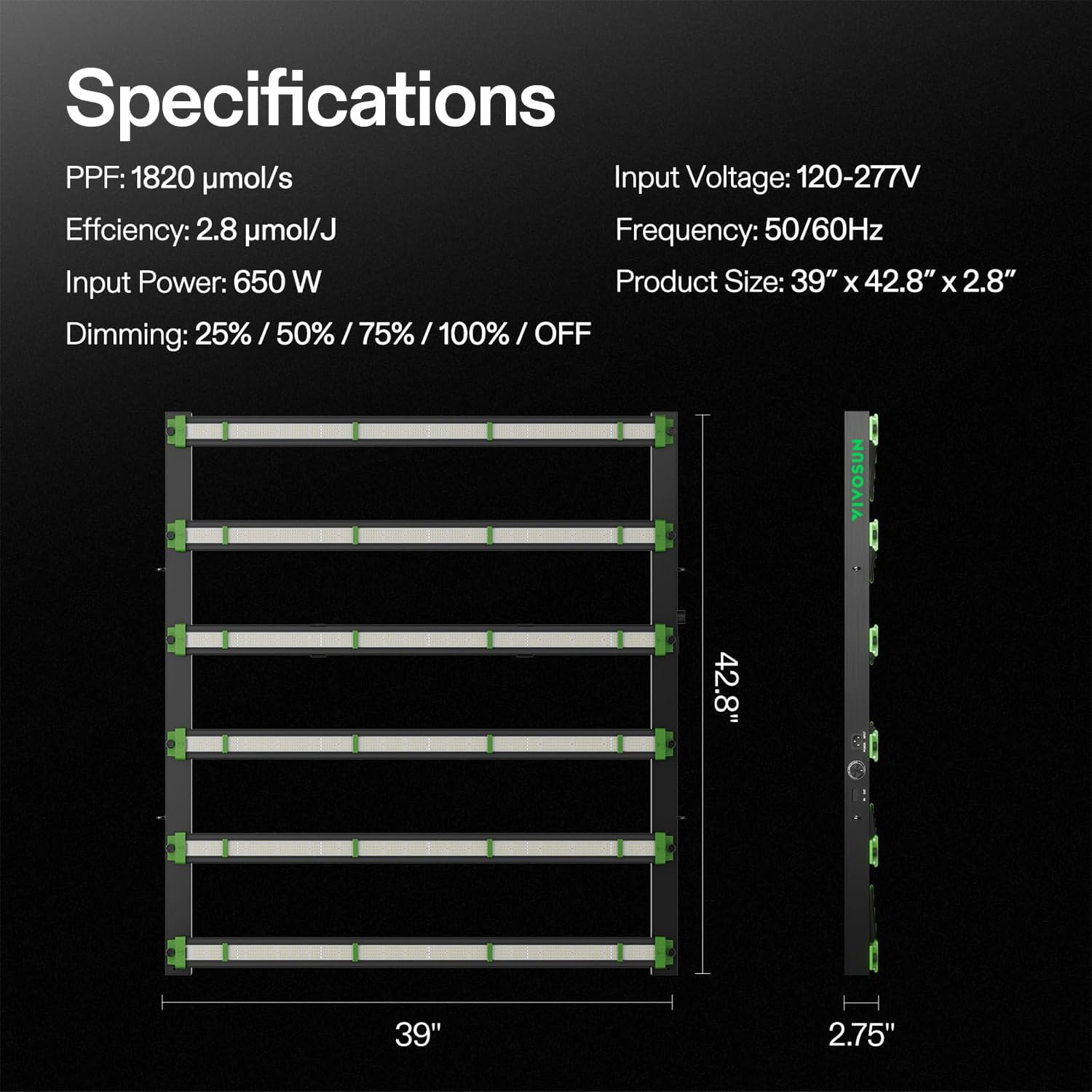
Image: A visual summary of the VSFD6500's key technical specifications and physical dimensions.
Warranty Information
VIVOSUN products are manufactured to high-quality standards. For specific warranty terms and conditions applicable to your VSFD6500 LED Grow Light, please refer to the warranty card included with your product or visit the official VIVOSUN website. Keep your purchase receipt as proof of purchase for any warranty claims.
Customer Support
For technical support, product inquiries, or assistance with troubleshooting, please contact VIVOSUN customer service. You can find contact information and additional resources on the official VIVOSUN website:


