
1. Introduction
This manual provides detailed instructions for the proper use and maintenance of your EPAuto 1/2-Inch Digital Torque Wrench. Designed for precision and ease of use, this tool ensures accurate torque application for various tasks, from automotive maintenance to general repairs. Please read this manual thoroughly before operation to ensure safe and effective use.

Figure 1: EPAuto 1/2-Inch Digital Torque Wrench with its protective storage case.
2. Setup
2.1 Battery Installation
The digital torque wrench requires batteries for operation. Follow these steps to install them:
- Locate the battery cap at the end of the wrench handle.
- Use the provided tool (or a suitable coin) to unscrew the battery cap.
- Insert the required batteries (typically AAA, check specifications) according to the polarity markings inside the compartment.
- Replace the battery cap and tighten it securely.

Figure 2: Specialized tool for removing the battery cap.
2.2 Initial Power-On
After installing batteries, press the power button to turn on the wrench. The backlit display should illuminate, showing the current settings.
3. Operating Instructions
3.1 Display Features
The digital torque wrench features an easy-to-read backlit display that can be rotated for optimal viewing angles during operation.

Figure 3: The clear, backlit digital display for easy reading.

Figure 4: The display panel can be rotated to easily observe the torque value from different angles.
3.2 Unit Selection
Press the "Unit" button to cycle through available torque units: Kg-m, Kg-cm, lb.-in, and N-m. Select the unit appropriate for your task.
3.3 Setting Target Torque
Use the "+" and "-" buttons to adjust the target torque value. The wrench allows for precise adjustments in 0.1 increments, ensuring accuracy for specific requirements.
3.4 Applying Torque
Attach the appropriate socket to the 1/2-inch drive. Apply force to the wrench. As you approach the preset torque value, the wrench will emit a "Beep" sound, indicating that the target torque has been reached. Stop applying force once the beep sounds to avoid over-tightening.

Figure 5: Proper use of the digital torque wrench during an engine maintenance task.
4. Maintenance
4.1 Cleaning and Storage
After each use, wipe the wrench clean with a dry, soft cloth. Do not use abrasive cleaners or solvents. Store the wrench in its sturdy plastic storage case to protect it from dust, moisture, and physical damage. The case is designed with dedicated compartments, including space for storing spare batteries.

Figure 6: The digital torque wrench securely stored in its durable case.
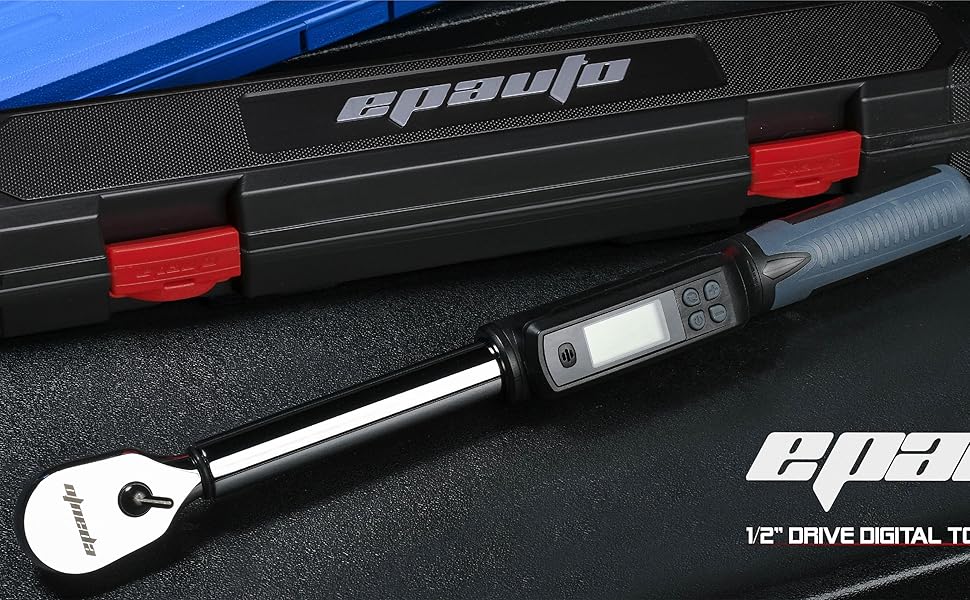
Figure 7: The sturdy storage case provides ample room, including space for batteries.
4.2 Calibration
Your EPAuto Digital Torque Wrench is factory calibrated to an accuracy of ±4%. A test certificate is included with each wrench, detailing its specific calibration readings and serial number. It is recommended to have the wrench recalibrated periodically by a certified professional to maintain accuracy, especially after heavy use or if accuracy is critical for your applications.
5. Troubleshooting
- Display not turning on: Check battery installation and ensure batteries are fresh.
- Inaccurate readings: Ensure the wrench is properly calibrated. Avoid dropping or subjecting the wrench to severe impacts.
- No "Beep" sound: Verify that the target torque is set correctly and that the wrench is functioning properly.
6. Specifications
| Feature | Detail |
|---|---|
| Brand | EPAuto |
| Model Number | ST-12A-1 |
| Drive Size | 1/2 Inch |
| Torque Range | 19.9 to 154.8 lb-ft (27 to 210 N-m) |
| Accuracy | ±4% |
| Units | Kg-m, Kg-cm, lb.-in, N-m |
| Display | Rotatable, Backlit Digital Panel |
| Material | Metal |
| Finish Type | Powder Coated |
| Item Weight | 3.54 pounds (1.61 Kilograms) |
| Product Dimensions | 3.6 x 17.9 x 3.5 inches |
| UPC | 840323200271 |
