
Introduction
Thank you for choosing the Pretul ROTI-20P2K Cordless Rotary Hammer Kit. This manual provides essential information for the safe operation, maintenance, and troubleshooting of your new tool. Please read this manual thoroughly before first use and keep it for future reference.
The Pretul ROTI-20P2K is a versatile 20V cordless rotary hammer designed for various drilling and hammering tasks. It features two mechanical speeds, 21 levels of torque adjustment, an LED light, and a belt clip for convenience.
General Safety Information
Always follow basic safety precautions when using power tools to reduce the risk of fire, electric shock, and personal injury.
- Work Area Safety: Keep your work area clean and well-lit. Cluttered or dark areas invite accidents. Do not operate power tools in explosive atmospheres, such as in the presence of flammable liquids, gases, or dust.
- Electrical Safety: Avoid body contact with earthed or grounded surfaces. Do not expose power tools to rain or wet conditions.
- Personal Safety: Always wear eye protection. Use hearing protection when operating the tool for extended periods. Dress properly; avoid loose clothing or jewelry. Secure long hair.
- Tool Use and Care: Do not force the power tool. Use the correct power tool for your application. Disconnect the battery pack from the power tool before making any adjustments, changing accessories, or storing power tools.
- Battery Pack Use and Care: Recharge only with the charger specified by the manufacturer. Do not use battery packs or tools that are damaged or modified.
What's Included
Your Pretul ROTI-20P2K kit comes with a comprehensive set of tools and accessories to get you started. Please check the contents of your package against the list below:
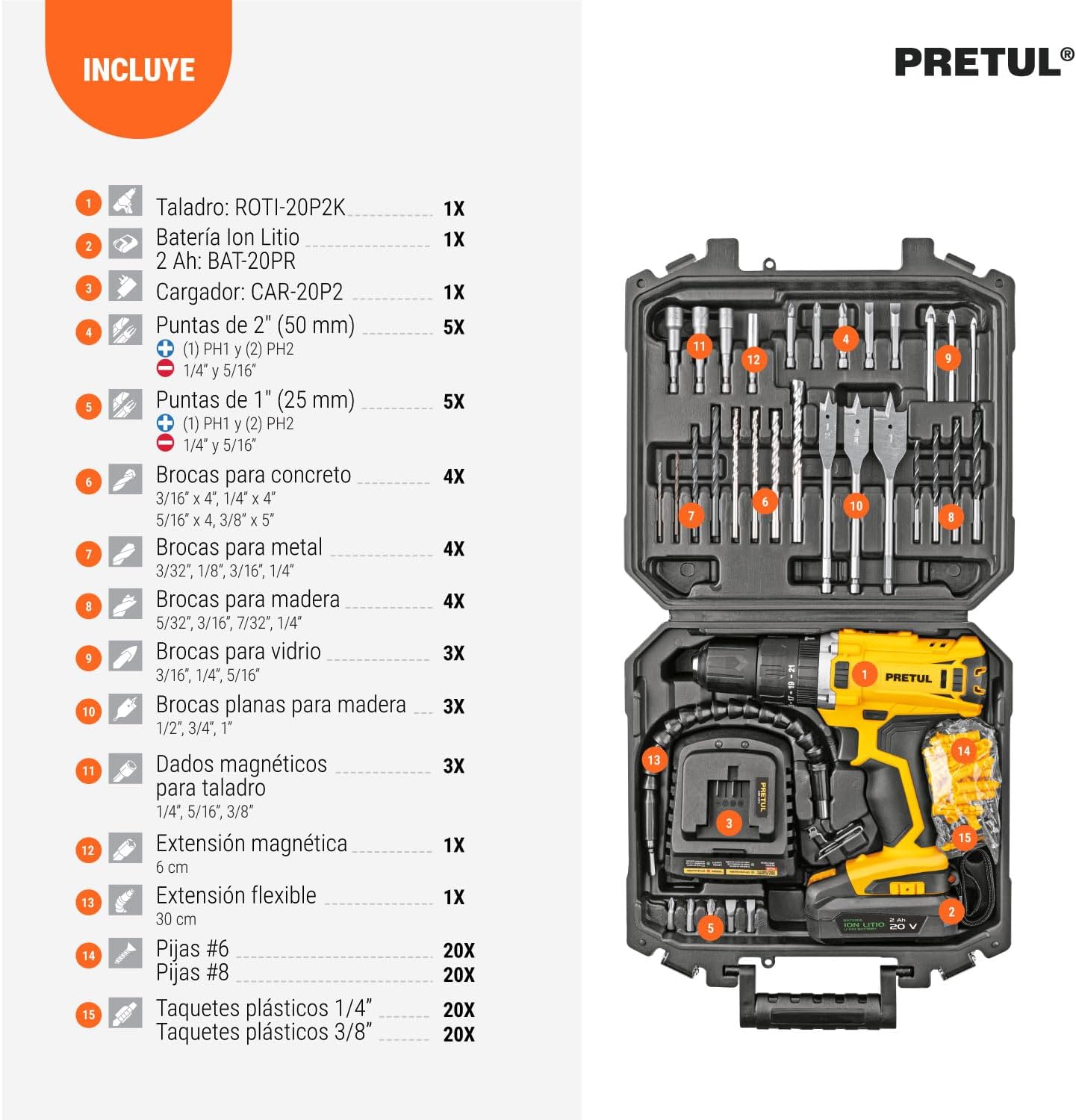
Figure 1: Overview of the Pretul ROTI-20P2K Cordless Rotary Hammer Kit and its included accessories. The image displays the rotary hammer, battery, charger, and various drill bits and fasteners neatly organized in the carrying case.
- ROTI-20P2K Rotary Hammer (1X)
- 2 Ah Lithium Ion Battery (BAT-20PR) (1X)
- Charger (CAR-20PR) (1X)
- 2" (50 mm) Bits: (1) PH1, (2) PH2, 1/4", 5/16" (5X total)
- 1" (25 mm) Bits: (1) PH1, (2) PH2, 1/4", 5/16" (5X total)
- Concrete Drill Bits: 3/16" x 4", 1/4" x 4", 5/16" x 4", 3/8" x 5" (4X)
- Metal Drill Bits: 3/32", 1/8", 3/16", 1/4" (4X)
- Wood Drill Bits: 5/32", 3/16", 7/32", 1/4" (4X)
- Glass Drill Bits: 3/16", 1/4", 5/16" (3X)
- Flat Wood Drill Bits: 1/2", 3/4", 1" (3X)
- Magnetic Nut Setters for Drill: 1/4", 5/16", 3/8" (3X)
- Magnetic Extension: 6 cm (1X)
- Flexible Extension: 30 cm (1X)
- #6 Screws (20X)
- #8 Screws (20X)
- Plastic Anchors 1/4" (20X)
- Plastic Anchors 3/8" (20X)
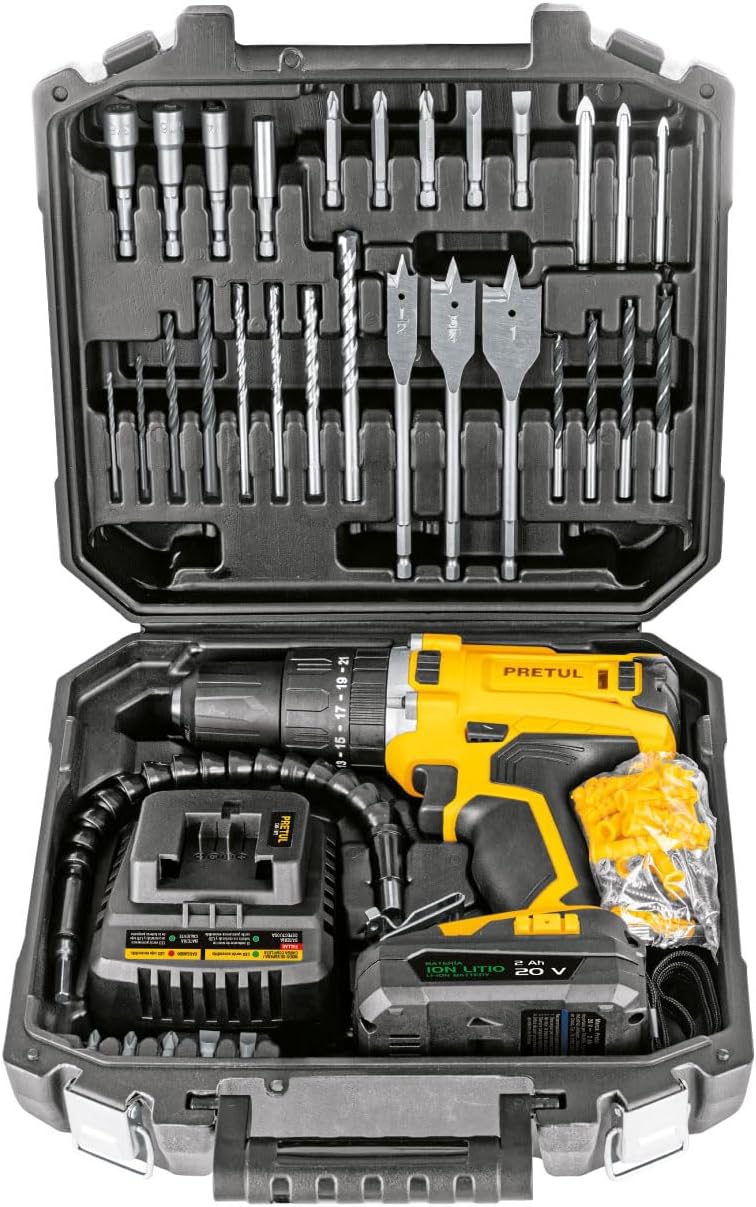
Figure 2: The Pretul ROTI-20P2K Cordless Rotary Hammer Kit neatly stored within its durable plastic carrying case, showcasing the drill, battery, charger, and various accessories.
Product Features and Components
Familiarize yourself with the key features and components of your rotary hammer:

Figure 3: Key components of the Pretul ROTI-20P2K rotary hammer. Labels indicate the quick-change chuck, torque selector collar (21+3 functions), direction change button, LED light, charge indicator, and belt clip. The tool is designed to be lightweight and portable.
- Quick-Change Chuck: Allows for fast and easy bit changes.
- Torque Selector Collar: Features 21 levels of torque adjustment plus 3 additional functions (drilling, hammer drilling, and driving).
- Direction Change Button: Controls the rotation direction (forward/reverse).
- LED Light: Illuminates the work area for improved visibility.
- Charge Indicator: Displays the remaining battery charge level.
- Belt Clip: Conveniently attach the tool to your belt for easy access.
- Two Mechanical Speeds: Provides versatility for different applications.
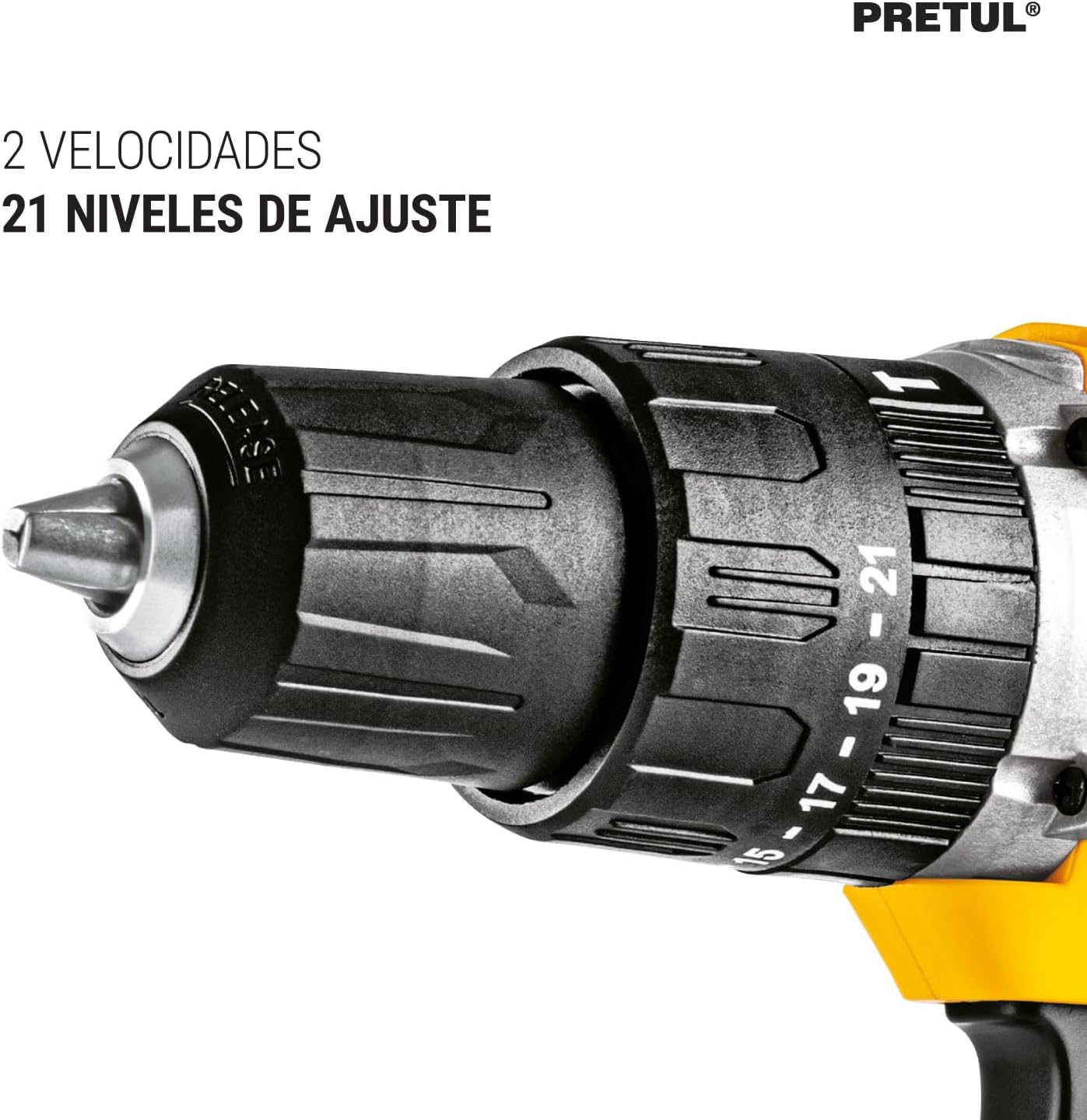
Figure 4: A detailed view of the chuck and torque adjustment ring on the Pretul ROTI-20P2K, highlighting the 21 adjustment levels and the two mechanical speed settings.
Setup
1. Charging the Battery
Before first use, fully charge the 2 Ah Lithium Ion battery (BAT-20PR). The charger (CAR-20PR) is designed for this specific battery.
- Connect the charger to a standard electrical outlet (127 V / 60 Hz).
- Slide the battery pack onto the charger until it clicks into place.
- The charger's indicator light will show the charging status. A full charge typically takes approximately 55 minutes.
- Once fully charged, disconnect the battery from the charger.
2. Installing/Removing the Battery
- To Install: Align the battery pack with the receptacle on the bottom of the tool handle. Slide the battery into place until it locks securely with the metal snaps.
- To Remove: Press the battery release buttons (usually on the sides of the battery pack) and slide the battery out of the tool.
3. Installing/Removing Drill Bits and Accessories
- To Install: Rotate the chuck counter-clockwise to open the jaws. Insert the desired drill bit or accessory fully into the chuck. Rotate the chuck clockwise to tighten the jaws securely around the bit. Ensure the bit is centered and firmly held.
- To Remove: Rotate the chuck counter-clockwise to loosen the jaws and remove the bit.
Operating Instructions
1. Powering On/Off
The tool is activated by pressing the trigger switch. The speed is variable depending on how far the trigger is pressed.
2. Speed Selection
The ROTI-20P2K features two mechanical speed settings:
- Low Speed (Level 1: 0 - 350 rpm): Ideal for high-torque applications, such as driving screws or drilling large diameter holes in softer materials.
- High Speed (Level 2: 0 - 1,500 rpm): Suitable for faster drilling in wood, metal, or for smaller diameter holes.
To change speed, use the speed selector switch located on top of the tool. Ensure the tool is stopped before changing speeds.
3. Torque Adjustment
The torque selector collar allows you to set the desired torque for driving screws or select drilling modes.
- Rotate the collar to select one of the 21 torque settings. Lower numbers are for smaller screws or softer materials, higher numbers for larger screws or harder materials.
- Beyond the torque settings, there are typically three additional modes:
- Drill Mode (Drill Bit Icon): For general drilling without clutch action.
- Hammer Drill Mode (Hammer Icon): For drilling into masonry, concrete, or brick with impact action.
- Drive Mode (Screw Icon): For driving screws with clutch action.
4. Direction Control
The forward/reverse lever (direction change button) is located above the trigger. Push it to the left for forward rotation (drilling/driving) and to the right for reverse rotation (removing screws or backing out bits). Center position locks the trigger for safety.
5. Using the LED Light
The integrated LED light automatically illuminates the work area when the trigger is pressed, providing better visibility in dimly lit spaces.
Maintenance
Regular maintenance ensures the longevity and optimal performance of your tool.
1. Cleaning
- Always disconnect the battery pack before cleaning.
- Use a clean, damp cloth to wipe down the exterior of the tool. Do not use harsh chemicals or abrasive cleaners.
- Keep the ventilation openings free from dust and debris to prevent overheating. Use compressed air if necessary.
- Clean the chuck jaws regularly to ensure proper gripping of bits.
2. Battery Care
- Store battery packs in a cool, dry place away from direct sunlight and extreme temperatures.
- Do not store battery packs in a discharged state for extended periods. Recharge them periodically if not in use.
- Do not attempt to disassemble or modify the battery pack.
3. Storage
When not in use, store the tool, battery, and charger in their original carrying case in a secure, dry place out of reach of children.
Troubleshooting
If you encounter issues with your Pretul ROTI-20P2K, refer to the following common problems and solutions:
| Problem | Possible Cause | Solution |
|---|---|---|
| Tool does not start. | Battery not charged or not properly installed. | Ensure battery is fully charged and securely inserted. |
| Reduced power or speed. | Low battery charge; incorrect speed/torque setting. | Recharge battery; adjust speed/torque settings as needed for the task. |
| Bit slips in chuck. | Chuck not tightened sufficiently; bit shank is dirty or damaged. | Retighten chuck firmly; clean or replace bit. |
| Tool overheats. | Overloading the tool; blocked ventilation slots. | Reduce load; allow tool to cool; clear ventilation slots. |
If the problem persists after trying these solutions, please contact customer support.
Specifications
Detailed technical specifications for the Pretul ROTI-20P2K Cordless Rotary Hammer Kit:

Figure 5: Visual representation of the Pretul ROTI-20P2K's dimensions and key performance characteristics, including chuck size, speeds, blows per minute, torque levels, and battery recharge time.
| Feature | Specification |
|---|---|
| Brand | Pretul |
| Model Number | ROTI-20P2K (Internal Model: 29000) |
| Power Source | Battery Powered |
| Voltage | 20 Volts |
| Battery Capacity | 2 Ah Lithium Ion |
| Charger Input | 127 V / 60 Hz / 190 W |
| Recharge Time | Approx. 55 minutes |
| Chuck Size | 1/2 inch |
| Number of Speeds | 2 Mechanical Speeds |
| Speed (Level 1) | 0 - 350 RPM |
| Speed (Level 2) | 0 - 1,500 RPM |
| Blows Per Minute (BPM) | 0 - 5,600 / 0 - 24,000 GPM (Hammer Mode) |
| Torque Adjustment | 21 Levels + 3 Functions (Drill, Hammer, Drive) |
| Max Torque (Level 1) | 24 lb/ft (33 Nm) |
| Max Torque (Level 2) | 4 lb/ft (6 Nm) |
| Item Weight (with accessories) | 3.3 kg (7.26 pounds) |
| Product Dimensions | 9.06 x 3.94 x 9.45 inches |
| Material | Metal |
Warranty and Support
Pretul products are manufactured to high-quality standards. For information regarding warranty coverage, technical support, or service, please refer to the warranty card included with your product or visit the official Pretul website. Keep your purchase receipt as proof of purchase for any warranty claims.


