
Avylet C301
Avylet C301 Car Stereo User Manual
Model: C301 | Brand: Avylet
Introduction
Thank you for choosing the Avylet C301 Car Stereo. This manual provides detailed instructions for the installation, operation, and maintenance of your new car audio system. Please read this manual thoroughly before use to ensure proper functionality and to maximize your listening experience.

Figure 1: Avylet C301 Car Stereo with included remote control and examples of the 7-color backlight options.
What's in the Box
Upon opening the package, please verify that all components are present:
- 1 x Avylet C301 Car Stereo
- 1 x Wireless Remote Control (with pre-installed batteries)
- 2 x Connection Cables (wiring harnesses)
- 2 x Disassembly Keys
- 1 x User Manual (this document)

Figure 2: All items included in the Avylet C301 Car Stereo package.
Setup and Installation
Proper installation is crucial for optimal performance. If you are unsure about any steps, it is recommended to seek professional assistance.
Wiring Diagram
Refer to the wiring diagram below for correct electrical connections. Ensure all connections are secure to prevent short circuits or damage.

Figure 3: Wiring diagram showing connections for speakers, power (ACC, Battery, Ground), and antenna.
- Power Connections: Connect the yellow wire to the constant 12V power supply (battery), the red wire to the accessory (ACC) 12V supply, and the black wire to ground.
- Speaker Connections: Connect the speaker wires according to the diagram, ensuring correct polarity for each speaker (front left, front right, rear left, rear right).
- Antenna Connection: Connect your car's FM antenna to the designated input on the stereo.
- Note on Power-off Memory: If the stereo does not retain settings (like radio stations) after the car is turned off, it may be necessary to swap the red and yellow power wires. This is a common variation in vehicle wiring.
Physical Installation
Follow these steps to physically install the car stereo into your vehicle's dashboard:
- Remove the radio frame: Carefully detach the outer frame from the car stereo unit.
- Fix the frame: Insert and secure the radio frame into the installation window of your car's dashboard.
- Press the iron piece: Use the mounting tools to press the iron pieces on the frame, fastening it securely to the car's console.
- Push the main unit: Slide the car stereo main unit into the secured frame until it snaps firmly into place.

Figure 4: Visual guide for the physical installation process of the car stereo.
Operating Instructions
Basic Operation
- Power On/Off: Press the POWER button to turn the unit on or off.
- Volume Control: Rotate the large knob on the left to adjust the volume.
- Mode Selection: Press the MODE button to cycle through available sources: FM, Bluetooth (BT), USB, SD, AUX.
FM Radio Function
The car stereo features an FM tuner with a frequency range of 87.5-108.0 MHz and can store up to 18 radio stations.
- Automatic Scan: In FM mode, press and hold the BAND button to automatically scan and save available stations.
- Manual Tuning: Use the CH+ and CH- buttons to manually tune to specific frequencies.
- Saving Stations (Remote Control): To save a station to a specific preset number (1-6), tune to the desired station, then press and hold the corresponding number button on the remote control for a few seconds.
- Recalling Stations: Briefly press the number buttons (1-6) on the remote or the corresponding buttons on the unit to recall saved stations.

Figure 5: The car stereo display indicating FM stereo tuning and the power-off memory feature.
Bluetooth 5.0 Connectivity
Connect your mobile devices wirelessly for hands-free calling and music streaming.
- Pairing: Switch the stereo to Bluetooth (BT) mode. On your mobile device, search for "Avylet" or "C301" in the Bluetooth settings and pair.
- Hands-free Calling: Use the CALL button on the unit or remote to answer/end calls.
- Music Playback: Play audio from your paired device. Use the PREV and NEXT buttons to skip tracks.

Figure 6: Bluetooth 5.0 features, highlighting stable transmission and hands-free capabilities.
Media Playback (USB, SD, AUX)
The stereo supports MP3/WMA/WAV formats from USB drives (up to 32GB), SD cards (up to 32GB), and external devices via AUX-in.
- USB/SD: Insert your USB drive or SD card into the respective slot. The unit will automatically switch to the correct mode and begin playback.
- AUX-in: Connect your audio device (e.g., smartphone, MP3 player) to the 3.5mm AUX input using an audio cable. Switch the stereo to AUX mode.
- USB Charging: One of the USB ports can be used for charging mobile devices.

Figure 7: The AUX-in port and USB charging functionality of the car stereo.
Sound Settings
Customize your audio experience with the built-in equalizer and loudness function.
- Equalizer (EQ): Press the EQ button on the remote or unit to cycle through preset equalizer modes (e.g., Pop, Rock, Classic) or a custom setting.
- Loudness: Press the LOUD button on the remote to enable or disable the loudness feature, which enhances bass and treble at low volumes.
Display and Backlight
The unit features a clear LCD display and customizable 7-color backlights.
- 7-Color Backlights: The backlight colors can be changed to suit your preference. Use the BAND button or specific color buttons on the remote to cycle through colors or set to automatic color cycling.
- Note: Some users have reported that the selected backlight color may not be saved after the unit is powered off and on. You may need to re-select your preferred color each time.

Figure 8: Examples of the 7-color backlight options available on the car stereo.
Remote Control
The included wireless remote control allows convenient operation from anywhere within three meters of the stereo.
- Functions: The remote provides access to power, mode, volume, track skip, EQ, loudness, number presets, and call functions.
- Battery: The remote control comes with a pre-installed Lithium Metal battery.
Media Demonstrations
View the following official product videos for visual demonstrations of key features and operations.
Avylet High-Quality Car Stereo Overview
This video provides a general overview of the Avylet car stereo, showcasing its design and basic functionalities.
How to Retrieve Pre-Stored Stations
Learn how to access and recall your pre-saved radio stations using the car stereo's controls.
Avylet Car Stereo Setting Adjustment
This video demonstrates how to adjust various settings on the Avylet car stereo, including sound and display options.
Maintenance
- Cleaning: Use a soft, dry cloth to clean the unit's surface. Avoid abrasive cleaners or solvents.
- Temperature: The unit is suitable for operating environments from -15°C (+5°F) to +60°C (+140°F). Avoid exposing the unit to extreme temperatures.
- Fuse Replacement: If the unit does not power on, check the fuse located at the rear of the unit. Replace with a fuse of the same rating if necessary.
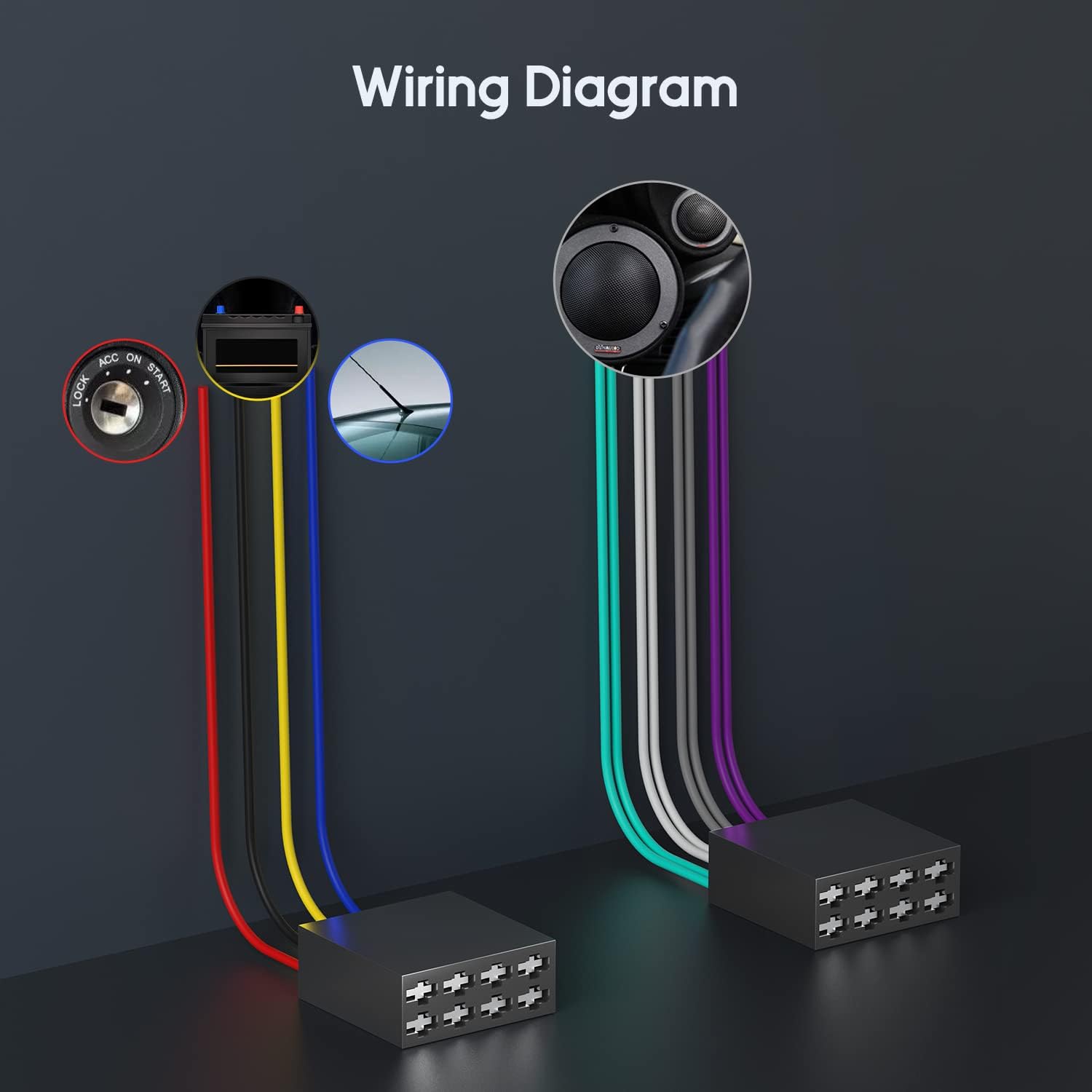
Figure 9: The car stereo is designed to withstand a wide range of operating temperatures.
Troubleshooting
| Problem | Possible Cause | Solution |
|---|---|---|
| No power | Incorrect wiring; Blown fuse | Check power connections (red/yellow wires); Replace fuse if blown. |
| Settings not saved | Red and yellow power wires swapped | Swap the red (ACC) and yellow (Battery) power wires. |
| No sound | Incorrect speaker wiring; Volume too low; Mute activated | Check speaker connections and polarity; Increase volume; Deactivate mute. |
| Bluetooth not connecting | Not in BT mode; Device not discoverable | Ensure stereo is in BT mode; Make sure device's Bluetooth is on and discoverable. |
| Backlight color not saving | Unit design limitation | This is a known characteristic; re-select color after power cycle if desired. |
| No play/pause button on unit | Design limitation | Use the remote control for play/pause functionality or control from the connected device. |
Specifications
- Model Number: C301
- Brand: Avylet
- Connectivity Technology: Bluetooth 5.0, Auxiliary, USB
- Controller Type: iOS, Android
- Special Features: 7-Color Backlights, LCD Display, Equalizer, FM Stereo
- Compatible Devices: Smartphone
- Connector Type: 3.5mm Jack
- Audio Output Mode: Stereo
- Surround-sound Channel Configuration: 4
- Color: Black
- Product Dimensions: 10.8D x 18.6W x 5H centimetres (4.25D x 7.32W x 1.96H inches)
- Weight: 460 g
- Batteries: 1 Lithium Metal battery required (included for remote)
- Manufacturer: Avylet
- First Available Date: 2 Dec. 2022

Figure 10: Dimensions of the Avylet C301 Car Stereo.
Warranty and Support
For warranty information, technical support, or service inquiries, please refer to the contact details provided with your purchase documentation or visit the official Avylet website. Keep your proof of purchase for warranty claims.
Official Website: http://qr.hotlnk.cn/url/79841897337
Facebook: http://qr.hotlnk.cn/url/79840789016
YouTube: http://qr.hotlnk.cn/url/79841897079