
VIPARSPECTRA XS1500 PRO
VIPARSPECTRA XS1500 Pro LED Grow Light User Manual
Model: XS1500 PRO
Introduction
The VIPARSPECTRA XS1500 Pro LED Grow Light is engineered to provide optimal light spectrum and intensity for indoor plant cultivation, from seed starting through flowering. Featuring new-generation optical lenses and a dimmable daisy-chain function, this light ensures uniform light distribution and energy efficiency, supporting healthy plant growth and increased yields.
Safety Information
- Always disconnect the power supply before installation, cleaning, or maintenance.
- Do not look directly at the LED lights when the unit is operating, as it may cause eye strain.
- Ensure the grow light is installed in a well-ventilated area to prevent overheating.
- Keep the light away from water and other liquids. This product is designed for indoor use only.
- Do not attempt to disassemble or modify the unit. Refer all servicing to qualified personnel.
- Maintain appropriate hanging distance from plants to prevent light burn and ensure optimal growth.
Package Contents
Upon opening your VIPARSPECTRA XS1500 Pro package, please verify that all the following components are included:
- 1 x VIPARSPECTRA XS1500 Pro LED Grow Light
- 2 x Stainless Steel Hooks
- 2 x Rope Hangers
- 1 x Dimming Cable (1.5m/59 inches)
- 1 x Power Cord (5.9ft/180cm)
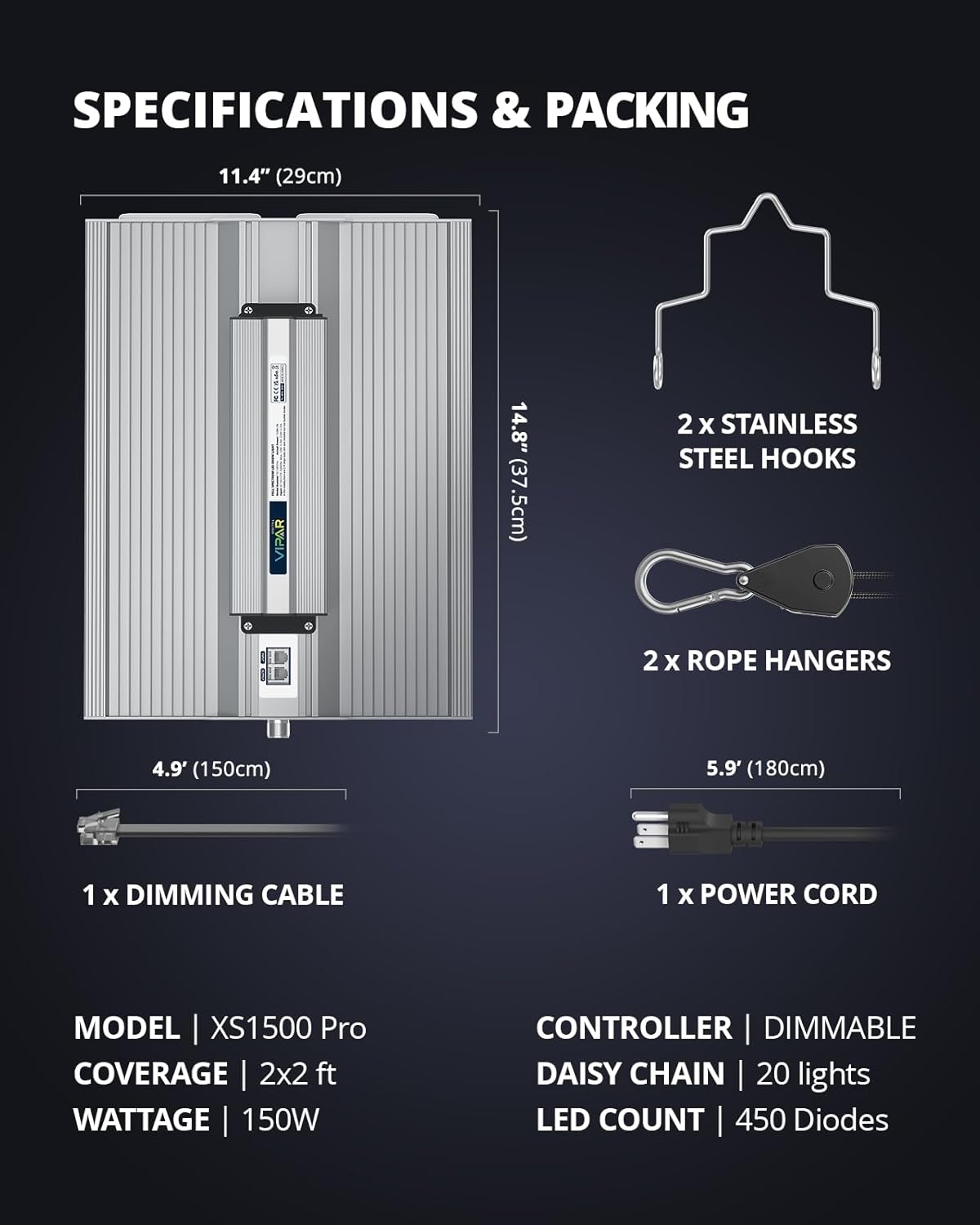
Image: Detailed view of the VIPARSPECTRA XS1500 Pro LED Grow Light and its included accessories, such as hanging kits and cables.
Setup
Follow these steps to set up your VIPARSPECTRA XS1500 Pro LED Grow Light:
- Unpack and Inspect: Carefully remove all components from the packaging. Inspect the grow light and accessories for any signs of damage.
- Choose Location: Select a suitable indoor location for your grow light, such as a grow tent or a dedicated plant area. Ensure adequate space for hanging and ventilation.
- Install Hanging Kit: Attach the stainless steel hooks to the top of the grow light. Connect the rope hangers to the hooks and suspend the light from a sturdy support structure. Adjust the height using the rope hangers to achieve the desired distance from your plants.
- Connect Power: Plug the power cord into the grow light's power input, then plug the other end into a standard 120V AC outlet.
- Optional Daisy Chain Connection: If connecting multiple XS1500 Pro lights, use the provided dimming cable to link them. This allows for synchronized dimming control across all connected units.

Image: The VIPARSPECTRA XS1500 Pro LED Grow Light suspended by its hanging kit, ready for operation.

Image: An illustration demonstrating the typical setup of the grow light system inside a grow tent, highlighting proper placement and ventilation.
Operating Instructions
The VIPARSPECTRA XS1500 Pro is designed for ease of use with advanced features to optimize plant growth.
Dimming Control
The light features a dimmer knob for precise control over light intensity. Adjust the knob to set the desired brightness level according to your plants' growth stage and needs. The XS1500 Pro offers 6 levels of brightness adjustment.

Image: A detailed view of the dimming knob, illustrating the 6 levels of brightness control available on the grow light.
Full Spectrum Output
The XS1500 Pro utilizes a full spectrum of LEDs, including white (3000K, 5000K), red (660nm), and IR (730nm). This optimized spectrum provides all necessary wavelengths for plant photosynthesis throughout their entire life cycle, from germination to bloom.

Image: A visual representation of the optimized light spectrum, showing the different wavelengths and their benefits for plant growth stages.
Daisy Chain Function
For larger grow operations, up to 20 XS1500 Pro units can be connected in a daisy chain. This allows a single dimmer to control the intensity of all connected lights simultaneously, simplifying management in commercial growing, horizontal/vertical farming, greenhouses, and hydroponics.

Image: A diagram showing how multiple grow lights can be linked together using the daisy chain feature for centralized control.
Maintenance
Proper maintenance ensures the longevity and optimal performance of your grow light:
- Cleaning: Regularly wipe the surface of the light and the LED lenses with a soft, dry cloth to remove dust and debris. Ensure the light is unplugged before cleaning.
- Ventilation: Ensure adequate airflow around the light to facilitate heat dissipation. Do not block the heatsink fins.
- Cable Inspection: Periodically check all cables and connections for any signs of wear, fraying, or damage. Replace any damaged cables immediately.
Troubleshooting
If you encounter issues with your VIPARSPECTRA XS1500 Pro, refer to the following common problems and solutions:
| Problem | Possible Cause | Solution |
|---|---|---|
| Light does not turn on. | No power supply; loose connection; dimmer set to 0%. | Check power cord connection; ensure outlet is functional; turn dimmer knob up. |
| Light flickers or dims unexpectedly. | Unstable power supply; loose connection; faulty dimmer. | Check power source stability; re-secure all connections; contact support if issue persists. |
| Plants show signs of stress (e.g., yellowing, burning). | Light too close or too intense; improper nutrient levels. | Increase hanging distance or reduce dimmer intensity; adjust plant nutrients as needed. |
| Daisy chain not working. | Incorrect cable connection; too many lights connected. | Verify dimming cable connections; ensure no more than 20 lights are chained. |
Specifications
| Feature | Detail |
|---|---|
| Model | XS1500 PRO |
| Actual Power Draw | 150 Watts |
| LED Count | 450 Diodes |
| Spectrum | Full Spectrum (3000K, 5000K, 660nm Red, 730nm IR) |
| Coverage Area (Veg) | 3x3 ft |
| Coverage Area (Flowering) | 2x2 ft |
| Dimming | Yes, 6 levels |
| Daisy Chain Capability | Up to 20 lights |
| Voltage | 120 Volts |
| Brightness | 25000 Lumen |
| Material | Aluminum |
| Product Dimensions | 14.2"L x 11.4"W x 3.1"H |
| Item Weight | 5.6 Pounds |
| Certifications | FCC, UL |

Image: A visual representation of the PAR (Photosynthetically Active Radiation) map, demonstrating the uniform light distribution and penetration at various hanging heights.
Warranty and Support
VIPARSPECTRA stands behind the quality of its products. For detailed warranty information, product support, or technical assistance, please visit the official VIPARSPECTRA website or contact their customer service team. Keep your purchase receipt for warranty claims.
Official Website: www.viparspectra.com
Related documentsXS1500 PRO


Ask a question about this manual
Ask about setup, troubleshooting, compatibility, parts, safety, or missing instructions. Manuals+ will review the question and use this page’s manual context to help answer it.