
Micool S03
Micool S03 Ear-Clip Bone Conduction Headphones User Manual
Model: S03
Introduction
Thank you for choosing the Micool S03 Ear-Clip Bone Conduction Headphones. These headphones are designed to provide a comfortable, open-ear listening experience with advanced Bluetooth 5.3 technology, HiFi sound quality, and long battery life. This manual provides detailed instructions for setup, operation, maintenance, and troubleshooting to ensure optimal performance and longevity of your device.

Image: The Micool S03 Ear-Clip Bone Conduction Headphones, black, resting inside their open charging case. The earbuds feature a unique ear-clip design.
Package Contents
- Micool S03 Ear-Clip Bone Conduction Headphones (Left and Right)
- Wireless Charging Case
- User Manual (this document)
Product Overview
The Micool S03 headphones utilize bone conduction technology, allowing for an open-ear design that does not block the ear canal. This design enhances comfort during extended wear and allows awareness of ambient sounds.

Image: A woman wearing the Micool S03 Ear-Clip Headphones, demonstrating their comfortable, open-ear fit.
Key Features:
- Bone Conduction Technology: Delivers sound through the cheekbones, leaving ear canals open.
- Bluetooth 5.3: Ensures stable connection and low power consumption.
- Painless Ear-Clip Design: Ergonomically designed for comfort during long periods of wear.
- HD Noise Elimination Call: Dual microphones with ENC for clear calls.
- IPX Waterproof: Resistant to sweat and splashes, suitable for sports.
- Smart Touch Control: Intuitive control for music and calls.
- Long Battery Life: Up to 6.5 hours on a single charge, 36 hours with charging case.
Setup and Pairing
Charging the Headphones and Case:
- Place both earbuds into the charging case. Ensure they are correctly seated; indicator lights on the case will confirm charging.
- Connect the charging case to a USB power source using a compatible USB cable (not included).
- The charging case has a 350mAh capacity, providing multiple charges for the earbuds. A full charge for the earbuds takes approximately 2.17 hours.

Image: An illustration detailing the battery life of the Micool S03 headphones: 6.5 hours single listening time, 36 hours total listening time with the 350mAh charging compartment.
Initial Pairing:
- Ensure the headphones are charged.
- Open the charging case. The earbuds will automatically enter pairing mode.
- On your device (smartphone, tablet, laptop), enable Bluetooth.
- Search for available Bluetooth devices and select "S03" from the list.
- Once connected, a voice prompt will confirm successful pairing.
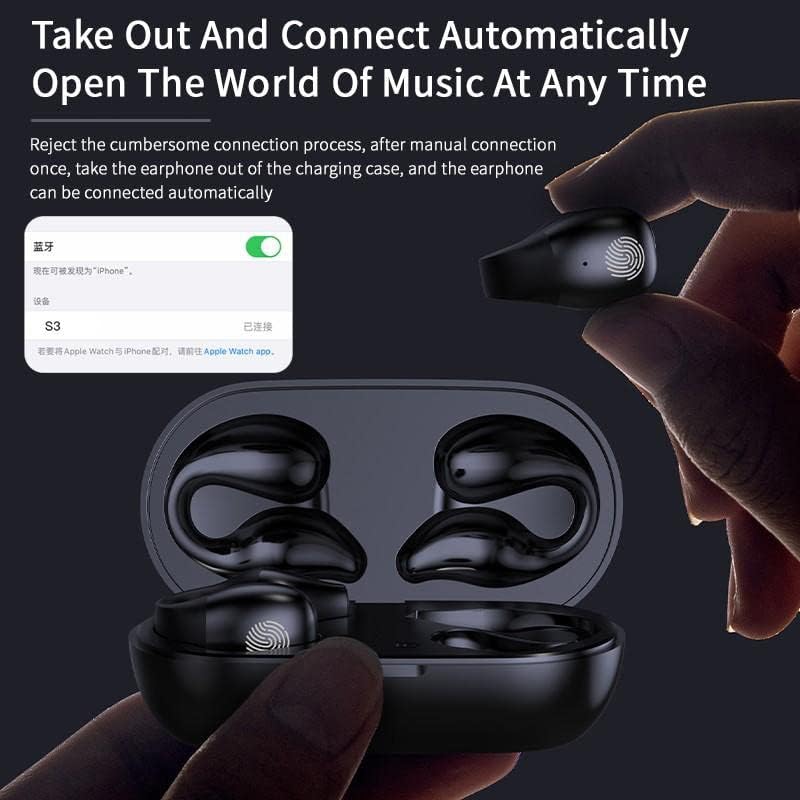
Image: A hand taking an earbud out of the charging case, with a phone screen showing "S03 Connected", illustrating the automatic connection feature.
The headphones support master-slave switching technology, allowing either earbud to be used independently.
Operating Instructions
Wearing the Headphones:
Gently clip the headphones onto your ear, ensuring the bone conduction transducer rests comfortably near your temple, just in front of your ear canal. The design is intended to be painless and secure.
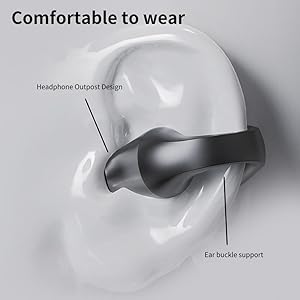
Image: A diagram illustrating the correct placement of the Micool S03 ear-clip headphone on the ear, highlighting the headphone outpost design and ear buckle support for comfortable wear.
Touch Controls:
The Micool S03 headphones feature intelligent touch controls on each earbud. The touch-sensitive area is typically located on the outer surface of the earbud.

Image: A diagram showing the smart fingerprint touch area on the Micool S03 earbud, indicating how gentle touches complete commands quickly.
| Action | Function |
|---|---|
| Single Tap (Left/Right) | Play/Pause Music, Answer/End Call |
| Double Tap (Right) | Next Track |
| Double Tap (Left) | Previous Track |
| Triple Tap (Left/Right) | Activate Voice Assistant |
| Long Press (2 seconds) | Reject Call |
| Long Press (3 seconds) | Power On/Off (if not in case) |
Note: Volume control is typically managed via your connected device.
Maintenance and Care
- Cleaning: Use a soft, dry, lint-free cloth to clean the headphones and charging case. Do not use abrasive cleaners or solvents.
- Water Resistance: The headphones are waterproof and sweat-resistant (IPX rating). However, they are not designed for submersion. Avoid exposing them to strong jets of water or prolonged immersion. Dry them thoroughly after exposure to sweat or water.
- Storage: When not in use, store the headphones in their charging case to protect them and keep them charged. Store in a cool, dry place away from direct sunlight and extreme temperatures.
- Battery Care: To prolong battery life, avoid fully discharging the headphones frequently. Charge them regularly, even if not used for extended periods.
Troubleshooting
| Problem | Possible Solution |
|---|---|
| Headphones not pairing |
|
| No sound or low volume |
|
| Intermittent connection/skipping |
|
| Earbuds not charging in case |
|
Specifications
| Feature | Detail |
|---|---|
| Model Name | S03 |
| Brand | Micool |
| Connectivity Technology | Wireless (Bluetooth 5.3) |
| Audio Driver Type | Bone Conduction Driver |
| Ear Placement | Open Ear (Ear-Clip) |
| Noise Control | Active Noise Cancellation (for calls) |
| Battery Life (Single Charge) | Up to 6.5 Hours |
| Total Battery Life (with Case) | Up to 36 Hours |
| Charging Time | Approx. 2.17 Hours (earbuds in case) |
| Charging Case Capacity | 350mAh |
| Bluetooth Range | 10 Meters |
| Water Resistance Level | Waterproof (Sweatproof) |
| Control Method | Touch |
| Compatible Devices | Cellphones, Laptops, Tablets |
| Material | Plastic |
| Item Weight | 0.08 Kilograms (approx. 2.82 ounces) |
| Package Dimensions | 5.12 x 3.07 x 1.38 inches |
Warranty and Support
Micool is committed to providing high-quality products and excellent customer service. For any inquiries, technical support, or warranty claims, please refer to the following:
- After-Sales Service: Micool provides 24-hour after-sales service.
- VIP Service: Any item purchased is eligible for VIP service.
- Contact Information: Please visit the official Micool website or refer to the contact details provided on your purchase receipt for direct support.
For more information about Micool and their products, you can visit the Micool Store on Amazon.
Ask a question about this manual
Ask about setup, troubleshooting, compatibility, parts, safety, or missing instructions. Manuals+ will review the question and use this page’s manual context to help answer it.