
1. Product Overview
The Dpofirs Car Audio Graphic Equalizer is designed to enhance your vehicle's audio system by providing precise control over sound frequencies. This 7-band equalizer allows for detailed sound customization, ensuring an optimized listening experience in various environments, including cars, boats, RVs, RTVs, and motorcycles.
Key features include:
- 7 Adjustable Bands: Fine-tune audio frequencies at 50Hz, 125Hz, 315Hz, 750Hz, 2.2KHz, 6KHz, and 12KHz.
- Variable Gain Adjustment: Allows for precise control over input signal levels.
- High-Level Speaker Input: Provides flexibility for integration with various audio systems.
- Independent Volume Controls: Features separate controls for main volume and subwoofer output.
- Multiple Outputs: Includes front, rear, and subwoofer outputs for comprehensive system connectivity.
- Easy Installation: Comes with mounting brackets and screws for straightforward setup.

Image 1.1: The Dpofirs Car Audio Graphic Equalizer, displaying its various input/output ports and control knobs, along with printed specifications on its surface.
2. Setup and Installation
Proper installation is crucial for optimal performance and safety. It is recommended that installation be performed by a qualified professional if you are unfamiliar with car audio wiring.
2.1 Package Contents
- 1 x Car Audio Graphic Equalizer
- 1 x Manual (this document)
- 4 x Screws
- 2 x Mounting Accessories (brackets)

Image 2.1: The equalizer unit displayed alongside its mounting hardware, including two L-shaped brackets and four screws, ready for installation.
2.2 Wiring Connections
Ensure the vehicle's battery is disconnected before making any electrical connections.
- Power (+12V): Connect the +12V terminal on the equalizer to a constant +12V power source from the vehicle's battery. Use an inline fuse (not included) for protection.
- Ground (GND): Connect the GND terminal to a clean, unpainted metal surface on the vehicle's chassis. Ensure a solid ground connection to prevent noise.
- Remote (REM): Connect the REM terminal to the remote output wire from your head unit. This will turn the equalizer on and off with your stereo.
- Audio Input: Connect the audio output from your head unit (CD/AUX) to the corresponding input jacks on the equalizer. The unit supports both CD and AUX inputs.
- Audio Output: Connect the equalizer's output jacks (Front, Rear, Subwoofer) to the input jacks of your amplifier(s).
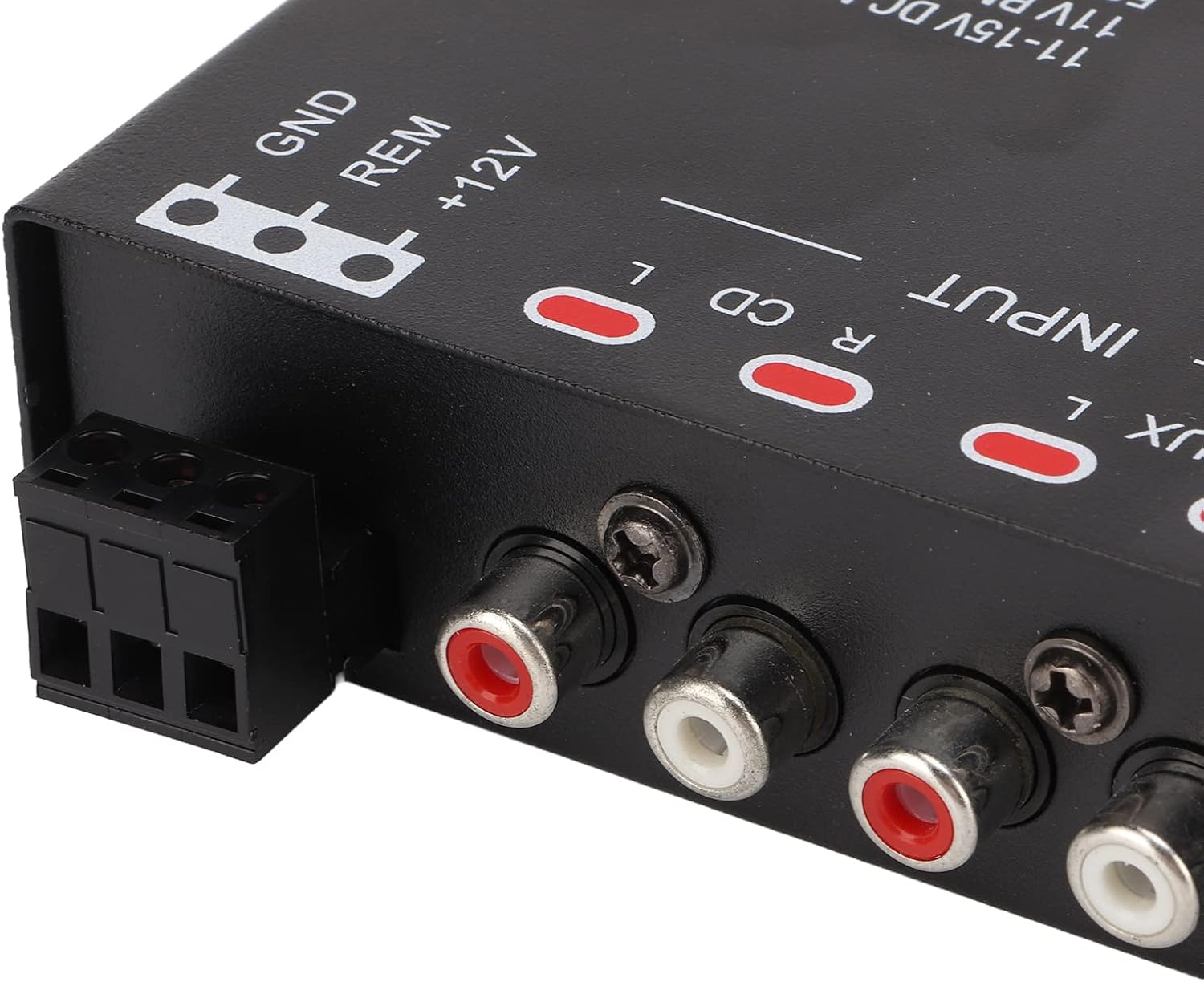
Image 2.2: A detailed shot of the power input section of the equalizer, showing the +12V, REM, and GND terminals for electrical connections.

Image 2.3: A close-up of the RCA input and output connections, highlighting the 'Input' and 'Output' sections with their respective left and right channels.
3. Operating Instructions
Once installed and powered on, you can begin adjusting the sound to your preference.
3.1 Controls Overview

Image 3.1: The top panel of the equalizer, clearly showing all the rotary knobs for volume, subwoofer level, fader, and the seven individual frequency bands.
- Volume Knob: Controls the overall output volume of the system.
- Sub Vol Knob: Adjusts the output level of the subwoofer channel independently.
- Sub Freq Knob: Sets the crossover frequency for the subwoofer output (35-250Hz).
- Fader Knob: Balances the sound between the front and rear speakers.
- CD/AUX Switch: Selects between the CD input and AUX input sources.
- 7-Band EQ Knobs: Adjust the gain (±18dB) for each of the seven frequency bands (50Hz, 125Hz, 315Hz, 750Hz, 2.2KHz, 6KHz, 12KHz).
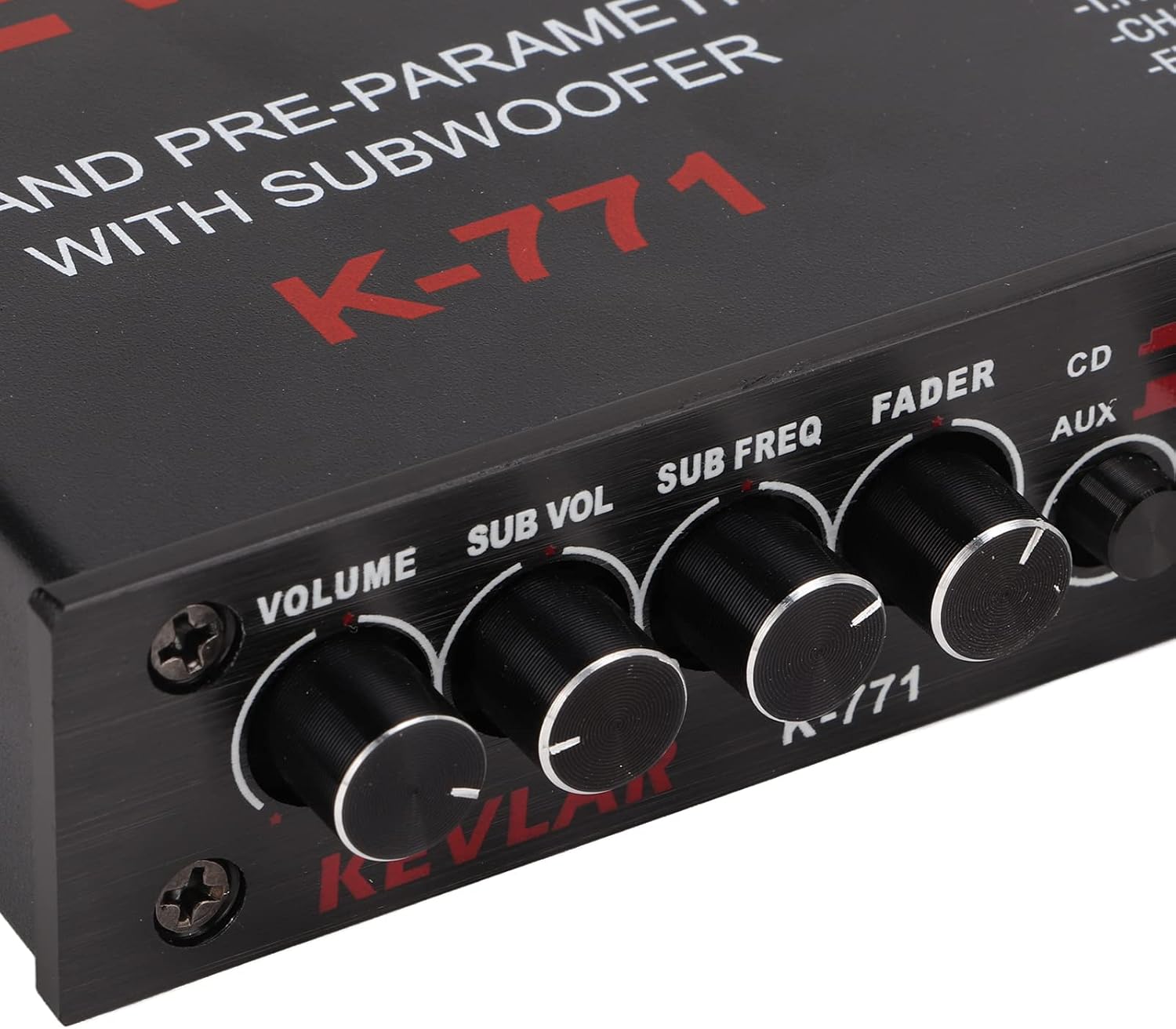
Image 3.2: A detailed view of the primary audio control knobs, including Volume, Sub Vol, Sub Freq, and Fader, allowing for precise sound shaping.
3.2 Adjusting Frequencies
Use the 7-band EQ knobs to boost or cut specific frequencies to tailor the sound to your vehicle's acoustics and your personal preference. Experiment with different settings to find the ideal balance for your music.

Video 3.1: A brief demonstration of the Dpofirs Car Audio Graphic Equalizer, highlighting its features and application in various vehicles. This video is provided by the seller.
4. Maintenance
To ensure the longevity and optimal performance of your Dpofirs Car Audio Graphic Equalizer, follow these maintenance guidelines:
- Cleaning: Use a soft, dry cloth to wipe down the unit. Avoid using harsh chemicals, solvents, or abrasive cleaners, as they can damage the finish and internal components.
- Environment: Install the equalizer in a location that is protected from direct sunlight, excessive heat, moisture, and dust. Extreme temperatures can affect performance and lifespan.
- Connections: Periodically check all wiring connections to ensure they are secure and free from corrosion. Loose connections can lead to poor sound quality or intermittent operation.
- Ventilation: Ensure adequate airflow around the unit to prevent overheating, especially if it is installed in an enclosed space.
5. Troubleshooting
If you encounter issues with your equalizer, refer to the following common problems and solutions:
| Problem | Possible Cause | Solution |
|---|---|---|
| No power | Loose power/ground/remote wire; Blown fuse; Faulty head unit remote output. | Check all power connections. Verify fuse integrity. Test remote wire for 12V when head unit is on. |
| No sound output | Incorrect input/output connections; Volume knob turned down; Amplifier not powered on. | Ensure RCA cables are correctly connected. Increase volume. Check amplifier power. |
| Distorted sound | Input signal too high; EQ bands set too high; Poor ground connection. | Reduce head unit volume. Adjust EQ bands to a neutral position and re-tune. Verify ground connection. |
| Engine noise/whine | Poor grounding; RCA cables too close to power wires; Ground loop. | Improve ground connection. Reroute RCA cables away from power wires. Consider a ground loop isolator. |
If the problem persists after attempting these solutions, please contact customer support.
6. Specifications
Detailed technical specifications for the Dpofirs Car Audio Graphic Equalizer:
| Parameter | Value |
|---|---|
| Item Type | Car Audio Graphic Equalizer |
| Material | Metal |
| Voltage | 11-15V DC |
| Pre Graphic Frequencies | 50Hz, 125Hz, 315Hz, 750Hz, 2.2KHz, 6KHz, 12KHz |
| Equalization Range | ±18dB |
| Subwoofer Frequency | 35-250HZ |
| Input Impedance | 10K OHMS |
| Signal To Noise Ratio | 90dB |
| THD (Total Harmonic Distortion) | 0.05% |
| Channel Separation Ratio | 70dB |
| Frequency Response | 15Hz-30KHz (-3dB) |
| Application Range | Universal |
| Item Weight | 1.37 pounds |
| Package Dimensions | 11.89 x 8.54 x 1.46 inches |
7. Warranty and Support
For warranty information and technical support, please refer to the documentation included with your purchase or contact Dpofirs customer service directly. Keep your purchase receipt as proof of purchase for any warranty claims.
For further assistance, you may visit the official Dpofirs store online: Dpofirs Store