
AMBITFUL AMBITFUL P35R
AMBITFUL P35R RGB LED Light Panel User Manual
Model: AMBITFUL P35R
1. Introduction
The AMBITFUL P35R is a professional-grade RGB LED video light panel designed for a wide range of photographic and videographic applications. It offers versatile lighting options with adjustable color temperature, full RGB control, and various special effects. With dual power supply modes and convenient app control, the P35R is suitable for both studio and outdoor shooting environments.
2. Safety Information
- Do not look directly into the light when it is on, as it can cause eye strain or damage.
- Keep the device dry. Do not expose it to rain or moisture. The product is rated as waterproof, but extreme conditions should be avoided.
- Do not disassemble or modify the product. Repairs should only be performed by authorized personnel.
- Ensure proper ventilation to prevent overheating.
- Use only the specified power adapter or compatible NP-F batteries.
- Keep out of reach of children.
3. Product Overview
3.1 Components
- AMBITFUL P35R LED Light Panel
- Power Adapter
- Barn Doors (integrated)
- Mounting Bracket

Figure 3.1: Overview of the AMBITFUL P35R LED Light Panel, showing its main body, barn doors, and a smartphone displaying the control app interface with various color options.
3.2 Key Features
- RGB/Bi-color Output Modes: Features 648 LED beads, offering CCT mode (3200K-5600K) and HSI mode (Hue, Saturation, Intensity 0-100%) for 36,000 adjustable colors.
- Dual Power Supply: Can be powered by an NP-F lithium battery (not included) or the included DC power adapter, providing flexibility for studio or outdoor use.
- Advanced Control: Supports both mobile app control via "ambitful pro" (available on Apple Store/Google Play) and direct control from the host panel. Allows remote adjustment of color and temperature, and multi-device linkage.
- High Brightness: 30W high-power LED light source, providing stable output without flickering. Achieves 3200 Lux at 0.5 meters.
- Adjustable Color Temperature: CCT range from 2800K to 6800K to match various lighting conditions and creative needs.
- Special Lighting Effects: Includes 24 preset environmental lighting effects with adjustable brightness and speed.
4. Setup
4.1 Powering the Device
- Using DC Power:
Connect the included power adapter to the DC input port on the light panel. Plug the adapter into a suitable power outlet.

Figure 4.1: Contents of the box, showing the AMBITFUL P35R light panel with barn doors and the power adapter.
- Using NP-F Battery (Not Included):
Insert a fully charged NP-F series lithium battery into the battery slot on the back of the light panel. Ensure it clicks into place securely.
4.2 Mounting the Light
Attach the light panel's mounting bracket to a compatible light stand or tripod. Secure it firmly using the locking knob on the bracket.
5. Operating Instructions
5.1 Panel Control
The AMBITFUL P35R features an intuitive control panel on the back of the unit. Use the various buttons and dials to adjust settings directly.

Figure 5.1: The control panel of the AMBITFUL P35R, displaying icons for 24 different lighting effects such as lightning, flash, candle light, and police car.
5.2 Mobile App Control
- Download the App: Search for "ambitful pro" in your device's app store (Apple Store, Google Play) and install it.
- Connect via Bluetooth:
- Ensure Bluetooth is enabled on your smartphone or tablet.
- Turn on the AMBITFUL P35R light.
- Open the "ambitful pro" app and follow the on-screen instructions to connect to your light panel.

Figure 5.2: A smartphone screen showing the "ambitful Pro" app interface, which allows for wireless control and adjustment of the light's parameters.
- Adjusting Settings:
Once connected, you can remotely control various parameters:
- CCT Mode: Adjust color temperature between 2800K and 6800K.
- HSI Mode: Fine-tune Hue, Saturation, and Intensity (0-100%) to achieve 36,000 different colors.
- Brightness: Stepless dimming from 0% to 100%.
- Special Effects: Select from 24 preset lighting effects and adjust their speed and intensity.

Figure 5.3: An illustration of the AMBITFUL P35R's capability to produce 36,000 different RGB colors through HSI mode, allowing for precise color adjustment.

Figure 5.4: The AMBITFUL P35R demonstrating its high brightness output, capable of 3200 Lux at 0.5 meters, suitable for various scene lighting requirements.
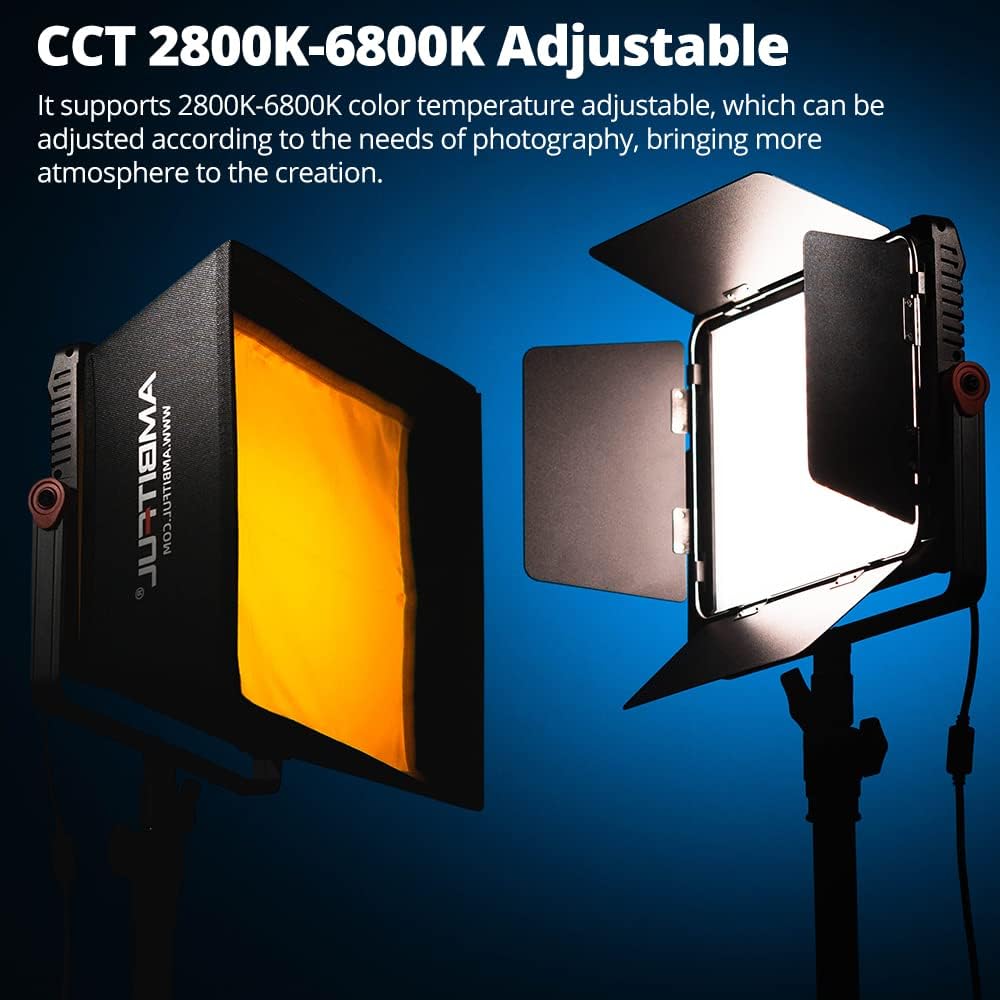
Figure 5.5: Two AMBITFUL P35R lights, one equipped with a softbox, illustrating the adjustable color temperature range from 2800K to 6800K, enhancing creative atmosphere.
6. Maintenance
- Cleaning: Use a soft, dry cloth to clean the light panel. Do not use abrasive cleaners or solvents.
- Storage: When not in use, store the light in a cool, dry place, away from direct sunlight and excessive humidity.
- Battery Care: If using NP-F batteries, ensure they are charged regularly and stored properly when not in use to prolong their lifespan.
7. Troubleshooting
| Problem | Possible Cause | Solution |
|---|---|---|
| Light does not turn on. | No power, faulty power adapter/battery, or loose connection. | Check power connection. Ensure battery is charged or power adapter is working. |
| App cannot connect to the light. | Bluetooth is off, light is too far, or app issue. | Ensure Bluetooth is on. Move closer to the light. Restart the app and the light. |
| Light flickers. | Unstable power supply or internal issue. | Ensure stable power. If using battery, check charge level. If problem persists, contact support. |
8. Specifications
| Feature | Detail |
|---|---|
| Model | AMBITFUL P35R |
| LED Beads | 648 |
| Power | 30W |
| Color Temperature (CCT) | 2800K - 6800K |
| RGB Color Range | 36,000 colors (HSI mode) |
| Brightness | 3200 Lux @ 0.5m |
| Luminous Flux | 3000 Lm |
| Control Modes | Mobile App (Bluetooth), On-panel Control |
| Compatible App | ambitful pro |
| Power Supply | DC Power Adapter, NP-F Lithium Battery (not included) |
| Dimensions (Package) | 37.6 x 33 x 8.4 cm |
| Weight (Package) | 1.94 kg |
| Water Resistance | Waterproof |
| Manufacturer | AMBITFUL |
| Country of Origin | China |
9. Warranty and Support
9.1 Warranty Information
The AMBITFUL P35R comes with a 1 Year Warranty from the date of purchase. This warranty covers manufacturing defects and malfunctions under normal use. It does not cover damage caused by misuse, accidents, unauthorized modifications, or natural disasters.
9.2 Customer Support
For technical support, warranty claims, or any inquiries regarding your AMBITFUL P35R, please contact AMBITFUL customer service. Refer to the official AMBITFUL website or your purchase documentation for contact details.
You can also visit the official AMBITFUL store on Amazon for more information and support: AMBITFUL Amazon Store
Related documentsAMBITFUL P35R


Ask a question about this manual
Ask about setup, troubleshooting, compatibility, parts, safety, or missing instructions. Manuals+ will review the question and use this page’s manual context to help answer it.