
1. Product Overview
The Aheaplus L Shaped Desk is a versatile and functional furniture piece designed for home office, gaming, or general workspace use. It features a spacious desktop, integrated power outlets and USB charging ports, and flexible storage options. Its reversible design allows for configuration as an L-shaped corner desk or a long two-person table, adapting to various room layouts and user needs.

Figure 1.1: Overview of the Aheaplus L Shaped Desk, highlighting its spacious design and integrated features.
2. Key Features
- Integrated Power & USB Ports: Equipped with a built-in socket featuring 3 AC outlets and 2 USB ports, providing convenient power access for electronic devices directly on the desktop. Includes 3 cable holes for organized wire management.

Figure 2.1: Detail of the integrated power and USB charging hub.
- Reversible & Flexible Design: Offers 4 flexible installation methods, allowing assembly as an L-shaped corner desk or a long table. The storage shelf can be positioned on either the left or right side to suit your preference and room layout.
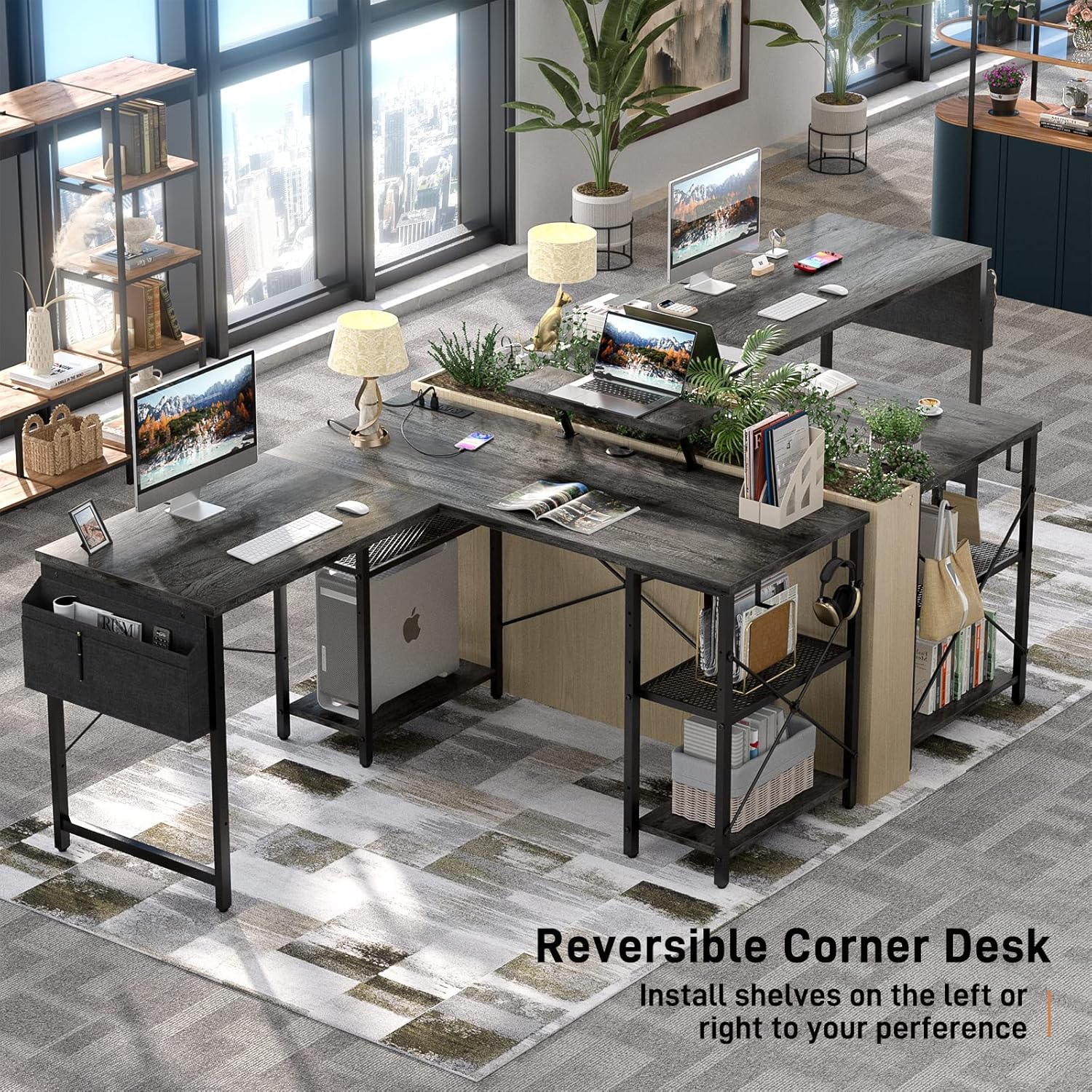
Figure 2.2: Illustration of the reversible design for shelf placement.
- Ample Workspace & Storage: Features a spacious desktop (51.2"L x 51.2"L x 19.7"W for L-shape) capable of accommodating multiple monitors or laptops. Includes 2 multi-function storage shelves and a large monitor stand for organizing books, devices, and computer towers.

Figure 2.3: Desk features including storage bag, hooks, and structural elements.
- Durable Construction: Crafted from P2 MDF Wood Board and heavy-duty powder-coated steel for stability and durability. The desktop is anti-scratching, waterproof, and easy to clean. Adjustable non-slip foot pads protect floors and ensure stability on uneven surfaces.
3. Safety Information
This desk has a maximum weight recommendation of 500 pounds. For optimal stability, it is recommended to assemble and use the desk on a flat, level surface. Always ensure that the desk is properly anchored to the wall if recommended by the assembly instructions. Do not exceed the recommended weight limit, as it may lead to stability issues or damage to the desk.
4. Package Contents
Please verify that all components are present before beginning assembly. If any parts are missing or damaged, please contact customer support.
- Desktop Panels (L-shaped sections)
- Steel Frame Components (legs, support bars)
- Storage Shelves (2 units)
- Monitor Stand
- Built-in Socket with 3 Outlets & 2 USB Ports (pre-installed or separate unit)
- Fabric Storage Bag
- Removable Hooks (2 units)
- Adjustable Non-slip Foot Pads
- All Necessary Hardware (screws, bolts, etc.)
- Assembly Tools (e.g., Allen wrench)
- Instruction Manual
5. Setup and Assembly
The Aheaplus L Shaped Desk is designed for straightforward assembly. All necessary hardware and tools are included. It is recommended to have two people for assembly to ensure stability and ease of handling larger components.
5.1 Assembly Options
This desk offers four flexible installation methods to suit your space:
- L-Shaped Corner Desk (Left Shelf): Configures the desk to fit into a corner with the storage shelves on the left side.
- L-Shaped Corner Desk (Right Shelf): Configures the desk to fit into a corner with the storage shelves on the right side.
- Long Two-Person Table (Central Shelves): Extends the desk into a straight line, ideal for two users, with shelves positioned centrally.
- Long Two-Person Table (End Shelves): Extends the desk into a straight line, with shelves positioned at one end.

Figure 5.1: Various configurations and dimensions of the desk.
Follow the detailed step-by-step instructions provided in the included assembly manual for your chosen configuration. Ensure all screws are tightened securely, but do not overtighten.
6. Operating Instructions
6.1 Using the Integrated Power Hub
The desk features a built-in power hub for convenient access to electricity. Simply plug the desk's main power cord into a standard wall outlet. You can then plug your computer, laptop, phone, and other smart devices into the 3 AC outlets and 2 USB ports located on the desktop. Use the integrated cable holes to route and organize your wires, maintaining a clean and tidy workspace.
6.2 Utilizing Storage and Accessories
- Storage Shelves: Use the two open shelves to store books, documents, computer towers, or other office supplies.
- Monitor Stand: Position your monitor on the elevated stand to improve ergonomics and maintain correct sitting posture.
- Fabric Storage Bag: Attach the fabric storage bag to the side of the desk for quick access to smaller items like pens, notebooks, or glasses.
- Removable Hooks: Utilize the two removable hooks to hang headphones, bags, or other items, keeping your desktop clear.
7. Maintenance
To maintain the appearance and longevity of your Aheaplus L Shaped Desk, follow these simple care instructions:
- Cleaning: Wipe the desktop and metal frame with a damp cloth. Avoid using harsh chemicals or abrasive cleaners, as these may damage the finish.
- Spills: Immediately wipe up any spills to prevent water damage or staining.
- Weight Distribution: Distribute weight evenly across the desktop and shelves to prevent stress on the frame.
- Foot Pads: Periodically check the adjustable foot pads to ensure they are secure and providing proper stability.
8. Troubleshooting
| Problem | Possible Cause | Solution |
|---|---|---|
| Desk is wobbly or unstable. | Uneven floor; loose connections; incorrect assembly. | Adjust the non-slip foot pads to level the desk. Check all screws and bolts to ensure they are tightened securely. Review assembly instructions to confirm correct installation. |
| Holes do not align during assembly. | Minor manufacturing tolerance; incorrect orientation of parts. | Ensure all parts are oriented correctly as per the instruction manual. Loosen all screws slightly, align the parts, then tighten them gradually. If issues persist, contact customer support. |
| Power outlets/USB ports not working. | Desk not plugged into wall outlet; wall outlet not active; internal wiring issue. | Verify the desk's main power cord is securely plugged into a functional wall outlet. Test the wall outlet with another device. If the issue persists, contact customer support. |
9. Specifications
| Brand | Aheaplus |
| Model Number | B0BNQ2HTYH |
| Product Dimensions | 51.2"D x 51.2"W x 29.1"H (L-Shape) |
| Color | Oak |
| Material | P2 MDF Wood Board, Alloy Steel |
| Maximum Weight Recommendation | 500 Pounds |
| Number of Shelves | 2 (Open Shelves) |
| Included Components | Built-in socket with 3 Outlets & 2 USB ports, 3 cable holes, Monitor Stand, Fabric Storage Bag, Removable Hooks |
| Assembly Required | Yes (Tools Included) |
10. Warranty & Support
Aheaplus provides lifetime customer support for this product. If you encounter any quality problems or require assistance with assembly or usage, please do not hesitate to contact our professional customer service team. Our experienced team will respond as soon as possible to address your concerns.
For support, please refer to the contact information provided on the product packaging or the official Aheaplus website.