
One Fire YBTD1201
One Fire Clip-On Rechargeable LED Desk Lamp YBTD1201 User Manual
Model: YBTD1201 | Brand: One Fire
Introduction
Thank you for choosing the One Fire Clip-On Rechargeable LED Desk Lamp. This manual provides comprehensive instructions to ensure safe and optimal use of your new lamp. Please read it thoroughly before operation and retain it for future reference.
Safety Information
- Do not disassemble or modify the lamp.
- Keep away from water and high humidity environments.
- Avoid exposing the lamp to direct sunlight or extreme temperatures.
- Use only the provided USB charging cable or a certified equivalent.
- Do not look directly into the LED light source for extended periods.
Package Contents
- 1 x One Fire Clip-On Rechargeable LED Desk Lamp
- 1 x USB Charging Cable
- 1 x User Manual (This document)
Product Overview
The One Fire Clip-On Rechargeable LED Desk Lamp features a flexible gooseneck, a sturdy clip base, and intuitive touch controls for brightness and color temperature adjustments. It is designed for versatile use in various settings.
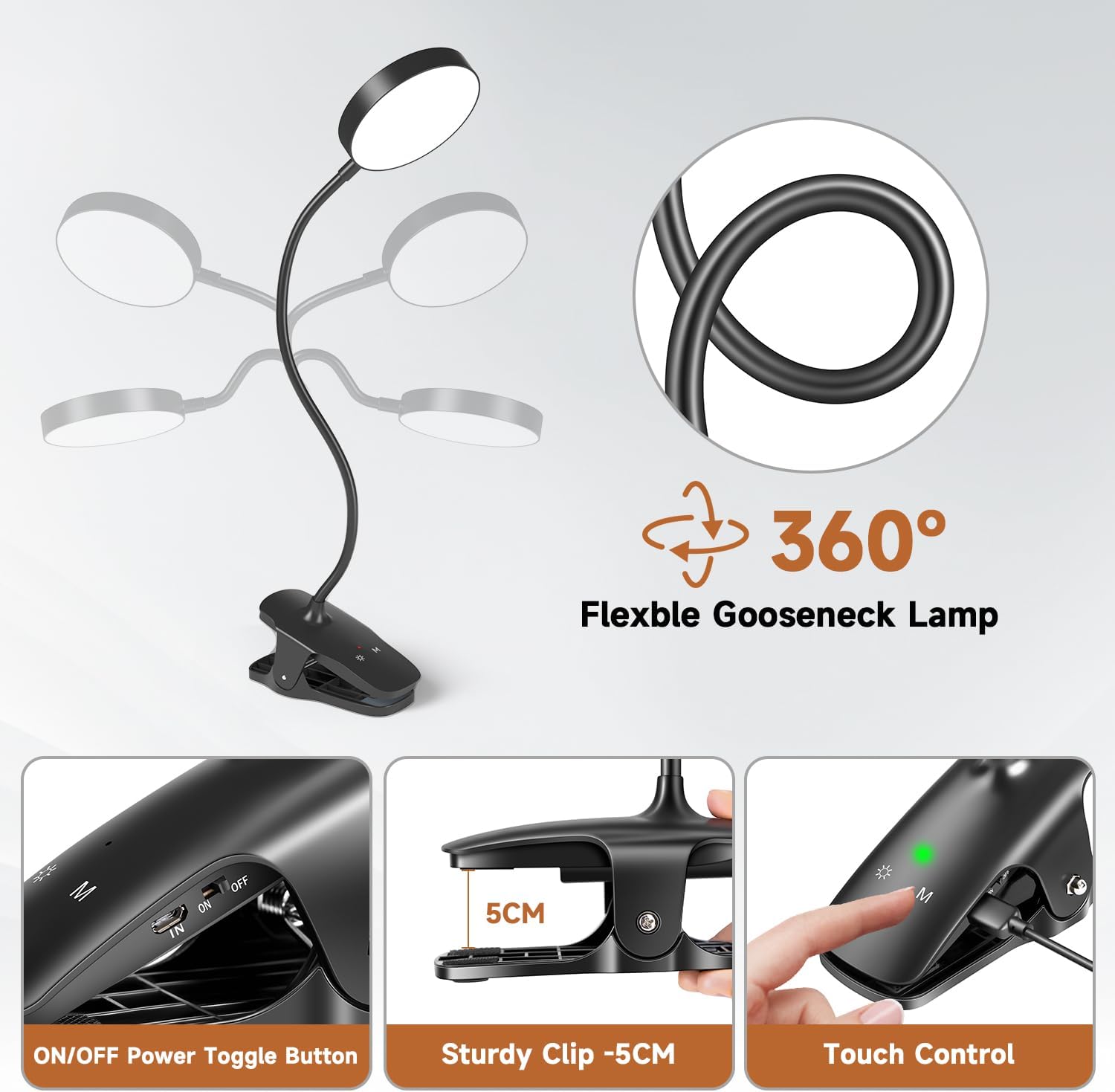
Image: Product Components and Controls. This image illustrates the main parts of the lamp, including the 360° flexible gooseneck, the ON/OFF power toggle button, the sturdy 5cm clip, and the touch control panel for light adjustments.
Key Features:
- 25 Lighting Modes: 5 color temperatures (3000K-6500K) and 5 brightness levels for each.
- Eye Protection: Features 36 LED beads (400 lumens) designed to be flicker-free and glare-free, with high color rendering (CRI > 90) to reduce eye strain.
- Memory Function: Automatically recalls the last used brightness and color temperature settings.
- Flexible Gooseneck: 360° adjustable gooseneck for optimal light positioning.
- Rechargeable & Cordless: Built-in 1800mAh battery provides up to 32 hours of continuous light (at lowest brightness).
- Versatile Clip: Sturdy clip with a maximum opening of 6 cm, suitable for various surfaces like desks, shelves, and headboards.
Setup
- Unpack: Carefully remove the lamp and all accessories from the packaging.
- Initial Charge: Before first use, fully charge the lamp. Connect the provided USB cable to the lamp's charging port and to a USB power source (e.g., computer, power bank, USB adapter). The charging indicator light will show charging status.
- Attach: Securely clip the lamp onto a desired surface. The clip base has a maximum opening of 6 cm and features soft rubber pads to prevent damage and ensure stability.
- Adjust: Position the lamp head using the flexible 360° gooseneck to direct light as needed.

Image: USB Charging Options. This image demonstrates the various ways to power and charge the lamp, including via USB cable, adapter, power bank, PC, or USB socket. The lamp features a built-in 1800mAh battery for cordless operation.
Operating Instructions
1. Power On/Off
- Locate the ON/OFF power toggle button on the clip base.
- Slide the button to the "ON" position to power on the lamp.
- Slide the button to the "OFF" position to power off the lamp.
2. Adjusting Brightness
- With the lamp powered on, tap the touch control button (often marked with a sun icon or similar) to cycle through 5 brightness levels.
- Hold the touch control button to smoothly adjust brightness up or down.
3. Adjusting Color Temperature
- Tap the 'M' (Mode) touch control button to cycle through 5 color temperature modes (e.g., warm white, natural white, cool white).

Image: 25 Lighting Modes. This image displays the 5 distinct color temperatures (3000K, 4000K, 4500K, 5500K, 6500K) and 5 brightness levels (20%, 45%, 60%, 80%, 100%) available on the lamp, totaling 25 modes. It also highlights the touch controls for power/brightness and color modes.
4. Memory Function
- The lamp features a memory function that automatically saves your last used brightness and color temperature settings. When you turn the lamp back on, it will resume with these settings.
Maintenance
- Cleaning: Wipe the lamp with a soft, dry cloth. Do not use abrasive cleaners or solvents.
- Storage: When not in use for extended periods, store the lamp in a cool, dry place. Ensure the battery is partially charged before storage to prolong its lifespan.
- Battery Care: For optimal battery life, avoid fully discharging the battery frequently. Recharge the lamp when the light dims significantly.
Troubleshooting
| Problem | Possible Cause | Solution |
|---|---|---|
| Lamp does not turn on. | Battery is depleted. Power switch is OFF. | Charge the lamp using the USB cable. Ensure the power switch is in the "ON" position. |
| Light is dim or flickers. | Low battery. | Recharge the lamp. |
| Cannot change brightness/color. | Touch controls unresponsive. | Ensure fingers are clean and dry. Try turning the lamp off and on again. |
| Lamp does not hold a charge. | Faulty battery or charging cable. | Try a different USB charging cable and power source. If the issue persists, contact customer support. |
Specifications
| Model Number | YBTD1201 |
| Brand | One Fire |
| Dimensions (L x W x H) | 5 x 8 x 12 cm (Product); 33cm Gooseneck length |
| Weight | 290 grams |
| Material | Plastic |
| Light Source | LED (36 beads) |
| Luminous Flux | 400 Lumens |
| Power | 5 Watts |
| Voltage | 5 Volts (DC) |
| Battery | 1800mAh Lithium Metal (Built-in) |
| Charging Time | Approx. 3-4 hours |
| Operating Time | Up to 32 hours (at lowest brightness) |
| Color Temperatures | 5 modes (e.g., 3000K, 4000K, 4500K, 5500K, 6500K) |
| Brightness Levels | 5 levels per color mode |
| Switch Type | Tactile |
| Clip Opening | Max 6 cm |
| Energy Efficiency Class | G |
| EPREL Database Link | https://eprel.ec.europa.eu/qr/1506914 |

Image: Product Dimensions. This image provides a visual representation of the lamp's dimensions, including the head (9cm diameter, 1cm thickness), gooseneck (33cm length), and clip base (12cm x 4.5cm). The packaging dimensions are also shown (17cm x 8cm).
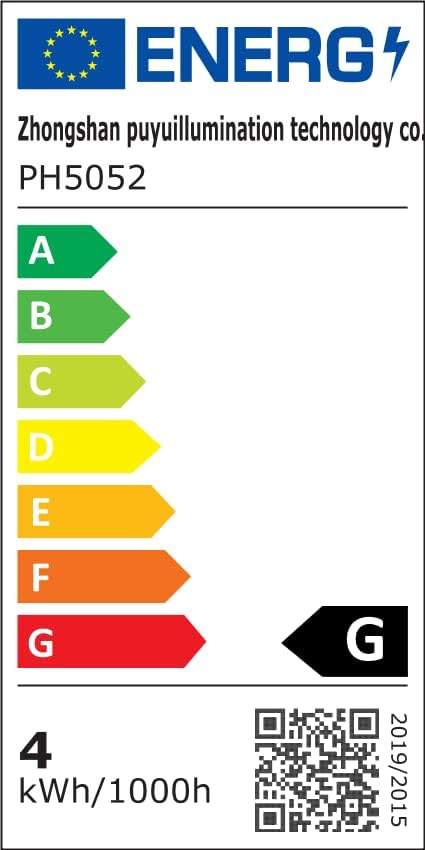
Image: Energy Label. This image displays the EU energy label for the product, indicating an energy efficiency class of G and energy consumption of 4 kWh/1000h.
Warranty Information
The One Fire Clip-On Rechargeable LED Desk Lamp comes with a 36-month warranty from the date of purchase. This warranty covers manufacturing defects and material faults under normal use. It does not cover damage caused by misuse, accidents, unauthorized modifications, or normal wear and tear. Please retain your proof of purchase for warranty claims.
Support
For any questions, technical assistance, or warranty claims, please contact One Fire customer support through the retailer where you purchased the product. Please provide your model number (YBTD1201) and a detailed description of the issue.
Related documentsYBTD1201

Ask a question about this manual
Ask about setup, troubleshooting, compatibility, parts, safety, or missing instructions. Manuals+ will review the question and use this page’s manual context to help answer it.