
1. Introduction
This manual provides detailed instructions for the safe and efficient operation, setup, and maintenance of your YIHUA 982 Precision Soldering Kit. Please read this manual thoroughly before using the device to ensure proper function and to prevent damage or injury.
The YIHUA 982 is a precision soldering station designed for intricate work, featuring rapid heating, a digital LCD, and advanced temperature control. It utilizes C210 cartridge-type soldering tips for optimal performance.
2. Safety Information
WARNING: High temperatures are involved. Always exercise caution to prevent burns and fire hazards.
- Ensure the soldering station is placed on a stable, heat-resistant surface.
- Do not touch the soldering tip or heating element when the unit is powered on or cooling down.
- Always use in a well-ventilated area to avoid inhaling solder fumes.
- Wear appropriate personal protective equipment, including safety glasses.
- Keep out of reach of children and pets.
- Disconnect the power cord from the outlet before cleaning or performing maintenance.
- Never use the soldering station near flammable materials or gases.
- Only use genuine YIHUA replacement parts and accessories.
3. Package Contents
Verify that all items are present in your YIHUA 982 Precision Soldering Kit package:
- YIHUA 982 Soldering Station
- Precision Soldering Iron Handpiece
- C210 Cartridge-Type Soldering Tips (various types, typically I, SI, K)
- Integrated Solder Wire Dispenser
- Integrated Cleaning Kit (brass wool, cleaning sponge)
- Soldering Iron Holder with protective metal mesh
- Handpiece Cable Guide
- Power Cord (Type-F EU plug for 230V AC)
- User Manual
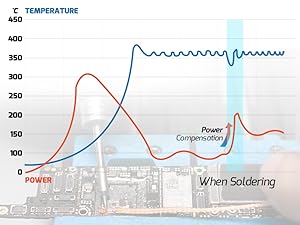
Image: Components of the YIHUA 982 Precision Soldering Kit.
4. Product Overview
The YIHUA 982 soldering station features a compact design with an intuitive interface for precise temperature control and efficient soldering operations.
Digital LCD Display
The digital LCD provides real-time information, including the actual temperature, set temperature, power meter, selected preset channel, and feedback from the control knob and buzzer. The power meter indicates the real-time power output, allowing you to monitor the soldering iron's status.

Image: Close-up of the YIHUA 982's digital LCD display and preset channel buttons.
Integrated Features
The station includes an integrated metal rack for convenient tip storage and exchange. A raised cable guide helps manage the soldering handpiece cable, improving maneuverability. The built-in solder wire dispenser and cleaning kit (brass wool and sponge) provide a complete workstation solution.

Image: The YIHUA 982 soldering station with its integrated solder wire dispenser and cleaning tools.
5. Setup
- Placement: Place the soldering station on a stable, heat-resistant, and non-flammable surface. Ensure adequate ventilation.
- Power Connection: Connect the power cord to the station and then to a grounded 230V AC power outlet.
- Handpiece Connection: Connect the soldering iron handpiece to the designated port on the station.
- Tip Installation: Select the desired C210 cartridge tip. Insert the tip fully into the handpiece until the marking line on the heating element reaches the rim of the handpiece's receptacle. Ensure it is securely seated for proper heating and temperature sensing.

Image: Visual guide for correct soldering tip installation. The tip must be fully inserted.
- Solder Wire Dispenser: Mount the solder wire dispenser onto the station and load your preferred solder wire.
- Cable Guide: Attach the handpiece cable guide to the station. Thread the soldering iron cable through the guide to enhance maneuverability and prevent cable entanglement during use.
Video: Demonstrates the setup of the YIHUA 982 Precision Soldering Kit, including the cable guide and other accessories.
6. Operating Instructions
Power On/Off
Press the power switch to turn the station on. The LCD will illuminate, displaying the current settings. Press the switch again to power off the unit.
Temperature Adjustment
The YIHUA 982 allows temperature settings from 90°C to 450°C. Use the control knob to adjust the desired temperature. The digital LCD will show both the set temperature and the actual tip temperature.

Image: Illustrates the rapid heating capability of the YIHUA 982, reaching set temperature from room temperature in 2 seconds.
Preset Channels
The station features 4 customizable preset channels (CH1, CH2, CH3, CH4). You can save frequently used temperature settings to these channels for quick recall. To save a temperature, set the desired temperature, then press and hold the corresponding channel button until the setting is confirmed.

Image: Shows the preset channel buttons and their typical default temperatures.
PID Temperature Stabilization
The YIHUA 982 employs PID (Proportional-Integral-Derivative) temperature stabilization to maintain a constant tip temperature, even during heavy soldering tasks. This ensures consistent heat delivery and prevents temperature fluctuations.

Image: Graph illustrating stable temperature output with power compensation during soldering, thanks to PID control.
Sleep Mode and Automatic Shutdown
The station features a sleep mode that automatically cools the tip to 200°C when the iron is placed in its holder, reducing wear and extending tip life. If left dormant for more than 30 minutes, the unit will automatically shut down for safety and energy saving.

Image: Depicts the low-wear idling mode (sleep mode) and the automatic shutdown feature.
Celsius/Fahrenheit Conversion
The temperature display can be switched between Celsius (°C) and Fahrenheit (°F) as per user preference. Refer to the full product manual for specific button combinations or menu options to perform this conversion.
7. Maintenance
Soldering Tip Care
Proper tip maintenance is crucial for optimal performance and longevity. Always keep the tip coated with solder when not in use to prevent oxidation. Clean the tip regularly using the integrated brass wool or damp sponge.

Image: Illustrates the importance of keeping the soldering tip coated with solder to avoid oxidation.
Cleaning the Station
Ensure the unit is powered off and unplugged before cleaning. Use a soft, dry cloth to wipe down the exterior of the station. Do not use abrasive cleaners or solvents. Regularly clean the brass wool and replace the sponge as needed.
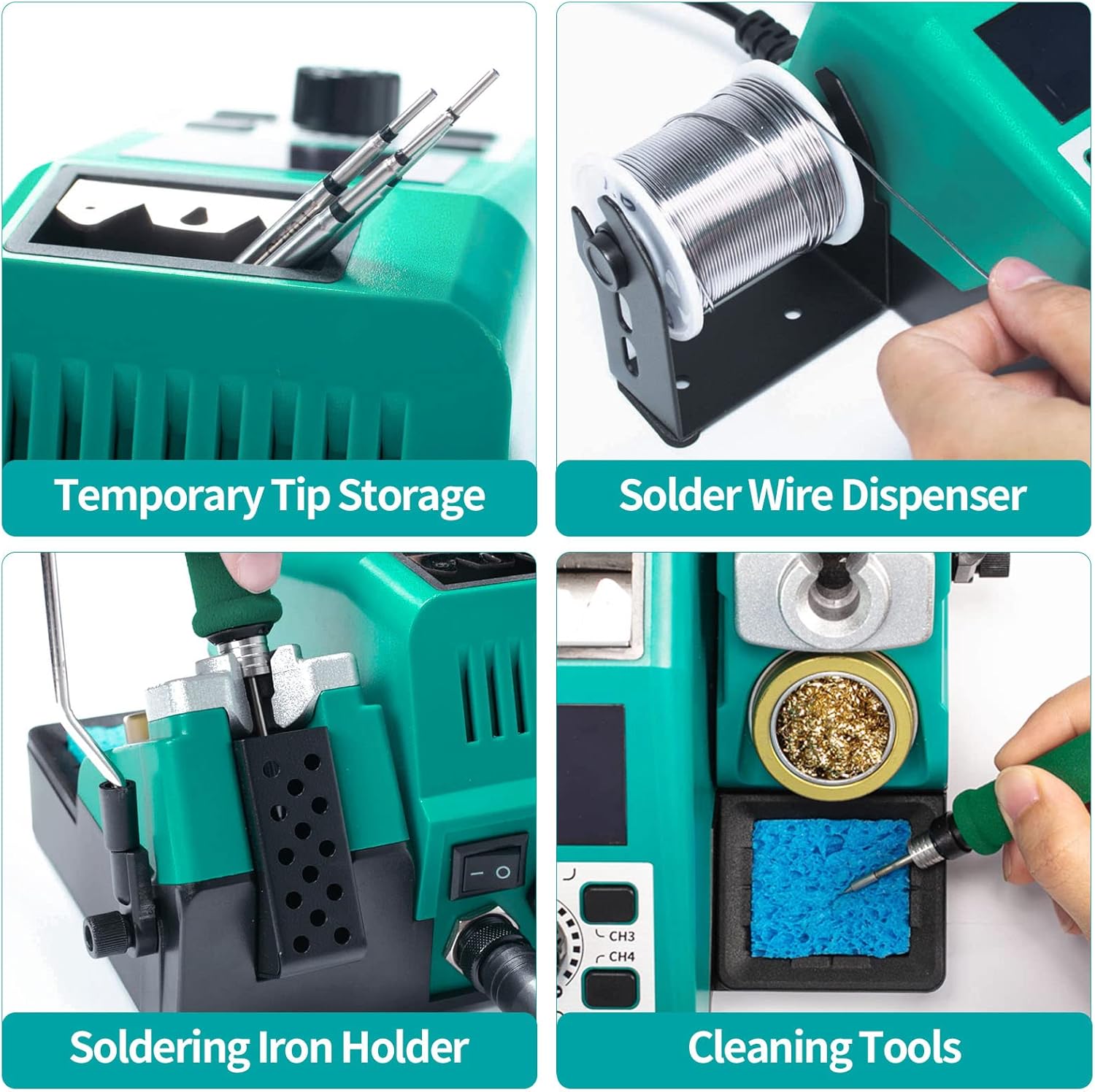
Image: Shows the integrated cleaning tools and temporary tip storage on the YIHUA 982 station.
8. Troubleshooting
- Iron Not Heating:
- Check if the power cord is securely connected and the power switch is on.
- Ensure the soldering iron handpiece is properly connected to the station.
- Verify that the soldering tip is fully inserted into the handpiece. An improperly seated tip may not heat correctly.
- If the tip is old or heavily oxidized, it may need cleaning or replacement.
- Temperature Instability:
- Ensure the tip is clean and properly tinned.
- Check for proper tip installation.
- If the issue persists, perform a digital temperature calibration as described in the full product manual.
- Display Errors:
- If the display shows an error code, refer to the comprehensive troubleshooting section in the full product manual for specific meanings and solutions.
- Try powering off the unit, waiting a few seconds, and powering it back on.
- Buzzer Feedback:
- The buzzer provides audible feedback for certain operations or warnings. Consult the full product manual to understand specific buzzer patterns.
For persistent issues, please contact YIHUA customer support.
9. Specifications
| Feature | Specification |
|---|---|
| Brand | YIHUA |
| Model Number | YIHUA 982 C210 |
| Voltage | 230 Volt |
| Wattage | 22500 Watt (Note: This value seems unusually high and might refer to peak power or a misinterpretation. Typical soldering stations are 60-150W. Please verify with product documentation.) |
| Display Type | LCD |
| Temperature Range | 90°C - 450°C |
| Temperature Stability | Maintains constant temperature (PID controlled) |
| Number of Channels | 4 (Preset) |
| Power Plug Type | Type-F EU |
10. Warranty and Support
The YIHUA 982 Precision Soldering Kit comes with a 12-month technical coverage period. YIHUA EU Official Store provides professional technical support 24/7 on Amazon. For any questions, suggestions, or technical assistance, please contact our support team through the Amazon platform.
You can visit the official YIHUA store on Amazon for more information and products: YIHUA Official Store


