
1. Introduction
Thank you for choosing the XTRONS AHD Backup Camera CAM1080Y-JP. This manual provides essential information for the proper installation, operation, and maintenance of your new backup camera. Please read this manual thoroughly before use to ensure optimal performance and safety.
2. Product Features
- 1080P Full HD High-Resolution AHD Backup Camera: This camera features a 1920x1080 resolution and a 2-megapixel high-sensitivity CMOS sensor, delivering superior image quality day and night compared to conventional cameras.
- 170° Ultra-Wide Angle & IP68 High Waterproof/Dustproof Performance: Equipped with a 170° horizontal and 110° vertical wide-angle lens, it significantly reduces blind spots and enhances safety. Its high-standard IP68 waterproof rating ensures durability and reliability against rain and dust.
- Compatibility with Specific XTRONS Android Navigation Systems: When used with compatible XTRONS Android navigation systems, it offers high-definition backup images, switchable guide lines (ON/OFF), and switchable normal/mirror images, greatly assisting safe parking.
- 4 LEDs & Powerful Night Vision Function: Utilizes a high-performance CMOS sensor with a minimum illumination of 0.1 lux, further enhanced by 4 built-in LEDs for clear night vision. This allows for confident backing up even in low-light conditions.
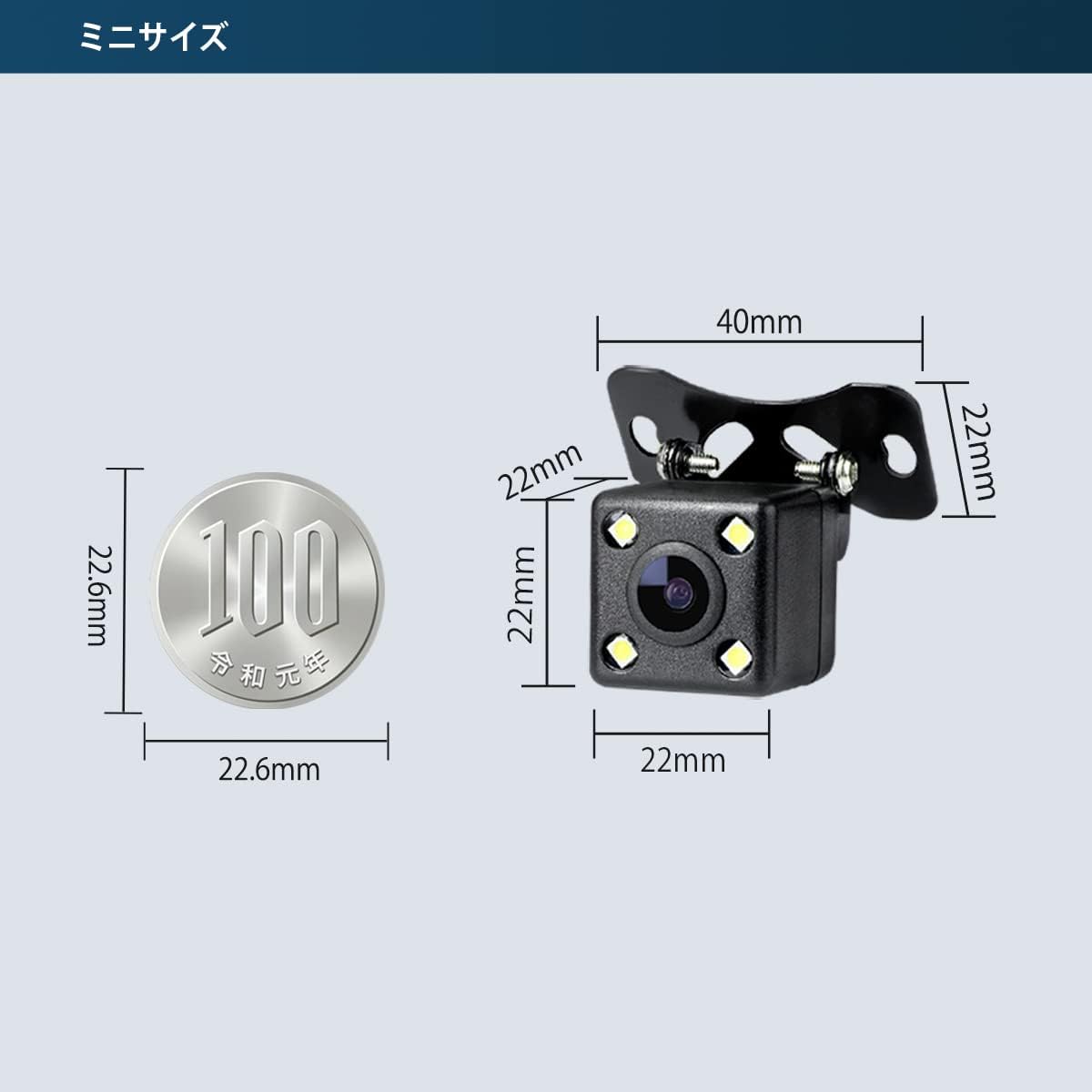
- Mini Size & Adjustable Angle & Easy Installation: With an ultra-compact size of 22x22x22mm, it is inconspicuous and offers flexible installation options. The 90-degree adjustable angle allows for optimal positioning during installation.

3. Package Contents
Please check that all items are present and in good condition:
- 1 × Camera Unit
- 1 × Power/Video Cable (6 meters)
- 2 × Mounting Screws
- 1 × Instruction Manual (English/Japanese)
4. Setup
4.1. Installation
The camera features a mini size (22x22x22mm) and an adjustable angle bracket for flexible mounting. Choose a location on the rear of your vehicle that provides a clear view and allows for secure attachment. The bracket allows for a 90-degree angle adjustment to achieve the optimal viewing angle.
4.2. Wiring Diagram
Follow the diagram below for correct electrical connections:

- Red Wire: Connect to the positive (+) terminal of the reverse signal.
- Black Wire: Connect to ground (-) (negative terminal).
- Green Wire: Connect to the reverse signal wire of the car monitor or navigation system.
- Yellow RCA Terminal: Connect to the dedicated backup camera video input on your navigation unit.
4.3. Compatibility and XTRONS Android Navi Settings
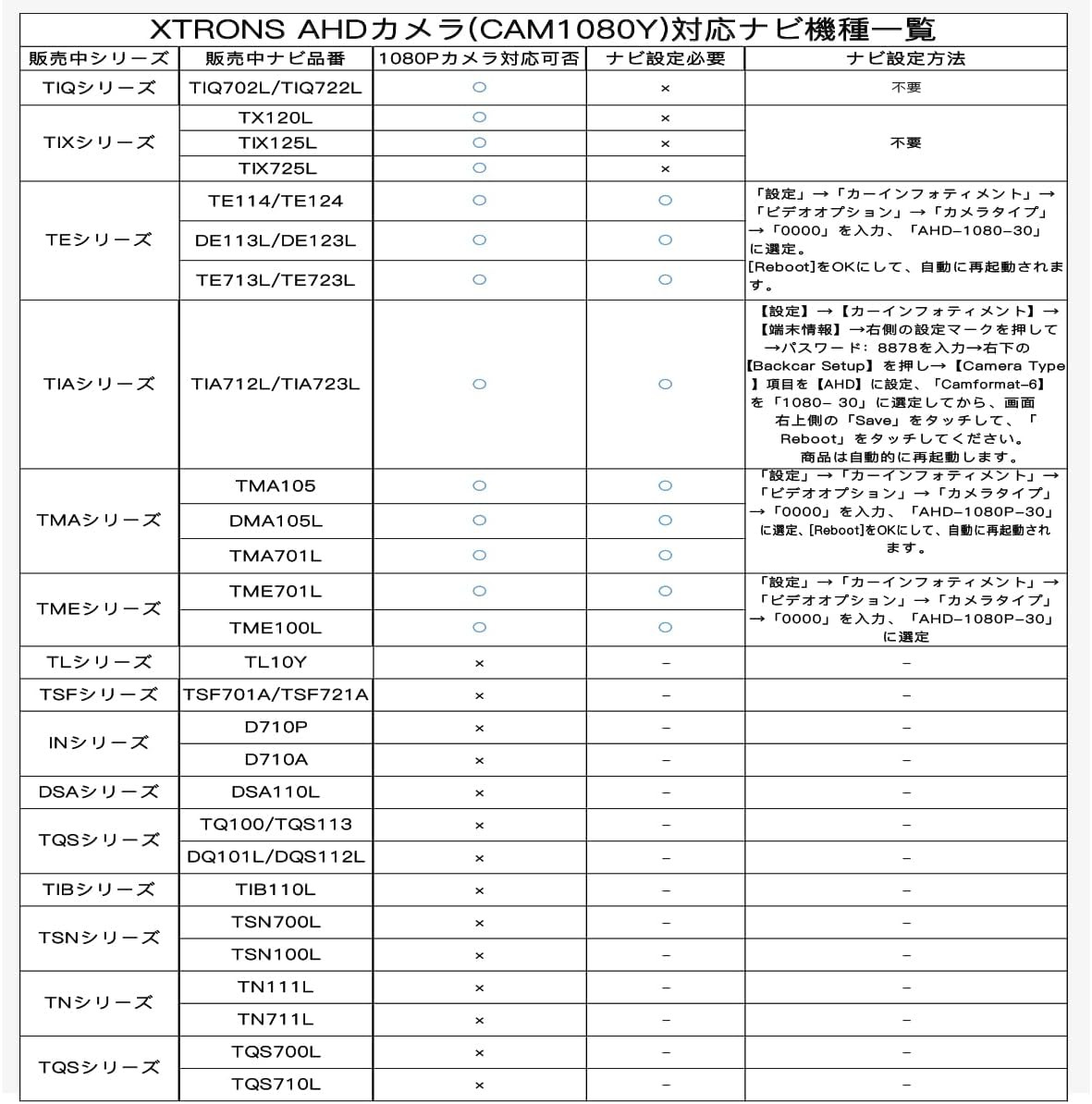
This AHD camera is designed for use with specific XTRONS Android navigation systems. Compatibility and necessary settings vary by model. Please refer to the table and instructions below.
Compatible XTRONS Android Navi Models and Settings:
- For TE114/TE124/TE713L/TE723L/DE113L/DE123L/TMA105/DMA105L/TME100L/TME701L/TMA701L:
Go to Settings → Car Infotainment → Video Option → Camera Type → Enter "0000" → Select "AHD-1080P-30". The unit will then automatically reboot. - For TIA712L/TIA723L:
Go to Settings → Car Infotainment → Terminal Information → Press the settings icon on the right → Enter Password: "8878" → Press "Backcar Setup" on the bottom right → Set "Camera Type" to "AHD" → Select "Camformat-6" to "1080 30" → Touch "Save" on the top right → Touch "Reboot". The unit will then automatically reboot.
Incompatible XTRONS Android Navi Models:
TL10Y, TN111L, TN711L, TQS113, DQS112L, TSF721A, TSF701A, TSN100L, TSN700L, DSA110L.
Note: This AHD camera is only compatible with the listed XTRONS Android navigation systems. Compatibility with other AHD-compatible monitors or audio systems from other brands cannot be guaranteed. Please confirm compatibility before purchase.
5. Operating Instructions
5.1. Automatic Activation
When correctly installed and connected to a compatible XTRONS Android navigation system, the backup camera will automatically activate and display the rear view on the screen when the vehicle is shifted into reverse gear.
5.2. Guide Line and Image Switching
For compatible XTRONS Android navigation systems, you can adjust the display settings directly from the navigation unit:
- Guide Line ON/OFF: You can enable or disable the parking guide lines through the settings menu of your XTRONS Android navigation unit.
- Normal/Mirror Image: The camera supports both normal and mirror image display. This setting can be adjusted via your XTRONS Android navigation unit to suit your preference (e.g., for front camera use or specific rear view mirror displays).

5.3. Night Vision
The camera's integrated 4 LEDs and high-performance CMOS sensor provide enhanced night vision capabilities. In low-light conditions, the LEDs will automatically illuminate to provide a clear image, making parking safer at night.

6. Maintenance
The XTRONS AHD Backup Camera is designed for durability and minimal maintenance due to its IP68 waterproof and dustproof rating.
- Cleaning: Periodically clean the camera lens with a soft, damp cloth to ensure a clear view. Avoid using harsh chemicals or abrasive materials that could scratch the lens.
- Inspection: Regularly check the mounting screws and cable connections to ensure they are secure and free from damage.
- Water and Dust: The IP68 rating protects the camera from water immersion and dust ingress. However, avoid directing high-pressure water jets directly at the camera during car washes.
7. Troubleshooting
- No Image Display:
- Check all cable connections (power, ground, reverse signal, RCA video) to ensure they are secure and correctly wired.
- Verify that your XTRONS Android navigation system is set to the correct AHD camera input mode (refer to Section 4.3).
- Ensure the vehicle is in reverse gear to activate the camera.
- Poor Image Quality / Distorted Image:
- Confirm that the camera type setting on your XTRONS Android navigation system is correctly configured for AHD-1080P-30 (refer to Section 4.3).
- Clean the camera lens to remove any dirt or obstructions.
- Check for any kinks or damage in the video cable.
- Guide Lines Not Appearing / Incorrect:
- Ensure your XTRONS Android navigation system supports guide line switching and that the feature is enabled in its settings.
- Image Orientation Incorrect (e.g., upside down or reversed):
- Adjust the normal/mirror image setting on your XTRONS Android navigation system (refer to Section 5.2).
- Camera Not Compatible:
- This camera is only compatible with specific XTRONS Android navigation systems. If your model is not listed as compatible in Section 4.3, it will not work.
8. Specifications
| Brand | XTRONS |
| Model Number | CAM1080Y-JP |
| Manufacturer | UG |
| Compatible Devices | Car Navigation Systems (Specific XTRONS Android models) |
| Voltage | 12V / 24V |
| Optical Sensor Technology | CMOS |
| Lens Type | Wide Angle |
| Actual Angle of View | 170 degrees |
| Connector Type | RCA |
| Optical Sensor Size | 1/3 inch |
| Product Dimensions (L x W x H) | 22 x 22 x 22 mm |
| Package Size | 12.3 x 12.2 x 5.7 cm |
| Package Weight | 200 g |

9. Warranty and Support
The XTRONS AHD Backup Camera comes with a 1-year warranty from the date of purchase. This warranty covers manufacturing defects and ensures reliable operation under normal use.
For technical support, warranty claims, or any questions regarding your product, please contact XTRONS customer service through the official XTRONS store or your point of purchase. Please have your model number (CAM1080Y-JP) and proof of purchase ready when contacting support.
You can find more information and contact details on the XTRONS Brand Store.