
1. Introduction
The Archer line of receivers has been enhanced further with the addition of the new Archer Plus Series. The Archer Plus Series receivers include some new features. Firstly an enhanced anti-RF-Interference capability can offer a more solid RF performance, and this is in addition to existing anti-interfere performance in the spark ignition process. These Plus series receivers are also with both ACCESS and ACCST D16 modes, where the RF protocol is smart matched during the binding process on the radio. With the Black-Box function, some basic flight data (like Power & Signal related) can be well preserved.
The Archer Plus SR10+ are gyro-stabilized receivers with a built-in 3-axis gyroscope and 3-axis accelerometer and feature multiple flight modes (Auto-level, Stabilization, Knife-Edge, etc.) and configuration methods. The SR10+ receivers have 10 configurable channel ports*, each channel port can be assigned as PWM, SBUS, FBUS, or S.Port. The SR10+ supports full-range signal strength with dual detachable antennas and guarantees optimal antenna reception and range. The SR10+ can be used as a Primary receiver in a redundant solution by setting a port as SBUS In and connecting to any other FrSky receiver equipped with an SBUS Out port. With the FBUS protocol, the Archer Plus series receivers can open up the possibility of seamlessly pairing with multiple telemetry devices (XACT servos, ADV Sensors, etc.) as well as simplifying the builds setup.
2. Key Features
- Enhanced Anti RF-Interference capability with more solid RF performance.
- Smart-matched ACCESS & ACCST D16 modes.
- Supports basic Black-Box function (Available later by updating the FW.).
- Built-in 3-axis gyroscope and 3-axis accelerometer sensor.
- Multiple flight modes and configuration tools (ETHOS, LUA scripts, etc.).
- 10 configurable channel ports (PWM, SBUS, FBUS, or S.Port).
- Supports signal redundancy (SBUS In).
- Full control range with telemetry (S.Port or FBUS).
- Anti-interference capability in the spark-ignition process.
- Over-The-Air (OTA) FW update.
- External battery/device voltage detection.
- Compatibility: FrSky 2.4GHz ACCESS / ACCST D16 capable transmitters.
3. Package Contents
The package for the FrSky Archer Plus SR10+ Receiver typically includes:
- 1x FrSky Archer Plus SR10+ Receiver
- Additional accessories such as connection cables or documentation may be included.

Figure 3.1: Contents of the FrSky Archer Plus SR10+ Receiver package, showing the receiver unit, connection cables, and documentation.
4. Product Overview
The FrSky Archer Plus SR10+ receiver is a compact unit designed for robust performance and versatile connectivity. It features multiple ports for channels, telemetry, and power, along with dual antennas for reliable signal reception.

Figure 4.1: Front view of the SR10+ receiver, highlighting the channel ports (1-10), LED indicator, and antenna connections.
The front of the receiver (Figure 4.1) displays the numbered channel ports, an LED indicator for status, and the FrSky branding. The ports are clearly labeled for easy connection of servos and other devices.
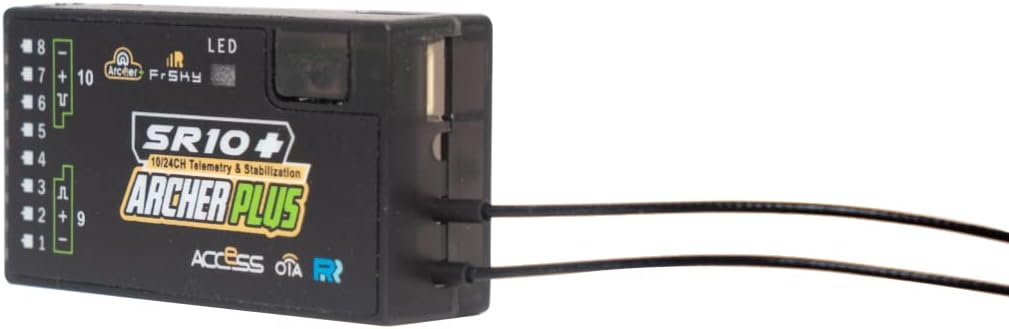
Figure 4.2: Side view of the SR10+ receiver, showing the dual antenna connectors.
Figure 4.2 illustrates the side profile, emphasizing the robust antenna connections which are crucial for maintaining a strong and stable signal link with the transmitter.

Figure 4.3: Angled view of the SR10+ receiver, providing a clearer look at the pin headers for channel connections.
An angled view (Figure 4.3) provides a comprehensive perspective of the pin headers, which are standard for connecting PWM servos, SBUS, FBUS, or S.Port devices.
5. Setup
5.1. Binding Procedure
To establish communication between your FrSky transmitter and the SR10+ receiver, a binding procedure is required. The SR10+ supports both ACCESS and ACCST D16 modes, with the RF protocol smart-matched during binding.
- Power on your FrSky transmitter and navigate to the Model Setup menu.
- Select the appropriate RF mode (ACCESS or ACCST D16) for your model.
- Put the transmitter into bind mode.
- Connect a bind plug to the signal pins of any channel port on the SR10+ receiver.
- Apply power to the SR10+ receiver. The LED on the receiver will indicate binding status.
- Once bound, remove the bind plug and cycle power on the receiver.
- Verify successful binding by checking the receiver's LED status and transmitter telemetry.
5.2. Channel Configuration
The SR10+ features 10 configurable channel ports. Each port can be assigned as PWM, SBUS, FBUS, or S.Port using your transmitter's configuration tools (e.g., ETHOS, LUA scripts).
- PWM: Standard servo connections for individual channels.
- SBUS: Single wire connection for multiple channels, often used for flight controllers. The SR10+ can also use an SBUS In port for signal redundancy.
- FBUS: FrSky's new protocol for seamless pairing with multiple telemetry devices.
- S.Port: Smart Port for telemetry data output.
5.3. Antenna Installation
Proper antenna placement is critical for optimal signal reception and range. The SR10+ uses dual detachable antennas.
- Ensure antennas are mounted at 90-degree angles to each other to maximize signal diversity.
- Keep antennas away from carbon fiber, metal, and other conductive materials that can shield the signal.
- Avoid bending the active part of the antenna (the last 31mm of the wire).
6. Operating the SR10+
6.1. Flight Modes (Stabilization)
The SR10+ features a built-in 3-axis gyroscope and 3-axis accelerometer, enabling various flight stabilization modes:
- Auto-level: Automatically levels the aircraft.
- Stabilization: Provides general flight stabilization.
- Knife-Edge: Assists in maintaining knife-edge flight.
- These modes can be configured and activated via your transmitter's settings.
6.2. Telemetry and Black-Box Function
The SR10+ supports full-range telemetry via S.Port or FBUS, allowing real-time monitoring of flight data on your transmitter. Additionally, the basic Black-Box function preserves essential flight data like power and signal-related information, which can be useful for post-flight analysis (available with future firmware updates).
7. Maintenance
7.1. Firmware Updates (OTA)
The SR10+ supports Over-The-Air (OTA) firmware updates, simplifying the process of keeping your receiver up-to-date with the latest features and improvements. Refer to the FrSky official website for the latest firmware and update instructions.
7.2. General Care
- Keep the receiver clean and free from dust and moisture.
- Avoid exposing the receiver to extreme temperatures or direct sunlight for prolonged periods.
- Ensure all connections are secure before each use.
8. Troubleshooting
8.1. Signal Loss or Interference
- Check Antenna Placement: Ensure antennas are correctly oriented and not obstructed.
- Verify Binding: Re-bind the receiver to the transmitter if connectivity issues persist.
- Anti-RF Interference: The SR10+ has enhanced anti-RF interference capabilities. If issues arise, check for external sources of interference.
8.2. Incorrect Channel Output
- Review Configuration: Double-check channel assignments (PWM, SBUS, FBUS, S.Port) in your transmitter's settings.
- Firmware: Ensure both transmitter and receiver have compatible and up-to-date firmware.
9. Specifications
| Attribute | Value |
|---|---|
| Product Dimensions | 3 x 3 x 3 inches |
| Item Weight | 1.13 ounces |
| ASIN | B0BNPLZ3N4 |
| Manufacturer recommended age | 12 years and up |
| Manufacturer | FrSky |
| Brand | FrSky |
| Material | Metal |
10. Warranty and Support
For warranty information, technical support, or service inquiries regarding your FrSky Archer Plus SR10+ Receiver, please refer to the official FrSky website or contact their customer support directly. Keep your proof of purchase for warranty claims.
Official FrSky Website: www.frsky-rc.com