Introduction
The MEILAN M3 Mini GPS Bike Computer is a compact and highly functional device designed to enhance your cycling experience. It provides essential riding data using a high-sensitivity GPS chip, supporting Beidou, GPS, and GLONASS systems for fast and accurate positioning. This manual will guide you through the setup, operation, and maintenance of your new bike computer.

Image: The MEILAN M3 Mini GPS Bike Computer, shown in both white and red color variants, displaying digital readouts for speed and time.
Key Features
- Built-in High-Sensitivity GPS Chip: Supports Beidou, GPS, and GLONASS for fast and accurate global positioning. Automatic time correction after GPS lock.
- Anti-Glare Mono LCD: A 1.7-inch display visible from all angles, even in direct sunlight. Features full-screen white backlight for night riding.
- USB Rechargeable: Provides up to 8 hours of use on a full charge with backlight enabled. Charges via any USB DC 5V port.
- Comprehensive Cycling Data Display: Shows riding time, current/average/maximum speed, speed comparison, current time, altitude, ODO (odometer), riding distance, and total time.
- History Records: Automatically stores up to 30 riding records for later review.

Image: Illustration showing the MEILAN M3 Mini GPS Bike Computer receiving signals from Beidou, GPS, and GLONASS satellite systems, highlighting its multi-system support.

Image: The bike computer display shown clearly in both bright daylight and dark night conditions, demonstrating its full-screen backlight feature.
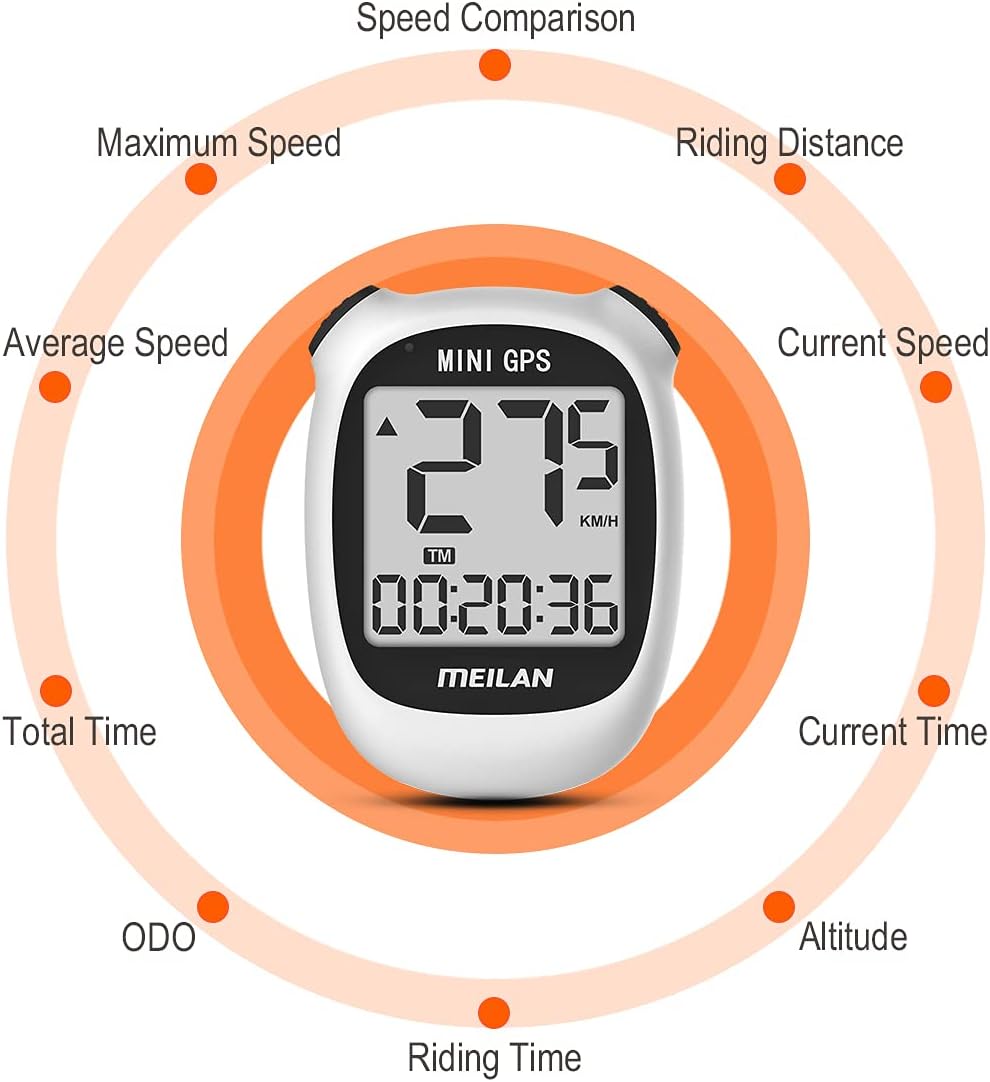
Image: A circular diagram illustrating the various cycling data points displayed on the MEILAN M3, including speed, time, distance, altitude, and ODO.
Setup Guide
- Power On: Long press the left top button to turn on your M3 GPS cycle computer.
- Initial Settings: Set up the time zone, turn sound on/off, and select Metric/Imperial units. You can also set the ODO (odometer) value. The time will automatically correct after GPS positioning based on your set time zone.
- GPS Signal Acquisition: Take the device to an outdoor open and broad area to acquire a GPS signal. Ensure a clear view of the sky for best results.
- Mounting: Securely attach the M3 Mini GPS Bike Computer to your bicycle's handlebar using the provided mounting base.
- Start Riding: Once GPS is connected, you can begin your ride and the computer will start recording data.

Image: A visual guide demonstrating the setup process, including powering on, adjusting settings, acquiring GPS signal outdoors, and mounting the device on a bicycle.
Operating Instructions
Basic Operation
- Power On/Off: Long press the left top button to turn the device on or off.
- Backlight Control: Press the top two buttons simultaneously to turn the backlight on or off. The backlight level is fixed at 1.
- Viewing Data: The main screen displays real-time cycling data. The device cycles through various data points automatically or can be manually advanced depending on settings.
Viewing History Records
- The M3 automatically stores up to 30 riding records.
- To enter the history data view, long press the right key.
- To exit the history interface, long press the right key again.
Note: The M3 GPS bicycle computer does not support track storage or data upload functions.
Maintenance
- Cleaning: Wipe the device with a soft, damp cloth. Avoid using harsh chemicals or abrasive cleaners.
- Charging: The device is USB rechargeable. Use any standard USB DC 5V port for charging. A full charge provides approximately 8 hours of usage with the backlight on.
- Water Resistance: The M3 Mini GPS Bike Computer has an International Protection Rating of IP54, meaning it is protected from dust and splashing water from any direction. While it is water-resistant, avoid submerging the device in water.

Image: The MEILAN M3 Mini GPS Bike Computer with water droplets on its surface, illustrating its IP54 waterproof rating.

Image: A close-up view of the MEILAN M3 Mini GPS Bike Computer's USB charging port, showing it connected to a charging cable.
Troubleshooting
| Problem | Possible Cause | Solution |
|---|---|---|
| Device does not power on. | Low battery or not charged. | Charge the device using a USB DC 5V power source. Ensure the charging cable is properly connected. |
| Cannot acquire GPS signal. | Indoors, obstructed view of sky, or initial signal acquisition. | Move to an open outdoor area with a clear view of the sky. Initial GPS lock may take a few minutes. |
| Display is dim or unreadable at night. | Backlight is off. | Press the top two buttons simultaneously to turn on the backlight. |
| Inaccurate speed/distance readings. | GPS not connected or weak signal. | Ensure the M3 is connected to GPS before cycling. Check for strong GPS signal in an open area. |
| Battery drains quickly. | Constant backlight use or prolonged GPS searching. | Reduce backlight usage if not needed. Prolonged GPS searching (e.g., indoors) consumes more power; this is normal. |
Specifications
| Feature | Detail |
|---|---|
| Brand | MEILAN |
| Model | M3 Mini GPS Bike Computer |
| Color | White, Red |
| Screen Size | 1.7 inches (actual display area), 3.1 inches (overall unit size) |
| Display Type | Mono LCD with Backlight |
| Battery Life | Up to 8 hours (with backlight) |
| Sensor Type | GLONASS Sensor, GPS Sensor, Beidou |
| Connectivity | USB (for charging) |
| Included Components | Manual, Mounting Base |
| International Protection Rating | IP54 |
| Display Resolution | 128x64 |
| Mounting Type | Handlebar Mount |
| Human Interface Input | Buttons |
Warranty and Support
MEILAN is committed to providing excellent customer service and support for your M3 Mini GPS Bike Computer.

24 Hours Quick Reply: Expect prompt responses to your inquiries.
30 Days Exchange or Return: Hassle-free options for exchanges or returns within 30 days of purchase.
12 Months Warranty: Your device is covered by a one-year warranty from the date of purchase.
Lifetime After-Sales Service: MEILAN provides ongoing support for the lifetime of your product.
If you have any questions or require assistance, please contact MEILAN customer service. We are always here to help you solve your problems quickly and accurately.


