
Nexxt Solutions NHC-I710
NEXXT Indoor Smart Camera
Model: NHC-I710
1080p HD Fixed Room Camera with Night Vision and Two-Way Talk
1. Introduction
Thank you for choosing the Nexxt Indoor Smart Camera. This manual provides essential information for the safe and efficient use of your new device. Please read it thoroughly before installation and operation, and retain it for future reference.
This 1080p HD fixed room camera is designed to provide reliable indoor surveillance with features such as night vision, two-way audio communication, motion detection, and seamless integration with smart home ecosystems like Amazon Alexa and Google Assistant.
2. Safety Information
- Ensure the camera is powered by the provided power adapter. Using unauthorized adapters may damage the device and void the warranty.
- Do not expose the camera to water, moisture, or extreme temperatures. It is designed for indoor use only.
- Avoid placing the camera in direct sunlight or near heat sources.
- Do not attempt to disassemble or repair the camera yourself. Refer all servicing to qualified personnel.
- Keep the camera and its accessories out of reach of children and pets.
- Ensure stable Wi-Fi connectivity for optimal performance.
3. Package Contents
Verify that all items are present in the package:
- NEXXT Indoor Smart Camera (NHC-I710)
- Power Adapter
- Stand
- User Manual (this document)

Image: The retail packaging of the NEXXT Indoor Smart Camera, showing the camera and key features.
4. Product Overview
The Nexxt Indoor Smart Camera offers a range of features for comprehensive home monitoring:
- Full HD 1080p Resolution: Provides clear and detailed video footage.
- Automatic Night Vision: Integrated infrared LEDs enable clear monitoring in low-light conditions up to 30 feet.
- Two-Way Communication: Built-in microphone and speaker allow for real-time audio interaction.
- Motion Detection: Alerts you to detected movement within the camera's field of view.
- Local and Cloud Storage: Supports microSD cards (sold separately) and Microsoft Azure cloud storage (subscription sold separately) for recording.
- Smart Home Integration: Compatible with Amazon Alexa and Google Assistant for voice control and integration into smart routines.
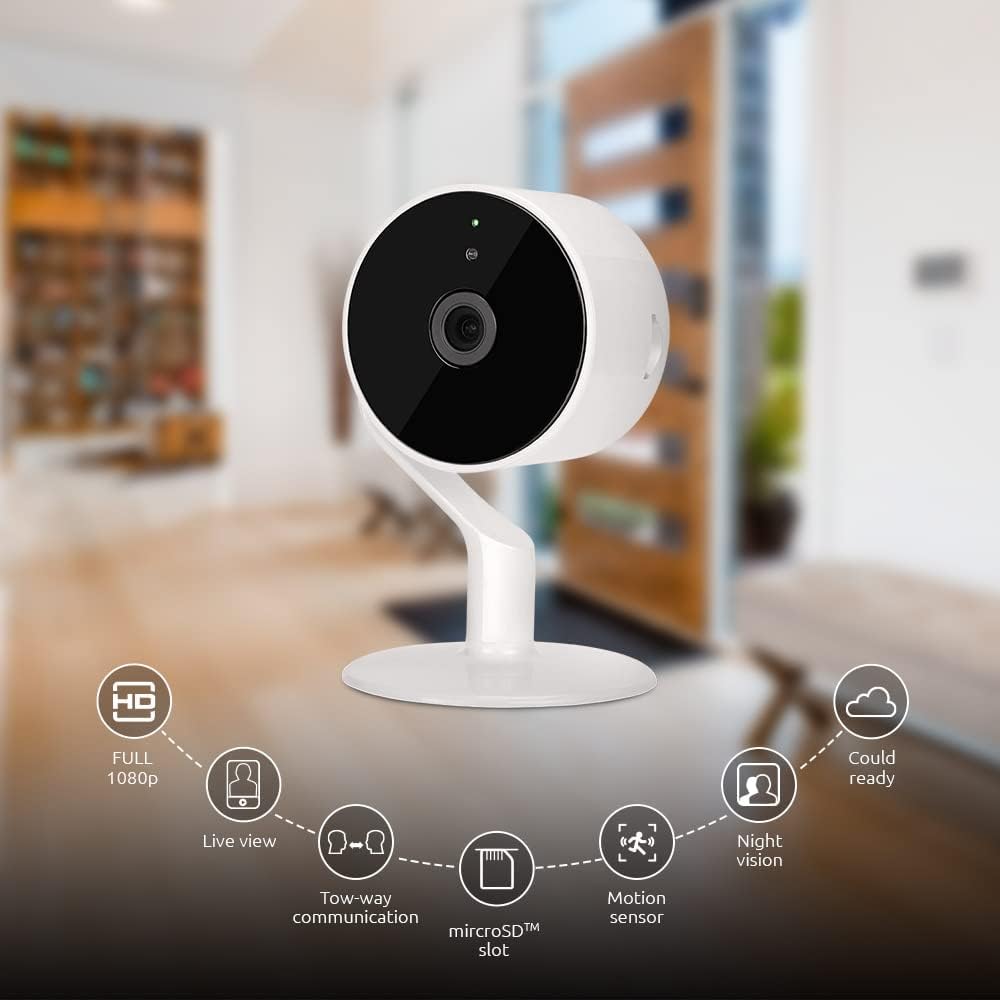
Image: The NEXXT Indoor Smart Camera highlighting its key features: Full HD 1080p, Live View, Two-way communication, microSD slot, Motion sensor, Night vision, and Cloud ready.
5. Setup
5.1 Powering On
- Place the camera on a stable, flat surface or mount it using appropriate hardware (not included).
- Connect the power adapter to the camera's power input port.
- Plug the power adapter into a standard electrical outlet. The camera will power on and its indicator light will begin to flash, indicating it's ready for pairing.
5.2 App Installation and Pairing
To control and monitor your camera, you need to download the Nexxt Home App:
- Download the Nexxt Home App from the Google Play Store (for Android devices) or the Apple App Store (for iOS devices).
- Open the Nexxt Home App and create a new account or log in if you already have one.
- Tap the "+" icon or "Add Device" to begin the pairing process.
- Select "Camera" or the specific camera model from the list of devices.
- Follow the on-screen instructions in the app to connect the camera to your home Wi-Fi network. This typically involves scanning a QR code displayed on your phone with the camera.
- Once connected, the camera's indicator light will turn solid, and you will see the camera added to your app.

Image: Illustration showing the NEXXT Indoor Smart Camera being set up to function as a webcam, connecting to a laptop.
6. Operating Instructions
6.1 Live View
From the Nexxt Home App, tap on your camera's name to access the live video feed. You can view real-time footage of your monitored area.

Image: The NEXXT Indoor Smart Camera on a desk, with text indicating "Full HD resolution" and its ability to provide 1080p high-quality video day or night.
6.2 Two-Way Talk
While in live view, tap the microphone icon in the app to enable two-way audio. You can speak through your phone, and your voice will be projected through the camera's speaker. Tap the icon again to end communication.

Image: An illustration depicting communication between a person using a phone and another person near the camera, symbolizing the two-way talk feature.
6.3 Night Vision
The camera automatically switches to night vision mode in low-light conditions. You can also manually toggle night vision on/off within the app settings for the camera.

Image: A split image showing a room in daylight on one side and the same room in night vision on the other, demonstrating the camera's night vision capability.

Image: A smartphone screen displaying the Nexxt Home app interface with a night vision toggle switch, overlaid on a room scene, indicating active night vision monitoring.
6.4 Motion Detection & Alerts
Configure motion detection sensitivity and alert preferences in the app. When motion is detected, you will receive notifications on your smartphone.

Image: A person sleeping in bed with a motion detection icon overlaid, indicating advanced motion detection with an effective range of up to 30 feet.

Image: A woman holding a smartphone displaying the Nexxt Home app, with text indicating that advanced human identification technology helps reduce false alarms and unwanted notifications.
6.5 Recording & Storage
The camera supports local storage via a microSD card (up to 128GB, not included) and cloud storage via Microsoft Azure (subscription required, sold separately). Insert the microSD card into the designated slot on the camera. Manage recording settings and view recorded footage through the Nexxt Home App.
6.6 Sharing Access
You can securely share your camera's security feed with multiple approved devices, allowing family members or trusted individuals to also monitor your home.

Image: Two smartphones displaying the Nexxt Home app, with text stating "Everyone Can Keep Watch" and explaining that the security feed can be securely shared with multiple approved devices.
6.7 Smart Home Integration
The Nexxt Indoor Smart Camera is compatible with Amazon Alexa and Google Assistant. Follow the instructions in your Alexa or Google Home app to link your Nexxt Home account and enable voice commands for your camera.
7. Maintenance
- Cleaning: Use a soft, dry cloth to clean the camera lens and body. Do not use liquid cleaners or aerosols.
- Storage: If storing the camera for an extended period, disconnect it from power and store it in a cool, dry place.
- Firmware Updates: Regularly check the Nexxt Home App for available firmware updates to ensure optimal performance and security.
8. Troubleshooting
- Camera not connecting to Wi-Fi:
- Ensure your Wi-Fi network is 2.4GHz. The camera does not support 5GHz Wi-Fi.
- Check your Wi-Fi password for accuracy.
- Move the camera closer to your Wi-Fi router.
- Restart your router and the camera.
- No live view or choppy video:
- Check your internet connection speed.
- Ensure the camera has a strong Wi-Fi signal.
- Close and reopen the Nexxt Home App.
- Motion alerts not received:
- Verify that motion detection is enabled in the app settings.
- Check your phone's notification settings for the Nexxt Home App.
- Adjust motion detection sensitivity.
- Two-way audio not working:
- Ensure your phone's microphone is enabled for the Nexxt Home App.
- Check the volume settings on your phone and within the app.
9. Specifications
| Feature | Specification |
|---|---|
| Model Name | NHC-I710 |
| Video Capture Resolution | 1080p HD |
| Indoor/Outdoor Usage | Indoor |
| Connectivity Technology | Wireless (Wi-Fi) |
| Connectivity Protocol | Wi-Fi (2.4GHz) |
| Power Source | Corded Electric |
| Night Vision Range | 30 Feet |
| Controller Type | Amazon Alexa, Google Assistant |
| Mounting Type | Tabletop Mount |
| Item Dimensions (L x W x H) | 3 x 7 x 3 inches |
| Item Weight | 6.7 ounces (0.19 Kilograms) |
| UPC | 798302056152 |
| International Protection Rating | IP65 |
10. Warranty and Support
The Nexxt Indoor Smart Camera comes with a 2-year warranty from the date of purchase. Please retain your proof of purchase for warranty claims.
For technical support, troubleshooting assistance, or warranty inquiries, please visit the official Nexxt Solutions website or contact their customer support through the Nexxt Home App.
Nexxt Solutions Website: www.nexxtsolutions.com
Related documentsNHC-I710


Ask a question about this manual
Ask about setup, troubleshooting, compatibility, parts, safety, or missing instructions. Manuals+ will review the question and use this page’s manual context to help answer it.