
Nexxt Solutions Built-in Battery 2PK
Nexxt Wireless Security Camera User Manual
Model: Built-in Battery 2PK
1. Product Overview
The Nexxt Wireless Security Camera offers a robust solution for both indoor and outdoor surveillance. Designed for ease of use and versatility, these cameras provide high-definition video, motion detection, two-way audio, and night vision capabilities, all powered by a built-in rechargeable battery for wire-free operation.
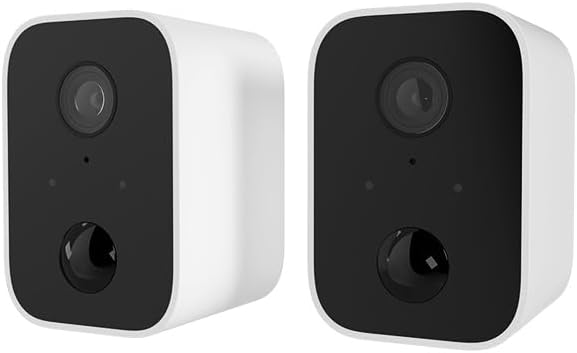
Image: Two Nexxt Wireless Security Cameras, showcasing their compact, white design with black camera faces.
Key Features:
- 1080P HD Live Video: Crystal clear real-time video and playback.
- Built-in Battery: Wire-free design for flexible placement and continued operation during power outages.
- IP65 Weatherproof: Durable construction suitable for outdoor use in various weather conditions.
- Motion Detection: Sends instant notifications to your smartphone upon detecting movement up to 26ft away.
- Two-Way Audio: Communicate directly through the camera using the built-in speaker and microphone.
- Night Vision: Equipped with IR LEDs for clear vision in low-light or dark conditions.
- Local & Cloud Storage: Supports micro-SD card (not included) for local storage and optional cloud storage (subscription required).
- Smart Home Integration: Compatible with Amazon Alexa and Google Assistant for voice control.

Image: A single Nexxt security camera surrounded by icons representing its features: Full 1080P HD, Motion detection, Two-way communication, Night vision, Voice activated, IP65 weatherproof, Micro-microSD™ slot, Wall mount bracket included, and Cloud ready.
2. Package Contents
Please verify that all items are present and in good condition upon opening the package. If any items are missing or damaged, please contact customer support.
- 2 x Nexxt Wireless Security Cameras
- 2 x Mounting Brackets
- 2 x USB Charging Cables
- 1 x Quick Start Guide
- Mounting Screws and Wall Anchors

Image: The retail packaging for the Nexxt Smart Wi-Fi battery camera 2-pack, showing the cameras and key features on the box.
3. Setup Guide
3.1 Charging the Camera
Before initial use, fully charge both cameras. Connect the provided USB charging cable to the camera's charging port and a standard USB power adapter (not included). The charging indicator light will show the charging status.
3.2 Downloading the Nexxt App
Search for "Nexxt Home" in the Apple App Store or Google Play Store and download the application. Create an account or log in if you already have one.
3.3 Pairing the Camera
- Open the Nexxt Home app and tap the "+" icon to add a new device.
- Select "Security Camera" from the device list.
- Follow the on-screen instructions to put the camera into pairing mode (usually involves pressing a reset button until an indicator light flashes).
- Connect your smartphone to a 2.4GHz Wi-Fi network. Note: 5GHz networks are not supported.
- The app will display a QR code. Hold your camera approximately 6-8 inches (15-20 cm) in front of your phone's screen until you hear a prompt from the camera.
- Once paired, the camera will connect to your Wi-Fi network, and you can name your device within the app.
3.4 Mounting the Camera
The Nexxt Wireless Security Camera can be easily mounted indoors or outdoors. Choose a location that provides the desired viewing angle and is within range of your Wi-Fi network.

Image: A Nexxt security camera mounted on an exterior wall, demonstrating its weatherproof design and easy installation.
- Identify a suitable mounting surface.
- Use the provided mounting bracket as a template to mark drill holes.
- Drill pilot holes and insert wall anchors if mounting into drywall or masonry.
- Secure the mounting bracket to the surface using the provided screws.
- Attach the camera to the mounting bracket and adjust the angle as needed.

Image: A Nexxt security camera detached from its mounting bracket, showing the connection point for easy installation and removal.
4. Operation
4.1 Live View
Open the Nexxt Home app and select your camera from the device list to access the live video feed. You can view real-time footage from anywhere with an internet connection.
4.2 Motion Detection
The camera's motion sensors detect movement up to 26 feet away. When motion is detected, the camera will record a short clip and send a notification to your smartphone. You can adjust motion sensitivity and set detection zones within the app settings.

Image: A dog and a child playing in a yard, with a 'Motion detection' icon overlay, illustrating the camera's ability to detect activity.
4.3 Two-Way Audio
To use two-way audio, tap the microphone icon in the live view interface of the app. You can then speak through your phone, and your voice will be projected through the camera's speaker. Release the icon to listen.
4.4 Night Vision
The camera automatically switches to night vision mode in low-light conditions, providing clear black-and-white video footage. This feature ensures continuous surveillance 24/7.
4.5 Storage Options
- Micro-SD Card: Insert a micro-SD card (up to 128GB, not included) into the camera's slot for local storage of recordings.
- Cloud Storage: Nexxt offers optional cloud storage plans for secure, off-site storage of your video recordings. Refer to the Nexxt Home app for subscription details.
4.6 Voice Control
Integrate your Nexxt camera with Amazon Alexa or Google Assistant for convenient voice control. Follow the instructions in the Nexxt Home app to link your account with your preferred smart home platform. You can then use voice commands to view live feeds on compatible smart displays.
5. Maintenance
5.1 Battery Management
To maximize battery life, ensure the camera is fully charged before deployment. The Nexxt Home app will notify you when the battery level is low. Regular charging is recommended, especially for cameras in high-traffic areas with frequent motion detection.
5.2 Cleaning the Camera
Periodically clean the camera lens and housing with a soft, dry cloth to ensure clear image quality. Avoid using harsh chemicals or abrasive materials that could damage the camera.
5.3 Firmware Updates
Nexxt Solutions may release firmware updates to improve performance, add new features, or address security vulnerabilities. The Nexxt Home app will notify you of available updates. It is recommended to keep your camera's firmware up to date for optimal performance and security.
6. Troubleshooting
| Problem | Possible Cause | Solution |
|---|---|---|
| Camera won't turn on | Low battery; Power button not pressed correctly | Charge the camera fully; Press and hold the power button for a few seconds. |
| Cannot connect to Wi-Fi | Incorrect Wi-Fi password; Camera too far from router; Only 2.4GHz supported | Verify password; Move camera closer to router; Ensure you are connecting to a 2.4GHz network. |
| Motion detection not working | Sensitivity too low; Detection zone not set; App notifications disabled | Adjust sensitivity in app; Configure detection zones; Enable notifications for Nexxt Home app. |
| Two-way audio not clear | Poor network connection; Obstruction near microphone/speaker | Check Wi-Fi signal strength; Ensure no obstructions; Reduce background noise. |
| Night vision is blurry | Dirty lens; IR LEDs obstructed | Clean the camera lens; Ensure nothing is blocking the IR LEDs. |
7. Technical Specifications
| Feature | Specification |
|---|---|
| Model Name | Battery (Built-in Battery 2PK) |
| Video Capture Resolution | 1080p HD |
| Indoor/Outdoor Usage | Outdoor, Indoor |
| Power Source | Battery Powered |
| Connectivity Protocol | Wi-Fi (2.4GHz only) |
| Controller Type | Amazon Alexa, Google Assistant |
| Mounting Type | Wall Mount |
| International Protection Rating | IP65 Weatherproof |
| Alert Type | Audio and Motion |
| Item Weight | 1.52 pounds (for the pair) |
| Package Dimensions | 11.69 x 6.5 x 2.56 inches |
| UPC | 798302057661 |
8. Warranty and Support
8.1 Warranty Information
Nexxt Solutions products typically come with a 2-year warranty from the date of purchase, covering defects in materials and workmanship. Please retain your proof of purchase for warranty claims. The warranty does not cover damage caused by misuse, accidents, unauthorized modifications, or natural disasters.
8.2 Customer Support
For technical assistance, troubleshooting, or warranty inquiries, please visit the official Nexxt Solutions website or contact their customer support team. You can often find FAQs, video tutorials, and contact information on their support pages.
Online Support: www.nexxtsolutions.com/support
Please have your product model number (Built-in Battery 2PK) and purchase date ready when contacting support.
Related documentsBuilt-in Battery 2PK


Ask a question about this manual
Ask about setup, troubleshooting, compatibility, parts, safety, or missing instructions. Manuals+ will review the question and use this page’s manual context to help answer it.