Introduction
This manual provides comprehensive instructions for the safe and efficient operation, setup, and maintenance of your Airvana AV200HUM Digital Humidifier. This digital top-fill humidifier is designed to help eliminate dry air in your home, offering customizable humidity levels with three mist settings and an extension wand for increased comfort and coverage. Please read all instructions carefully before use and retain this manual for future reference.

The Airvana AV200HUM Digital Humidifier in white, featuring a sleek design with a black water tank section and an LED display at the base.
Product Components
Your Airvana AV200HUM Humidifier package includes the following components:
- One (1) Humidifier Unit with 8.5 Liter Tank
- One (1) Extension Wand with 360-Degree Dual Port Nozzle
- One (1) Remote Control
- Integrated Essential Oil Tray
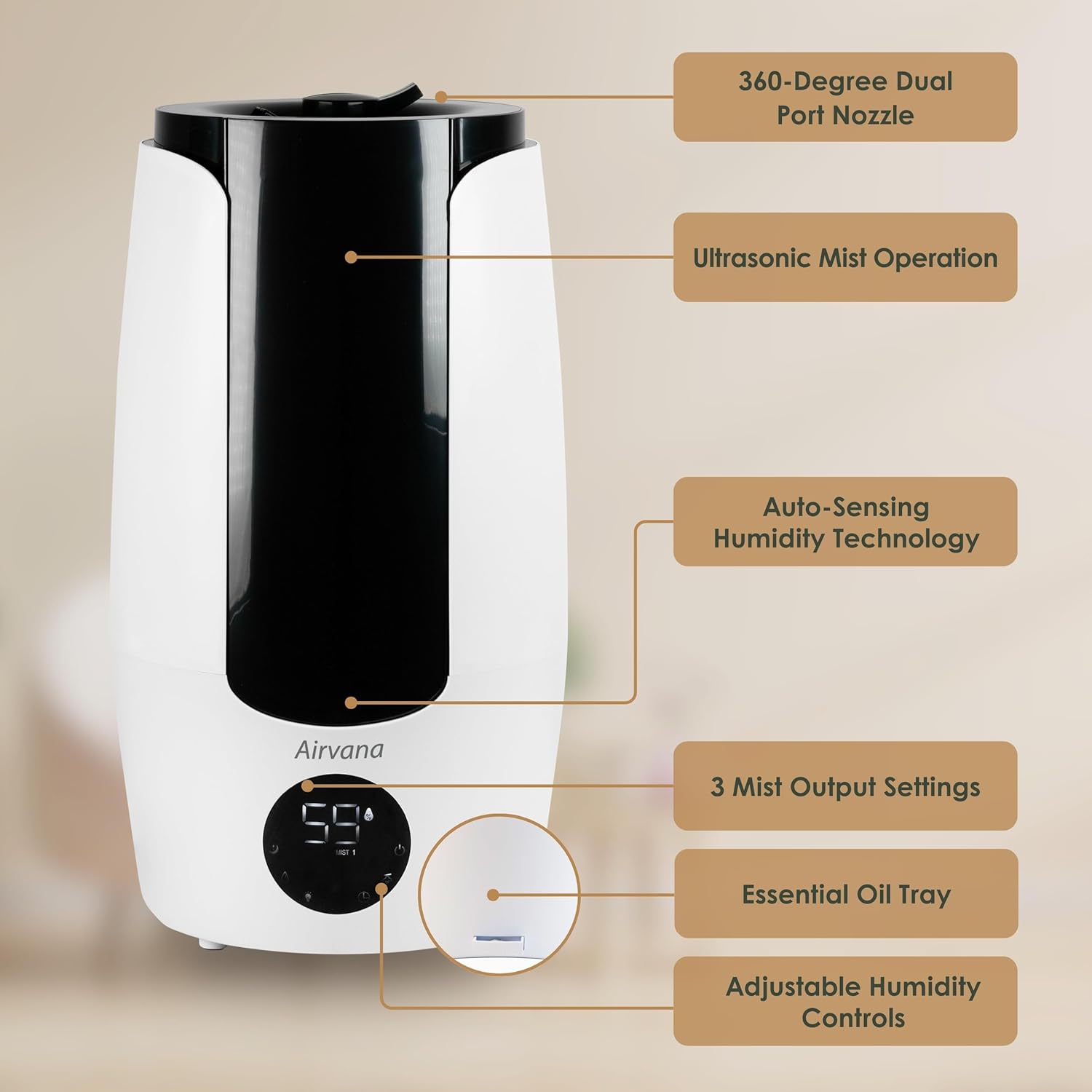
An image highlighting the key features of the Airvana AV200HUM Humidifier, including the 360-degree dual port nozzle, ultrasonic mist operation, auto-sensing humidity technology, three mist output settings, essential oil tray, and adjustable humidity controls.

A close-up view of the removable extension wand for the Airvana AV200HUM Humidifier, showing its 360-degree dual port nozzle and indicating it extends 13.25 inches.
Setup
- Unpack: Carefully remove all components from the packaging.
- Placement: Place the humidifier on a firm, flat, water-resistant surface at least 6 inches (15 cm) away from walls and furniture. Ensure the mist outlet is not directed at walls or furniture.
- Fill Water Tank: Remove the top cover. Fill the 8.5-liter water tank directly from the top opening with clean, cool tap water. Do not exceed the maximum fill line. Replace the top cover securely.
- Optional Extension Wand: If desired, attach the extension wand to the mist outlet for wider mist distribution.
- Connect Power: Plug the power cord into a standard electrical outlet. The unit will beep once, and the LED display will illuminate briefly.

An illustration of the easy top-fill design, showing water being poured into the 8.4-liter water tank of the Airvana AV200HUM Humidifier. It also mentions 26-hour run time and anti-bacterial nanosilver additive.
Operating Instructions
Control Panel and Remote Control
The humidifier can be operated using the touch controls on the LED display or the included remote control.

A detailed view of the Airvana AV200HUM Humidifier's LED display and control panel, showing humidity level, mist setting, and various function icons.

The remote control for the Airvana AV200HUM Humidifier, featuring buttons for power, mist setting, humidity setting, timer, accent light, and sleep mode.
Functions
- Power On/Off: Press the power button to turn the humidifier on or off.
- Mist Settings: Cycle through three mist output settings (Low, Medium, High) to adjust the vapor intensity.
- Humidity Level: Set your desired humidity level. The humidifier will automatically maintain this level.
- Timer: Set an operating timer for 1-12 hours. The unit will automatically shut off once the timer expires.
- Sleep Mode: Activate sleep mode to dim the LED display and operate quietly for undisturbed rest.
- Essential Oil Tray: Pull out the removable essential oil tray. Add a few drops of your preferred essential oil onto the pad. Reinsert the tray. Do not add essential oils directly into the water tank.

A hand adding essential oil to the removable essential oil tray located at the base of the Airvana AV200HUM Humidifier.

An image illustrating the key features of the Airvana AV200HUM Humidifier, including promotion of healthy skin, hair, and sleep, three mist settings, automatic shut-off, and auto-sensing humidity technology.
Maintenance
Regular cleaning is essential to ensure optimal performance and hygiene of your humidifier. The Airvana AV200HUM features a filterless design, which helps prevent the growth of mold, mildew, and airborne germs.
Cleaning Instructions
- Power Off and Unplug: Always turn off and unplug the humidifier before cleaning.
- Empty Water: Empty any remaining water from the tank and base.
- Hand Wash: The water tank and base should be hand washed. Use a soft brush or cloth to clean the inside of the tank and the ultrasonic nebulizer plate.
- Descaling: For mineral buildup, fill the base with a 1:1 ratio of white vinegar and water. Let it soak for 20-30 minutes, then gently scrub and rinse thoroughly.
- Dry Thoroughly: Ensure all parts are completely dry before reassembling or storing the humidifier.
- Essential Oil Tray: Clean the essential oil tray and pad as needed with a damp cloth.


Three icons illustrating that the filterless design helps prevent the growth of mold, mildew, and airborne germs.
Troubleshooting
If you encounter issues with your Airvana AV200HUM Humidifier, please review the following common problems and solutions. If the problem persists, contact customer support.
- No Mist Output:
- Ensure the unit is plugged in and powered on.
- Check if the water tank is empty; refill if necessary.
- Verify that the mist outlet is not blocked.
- Unusual Odor:
- Clean the water tank and base thoroughly.
- Use fresh, clean water.
- Excessive Noise:
- Ensure the humidifier is on a flat, stable surface.
- Check for any foreign objects in the water tank or base.
- White Dust:
- This is common with hard water. Use distilled or demineralized water to reduce mineral residue.
Specifications
| Brand | Airvana |
| Model Name | AV200HUM |
| Operation Mode | Ultrasonic |
| Tank Capacity | 2.25 Gallons (8.5 Liters) |
| Recommended Room Size | Up to 757 Square Feet |
| Run Time Per Fill | Up to 52 hours (setting dependent) |
| Product Dimensions | 8.13"D x 8.13"W x 17.25"H |
| Item Weight | 5.97 Pounds |
| Special Feature | Quiet Operation, LED Display, Sleep Mode, Essential Oil Tray, Extension Wand |
| Included Components | Humidifier, 8.5 Liter Tank, Extension Wand |
| Care Instructions | Hand Wash |
| Assembly Required | No |
| Batteries Required | No (for humidifier unit) |
Warranty and Support
For warranty information or technical support, please refer to the warranty card included with your product or visit the official Airvana website. You may also contact Airvana customer service directly for assistance with product operation, troubleshooting, or parts replacement.
Airvana Customer Service: Please refer to your product packaging or the official Airvana website for current contact details.


