Introduction
This manual provides instructions for the CHUNGHOP BRC0884305/01 remote control, designed for use with various Philips 4K Smart LED UHD Android HDTV models. Please read this manual carefully before using the remote control to ensure proper operation and to maximize its lifespan.
Setup
1. Battery Installation
The remote control requires two AAA batteries (not supplied). Follow these steps to install them:
- Locate the battery compartment cover on the back of the remote control.
- Slide the cover downwards or press the latch and lift to open.
- Insert two new AAA batteries, ensuring the positive (+) and negative (-) terminals match the diagrams inside the compartment.
- Replace the battery compartment cover, pushing it until it clicks securely into place.

Figure 1: Battery compartment with AAA batteries.
2. Initial Use
This remote control is pre-programmed for compatible Philips TV models and typically requires no code setup or tuning. After installing the batteries, it should be ready for immediate use.
- Point the remote control directly at the TV's infrared (IR) sensor.
- Ensure there are no obstructions between the remote control and the TV sensor.
Operating Instructions
The CHUNGHOP BRC0884305/01 remote control features an ergonomic design with sensitive keys for comfortable and efficient operation. It includes popular shortcut buttons for quick access to your favorite channels and streaming services.
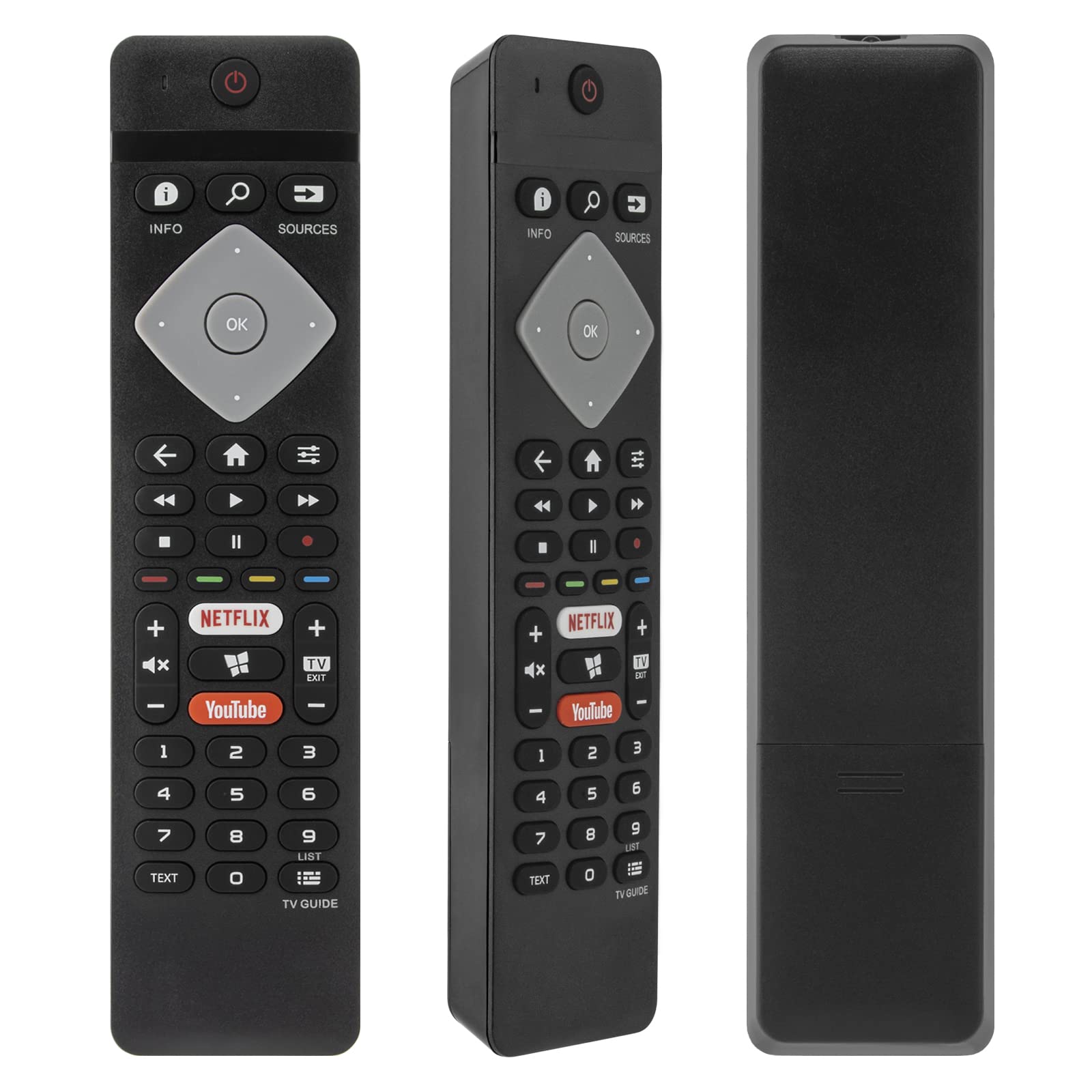
Figure 2: Overview of the remote control buttons.
Button Functions
- Power Button (●): Turns the TV on or off.
- Info Button (i): Displays information about the current program or input.
- Search Button (🔍): Accesses the TV's search function.
- Sources Button (↪): Selects input sources (HDMI, AV, etc.).
- Navigation Pad (Up, Down, Left, Right, OK): Navigates menus and confirms selections.
- Back Button (←): Returns to the previous screen or menu.
- Home Button (⌂): Accesses the TV's home screen or smart hub.
- List Button (☰): Opens a list of options or settings.
- Volume Up/Down (+/-): Adjusts the TV volume.
- Mute Button (🔇): Mutes or unmutes the TV audio.
- Channel Up/Down (▲/▼): Changes TV channels.
- Playback Controls (Rewind, Play/Pause, Fast Forward, Stop): Controls media playback.
- Netflix Button: Direct access to the Netflix application.
- YouTube Button: Direct access to the YouTube application.
- Numeric Keypad (0-9): Enters channel numbers or other numerical inputs.
- Text Button: Accesses teletext or other text-based services.
- TV Guide Button: Opens the electronic program guide.
Maintenance
Cleaning the Remote Control
To maintain the remote control's appearance and functionality:
- Wipe the surface with a soft, dry cloth.
- For stubborn dirt, slightly dampen the cloth with water or a mild, non-abrasive cleaner.
- Avoid using harsh chemicals, solvents, or abrasive materials, as these can damage the remote's finish or internal components.
Battery Replacement
Replace batteries when the remote control's response becomes sluggish or stops working. Always replace both batteries at the same time with new AAA batteries. Do not mix old and new batteries, or different types of batteries.
Storage
If the remote control will not be used for an extended period, remove the batteries to prevent leakage, which can damage the device.
Troubleshooting
If you encounter issues with your CHUNGHOP BRC0884305/01 remote control, try the following solutions:
- Remote not responding:
- Check if the batteries are correctly installed with the correct polarity.
- Replace the batteries with new ones.
- Ensure there is a clear line of sight between the remote control and the TV's IR sensor. Remove any objects blocking the path.
- Confirm that the TV is powered on.
- Specific buttons not working:
- This could indicate a faulty button or a need for battery replacement. Try replacing batteries first.
- Remote not compatible with your TV model:
- This remote is designed for specific Philips 4K Smart LED UHD Android HDTV models. If your TV model is not listed in the product description, it may not be compatible.
- For confirmation of compatibility, please contact CHUNGHOP customer support.
Specifications
| Feature | Detail |
|---|---|
| Brand | CHUNGHOP |
| Model | BRC0884305/01 |
| Compatible Devices | Television (Philips 4K Smart LED UHD Android HDTVs) |
| Connectivity Technology | Infrared |
| Controller Type | Button Control |
| Special Feature | Ergonomic |
| Power Source | 2 x AAA Batteries (not included) |
Warranty Information
Specific warranty details for the CHUNGHOP BRC0884305/01 remote control are not provided in this manual. For information regarding warranty coverage, terms, and conditions, please refer to the product packaging or contact CHUNGHOP customer support directly.
Support and Contact Information
If you have any questions, require assistance, or need to confirm compatibility for your TV model, please contact CHUNGHOP customer support. They typically respond within 24 hours.
- Manufacturer: CHUNGHOP
- Contact: Refer to the seller's contact information on the purchase platform or the official CHUNGHOP website for direct support channels.


