
USX STAR Movable 37-86inch
UL Listed Full Motion TV Wall Mount Bracket User Manual
Brand: USX STAR | Model: Movable 37-86inch
This manual provides detailed instructions for the safe and effective installation, operation, and maintenance of your USX STAR Full Motion TV Wall Mount Bracket.
Important Safety Information
Please read all instructions carefully before installation. If you have any questions, contact customer support.
- UL Listed: This product is UL Listed, ensuring it meets rigorous safety standards.
- Weight Capacity: Do not exceed the maximum load capacity of 132 lbs (60 kg).
- TV Size Compatibility: Designed for most TVs ranging from 37 to 86 inches.
- Wall Type Compatibility: Compatible with 8", 12", 16" wood studs, solid brick, or concrete walls. WARNING: Do not install on drywall alone.
- Professional Installation: If you are unsure about the installation process, consult a qualified professional.

Image: The USX STAR mount is shown with certifications, highlighting its 4X Load Test, Non-Deformation Test, and 6,000 Cycle Tests, confirming its durability and safety standards.
Setup and Installation
The USX STAR TV wall mount is designed for easy installation. Follow these general steps, referring to the included detailed instruction manual for specific guidance.
1. Pre-Installation Check
- Verify your TV's weight and VESA pattern are within the mount's specifications.
- Locate wood studs using a stud finder for secure mounting. For solid brick or concrete walls, ensure you have the appropriate anchors (concrete anchors are sent per request).
- Unpack all components and verify against the parts list in your instruction manual.

Image: This diagram illustrates the wide TV compatibility (37"-86" and Max Load 132LBS) and the three compatible wall types: wood studs (8"/12"/16"), solid concrete wall, and brick wall. A warning advises against installing on drywall alone.
2. Wall Plate Installation
- Use the provided drilling template to mark pilot holes on your wall.
- Ensure the wall plate is level using the included bubble level.
- Secure the wall plate to the wall using the appropriate hardware for your wall type.
3. TV Bracket Attachment
- Attach the TV brackets to the back of your television using the correct VESA screws and spacers from the pre-labeled bags.
- Ensure the brackets are securely fastened and aligned with your TV's VESA pattern.

Image: This image highlights the upgraded design of the TV mount, featuring robust articulating arms and the prominent UL Listed certification, indicating enhanced safety and structural integrity.
4. Mounting the TV
- Carefully lift the TV with the attached brackets and hook it onto the wall plate.
- Secure the TV to the wall plate using the locking mechanisms on the brackets.
Operating and Adjustments
This full motion TV wall mount offers versatile viewing angles and space-saving features.
Adjustable Viewing Angle
- Tilt: Adjust the screen from +5° to -15° to reduce glare and optimize viewing from different heights.
- Swivel: Pivot the TV up to +/-45° left or right (maximum swivel angle depends on screen size) for comfortable viewing from various seating positions.
- Level Adjust: Fine-tune the TV's level by +/-4° after installation to ensure a perfectly straight display.

Image: This image demonstrates the mount's swivel capability, allowing the TV to be angled up to +/-45 degrees for optimal viewing from various positions in a room.

Image: This diagram illustrates the mount's flexibility, allowing the TV to extend up to 16.61 inches from the wall and retract to a slim 2.52 inches. It also highlights the tool-free tilt range of +5° to -15°.

Image: This image demonstrates the post-installation level adjustment feature, allowing for a fine-tuning of +/-4 degrees to ensure the TV is perfectly horizontal.
Space Saving
- The dual articulation arm design allows the mount to retract to just 2.52 inches from the wall, saving space.
- It can extend up to 16.61 inches from the wall for maximum viewing flexibility.
- Integrated cable ties help manage TV cables for a neat and organized appearance.
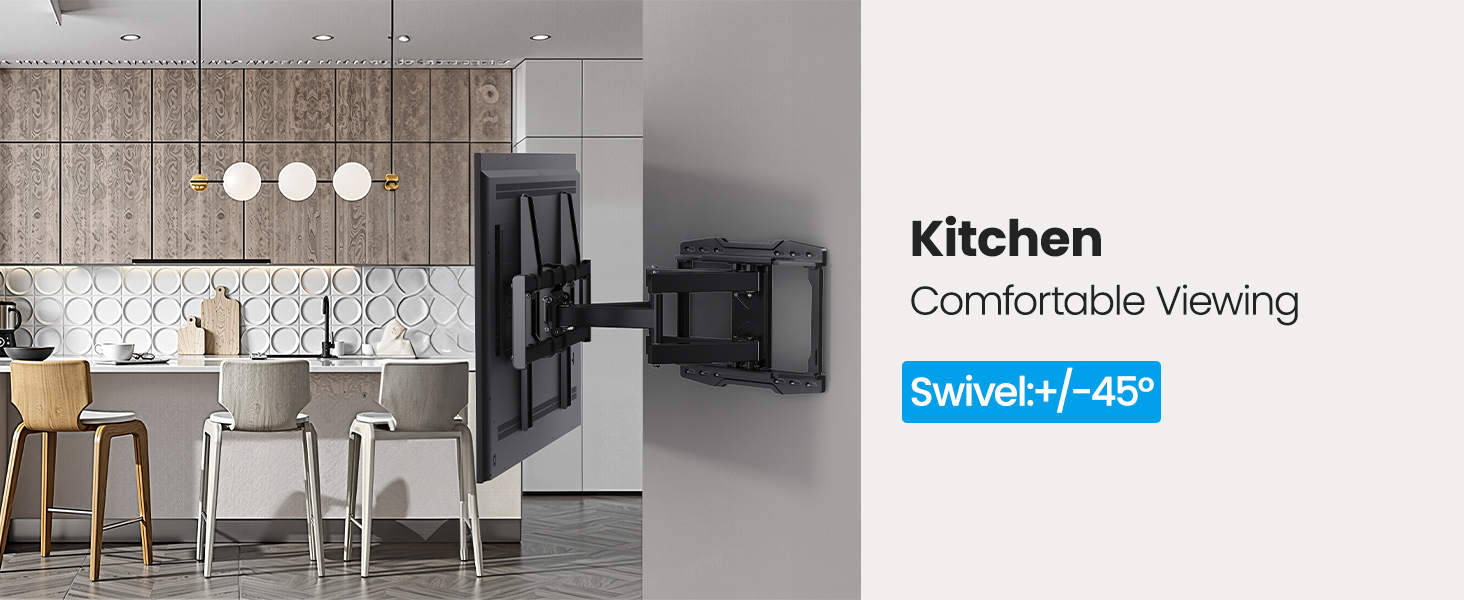
Image: This image provides a visual tip to avoid potential cable blockage behind the TV, ensuring proper functionality and aesthetics.
Maintenance
To ensure the longevity and safe operation of your USX STAR TV wall mount, periodic maintenance is recommended:
- Regular Inspection: Periodically check all screws and connections to ensure they remain tight and secure.
- Cleaning: Wipe the mount with a soft, dry cloth to remove dust. Avoid abrasive cleaners or solvents.
- Movement Check: Occasionally move the articulating arms and adjust the tilt/swivel to ensure smooth operation. If any stiffness is noted, check for debris or loose components.
Troubleshooting
If you encounter any issues during installation or operation, please refer to the detailed instruction manual included with your product. Common issues and their solutions are typically covered there.
- Mount not level: Use the +/-4° level adjustment feature to correct the angle.
- Difficulty with movement: Ensure all bolts are tightened correctly but not overtightened, which can restrict movement. Check for any obstructions.
- Missing parts: Refer to the parts list in your manual. Contact customer support for replacements.
For further assistance, please contact USX STAR customer support.
Specifications
| Feature | Detail |
|---|---|
| Brand | USX STAR |
| Model | Movable 37-86inch |
| Item Weight | 12.29 pounds |
| Package Dimensions | 17.76 x 11.97 x 2.83 inches |
| Color | Black |
| Mounting Type | Wall Mount |
| Movement Type | Articulating |
| Material | Alloy Steel |
| Maximum Compatible TV Size | 86 Inches |
| Minimum Compatible TV Size | 37 Inches |
| Compatible Devices | Television |
| Maximum Tilt Angle | 15 Degrees |
| VESA Standard | 200x100mm, 200x200mm, 200x300mm, 300x200mm, 300x300mm, 400x200mm, 400x300mm, 400x400mm, 600x400mm |
| Max Load Capacity | 132 lbs |
| Wood Stud Spacing | 8", 12", 16" |
| UPC | 797505421439 |
Warranty and Support
USX STAR is committed to providing high-quality products and excellent customer service.
- Product Support: This TV wall mount comes with a ten-year product support.
- Customer Service: USX STAR offers US-based customer service with quick response times, focused on meeting your needs.
- Warranty: All products are warranty-backed.
- User Manual (PDF): For a downloadable version of the user manual, please refer to the official product page or click here.
For any inquiries or support, please visit the USX STAR Store on Amazon or contact their customer service directly.
Related documentsMovable 37-86inch

Ask a question about this manual
Ask about setup, troubleshooting, compatibility, parts, safety, or missing instructions. Manuals+ will review the question and use this page’s manual context to help answer it.