
1. Introduction
The NB North Bayou G65 is a heavy-duty dual monitor arm desk mount designed to enhance your workspace ergonomics and viewing comfort. This full-motion monitor stand is compatible with two large screens ranging from 27 to 34 inches, supporting a weight capacity of 11 lbs to 35.2 lbs (5-16 KG) for each arm. Its robust construction, made from top-quality steel and aluminum alloys, ensures stability and durability for both computer and gaming monitors.
The G65 offers extensive adjustability, including tilt angles from +15° to -60°, swivel angles of ±90° and 360° rotation. It provides a maximum upright adjustment of 11.2 inches (285mm) and a maximum extension of up to 25.2 inches (640mm), allowing you to position your monitors precisely for optimal viewing angles and reduced strain on your spine, neck, and shoulders.

Image 1.1: The NB North Bayou G65 Dual Monitor Arm Desk Mount supporting two large monitors.
2. Safety Information
- Read all instructions carefully before assembly and installation. Failure to do so may result in personal injury or property damage.
- Ensure your desk surface is strong enough to support the combined weight of the monitor arm and your monitors.
- Do not adjust the tension screw without a monitor mounted on the arm. Adjusting tension without load can cause the arm to spring up unexpectedly, leading to injury.
- Keep children and pets away during installation. Small parts can be a choking hazard.
- Use only the provided hardware. If any parts are missing or damaged, contact customer support.
- Periodically check all screws and connections to ensure they remain tight and secure.
3. Package Contents
Please verify that all components are present before beginning installation:
- Dual Monitor Arm Assembly (2 arms, 1 base)
- C-Clamp Mounting Hardware
- Grommet Mounting Hardware
- VESA Plates (2x)
- Assorted Screws for Monitor Attachment (M4, M5)
- Allen Wrenches (various sizes)
- Cable Management Clips/Covers
- USB Extension Hub (integrated into base)
- Instruction Manual
4. Setup and Installation
The NB North Bayou G65 offers two primary installation methods: C-Clamp mounting and Grommet mounting. Choose the method that best suits your desk and preferences.
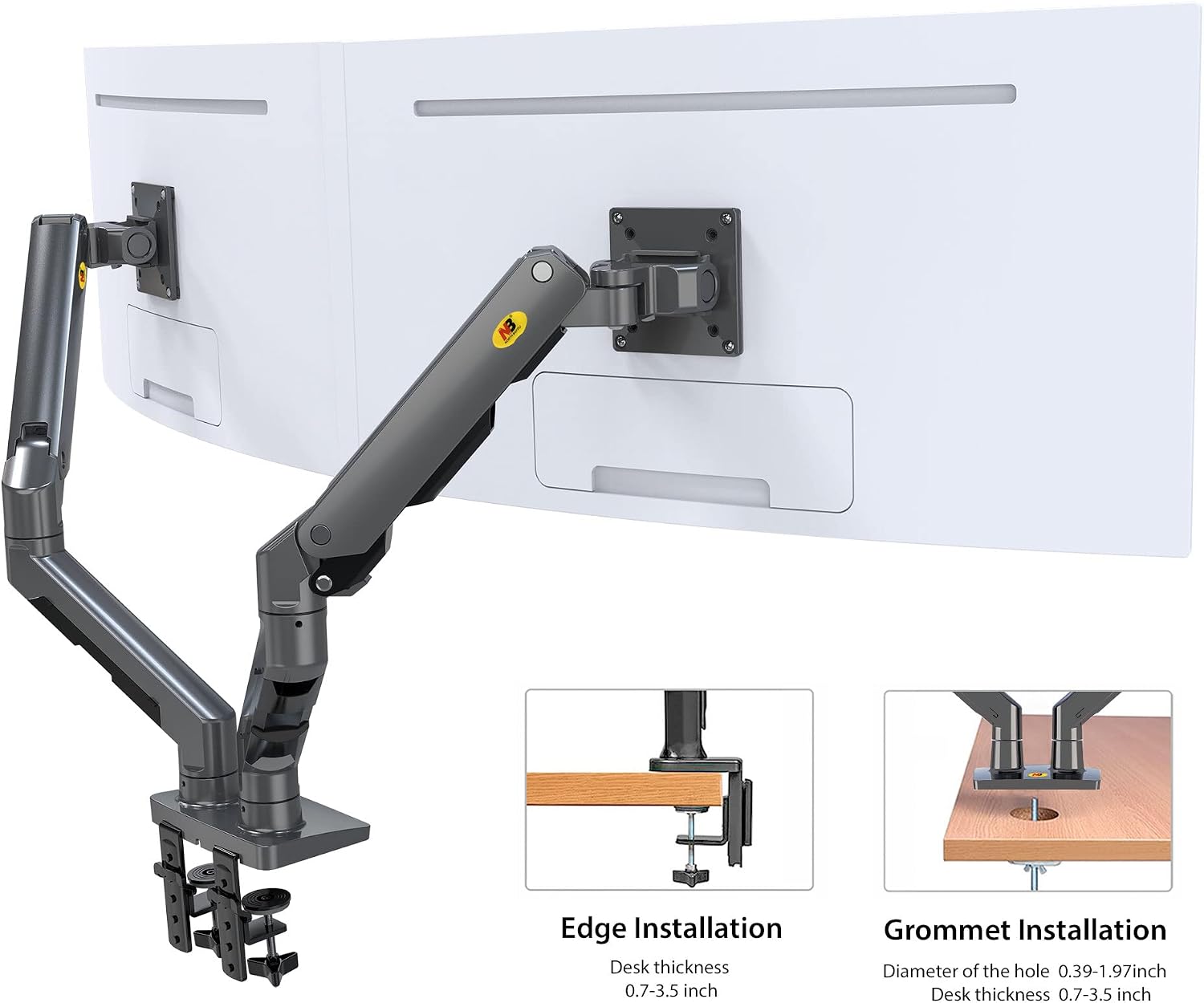
Image 4.1: C-Clamp and Grommet Installation Options.
4.1 C-Clamp Installation
- Attach the C-clamp base to the main pole of the monitor arm.
- Position the C-clamp on the edge of your desk. Ensure the desk thickness is between 0.7 and 3.5 inches.
- Tighten the C-clamp screws securely until the mount is stable on the desk.
- Slide the monitor arms onto the main pole and secure them with the provided screws.
4.2 Grommet Installation
- If your desk has a grommet hole, ensure its diameter is between 0.39 and 1.97 inches and the desk thickness is between 0.7 and 3.5 inches.
- Assemble the grommet base components according to the diagram in the manual.
- Insert the grommet bolt through the desk hole and secure it from underneath with the provided washer and nut.
- Slide the monitor arms onto the main pole and secure them with the provided screws.
4.3 Attaching Monitors
- Attach the VESA plate to the back of each monitor using the appropriate screws (M4 or M5) for your monitor's VESA pattern (75x75mm or 100x100mm).
- Carefully slide the monitor with the attached VESA plate onto the arm's mounting head. Ensure it clicks securely into place.
- Tighten any security screws on the VESA mounting head to prevent accidental detachment.
- Important: Do NOT adjust the tension screw on the arm before a monitor is mounted. Once the monitor is mounted, you can adjust the tension to match the monitor's weight.

Image 4.2: Details of the base, cable management, and VESA plate.
5. Operating and Adjustments
The NB North Bayou G65 offers a wide range of adjustments to achieve your ideal viewing position. Once your monitors are mounted, you can fine-tune the arm's movement.
5.1 Tension Adjustment
The arms feature a gas spring system that requires tension adjustment to match the weight of your monitors. Use the provided Allen wrench to adjust the tension screw located on the arm joint. Turn clockwise to increase tension (for heavier monitors) and counter-clockwise to decrease tension (for lighter monitors). Adjust until the monitor stays at any desired height without drifting up or down.
5.2 Positional Adjustments
- Height Adjustment: Gently push or pull the monitor up or down to adjust its vertical position. The arm supports a maximum upright extension of 11.2 inches (285mm).
- Extension/Retraction: Extend or retract the arm to bring the monitor closer or push it further away from you. The arm has a maximum extension of 25.2 inches (640mm).
- Tilt: Tilt your monitor screen up or down to reduce glare and optimize viewing angles. The tilt range is +15° to -60°.
- Swivel: Swivel the monitor left or right at various joints along the arm. The arm supports ±90° swivel at the VESA plate and 180° swivel at the arm joints.
- Rotation: Rotate your monitor 360° from landscape to portrait orientation.

Image 5.1: Optimize Your Viewing Angle with Tilt, Swivel, and Rotation.
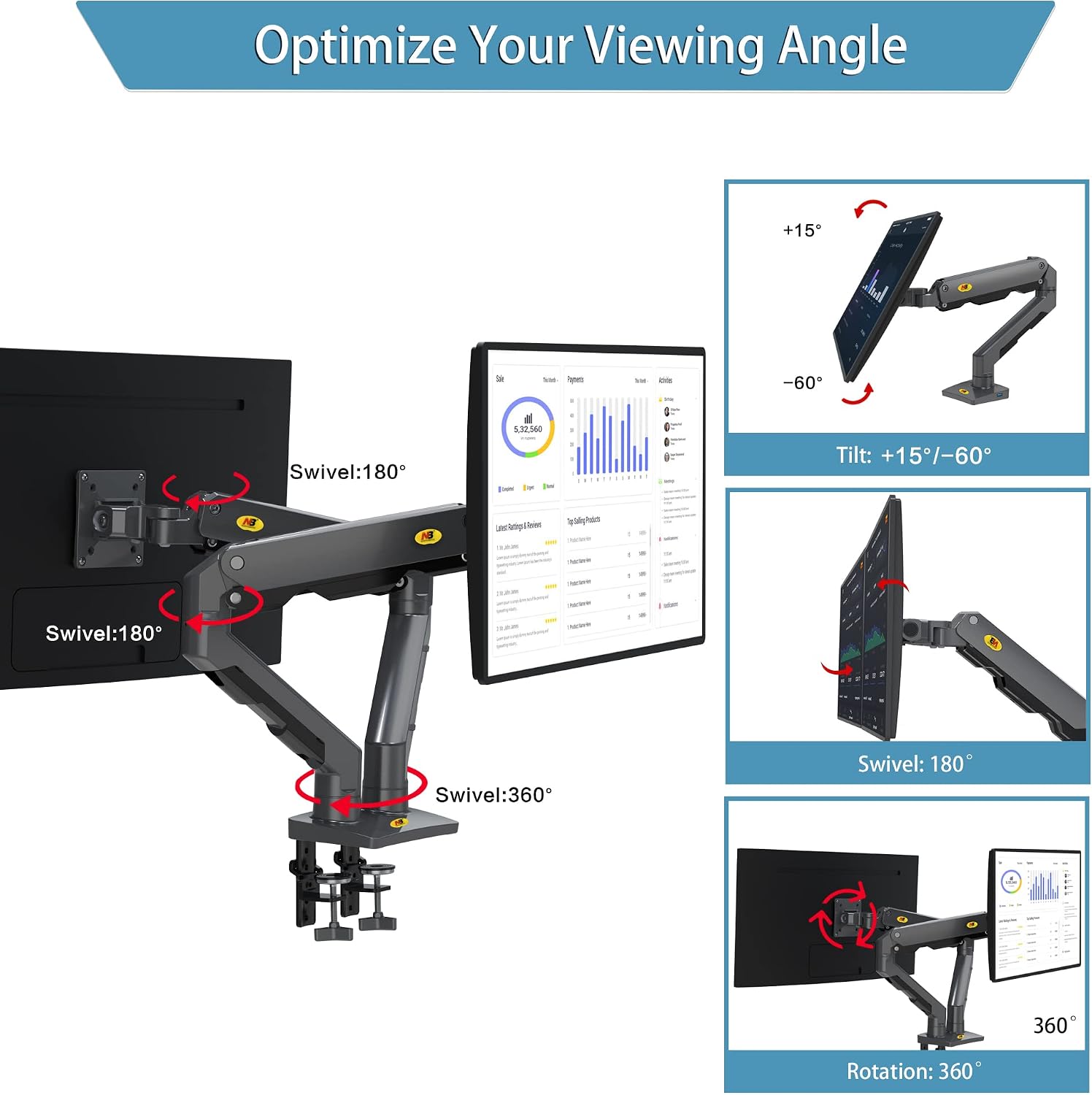
Image 5.2: Max Upright and Max Extension Capabilities.
5.3 Cable Management
The G65 features integrated cable management channels to keep your workspace tidy. Route your display and power cables through the designated clips or covers along the arms. Note that some covers may require a Phillips head screwdriver for removal and reattachment.

Image 5.3: Integrated USB Charge Hub for convenience.
6. Maintenance
- Cleaning: Wipe the monitor arm with a soft, damp cloth. Avoid using abrasive cleaners or solvents that could damage the finish.
- Inspection: Periodically check all screws and connections to ensure they are tight. Re-tighten if necessary.
- Gas Spring: The gas spring is designed for long-term use and generally requires no maintenance. If the arm's movement becomes stiff or loose, re-adjust the tension as described in Section 5.1.
7. Troubleshooting
- Monitor Sags or Drifts Down: The gas spring tension is too low for the monitor's weight. Increase the tension by turning the adjustment screw clockwise (towards the '+' sign). Ensure a monitor is mounted before adjusting.
- Monitor Springs Up or is Hard to Push Down: The gas spring tension is too high for the monitor's weight. Decrease the tension by turning the adjustment screw counter-clockwise (towards the '-' sign).
- Arm Feels Stiff or Difficult to Move: Check if the tension is set too high. Also, ensure all assembly screws are tightened correctly but not excessively. Lubrication is generally not required for the gas spring mechanism.
- Monitor Wobbles: Ensure the desk clamp or grommet mount is securely tightened to the desk. Also, check that the VESA plate is firmly attached to both the monitor and the arm.
- Screws Don't Fit Monitor VESA Holes: Verify you are using the correct M4 or M5 screws for your monitor. Some monitors may have recessed VESA holes or require specific screw lengths not included. Consult your monitor's manual.
- Cable Management Covers Difficult to Use: The larger covers may require a Phillips head screwdriver to remove and reattach. Ensure screws are aligned properly when reassembling.
8. Specifications

Image 8.1: Technical Dimensions of the G65 Monitor Arm.
| Feature | Detail |
|---|---|
| Model Number | G65 |
| Brand | NB North Bayou |
| Monitor Size Compatibility | 27" - 34" (per arm) |
| Weight Capacity | 11 lbs - 35.2 lbs (5-16 KG) per arm |
| VESA Compatibility | 75x75mm, 100x100mm |
| Tilt Angle | +15° to -60° |
| Swivel Angle | ±90° (at VESA plate), 180° (at arm joints) |
| Rotation | 360° |
| Max Upright Height | 11.2" (285mm) |
| Max Extension | 25.2" (640mm) |
| Mounting Options | C-Clamp, Grommet |
| Desk Thickness (C-Clamp/Grommet) | 0.7" - 3.5" |
| Grommet Hole Diameter | 0.39" - 1.97" |
| Material | Steel, Aluminum Alloys |
| Item Weight | 23.7 pounds |
| Color | Black |
9. Warranty and Support
For warranty information, product registration, or technical support, please refer to the official NB North Bayou website or contact their customer service directly. Keep your purchase receipt for warranty claims.
Visit the NB North Bayou Store on Amazon for more products and information.


