
Gardena 19210-20
Contents
Gardena Smart Irrigation Control Sensor Set (Model 19210-20) User Manual
Intelligent Watering System for Gardens
1. Introduction
The Gardena Smart Irrigation Control Sensor Set provides an intelligent solution for automated garden watering. This system allows you to control up to six individual 24V irrigation valves via the Gardena Smart app. The set includes the Gardena Smart Irrigation Control unit, a Gardena Smart Sensor, and a Gardena Smart Gateway. The Smart Gateway connects the system to your smartphone, enabling remote control and personalized programming. The Smart Sensor monitors soil moisture and temperature, ensuring efficient water usage and preventing overwatering. The system also features a frost warning function to protect your irrigation setup.
2. What's in the Box
Your Gardena Smart Irrigation Control Sensor Set package contains the following components:
- 1 x Gardena Smart Irrigation Control Unit
- 1 x Gardena Smart Sensor
- 1 x Gardena Smart Gateway

3. Setup Instructions
3.1. Gardena Smart Gateway Installation
The Smart Gateway acts as the central communication hub for your Gardena Smart System. Place it indoors, ideally near your internet router, to ensure a stable connection.
- Connect the Smart Gateway to your internet router using an Ethernet cable.
- Connect the power adapter to the Smart Gateway and plug it into an electrical outlet.
- Wait for the indicator lights on the Gateway to confirm a successful internet connection.
3.2. Gardena Smart Irrigation Control Unit Installation
The Irrigation Control unit manages the water flow to your garden zones. It is designed to work with conventional 24V irrigation valves.
- Mount the Irrigation Control unit in a suitable outdoor location, protected from direct weather if possible, or in an irrigation valve box.
- Connect your existing 24V irrigation valves to the corresponding terminals on the Smart Irrigation Control unit. The unit supports up to six valves.
- Ensure all connections are secure and waterproof.

3.3. Gardena Smart Sensor Placement
The Smart Sensor measures soil moisture and ambient temperature to optimize watering schedules.
- Choose a representative location in your garden where the sensor can accurately measure soil conditions. Avoid areas that are unusually wet or dry.
- Insert the Smart Sensor into the ground, ensuring the sensor tip is fully embedded in the soil. The sensor is designed to protrude only 20mm above ground, making it suitable for areas with robotic mowers.
- Ensure the sensor has a clear line of sight or reasonable proximity to the Smart Gateway for reliable communication.


3.4. App Installation and System Pairing
The Gardena Smart app is essential for controlling and monitoring your irrigation system.
- Download the free Gardena Smart app from your device's app store (available for iOS and Android).
- Follow the in-app instructions to create an account and register your Gardena Smart System components. This typically involves scanning QR codes or entering serial numbers.
- Ensure all devices are powered on and within range of the Smart Gateway during the pairing process.
4. Operating the System
4.1. Using the Gardena Smart App
The Gardena Smart app provides comprehensive control over your irrigation system.
- Scheduling Irrigation: Program individual watering schedules for each of the six valves. You can set specific start times, durations, and days of the week.
- Sensor-Based Watering: Utilize data from the Smart Sensor to automatically adjust watering. The system will prevent irrigation if the soil moisture is already sufficient, conserving water.
- Manual Control: Manually start or stop irrigation for any zone directly from the app.
- Frost Warning: The app will notify you of impending frost, allowing you to take preventative measures for your irrigation system.
- System Monitoring: View real-time status of your devices, including sensor readings and irrigation activity.

5. Compatibility
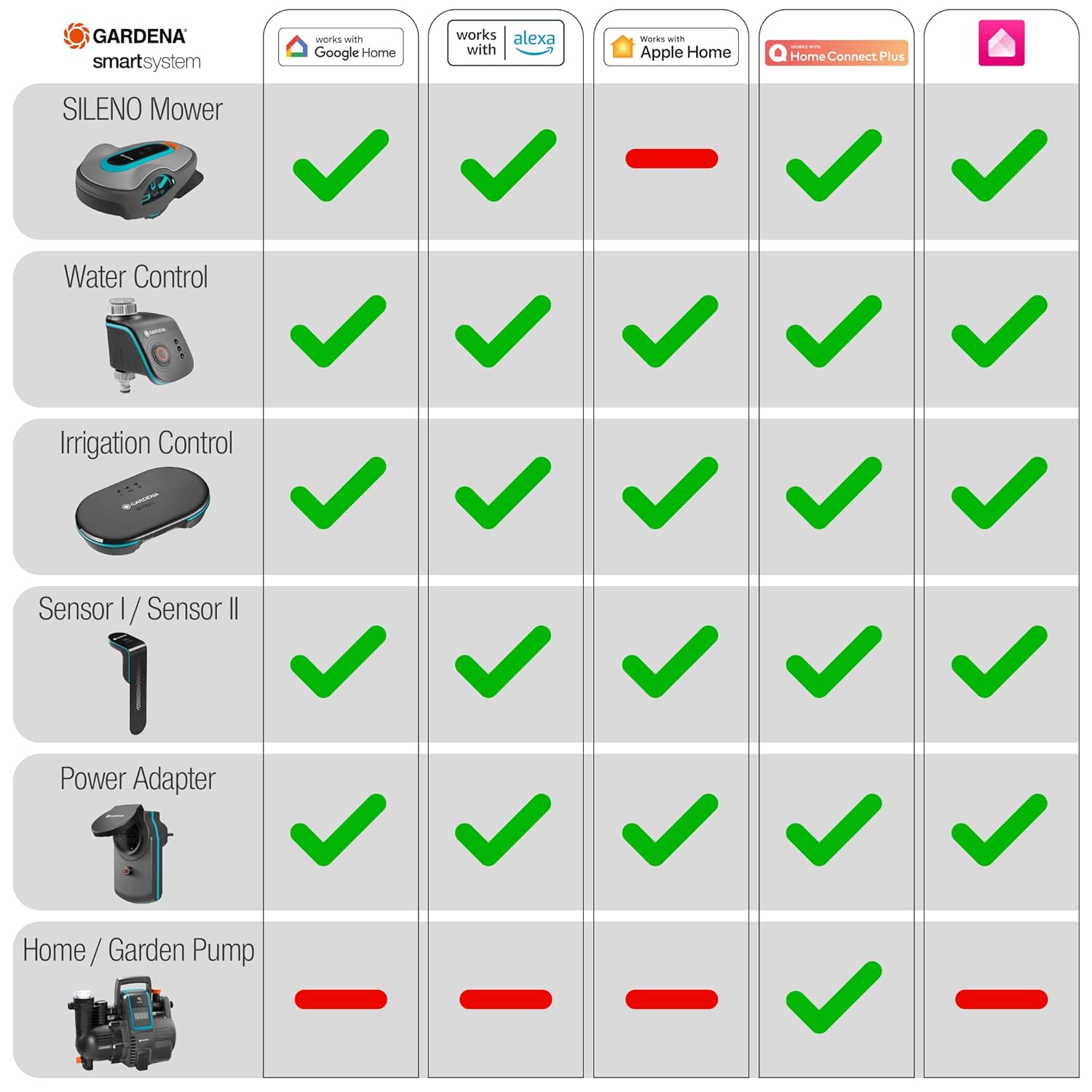
The Gardena Smart Irrigation Control is designed to be compatible with most conventional 24V irrigation valves, allowing integration with existing irrigation facilities. The Gardena Smart System also supports integration with various smart home platforms.


6. Maintenance
Regular maintenance ensures the longevity and optimal performance of your Gardena Smart Irrigation Control Sensor Set.
- Cleaning: Periodically clean the exterior of the Smart Gateway, Irrigation Control unit, and Smart Sensor with a soft, damp cloth. Avoid abrasive cleaners.
- Sensor Check: Ensure the Smart Sensor remains properly embedded in the soil and is free from debris that might obstruct its readings.
- Winterization: In regions with freezing temperatures, follow Gardena's guidelines for winterizing your irrigation system to prevent frost damage to the control unit and valves. Consult the Gardena website or app for specific instructions.
7. Troubleshooting
If you encounter issues with your Gardena Smart Irrigation Control Sensor Set, consider the following common troubleshooting steps:
- No App Connection: Ensure your Smart Gateway is properly connected to your router and powered on. Check your home internet connection. Restart the Gateway and your mobile device.
- Device Not Responding: Verify that the Smart Irrigation Control unit and Smart Sensor are powered on and within range of the Smart Gateway. Check battery levels for the Smart Sensor if applicable.
- Irrigation Not Starting: Confirm that schedules are correctly set in the app. Check for any active frost warnings or manual overrides. Ensure water supply to the valves is open.
- Inaccurate Sensor Readings: Re-evaluate the Smart Sensor's placement to ensure it is in a representative area and fully inserted into the soil. Clean the sensor tip if necessary.
For further assistance, refer to the Gardena Smart app's help section or contact Gardena customer support.
8. Technical Specifications
| Feature | Specification |
|---|---|
| Brand | Gardena |
| Model Number | 19210-20 |
| Product Dimensions | 10.28"L x 4.84"W x 10.39"H |
| Weight | 3.53 Pounds |
| Material | Plastic |
| Voltage | 230 Volts (for power adapter, control unit operates 24V valves) |
| Color | Black, Turquoise |
| Language | English |
| Manufacturer | GARDENA |
| First Available Date | August 14, 2023 |
9. Safety Information
Please observe the following safety guidelines for the Gardena Smart Irrigation Control Sensor Set:
- For external use only.
- Avoid contact with eyes.
- Keep away from naked flame or direct heat sources.
- Ensure all electrical connections are made according to local regulations and manufacturer instructions.
- Do not immerse electrical components in water.
10. Warranty and Customer Support
Gardena products are manufactured to high-quality standards and come with a manufacturer's warranty. For specific warranty terms and conditions, please refer to the documentation included with your product or visit the official Gardena website.
For technical support, troubleshooting assistance, or any questions regarding your Gardena Smart Irrigation Control Sensor Set, please visit the Gardena Brand Store on Amazon or the official Gardena customer support channels.
Documents and downloads
Ask a question about this manual
Ask about setup, troubleshooting, compatibility, parts, safety, or missing instructions. Manuals+ will review the question and use this page’s manual context to help answer it.