
AMBITFUL AMBITFUL RGB Light P35R
AMBITFUL P35R RGB LED Video Light User Manual
Model: AMBITFUL RGB Light P35R | Brand: AMBITFUL
1. Introduction
Thank you for choosing the AMBITFUL P35R RGB LED Video Light. This professional lighting solution is designed for various applications including YouTube, gaming, streaming, web conferencing, and photography. It features adjustable color temperature, full RGB color control, and multiple special effects, all housed in a durable aluminum alloy shell. This manual provides detailed instructions for setup, operation, and maintenance to ensure optimal performance and longevity of your device.
2. What's in the Box
Carefully unpack your AMBITFUL P35R RGB LED Video Light and ensure all items are present and in good condition. If any items are missing or damaged, please contact customer support.
- AMBITFUL P35R RGB LED Video Light (x1)
- Power Adapter (x1)

Image: The AMBITFUL P35R LED light panel and its included power adapter, laid out on a white surface.
3. Key Features
3.1. High Brightness and Power
The P35R features 30W high-power LED lamp beads, providing a stable and flicker-free light source. It can achieve 3200 LUX illumination at 0.5 meters, with a wide 120-degree light area, suitable for various fill light scenarios.

Image: The AMBITFUL P35R light panel emitting bright white light, with text overlays indicating "3200 Lux Illumination/0.5m" and "3000 Lm Luminous Flux/100m".
3.2. Full RGB Color Control (HSI Mode)
Utilize the HSI mode to adjust 36,000 kinds of colors with varying saturation and brightness. This allows for precise color matching and creative lighting effects, restoring real-world colors and enabling vibrant artistic expressions.

Image: A grid of the AMBITFUL P35R light panel showing different RGB colors, from red to purple, demonstrating its full color capabilities.
3.3. Adjustable Color Temperature (CCT)
The light supports a color temperature range of 2800K to 6800K, allowing for adjustment between cool and warm tones. This flexibility helps in setting the desired atmosphere for your photography or video projects.
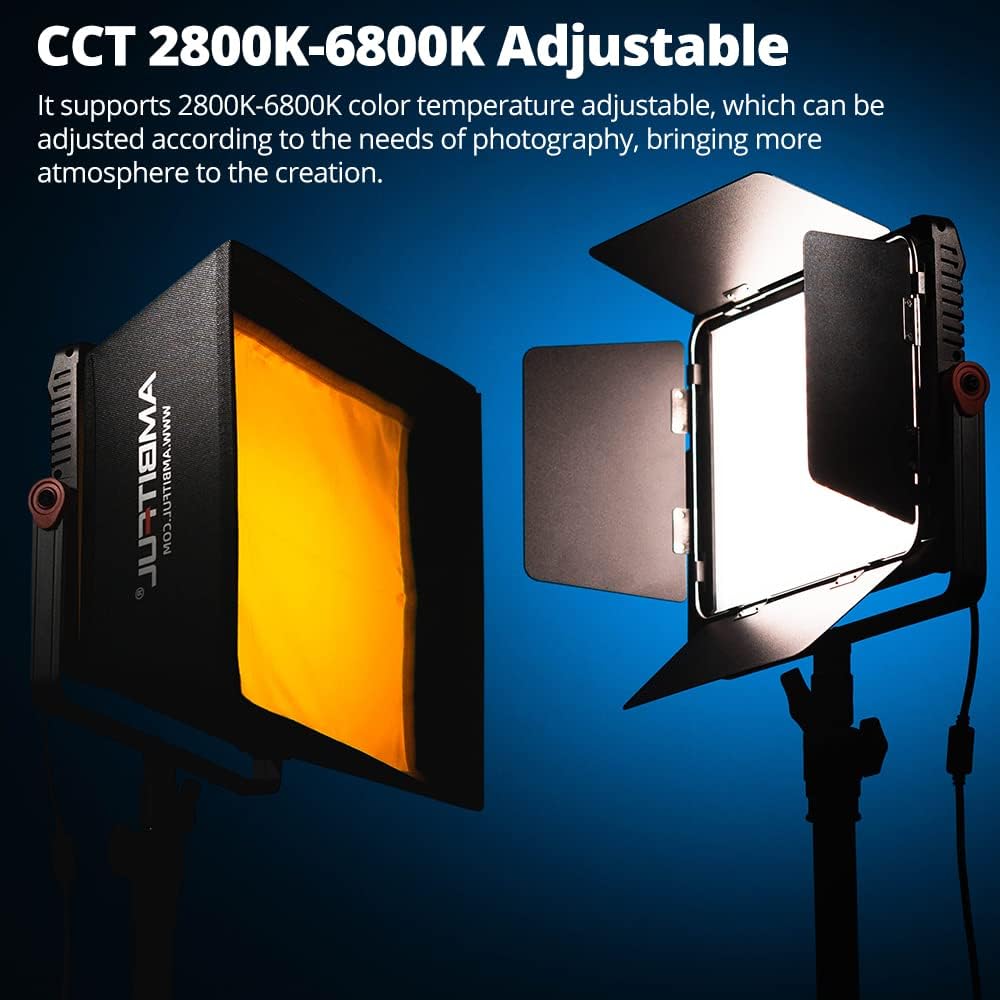
Image: Two AMBITFUL P35R lights, one with a softbox attachment emitting warm light, and another with barn doors emitting cool white light, illustrating the adjustable color temperature.
3.4. Wireless Light Control (Bluetooth APP)
Install the "ambitful Pro" application on your mobile phone to connect to the P35R via Bluetooth. This enables convenient remote adjustment of light parameters, offering greater control and flexibility during shoots.

Image: A hand holding a smartphone displaying the "ambitful Pro" app interface, with controls for color temperature, compensation, and brightness, next to the AMBITFUL P35R light.
3.5. Preset Lighting Effects
The P35R comes with 24 preset ambient lighting effects. Each effect's brightness and rate can be freely adjusted to match the shooting environment, allowing for precise and accurate light simulation.

Image: The control panel of the AMBITFUL P35R light, surrounded by icons representing 24 different lighting effects such as Lightning, Flash, Candle light, Firework, and various breathing light modes.
3.6. Dual Power Supply Options
The light can be powered by the standard adapter for indoor use or by NP series batteries (sold separately) for outdoor and portable applications, offering versatile power solutions for any creative space.
4. Setup Guide
4.1. Mounting the Light
- Attach the AMBITFUL P35R to a compatible light stand using the integrated mounting bracket.
- Securely tighten the locking knob on the bracket to prevent accidental movement.
- Adjust the tilt angle of the light as needed and tighten the side knobs to fix its position.
4.2. Powering On
- Using the Power Adapter:
- Connect the power adapter to the DC input port on the back of the light.
- Plug the power adapter into a suitable electrical outlet.
- Using NP Series Batteries (Sold Separately):
- Insert compatible NP series batteries into the battery slots on the back of the light, ensuring correct polarity.
- Press the power button located on the control panel to turn on the light.
5. Operation
5.1. Manual Control Panel
The AMBITFUL P35R features an intuitive control panel with a display screen and various knobs/buttons for direct adjustments.
- Mode Button: Cycle through different modes (CCT, HSI, FX).
- CCT Mode: Adjust color temperature (2800K-6800K) and brightness.
- HSI Mode: Adjust Hue, Saturation, and Intensity (Brightness) for full RGB control.
- FX Mode: Select from 24 preset lighting effects and adjust their parameters (brightness, speed).
- Dimmer Knob: Adjust brightness (0-100%) in all modes.
- Function Knobs: Adjust specific parameters within each mode (e.g., Hue, Saturation, Color Temperature).
5.2. APP Control (ambitful Pro)
For advanced control and convenience, use the "ambitful Pro" mobile application.
- Download the "ambitful Pro" app from your device's app store (iOS/Android).
- Ensure Bluetooth is enabled on your mobile device.
- Open the "ambitful Pro" app and search for available devices.
- Select "AMBITFUL P35R" from the list to connect.
- Once connected, you can remotely control all light parameters, including CCT, HSI, FX modes, brightness, and more, directly from your phone.
6. Specifications
| Attribute | Value |
|---|---|
| Product Dimensions | 30 x 13 x 2 inches |
| Item Weight | 3.59 pounds |
| ASIN | B0BNL5QXPF |
| Item Model Number | AMBITFUL RGB Light P35R |
| Brand | AMBITFUL |
| Connectivity Technology | Bluetooth |
| Hardware Interface | Bluetooth |
| Has Self-Timer | No |
| Water Resistance Level | Water Resistant |
| Color Temperature Range | 2800K-6800K |
| Power Output | 30W |
| Illumination (0.5m) | 3200 LUX |
| Light Area | 120 degrees |
7. Maintenance
- Cleaning: Use a soft, dry cloth to clean the surface of the light. Do not use abrasive cleaners or solvents.
- Storage: When not in use, store the light in a cool, dry place away from direct sunlight and extreme temperatures.
- Battery Care: If using NP series batteries, ensure they are charged regularly and stored properly when not in use to prolong their lifespan. Remove batteries if the light will not be used for an extended period.
- Handling: Handle the light with care to avoid dropping or impacting it, which could damage internal components.
8. Troubleshooting
| Problem | Possible Cause | Solution |
|---|---|---|
| Light does not turn on. | No power supply; power adapter not connected; batteries depleted or incorrectly inserted. | Ensure power adapter is securely connected and plugged into a live outlet. If using batteries, check charge level and correct insertion. |
| Light flickers or is unstable. | Low power; faulty connection; extreme temperature. | Check power source. Ensure all connections are secure. Operate within recommended temperature ranges. |
| APP cannot connect to the light. | Bluetooth not enabled; light too far from device; app not updated; interference. | Ensure Bluetooth is on. Move device closer to the light. Restart the app and the light. Check for app updates. |
| Controls are unresponsive. | Temporary software glitch; physical damage. | Turn off the light, wait a few seconds, then turn it back on. If the issue persists, contact customer support. |
9. Warranty and Support
AMBITFUL products are manufactured to high quality standards. For information regarding warranty coverage, technical support, or service inquiries, please refer to the warranty card included with your product or visit the official AMBITFUL website.
AMBITFUL Official Website: AMBITFUL Store on Amazon
Related documentsAMBITFUL RGB Light P35R


Ask a question about this manual
Ask about setup, troubleshooting, compatibility, parts, safety, or missing instructions. Manuals+ will review the question and use this page’s manual context to help answer it.