1. Introduction
Thank you for choosing the Alfox Laptop Power Bank. This high-capacity portable charger is designed to provide fast and efficient power to a wide range of devices, including laptops, tablets, and smartphones. With its 100W Power Delivery output and 30,000mAh capacity, it ensures your devices stay charged on the go. Please read this manual carefully before use to ensure proper operation and to maximize the lifespan of your device.
2. Safety Information
To prevent injury or damage to your device, please observe the following safety precautions:
- Do not expose the power bank to extreme temperatures (above 45°C or below 0°C).
- Avoid dropping, hitting, or disassembling the device.
- Keep away from water, moisture, and flammable materials.
- Do not use if the power bank is damaged, swollen, or leaking.
- Keep out of reach of children.
- Dispose of the power bank responsibly according to local regulations.
- Use only certified charging cables and adapters.
3. Package Contents
- Alfox Laptop Power Bank (AF-PB007)
- USB-C to USB-C Charging Cable
- User Manual
4. Product Overview
Familiarize yourself with the components of your Alfox Laptop Power Bank.
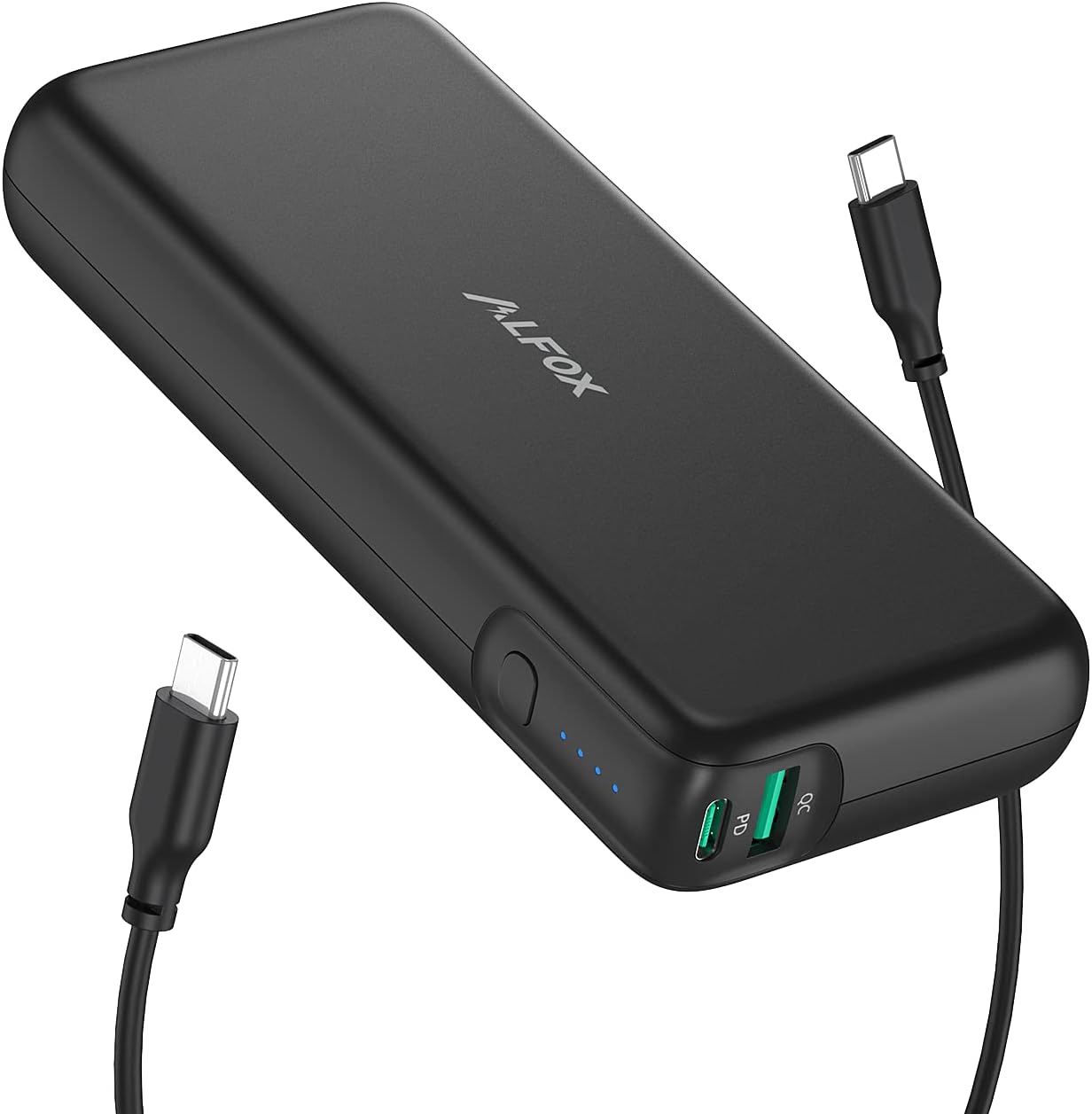
Image: The Alfox Laptop Power Bank, a black rectangular device, is shown with two USB-C cables connected. The power bank features a power button and LED indicators on its side, and two USB-C ports labeled 'PD' and 'QC' on one end.
Components:
- Power Button: Press once to check battery level, press and hold to turn on/off (if applicable).
- LED Indicators: Four blue LEDs indicate the remaining battery capacity (e.g., 4 LEDs = 75-100%, 1 LED = 0-25%).
- USB-C PD Port: Power Delivery input/output port for fast charging compatible devices and recharging the power bank.
- USB-C QC Port: Quick Charge output port for fast charging compatible devices.
5. Setup
Initial Charging of the Power Bank:
- Before first use, fully charge your Alfox Laptop Power Bank.
- Connect the provided USB-C to USB-C cable to the USB-C PD port on the power bank.
- Connect the other end of the cable to a compatible USB-C Power Delivery wall charger (not included, 100W recommended for fastest charging).
- The LED indicators will light up sequentially, indicating the charging progress. All four LEDs will be solid when fully charged.
A full charge may take several hours depending on the power of your wall charger.
6. Operating Instructions
Charging Your Devices:
- Ensure the power bank is sufficiently charged. Press the power button once to check the LED indicators.
- Connect your device (laptop, tablet, smartphone) to one of the USB-C output ports (PD or QC) on the power bank using an appropriate charging cable.
- The power bank will automatically begin charging your device. If not, press the power button once to initiate charging.
- The LED indicators will show the remaining battery level during charging.
- Disconnect your device once it is fully charged or when you no longer need to charge.
The USB-C PD port supports up to 100W output, ideal for fast-charging laptops like MacBook Pro/Air, Dell XPS, and other compatible devices. The USB-C QC port provides fast charging for smartphones and tablets.
Recharging the Power Bank:
Refer to the "Initial Charging of the Power Bank" section under Setup. Always use a USB-C PD compatible wall charger for optimal recharging speed.
7. Maintenance
- Cleaning: Wipe the power bank with a soft, dry cloth. Do not use harsh chemicals or abrasive materials.
- Storage: Store the power bank in a cool, dry place away from direct sunlight and extreme temperatures. For long-term storage, it is recommended to charge the power bank to about 50-75% every three months to maintain battery health.
- Handling: Avoid dropping or subjecting the power bank to strong impacts.
8. Troubleshooting
- Power bank not charging:
- Ensure the charging cable is securely connected to both the power bank and the wall charger.
- Verify that the wall charger is functional and provides sufficient power (preferably a USB-C PD charger).
- Try a different charging cable or wall charger.
- Device not charging from power bank:
- Check if the power bank has sufficient charge (press the power button to check LEDs).
- Ensure the charging cable is securely connected to both the power bank and your device.
- Try pressing the power button on the power bank to initiate charging.
- Try a different port on the power bank or a different charging cable.
- Verify your device is compatible with the power bank's output specifications.
- Slow charging:
- Ensure you are using a high-quality, compatible charging cable.
- For laptops, use the USB-C PD port and a cable capable of handling 100W.
- Check if your device supports fast charging protocols (PD, QC).
9. Specifications
| Feature | Detail |
|---|---|
| Model Number | AF-PB007 |
| Battery Capacity | 30,000 mAh |
| Max Output Power | 100W (USB-C PD) |
| Connector Type | USB Type C |
| Special Features | Fast Charging |
| Color | Black |
| Product Dimensions | 17.27 x 13.97 x 3.05 cm |
| Item Weight | 662 g |
10. Warranty and Support
Alfox products are designed and manufactured to the highest quality standards. For information regarding warranty coverage, technical support, or customer service, please refer to the warranty card included with your purchase or visit the official Alfox website. Please retain your proof of purchase for warranty claims.
For further assistance, please contact Alfox customer support.


