1. Introduction
Thank you for choosing the Electrolux UltimateHome 500 Humidifying Air Purifier. This appliance is designed to provide a healthier indoor environment by combining powerful air purification with efficient humidification. Developed specifically for the Japanese market, it features a dedicated pollen mode and a PureSense system for constant air quality monitoring. This manual provides essential information for safe and effective use, including setup, operation, maintenance, and troubleshooting.
2. Safety Information
Please read all safety instructions carefully before using the appliance to prevent injury or damage.
- Always ensure the appliance is placed on a stable, level surface.
- Do not block the air inlets or outlets. Maintain adequate clearance around the unit for proper airflow.
- Unplug the appliance from the power outlet before cleaning, performing maintenance, or when not in use for extended periods.
- Do not operate the appliance with a damaged power cord or plug. Contact customer service for repairs.
- Keep the appliance out of reach of children and pets. The evaporative humidification system produces no heat, ensuring safe use around them.
- Use only clean tap water in the water tank. Do not add essential oils or other chemicals.
- Do not immerse the appliance in water or other liquids.
3. Product Overview
The Electrolux UltimateHome 500 combines a multi-stage filtration system with an evaporative humidifier to deliver clean, moisturized air. Its slim, Nordic design integrates seamlessly into any interior.
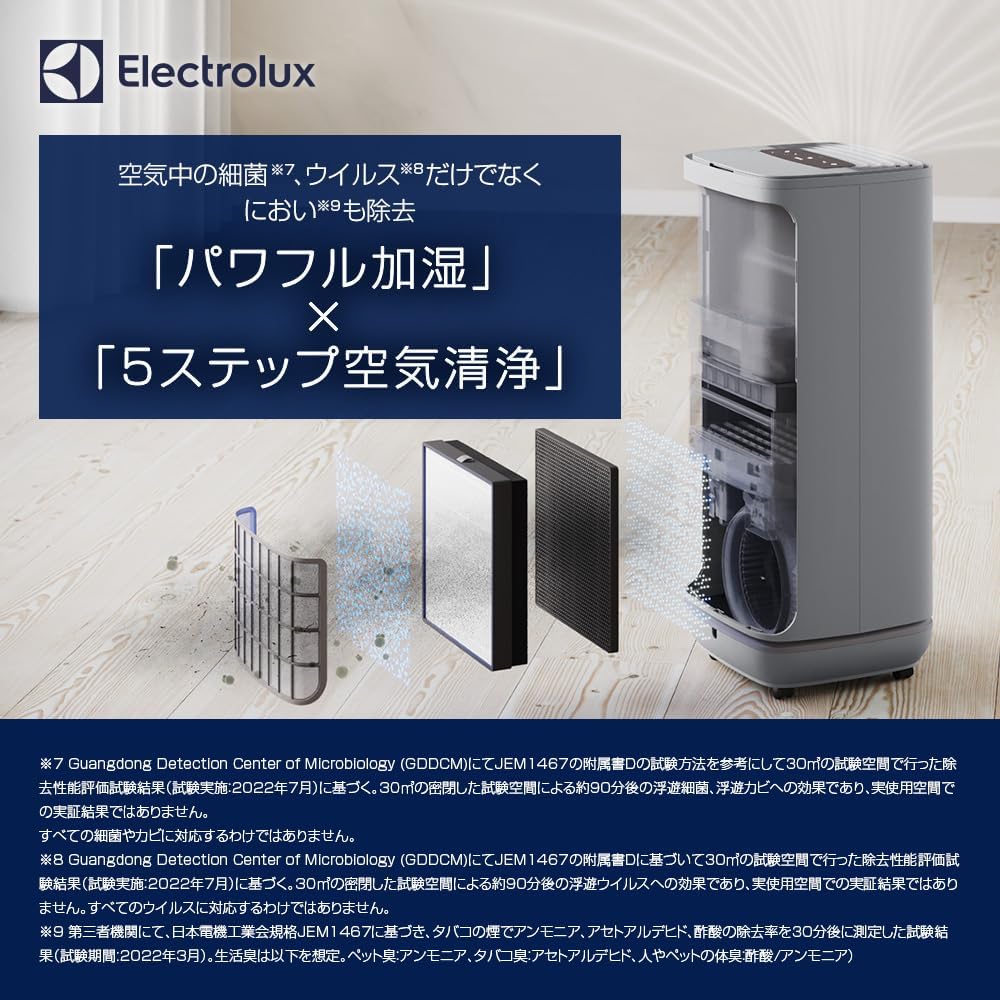
This image illustrates the internal structure of the air purifier, showing the multi-stage filtration system designed to capture bacteria, viruses, and odors, along with the humidification mechanism.
Key Features:
- Nordic Design: Organic form that blends with interior decor.
- User-Friendly Control Panel: Easy operation with buttons for mode, humidity, fan speed, filter replacement indicators, and water tank refill alerts.
- Safe and Clean Humidification: Evaporative humidification system produces no heat, ensuring safe use around children and pets.
- Powerful Air Purification: Capable of purifying rooms up to approximately 24 tatami mats (approx. 39.6 sqm).
- Pollen Mode (Developed for Japan): PM sensor settings selectable between PM2.5 (fine particles) and PM10 (pollen/dust-sized particles). Air quality light indicates real-time air quality in 4 stages (blue, green, orange, red) based on PM2.5 or PM10 levels.

This graphic highlights four main features: 99.9% removal of viruses and pollen, a slim design (28cm width), a smart mode for automatic air quality maintenance, and a stress-free, easy-to-refill water tank.
4. Setup
Follow these steps to set up your air purifier for the first time.
- Unpacking: Carefully remove the air purifier and all packaging materials from the box. Retain packaging for future transport or storage.
- Placement: Place the unit on a firm, level surface. Ensure there is at least 20 cm (8 inches) of space around the unit for optimal air circulation. Avoid placing it near heat sources, direct sunlight, or in areas with high humidity.
- Filter Installation: Open the filter compartment cover (usually located at the back or side). Remove all filters from their protective plastic packaging. Insert the filters according to the markings inside the compartment, ensuring they are securely seated. Close the cover.
- Fill Water Tank: Remove the water tank from the unit. Open the cap and fill the tank with clean tap water up to the maximum fill line. Close the cap securely and reinsert the water tank into the unit.
- Power Connection: Plug the power cord into a suitable electrical outlet. The unit will enter standby mode.
5. Operating Instructions
Familiarize yourself with the control panel and various operating modes.
Control Panel:
The intuitive control panel allows for easy adjustment of settings. Indicators for mode, humidity, fan speed, filter replacement, and water tank refill are clearly displayed.
Power On/Off:
- Press the Power button to turn the unit on or off.
Operating Modes:
- Auto Mode: The unit automatically adjusts fan speed and humidification levels based on real-time air quality and humidity readings.
- Pollen Mode: This specialized mode optimizes purification for pollen removal. The PM sensor can be set to detect either PM2.5 or PM10 particles.
- Humidification Mode: Activates the humidification function. You can adjust the desired humidity level.
- Fan Speed: Manually adjust the fan speed to your preference.
Air Quality Indicator:
The air quality light provides real-time feedback on your indoor air quality, based on PM2.5 or PM10 levels:
- Blue: Excellent air quality.
- Green: Good air quality.
- Orange: Moderate air quality.
- Red: Poor air quality.
6. Maintenance
Regular maintenance ensures optimal performance and extends the lifespan of your air purifier.
Filter Replacement:
The control panel will indicate when filters need replacement. Refer to the specific filter replacement instructions provided with your replacement filters. Filters should be replaced periodically based on usage and air quality.
Water Tank Cleaning:
Clean the water tank regularly to prevent mold and bacteria growth. Remove the tank, empty any remaining water, and rinse thoroughly with clean water. For deeper cleaning, use a mild detergent and a soft brush, then rinse completely. Allow to air dry before refilling.
Exterior Cleaning:
Wipe the exterior of the unit with a soft, damp cloth. Do not use abrasive cleaners or solvents.
7. Troubleshooting
If you encounter any issues, refer to the table below for common problems and solutions.
| Problem | Possible Cause | Solution |
|---|---|---|
| Unit does not turn on | No power supply; Power cord not properly plugged in | Check power outlet; Ensure power cord is securely plugged in |
| No air coming out / Weak airflow | Filters are clogged; Air inlets/outlets blocked | Check and replace filters if necessary; Ensure no obstructions around the unit |
| Humidification not working | Water tank is empty; Water tank not properly installed | Refill water tank; Ensure water tank is correctly seated |
| Unusual noise | Unit not on a level surface; Foreign object inside | Place on a level surface; Unplug and check for foreign objects |
| Air quality indicator always red/orange | High pollution levels; Sensor dirty | Allow time for purification; Clean the PM sensor according to maintenance instructions |
8. Technical Specifications
Detailed specifications for the Electrolux UltimateHome 500 Humidifying Air Purifier.
| Specification | Detail |
|---|---|
| Brand | Electrolux |
| Model Number | EP52-35 |
| Color | Walnut Beige |
| Product Dimensions (D x W x H) | 28.2 cm x 28.5 cm x 68.8 cm |
| Product Weight | 9.6 kg |
| Wattage | 65 W |
| Power Source | Electric |
| Water Tank Capacity | 2.7 liters |
| Applicable Room Size (Air Purification) | Up to approx. 24 tatami mats (approx. 39.6 sqm) |
| Other Functions | Bacteria removal |
| Battery Used | No |
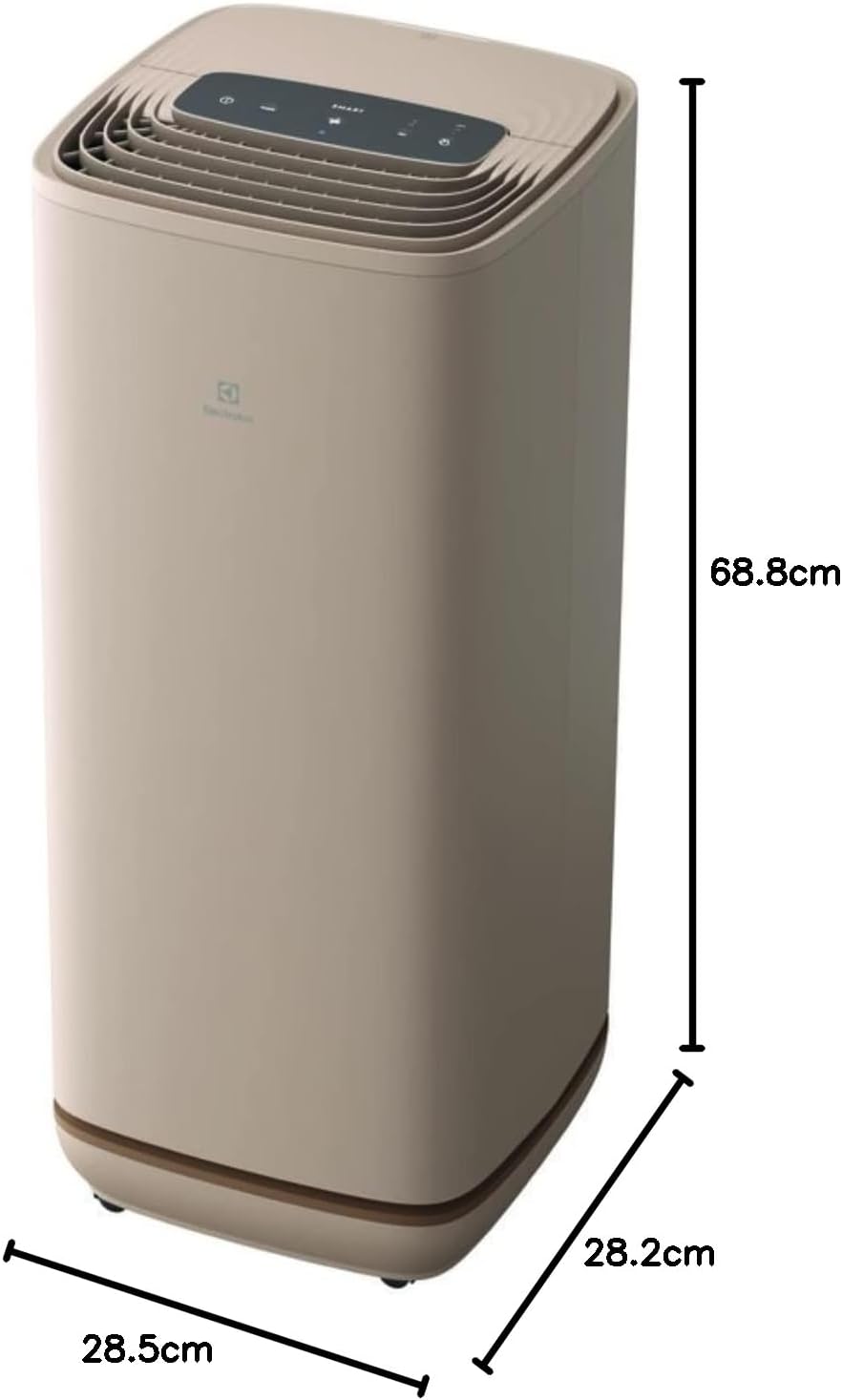
This image provides a visual representation of the product's dimensions, indicating a height of 68.8 cm, a width of 28.5 cm, and a depth of 28.2 cm.
9. Warranty Information
The Electrolux UltimateHome 500 Humidifying Air Purifier comes with a 1-year manufacturer's warranty from the date of purchase. This warranty covers defects in materials and workmanship under normal use. Please retain your proof of purchase for warranty claims. For service or support, please contact Electrolux customer service.
10. Comparison with UltimateHome 700
For reference, here is a comparison of the UltimateHome 500 with the UltimateHome 700 model.

This image displays a comparison table highlighting key differences between the UltimateHome 500 and UltimateHome 700 models, including applicable room size, humidification capacity, water tank volume, and weight.