
Uliptz WH203A
Uliptz Wireless Headphones User Manual
Model: WH203A
1. Product Overview
The Uliptz Wireless Headphones (Model WH203A) are designed to provide a high-fidelity audio experience with extended playtime and versatile connectivity. Featuring Bluetooth 5.3 technology, these over-ear headphones offer stable connections and can pair with two devices simultaneously. They are equipped with 40mm acoustic stereo drivers and 6 EQ modes for a customizable listening experience. The foldable and lightweight design ensures comfort for prolonged use and easy portability.

Figure 1: Uliptz Wireless Headphones (Model WH203A)
This image displays the Uliptz Wireless Headphones in black, showcasing their over-ear design and sleek appearance. The headphones feature soft earcups and an adjustable headband for comfortable wear.
2. What's in the Box
Upon opening the package, please verify that all the following components are included:
- Uliptz Wireless Bluetooth Headphones (1 unit)
- USB-C Charging Cable (1 unit)
- 3.5mm Audio Cable (1 unit)
- User Manual (1 unit)

Figure 2: Package Contents
This image shows the complete contents of the Uliptz Wireless Headphones package, including the headphones, USB-C charging cable, 3.5mm audio cable, and the user manual.
3. Specifications
| Feature | Detail |
|---|---|
| Model Name | WH203A |
| Connectivity Technology | Wireless (Bluetooth 5.3) |
| Wireless Profiles | HFP, A2DP, AVRCP |
| Operation Range | Up to 33 feet (10 meters) |
| Driver Size | 40mm Dynamic Drivers |
| Frequency Range | 20 Hz - 20 kHz |
| Impedance | 36 Ohm |
| Battery Capacity | 500mAh |
| Music/Talk Time | Up to 65 hours |
| Charging Time | Approx. 2.5 hours |
| Charging Voltage | 5V⎵1A |
| Weight | 201 grams |
| Dimensions | 14.48 x 11.43 x 7.87 cm |
| Material | Metal (headband slider) |
| Ear Placement | Over Ear |
| Control Type | Button Control |
| Microphone | Built-in (works in wireless mode only) |
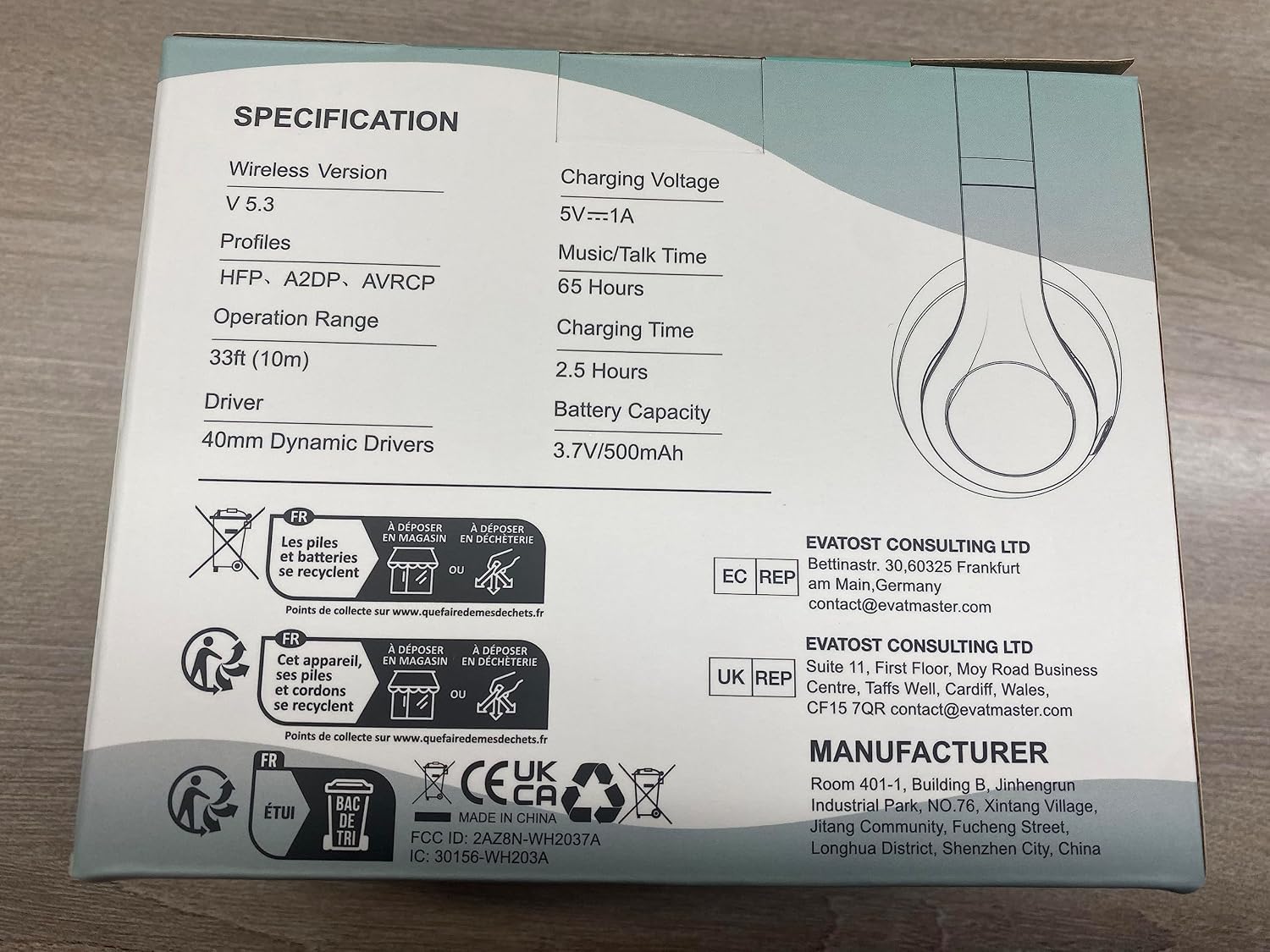
Figure 3: Product Specifications on Packaging
This image displays the back of the product packaging, detailing key specifications such as wireless version, charging voltage, music/talk time, charging time, and battery capacity.
4. Controls and Functions
Familiarize yourself with the control buttons located on the earcups for optimal use.

Figure 4: Intelligent Control Layout
This diagram highlights the various control buttons and interfaces on the Uliptz headphones, including volume controls, multi-function button, charging port, LED indicator, audio jack, microphone, and EQ button.
- Volume Up / Next Track Button: Press briefly to increase volume. Press and hold to skip to the next track.
- Multi-Function Button (MFB):
- Press and hold to power on/off.
- Press briefly to play/pause music.
- Press briefly to answer/end calls.
- Press and hold to reject calls.
- Double-press to activate voice assistant.
- Volume Down / Previous Track Button: Press briefly to decrease volume. Press and hold to go to the previous track.
- EQ Button: Press to cycle through the 6 available EQ sound modes.
- Type-C Charging Interface: Used for charging the headphones.
- LED Indicator: Displays power, charging, and connection status.
- 3.5mm Audio Interface: For wired connection using the included 3.5mm audio cable.
- Microphone: Built-in microphone for calls (functional in wireless mode only).
5. Setup Guide
5.1 Charging the Headphones
Before first use, fully charge the headphones. A full charge takes approximately 2.5 hours and provides up to 65 hours of playtime. A quick 10-minute charge can provide up to 4 hours of playtime.
- Connect the USB-C end of the charging cable to the Type-C Charging Interface on the headphones.
- Connect the USB-A end of the charging cable to a USB power adapter (5V⎵1A recommended) or a computer's USB port.
- The LED indicator will illuminate during charging and change color or turn off when fully charged. Refer to the specific LED behavior in the user manual for details.

Figure 5: Fast Charging Capability
This image illustrates the fast charging feature of the Uliptz headphones, indicating that a short charge provides significant playtime.
5.2 Bluetooth Pairing
The headphones use Bluetooth 5.3 for a stable and fast connection.
- Ensure the headphones are charged.
- Press and hold the Multi-Function Button (MFB) for approximately 3 seconds until the LED indicator flashes blue and red, indicating pairing mode.
- On your device (smartphone, tablet, PC), enable Bluetooth and search for available devices.
- Select "WH2037A" from the list of found devices.
- Once connected, the LED indicator will typically show a solid blue light or flash blue slowly.

Figure 6: Bluetooth 5.3 Connectivity
This image highlights the Bluetooth V5.3 technology integrated into the Uliptz headphones, ensuring a reliable and efficient wireless connection.
5.3 Multi-Device Connection
The Uliptz headphones can be paired with two devices simultaneously, allowing seamless switching between them.
- Pair the headphones with the first device (e.g., your phone) as described in Section 5.2.
- Disable Bluetooth on the first device. The headphones will re-enter pairing mode.
- Pair the headphones with the second device (e.g., your laptop) as described in Section 5.2.
- Enable Bluetooth on the first device again. The headphones should automatically connect to both devices.
- To switch between devices, simply pause audio on one device and start playing on the other. The headphones will automatically switch the audio source.

Figure 7: Smart One Connect Two Feature
This image demonstrates the headphones' ability to connect to two devices simultaneously, such as a phone and an iPad, for convenient switching.
6. Operating Instructions
6.1 Audio Playback
- Play/Pause: Press the Multi-Function Button (MFB) once.
- Next Track: Press and hold the Volume Up button.
- Previous Track: Press and hold the Volume Down button.
- Volume Up: Briefly press the Volume Up button.
- Volume Down: Briefly press the Volume Down button.
6.2 Call Management
- Answer/End Call: Press the Multi-Function Button (MFB) once.
- Reject Call: Press and hold the Multi-Function Button (MFB) for 2 seconds.
- Microphone: The built-in microphone functions only when the headphones are connected via Bluetooth.
6.3 EQ Modes
The headphones feature 6 Equalizer (EQ) modes to optimize sound for different music genres or preferences.
- Press the EQ button to cycle through the available sound modes.
- Listen for the audio prompt indicating the current EQ mode.

Figure 8: High Fidelity Audio Components
This image provides an exploded view of the headphone's internal components, emphasizing the 40mm dynamic drivers responsible for delivering high-fidelity audio and deep bass.
7. Maintenance and Care
Proper care will extend the lifespan of your Uliptz headphones.
- Cleaning: Use a soft, dry cloth to clean the headphones. Do not use abrasive cleaners or solvents.
- Storage: When not in use, store the headphones in a cool, dry place. The foldable design allows for compact storage.
- Water Resistance: These headphones are NOT water resistant. Avoid exposure to liquids, moisture, and extreme temperatures.
- Charging: Only use the provided USB-C charging cable or a certified equivalent.
- Avoid Impact: Do not drop or subject the headphones to strong impacts.

Figure 9: Portable and Foldable Design
This image demonstrates the foldable design of the headphones, making them easy to carry and store in a bag, which is beneficial for maintenance and protection during travel.
8. Troubleshooting
If you encounter issues with your headphones, refer to the following common problems and solutions:
| Problem | Solution |
|---|---|
| Headphones do not power on. | Ensure the headphones are charged. Connect them to a power source using the USB-C cable. |
| Cannot pair with device. |
|
| No sound or low volume. |
|
| Sound cutting in/out or distorted. |
|
| Microphone not working. |
|
9. Warranty and Support
Uliptz provides a worry-free after-sales experience for its products.
- Warranty: The product comes with a 12-month warranty from the date of purchase.
- Returns: Enjoy a 30-day free return policy.
- Customer Support: For any inquiries, technical assistance, or warranty claims, please contact Uliptz customer support. Contact information can typically be found on the product packaging or the official Uliptz website.
- Manufacturer: Uliptz
- Model Number: WH203A
For the most up-to-date support information, please visit the official Uliptz store on Amazon: Uliptz Amazon Store.
Ask a question about this manual
Ask about setup, troubleshooting, compatibility, parts, safety, or missing instructions. Manuals+ will review the question and use this page’s manual context to help answer it.