
1. Introduction
Thank you for choosing the ERICKHILL EWM03 Pin-Type Moisture Meter. This device is designed for accurate measurement of moisture content in various materials, including wood and building materials. It features a clear LCD display with backlight, multiple material modes, and convenient functions like data hold and auto-off. Please read this manual thoroughly before use to ensure proper operation and to extend the life of your device.
2. Safety Information
- The measurement pins are sharp. Handle with care to avoid injury.
- Do not insert the pins into live electrical circuits or materials.
- Keep the device away from water and high humidity environments to prevent damage.
- Do not attempt to disassemble or modify the device. Repairs should only be performed by qualified personnel.
- Remove batteries if the device will not be used for an extended period to prevent leakage.
3. Product Overview
Familiarize yourself with the components of your ERICKHILL EWM03 moisture meter:
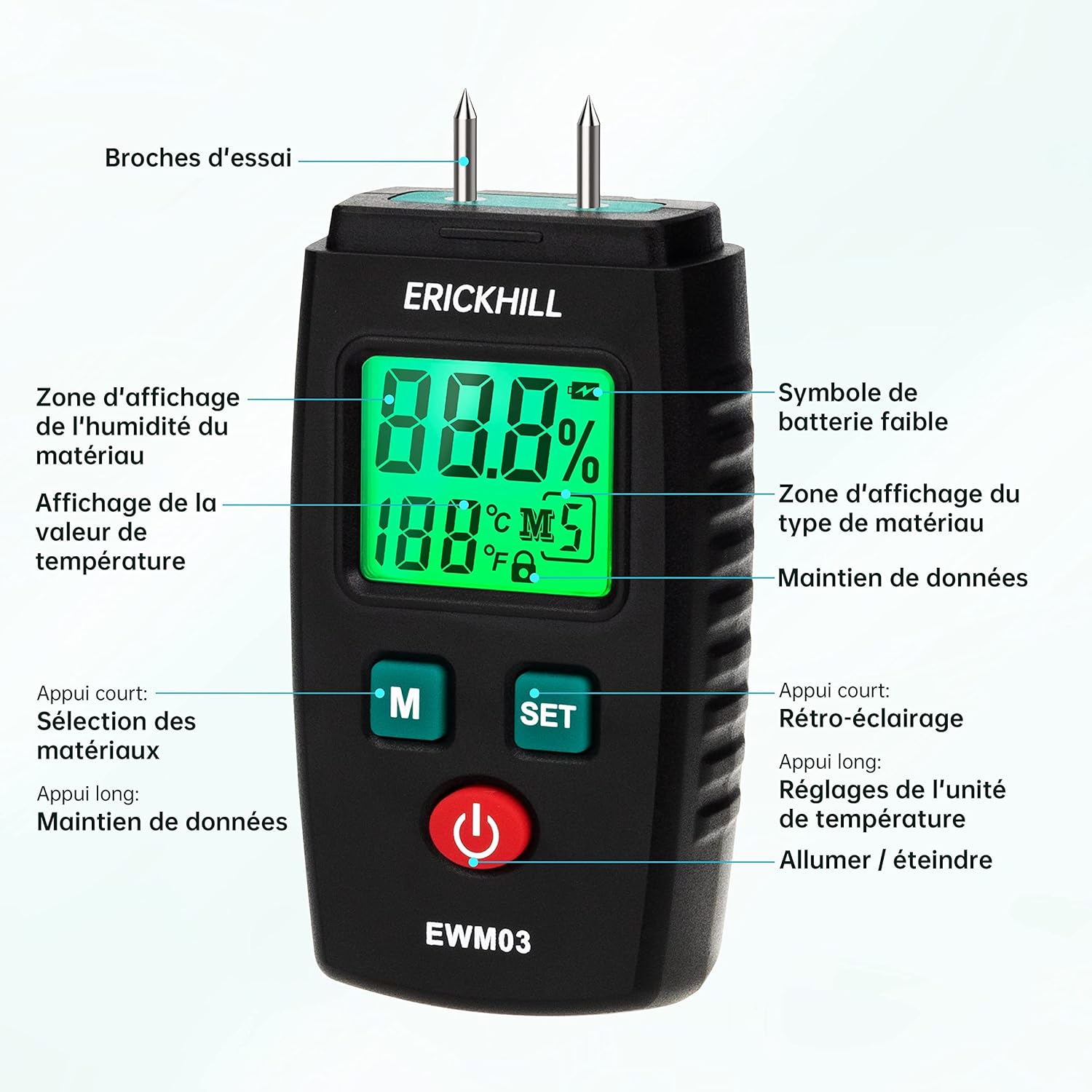
- Test Pins: Used to penetrate the material for moisture measurement.
- LCD Display: Shows moisture percentage, temperature, battery status, and selected material mode.
- 'M' Button: Short press to select material modes. Long press to activate/deactivate Data Hold.
- 'SET' Button: Short press to turn backlight on/off. Long press to switch temperature units (°C/°F).
- Power Button: Turns the device on or off.
- Protective Cap: Covers the test pins when not in use.
4. Setup
4.1 Battery Installation
- Locate the battery compartment cover on the back of the device.
- Slide or open the cover.
- Insert two (2) AAA batteries, observing the correct polarity (+/-) as indicated inside the compartment.
- Close the battery compartment cover securely.
Note: Two AAA batteries are included with the device.
4.2 Powering On/Off
- To Power On: Press the red power button. The LCD display will illuminate.
- To Power Off: Press the red power button again. The device will also automatically power off after approximately 10 minutes of inactivity to conserve battery life.
5. Operating Instructions
5.1 Selecting Material Modes
The ERICKHILL EWM03 offers 5 calibrated modes for different material types. To select a mode:
- Turn on the device.
- Short press the 'M' button repeatedly to cycle through the 5 material modes (M1, M2, M3, M4, M5). The selected mode will be displayed on the LCD.

Refer to the table below for detailed information on each material mode:
| Mode | Material Type | Measurement Range |
|---|---|---|
| M1 | Rhodesian Teak, White Red Bean, Brazilian Walnut | 6.0% ~ 39% |
| M2 | Walnut, Poplar, Teak | 7.0% ~ 48% |
| M3 | Fir, Lauan, White Fir, Maple, Ash, Sandalwood, Elm, Hemlock, Beech, Dipterocarp, Oak | 8.5% ~ 54% |
| M4 | Masson Pine, Chili Trees, White Pine, Larch, Birch, Linden | 9.5% ~ 65% |
| M5 | Bricks and other building materials | 0% ~ 15.2% |
5.2 Taking a Measurement
- Remove the protective cap from the test pins.
- Select the appropriate material mode (M1-M5) using the 'M' button.
- Carefully push the test pins into the material you wish to measure. Ensure both pins are fully inserted and make good contact with the material.
- Read the moisture percentage displayed on the LCD screen. The temperature of the environment will also be shown.
- After measurement, gently pull the pins out and replace the protective cap.


5.3 Data Hold Function
To freeze the current measurement on the display:
- While taking a measurement, long press the 'M' button. The 'HOLD' icon will appear on the display.
- To release the data hold, long press the 'M' button again.
5.4 Backlight Control
The LCD backlight improves visibility in low-light conditions:
- Short press the 'SET' button to turn the backlight on.
- Short press the 'SET' button again to turn the backlight off.
5.5 Temperature Unit Selection
To switch between Celsius and Fahrenheit:
- Long press the 'SET' button to toggle between °C and °F.
5.6 Automatic Power Off
The device is equipped with an automatic power-off function to save battery life. If no button is pressed for approximately 10 minutes, the meter will automatically shut down.
6. Maintenance
6.1 Cleaning
- Wipe the device with a soft, dry cloth.
- Do not use abrasive cleaners or solvents.
- Ensure the test pins are clean and free of debris after each use.
6.2 Storage
- Always replace the protective cap over the test pins when not in use.
- Store the device in a cool, dry place, away from direct sunlight and extreme temperatures.
- If storing for an extended period, remove the batteries to prevent leakage.
6.3 Battery Replacement
When the low battery symbol appears on the display, replace the batteries as described in Section 4.1. Use only AAA alkaline batteries.
7. Troubleshooting
If you encounter issues with your ERICKHILL EWM03, refer to the following common problems and solutions:
- Device does not power on:
- Check if batteries are installed correctly with correct polarity.
- Replace with new AAA batteries.
- No reading or unstable reading:
- Ensure the test pins are fully inserted into the material and making good contact.
- Verify that the selected material mode is appropriate for the material being tested.
- Clean the test pins if they appear dirty or corroded.
- Inaccurate readings:
- Ensure the correct material mode is selected.
- Test on a known dry material to verify baseline.
- Consider ambient temperature and humidity, which can slightly influence readings.
- Display is dim or flickering:
- Replace the batteries.
- If the issue persists, contact customer support.
8. Specifications
| Feature | Specification |
|---|---|
| Model | EWM03 |
| Measurement Principle | Pin-type (invasive) |
| Measurement Range (Wood) | 6.0% ~ 65% (depending on mode) |
| Measurement Range (Building Materials) | 0% ~ 15.2% |
| Accuracy | ± 2.0% |
| Temperature Range | 0°C ~ 50°C (32°F ~ 122°F) |
| Power Source | 2 x AAA batteries (included) |
| Automatic Power Off | Approx. 10 minutes of inactivity |
| Dimensions (L x W x H) | 4.3 x 2.44 x 9.35 cm |
| Weight | 280 grams |
| Probe Material | Stainless Steel |
| Casing Material | PVC |
9. Warranty and Support
ERICKHILL is committed to providing professional and high-quality meters. Your ERICKHILL EWM03 Moisture Meter comes with:
- 36-Month After-Sales Service: For any issues arising within 36 months of purchase, please contact our customer service for assistance.
- Lifetime Technical Support: We offer lifetime technical support to ensure you get the most out of your device.
For warranty claims, technical assistance, or any questions regarding your product, please contact ERICKHILL customer support through your purchase platform or the official ERICKHILL website.