
1. Introduction
Thank you for choosing the GYMAX Folding Treadmill. This smart 2-in-1 running machine is designed for both walking and running, offering a versatile workout solution for your home gym or small apartment. It features an LED monitor, adjustable device holder, and smart APP control for a convenient and effective exercise experience.
This manual provides essential information for the safe and efficient operation, assembly, and maintenance of your treadmill. Please read it thoroughly before first use and keep it for future reference.
2. Safety Information
WARNING: To reduce the risk of serious injury, read all important precautions and instructions in this manual before using the treadmill.
- Always place the treadmill on a level surface.
- Keep children and pets away from the treadmill during operation.
- Ensure adequate clear space around the treadmill (at least 2 feet on sides and rear).
- Wear appropriate athletic footwear.
- Do not operate the treadmill if it is damaged or malfunctioning.
- Always attach the safety key clip to your clothing before starting the treadmill.
- Do not use the treadmill on carpet to avoid overheating.
- Maximum user weight capacity: 220 lbs (as per product description) / 256 lbs (as per specifications). Please adhere to the lower limit for safety.
3. Package Contents
Please check that all components are present and undamaged:
- Treadmill Unit
- Remote Control
- Silicone Oil (for lubrication)
- Instruction Manual
- Safety Key
4. Assembly
The GYMAX Folding Treadmill requires minimal assembly. It is designed for effortless setup and folding.
- Carefully remove the treadmill from its packaging.
- Place the treadmill on a flat, stable surface.
- To unfold for running mode, lift the handlebar until it locks into place. Secure any locking mechanisms as per the included instruction manual.
- To use in walking mode (under desk), ensure the handlebar is folded down and secured.
- Connect the power cord to a grounded outlet.

The treadmill is designed for easy storage with its folding design and effortless movement using flexible wheels.
5. Operating Instructions
5.1. Modes of Operation
The GYMAX Folding Treadmill offers two distinct exercise modes:
- Walking Mode: Ideal for light exercise or use under a desk. Speed range: 0.6 - 2.5 mph. In this mode, the handlebar is typically folded down.
- Running Mode: For more intense workouts. Speed range: 0.6 - 9 mph. The handlebar should be upright and locked for stability.

The treadmill supports both walking and running modes to suit various fitness needs.
5.2. LED Display and Remote Control
The treadmill features a clear LED display that shows real-time exercise data, including Time, Speed, Distance, and Calories burned. The included remote control allows for easy adjustment of settings.
- Start/Stop: Press the corresponding button on the remote or console to start or stop the treadmill.
- Speed Adjustment: Use the '+' and '-' buttons to increase or decrease the speed.
- Data Retention: If you pause the treadmill, exercise data will remain displayed for approximately 5 minutes.

The clear LED display and remote control provide convenient access to your workout data and settings.
5.3. Smart APP Control (Gymax APP)
Enhance your workout experience by connecting your treadmill to the intelligent Gymax APP via Bluetooth. The app allows you to:
- Record and track your exercise data.
- Participate in training courses.
- Compete with other users.
- Switch speed units (e.g., to KM).
A phone stand is integrated into the treadmill's design, allowing you to conveniently place your device for app use or entertainment.
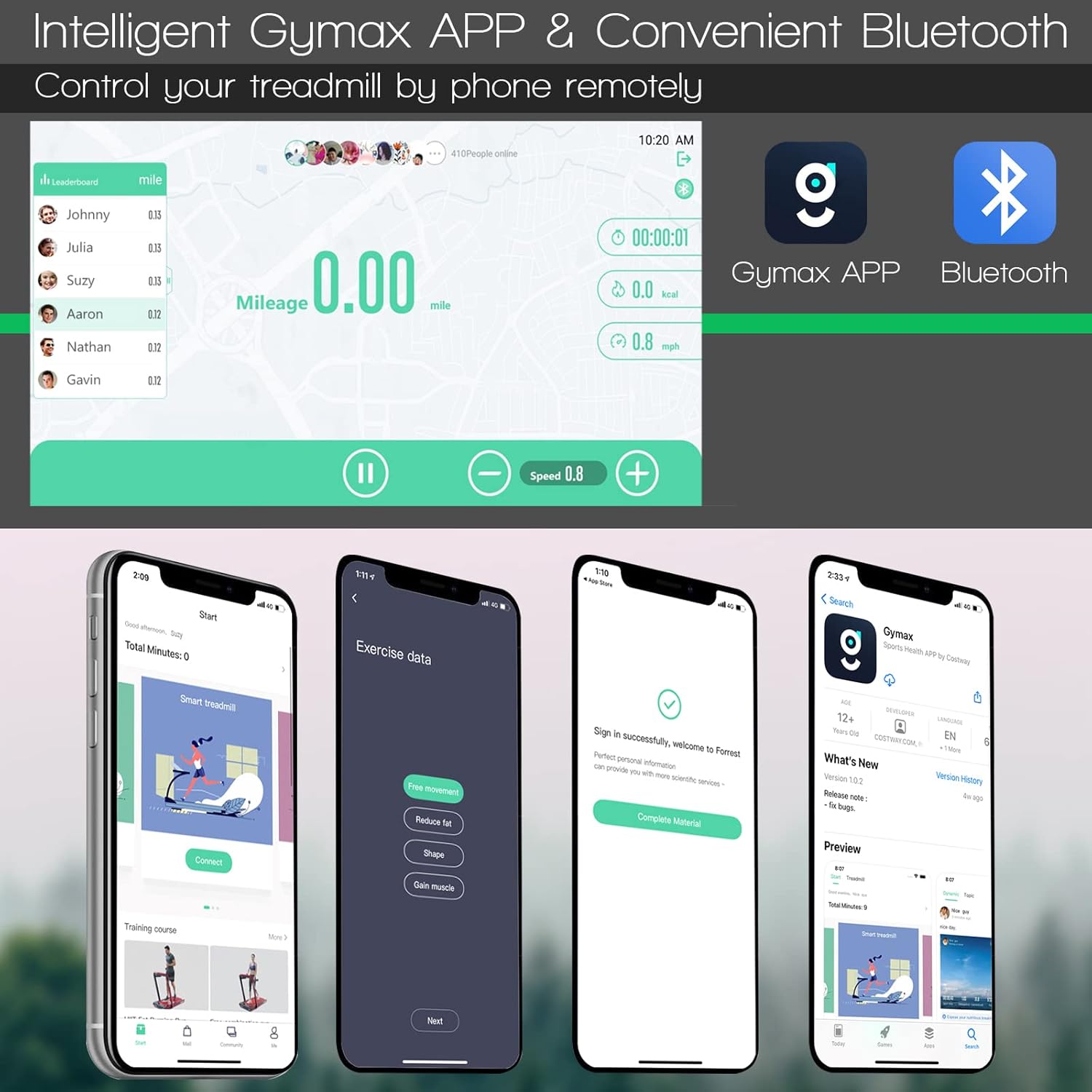
Control your treadmill remotely and track progress using the Gymax APP and Bluetooth connectivity.
5.4. Safety Key
The treadmill is equipped with a security lock (safety key) that ensures your safety during operation. Attach the safety key clip to your clothing. If the safety key is dislodged from the console, the treadmill will immediately stop, preventing potential accidents.
6. Maintenance
Regular maintenance will prolong the life of your treadmill and ensure optimal performance.
6.1. Cleaning
- Wipe down the treadmill surfaces with a damp cloth after each use to remove sweat and dust.
- Do not use abrasive cleaners or solvents.
- The diamond pattern running belt is designed to be easy to clean.
6.2. Lubrication
The running belt requires periodic lubrication with the provided silicone oil to ensure smooth operation and prevent wear. Refer to the detailed instructions in your included manual for the correct lubrication procedure and frequency.

The 5-layer shock-absorbing running belt protects your joints and ensures a quiet workout.
7. Troubleshooting
If you encounter issues with your treadmill, please refer to the following common solutions:
- Treadmill not starting: Ensure the power cord is securely plugged in and the safety key is properly inserted. Check the power switch.
- Belt slipping or uneven: This may indicate a need for belt tension adjustment or lubrication. Refer to the maintenance section and your detailed manual.
- Unusual noises: Check for loose parts or foreign objects under the belt. If the noise persists, contact customer support.
- Display not working: Ensure power connection. If the display is partially working or showing incorrect numbers, try restarting the machine. If issues persist, contact support.
For more complex issues, please consult the full instruction manual or contact GYMAX customer support.
8. Specifications

Detailed dimensions and specifications of the GYMAX Folding Treadmill.
| Feature | Specification |
|---|---|
| Brand | GYMAX |
| Color | Black |
| Product Dimensions (Unfolded) | 52"D x 27"W x 43.5"H |
| Folded Size | 54.5" x 27" x 5" |
| Item Weight | 75 Pounds |
| Material | Alloy Steel, Acrylonitrile Butadiene Styrene (ABS) |
| Maximum Speed | 9 Miles per Hour |
| Minimum Speed | 0.6 Miles per Hour |
| Maximum Horsepower | 2.25 Horsepower |
| Maximum Weight Recommendation | 256 Pounds |
| Running Area (Runway Size) | 45.5" x 15" (L x W) / 39" x 16" (L x W) - Note: Discrepancy in source data, refer to physical product for exact dimensions. |
| Display Type | LED |
| Connectivity Technology | Bluetooth |
| Power Source | Corded Electric (110V, 50/60Hz) |
| Included Components | Remote Control, Silicone Oil, Treadmill, Instruction Manual |
9. Warranty and Support
The GYMAX Folding Treadmill comes with a 6-month warranty. Please retain your proof of purchase for warranty claims.
For technical support, troubleshooting assistance, or warranty inquiries, please contact GYMAX customer service through the retailer where you purchased the product or visit the official GYMAX website for contact information.


