
Freenove FNK0077
Freenove Tank Robot Kit FNK0077 Instruction Manual
Model: FNK0077
Introduction
This manual provides detailed instructions for the assembly, operation, and maintenance of the Freenove Tank Robot Kit. This programmable robot kit offers multiple functions for users interested in robotics and programming.
The kit requires assembly and does not include a Raspberry Pi board or batteries. Please refer to the downloadable tutorial for battery specifications and purchasing information.
Packing List
Verify all components are present before beginning assembly. The kit includes various robot parts such as the chassis, clamp, camera, and ultrasonic sensor. A detailed list is provided in the downloadable tutorial.
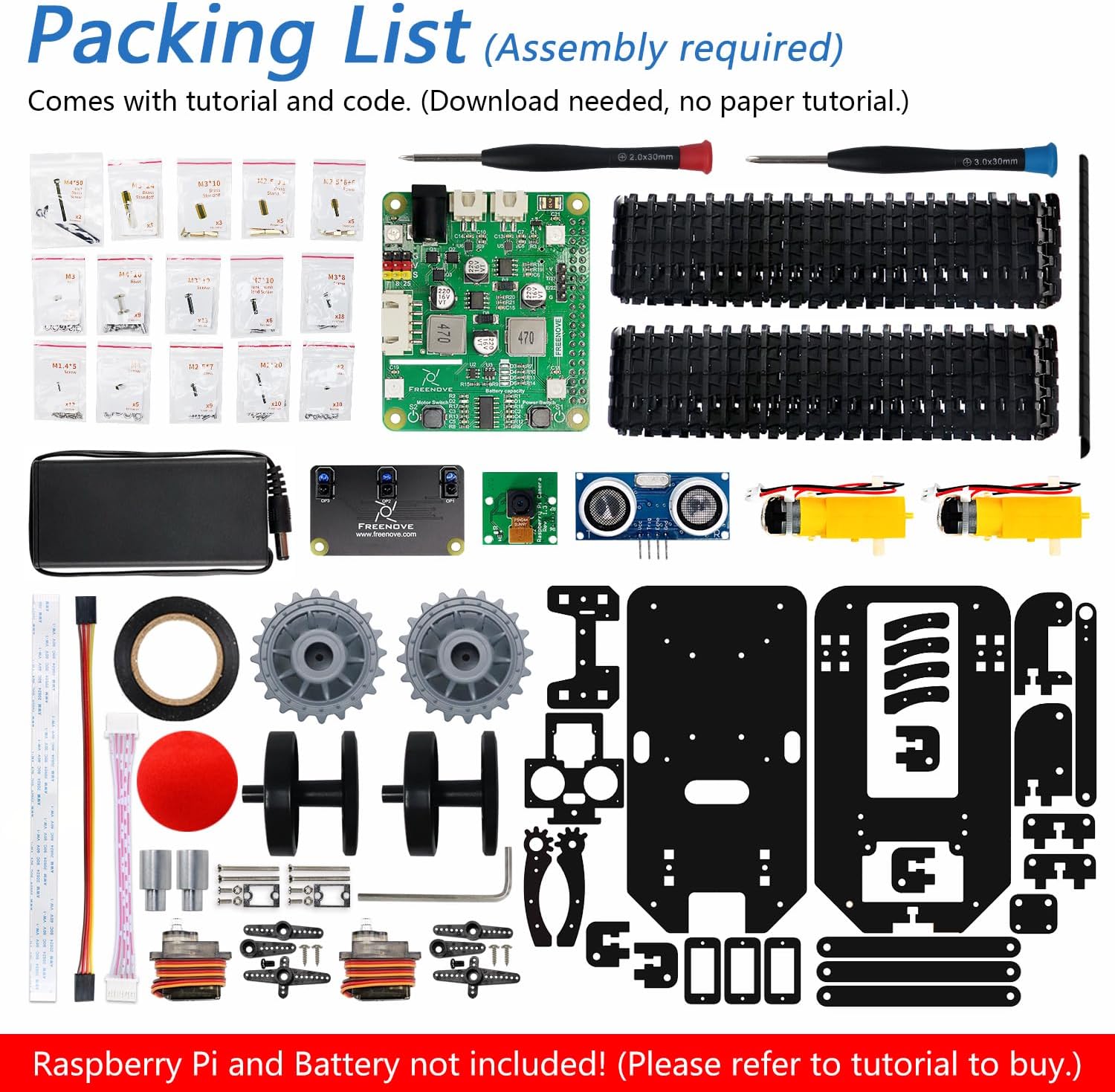
Image: All components included in the Freenove Tank Robot Kit, laid out for inspection. Note that the Raspberry Pi and batteries are not included.
Setup and Assembly
The Freenove Tank Robot Kit requires assembly. A comprehensive, step-by-step assembly guide and complete Python code are provided in a downloadable tutorial. The download link can be found on the product box.
Important: This kit does not include a Raspberry Pi board or batteries. You will need to acquire these separately. Recommended Raspberry Pi models include 5, 4B, 3B+, 3B, and 3A+. Other models like 2B, 1B+, 1A+, Zero 2 W, Zero W, and Zero 1.3 are compatible but may require additional parts as detailed in the tutorial.
Required Items (Not Included):
- Raspberry Pi board and necessary accessories.
- Two (2) non-standard batteries. Refer to the downloaded tutorial for specific battery type and purchasing recommendations.
- One (1) charger for the batteries.

Image: The assembled Freenove Tank Robot demonstrating its movement capabilities (forward, backward, left, right, turn in place) and the functionality of its robotic arm for grabbing and releasing objects.
Software and Programming:
The kit comes with complete Python code. Follow the tutorial to set up the Raspberry Pi and load the necessary software for the robot's functions.

Image: Example pages from the Freenove Tank Robot Kit's digital tutorial, illustrating detailed assembly instructions and Python code snippets for programming the robot.
Operating Instructions
Once assembled and programmed, the Freenove Tank Robot can perform various tasks. Ensure the batteries are fully charged and the Raspberry Pi is correctly powered before operation.
Control Methods:
- Computer: Control the robot using a laptop or desktop running Windows, macOS, or Raspberry Pi OS. Refer to the tutorial for client software installation and usage.
- Android Device: Use an Android phone or tablet (Android 5.0 or later) with the Freenove App installed. Search "Freenove" on Google Play.
- iPhone: Use an iPhone (iOS 10 or later) with the Freenove App installed. Search "Freenove" on the App Store.

Image: The Freenove Tank Robot demonstrating remote control capabilities via both a smartphone app and a computer interface, showing real-time camera feed and control options.
Key Functions:
- Crawler Chassis: Enables movement across various terrains.
- Grab Objects: Utilize the liftable clamp to pick up and move small objects.
- Ball Tracing: Program the robot to follow a red ball using its camera.
- Line Tracking: Program the robot to follow a designated line.
- Obstacle Avoidance: The ultrasonic distance sensor allows the robot to detect and avoid obstacles.
- Camera Functionality: Stream live video and enable object recognition features.
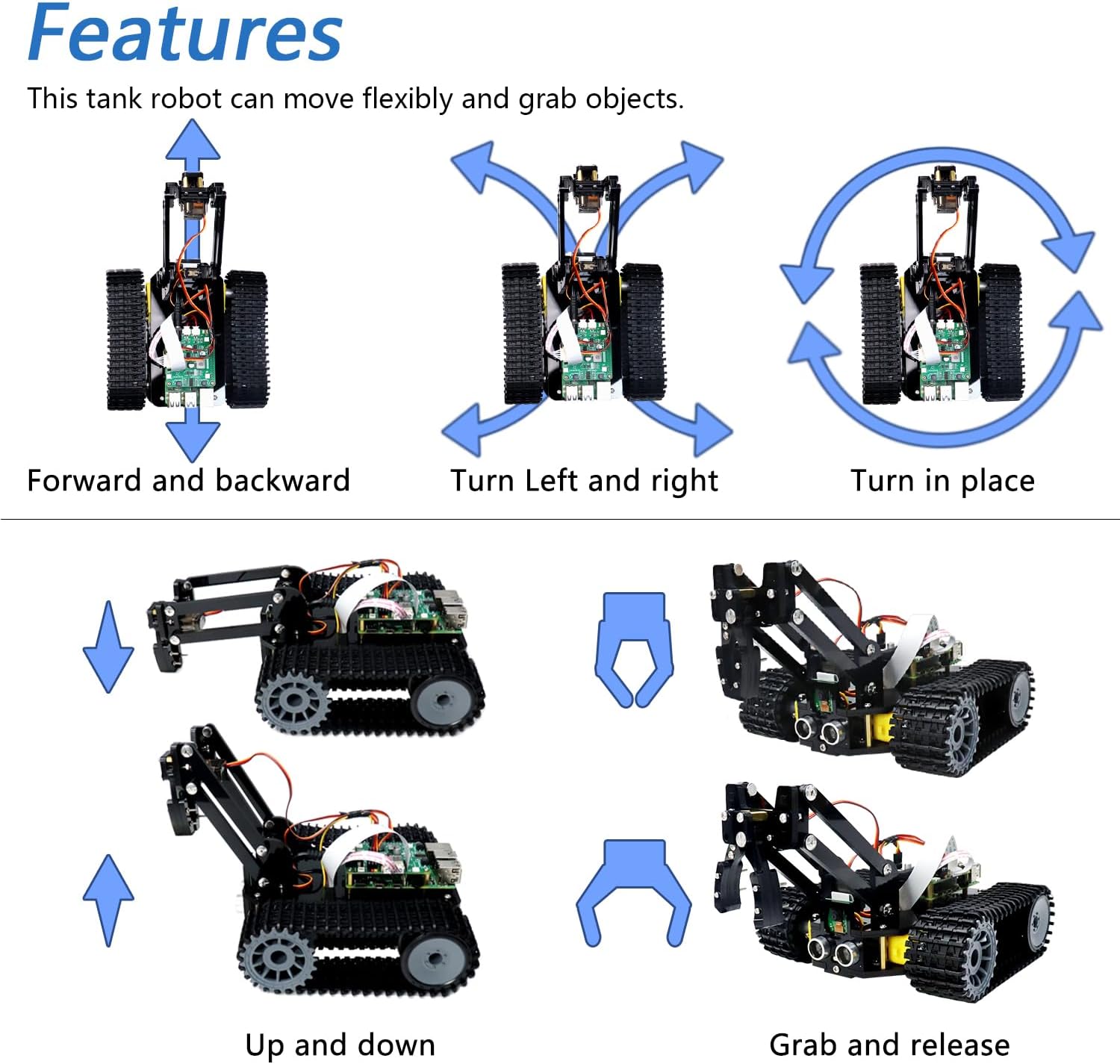
Image: A visual representation of the Freenove Tank Robot performing its core functions, including navigating a track (line tracking), avoiding obstacles, and using its gripper to interact with objects.
Maintenance
Regular maintenance ensures the longevity and optimal performance of your Freenove Tank Robot Kit.
- Cleaning: Keep the chassis, tracks, and sensors free from dust and debris. Use a soft, dry cloth for cleaning. Avoid using liquids directly on electronic components.
- Battery Care: Always use the recommended charger for your batteries. Do not overcharge or completely drain the batteries. Store batteries in a cool, dry place when not in use.
- Component Inspection: Periodically check all connections, screws, and moving parts (tracks, servos, clamp) for looseness or damage. Tighten screws as needed.
- Software Updates: Check the Freenove official website or tutorial download page for any software or firmware updates for the Raspberry Pi and robot control system.
Troubleshooting
This section addresses common issues you might encounter with your Freenove Tank Robot Kit.
| Problem | Possible Cause | Solution |
|---|---|---|
| Robot does not power on. |
|
|
| Robot does not respond to remote control. |
|
|
| Robotic arm/clamp not moving correctly. |
|
|
| Camera feed is not displayed. |
|
|
For further assistance, refer to the detailed troubleshooting section in the downloadable tutorial or contact Freenove technical support.
Specifications
| Feature | Detail |
|---|---|
| Model Name | FNK0077 |
| Brand | Freenove |
| Product Type | Programmable Tank Robot Kit |
| Educational Objective | Programming Skills Development |
| Compatible Raspberry Pi Models | Raspberry Pi 5 / 4B / 3B+ / 3B / 3A+ (Recommended); 2B / 1B+ / 1A+ / Zero 2 W / Zero W / Zero 1.3 (Compatible with extra parts) |
| Control Methods | Computer (Windows, macOS, Raspberry Pi OS), Android App (5.0+), iOS App (10+) |
| Power Source | Battery Powered (2 non-standard batteries, not included) |
| Assembly Required | Yes |
| Material Type | Plastic |
| Color | Black |
| Item Weight | 948 Grams |
| Item Dimensions (L x W x H) | 22.5 cm x 15.3 cm x 16 cm |
| Recommended Age Range | 6 to 10 years (72 to 120 months) |

Image: The assembled Freenove Tank Robot with its dimensions (19.5cm length, 17cm width, 16cm height) and the packaging box dimensions (22.5cm length, 15.3cm width, 6.5cm height).
Warranty Information
Freenove products are designed for quality and performance. For specific warranty details, please refer to the documentation provided with your kit or visit the official Freenove website. Typically, products are covered against manufacturing defects for a limited period from the date of purchase.
The return policy allows for refunds or replacements within 14 days of purchase, subject to terms and conditions.
Support and Contact
Freenove provides technical support to assist with any questions or problems you may encounter during assembly or operation.
- Online Tutorial: The most comprehensive resource for assembly, programming, and troubleshooting is the downloadable tutorial. The link is available on the product box.
- Freenove Website: Visit the official Freenove website for additional resources, FAQs, and contact information.
- Email Support: For direct technical assistance, please refer to the contact details provided in the downloadable tutorial or on the Freenove website.
Ask a question about this manual
Ask about setup, troubleshooting, compatibility, parts, safety, or missing instructions. Manuals+ will review the question and use this page’s manual context to help answer it.