
Kazeila HTC-326
Kazeila Dual Outlet Water Timer User Manual
Model: HTC-326
1. Introduction
Thank you for choosing the Kazeila Dual Outlet Water Timer. This device is designed to automate your garden watering system, providing efficient and precise irrigation for various applications such as gardens, lawns, and drip systems. Please read this manual carefully before operation to ensure proper setup and optimal performance.
2. Product Overview
The Kazeila Dual Outlet Water Timer features a large, easy-to-read LCD display and intuitive controls, allowing for flexible programming of two independent watering zones. Its robust design ensures durability for outdoor use.
2.1 Key Features
- Dual Outlet Separate Automatic Watering: Schedule watering independently for two different areas.
- Flexible Irrigation Schedule: Watering duration from 1 second to 1 hour 39 minutes; intervals from 1 hour to 15 days.
- Programmable & Easy to Operate: Simple setting of clock, start time, duration, and frequency.
- Large LCD Display: Clear display of current time, program details, and other pertinent information.
- Easy & Convenient Installation: Compact design with a swivel coupling for quick setup.
- Waterproof & Durable: IPX5 rated waterproofing with reinforced nylon fibers for outdoor use.
- User-Friendly Programs: Includes Timed Irrigation, Manual Watering, and Rain Delay functions.

Figure 2.1: Front view of the Kazeila Dual Outlet Water Timer, showing its large LCD display and two independent outlets.

Figure 2.2: An annotated image of the water timer's LCD display, highlighting key information such as current time, watering start time, duration, frequency, and time until next watering.
3. Components and Package Contents
Upon opening the package, please ensure all items listed below are present and in good condition:
- 1 × Sprinkler Timer (Kazeila Dual Outlet Water Timer HTC-326)
- 1 × 3mm O-Ring
- 1 × User Manual
Note: 2 × AAA 1.5V Alkaline batteries are required for operation and are not included in the package.
4. Setup
4.1 Battery Installation
- Locate the battery compartment on the back of the timer.
- Open the battery compartment cover.
- Insert two (2) AAA 1.5V Alkaline batteries, ensuring correct polarity (+/-).
- Close the battery compartment cover securely. The internal rubber ring helps protect the batteries from water.
4.2 Connecting the Timer to a Faucet
- Ensure the faucet is turned off.
- Thread the swivel coupling of the water timer onto your outdoor faucet. Hand-tighten only; do not overtighten.
- Connect your garden hoses or irrigation lines to the two independent outlets at the bottom of the timer.
- Ensure all connections are secure to prevent leaks.
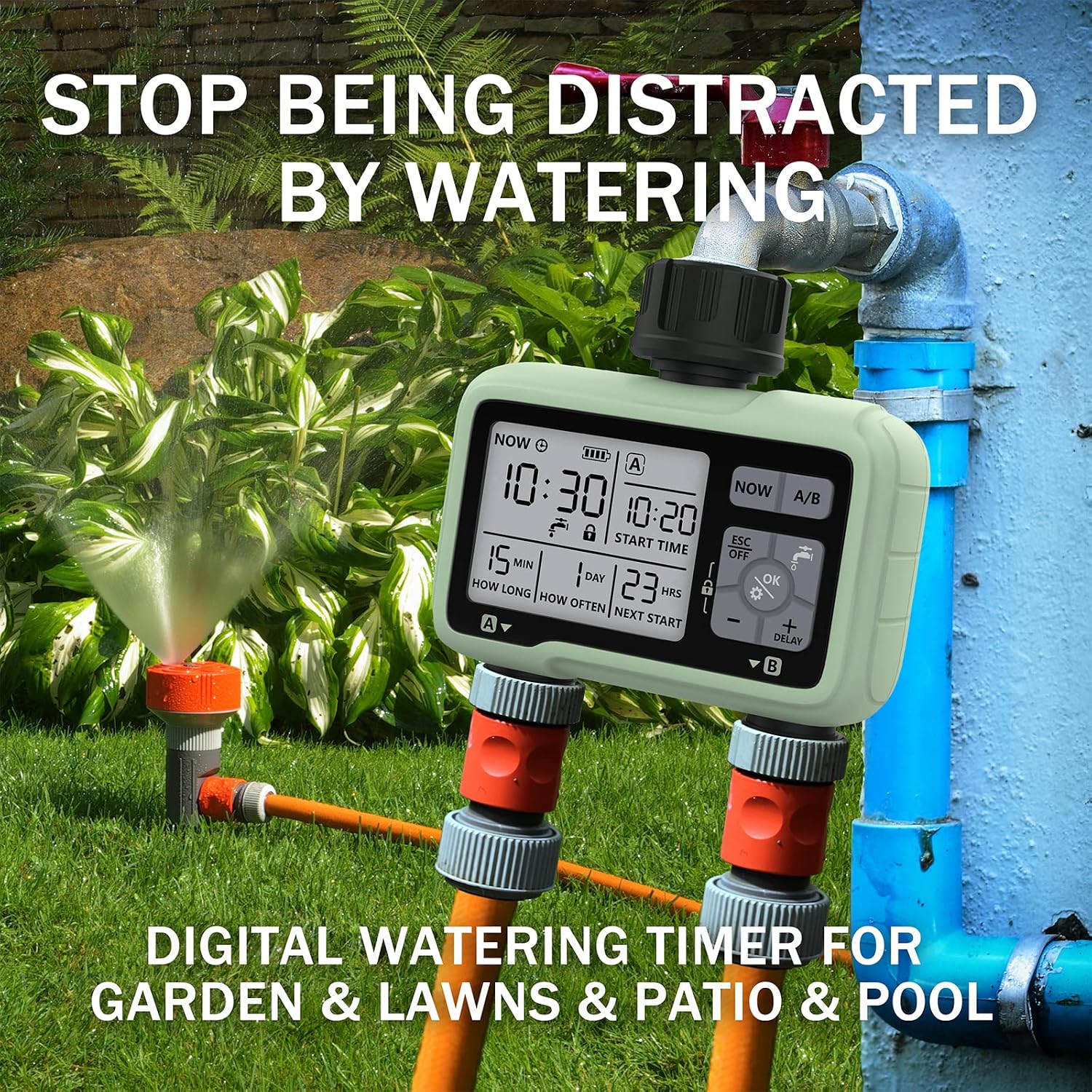
Figure 4.1: The Kazeila water timer connected to a garden faucet, demonstrating its use in an outdoor watering system.
5. Operation and Programming
The Kazeila water timer offers three main watering modes: Timed Irrigation, Manual Watering, and Rain Delay. Programming is done via the large LCD screen and control buttons.
5.1 Setting the Clock
Before programming, set the current time on the timer. Refer to the LCD display and use the control buttons (NOW, A/B, ESC/OFF, OK, +, -, DELAY) to adjust the time.
5.2 Timed Irrigation (Automatic Watering)
This mode allows you to set a fully automated watering schedule for each outlet (A and B) independently.
- Select Outlet: Use the A/B button to switch between Outlet A and Outlet B for programming.
- Set Start Time: Use the controls to set the desired time for watering to begin.
- Set Watering Duration (HOW LONG): Specify how long the watering cycle should last (from 1 second to 1 hour 39 minutes).
- Set Watering Frequency (HOW OFTEN): Determine how often the watering cycle repeats (from 1 hour to 15 days).
- Confirm Settings: Press OK to save your programmed schedule.
The timer will now automatically execute the watering schedule for the selected outlet.

Figure 5.1: Illustration of the dual outlet functionality, with Zone 1 watering a plant bed and Zone 2 watering a lawn area simultaneously.
5.3 Manual Watering
This function allows for immediate, on-demand watering without affecting your pre-programmed schedule.
- Press the NOW button to activate manual watering.
- Use the + or - buttons to set the desired duration for manual watering.
- Press OK to start manual watering.
- To stop manual watering, press ESC/OFF.
5.4 Rain Delay
The Rain Delay feature allows you to temporarily suspend your scheduled irrigation plan for a set period, conserving water during rainy conditions.
- Press the DELAY button.
- Use the + or - buttons to select the desired delay period (e.g., 24 hours, 48 hours, 72 hours).
- Press OK to activate the rain delay. The timer will resume its schedule after the delay period ends.
- To cancel rain delay, press ESC/OFF.
6. Maintenance
Proper maintenance ensures the longevity and optimal performance of your Kazeila water timer.
- Battery Replacement: Replace batteries when the low battery indicator appears on the LCD screen. Typically, batteries last up to 6 months.
- Cleaning: Periodically clean the exterior of the timer with a damp cloth. Do not use abrasive cleaners.
- Winterization: Before freezing temperatures, disconnect the timer from the faucet and store it indoors in a dry, frost-free location. Drain any remaining water from the timer.
- O-Ring Inspection: Regularly check the O-ring inside the swivel coupling for wear or damage. Replace if necessary to prevent leaks.

Figure 6.1: The Kazeila water timer installed outdoors, emphasizing its stable and durable construction, including corrosion resistance, UV protection, and waterproofing.
7. Troubleshooting
If you encounter issues with your Kazeila water timer, refer to the following common problems and solutions:
| Problem | Possible Cause | Solution |
|---|---|---|
| Timer not turning on/LCD blank | Dead or incorrectly installed batteries. | Replace batteries with fresh AAA 1.5V Alkaline batteries. Ensure correct polarity. |
| No water flow | Faucet is off; low water pressure; timer not programmed; clogged filter. | Ensure faucet is fully open. Check water pressure. Verify programming. Clean the filter washer at the inlet. |
| Water leaking from connections | Loose connections; damaged O-ring; missing washer. | Tighten all connections. Inspect and replace O-ring or washer if damaged or missing. |
| Timer not following schedule | Incorrect programming; rain delay active. | Review and re-enter your watering schedule. Check if rain delay is active and cancel if needed. |
8. Specifications
| Specification | Value |
|---|---|
| Model | HTC-326 |
| Product Dimensions | 4.7 x 2.2 x 4.8 inches (11.9 x 5.6 x 12.2 cm) |
| Item Weight | 14 oz (0.875 lbs) / 24 oz (1.5 lbs) - Note: Discrepancy in source data, refer to actual product. |
| Waterproof Rate | IPX5 |
| Outlet Type | Dual Outlet |
| Material | Nylon |
| Power Source | 2 × AAA 1.5V Alkaline batteries (not included) |
| Manufacturer | NINGBO HANCI ELECTRICAL CO., LTD. |

Figure 8.1: Dimensional drawing of the Kazeila water timer, indicating its length, width, and height.
9. Warranty and Support
For warranty information or technical support, please contact Kazeila customer service. Refer to the product packaging or the official Kazeila website for the most up-to-date contact details.
Manufacturer: NINGBO HANCI ELECTRICAL CO., LTD.
Ask a question about this manual
Ask about setup, troubleshooting, compatibility, parts, safety, or missing instructions. Manuals+ will review the question and use this page’s manual context to help answer it.