
1. Introduction
This manual provides detailed instructions for the installation, operation, and maintenance of your TAFFIO 7-inch Touchscreen Android Head Unit. This unit is designed for specific compatibility with Opel Insignia models from 2009 to 2014.
The system features an Android 12 operating system with an Octa-Core 1.6Ghz CPU, 4GB RAM, and 64GB Flash storage, offering a responsive and intuitive user experience. It includes integrated CarPlay and Android Auto functionality without requiring additional adapters, and built-in Wi-Fi for internet connectivity.
The unit is designed for a customized original fit, matching the vehicle's dashboard aesthetics, and supports steering wheel controls for seamless integration.
2. What's in the Box
Carefully unpack the contents and ensure all items listed below are present and undamaged. If any items are missing or damaged, please contact customer support.
- 1x Multimedia + Navigation System (Head Unit)
- 1x Power cable + Canbus Decoder
- 1x Audio/Video Cables
- 1x GPS Antenna
- 1x Radio antenna adapter
- 1x User Manual (English)
- 1x PDF manual for download (details provided separately)

3. Installation Guide
The TAFFIO Head Unit is designed for a Plug & Play installation, eliminating the need for additional adapters or mounting frames. However, professional installation is recommended to ensure proper functionality and avoid damage to your vehicle or the unit.
3.1 Wiring Connections
Refer to the connection diagram below for proper wiring. Ensure all connections are secure before powering on the unit.
- GPS Antenna: Connect the GPS antenna for navigation functionality.
- Power Cable + Canbus Decoder: Connect to the vehicle's original power harness. The Canbus decoder ensures communication with the vehicle's systems, including steering wheel controls.
- Audio/Video Cables: Utilize these for AUX A/V input and audio outputs.
- USB Ports: Connect external USB devices for media playback or data transfer.
- Rear Camera Input: Connect a compatible rear-view camera. The system supports automatic switching when reversing.

3.2 Important Notes for Opel Insignia
- Steering Wheel Control: The unit supports original steering wheel controls.
- Original Rear Camera: Original rear cameras are generally NOT supported. An aftermarket camera connected to the unit's dedicated input is required for rear-view functionality.
- Keypad Buttons: Keypad buttons for the radio on the original vehicle console are NOT supported if your vehicle originally had navigation. All functions will be operated via the touchscreen and steering wheel controls. This image shows the unit installed in a dashboard, highlighting the original car buttons that may not be supported.

4. Operating Instructions
4.1 General Interface
The unit features an intuitive user interface with a full graphic screen and capacitive multi-touch control. Navigate through menus and applications by touching and swiping on the 7-inch display.
4.2 Radio Functionality
Access the FM/AM tuner to listen to radio stations. The system supports RDS (Radio Data System) for displaying station names and other information.

4.3 Bluetooth Connectivity
The unit includes Bluetooth for hands-free phone calls and A2DP music streaming. Pair your mobile phone (Android or iPhone) to synchronize contacts and play audio wirelessly.


4.4 GPS Navigation
Utilize the integrated GPS navigation system with current map material. The unit supports a 2-Zone function, allowing you to listen to radio or music while navigation instructions are active.
4.5 Media Playback
Play music, view pictures, and watch videos directly from USB, SD, or SDHC cards. The system supports various media formats.
4.6 CarPlay & Android Auto
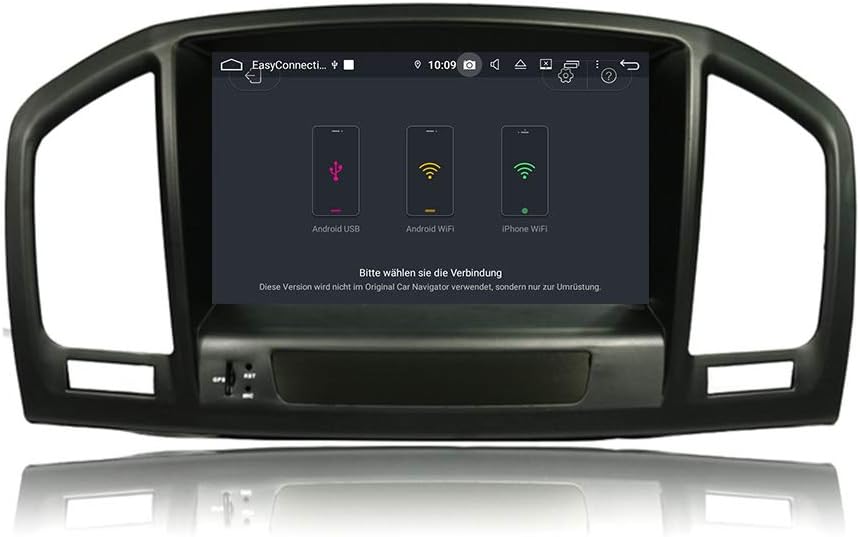
The unit features integrated CarPlay and Android Auto functionality, allowing seamless integration of your smartphone's features, such as navigation, music, and messaging, directly on the head unit's screen without an additional adapter.
4.7 Wi-Fi Connectivity
Connect to WLAN hotspots or your smartphone's hotspot via the integrated Wi-Fi module for internet access and to download apps from the Play Store.
4.8 Audio Settings
Customize your audio experience with adjustable EQ settings (Pop, Classic, Rock, Jazz, User) and control Bass/Treble/Balance.
5. Maintenance
5.1 Cleaning the Unit
To clean the touchscreen and exterior of the unit, use a soft, dry, lint-free cloth. For stubborn smudges, lightly dampen the cloth with water or a screen-safe cleaner. Avoid using harsh chemicals, abrasive cleaners, or solvents, as these can damage the screen and finish.
5.2 Software Updates
The Android operating system allows for app updates via the Play Store. System firmware updates may be released periodically. Refer to the manufacturer's website or contact support for information on available firmware updates and installation procedures.
6. Troubleshooting
If you encounter issues with your TAFFIO Head Unit, please refer to the following common troubleshooting steps before contacting support.
6.1 No Power
- Check all power connections to ensure they are securely plugged in.
- Verify the vehicle's fuse for the radio/accessory circuit.
- Ensure the vehicle's ignition is on.
6.2 No Sound
- Check the volume level on the head unit and ensure it is not muted.
- Verify speaker connections.
- Ensure the correct audio source is selected.
6.3 GPS Signal Issues
- Ensure the GPS antenna is properly installed and has a clear view of the sky.
- Check the GPS antenna connection to the head unit.
6.4 Touchscreen Unresponsive
- Restart the unit by turning off the vehicle's ignition and then restarting it.
- Ensure the screen is clean and free of debris.
For persistent issues, please refer to the warranty and support section.
7. Specifications
| Feature | Specification |
|---|---|
| Model Number | 10MT9953 |
| Display Size | 7 Inches |
| Operating System | Android 12 |
| Processor | Octa-Core 1.6Ghz CPU |
| RAM | 4GB |
| Internal Storage | 64GB Flash |
| Connectivity | Bluetooth, USB, Wi-Fi |
| Special Features | Touchscreen, Bluetooth, Integrated CarPlay & Android Auto |
| Map Type | Central America, North America, South America, Worldwide |
| Audio Output Mode | AUX |
| Mounting Type | Dashboard Mount |
8. Warranty and Support
8.1 Warranty Information
This TAFFIO Head Unit comes with a 2-year manufacturer's warranty. This warranty covers defects in materials and workmanship under normal use. Please retain your purchase invoice as proof of purchase for warranty claims.
8.2 Customer Support
For technical assistance, troubleshooting, or warranty claims, please contact TAFFIO customer support through the retailer where the product was purchased or visit the official TAFFIO website for contact information.