
1. Introduction
This manual provides detailed instructions for the safe and efficient operation, setup, and maintenance of the Canglan Technology PR30 Microcomputer Dual Pulse Pneumatic Battery Spot Welder. Please read this manual thoroughly before using the equipment to ensure proper function and to prevent injury or damage.
2. Safety Instructions
Always adhere to the following safety guidelines when operating the PR30 spot welder:
- Electrical Safety: Ensure the power supply matches the welder's requirements (110V/220V). Always connect the machine to a grounded outlet. Do not operate with wet hands or in damp conditions.
- Pneumatic Safety: Ensure air pressure does not exceed the maximum working air pressure of 6 KG. Use appropriate air lines and connections.
- Eye Protection: Always wear appropriate eye protection (e.g., welding goggles or shield) to protect against sparks and intense light generated during welding.
- Hand Protection: Wear insulated gloves to protect hands from heat and electrical shock.
- Ventilation: Operate the welder in a well-ventilated area to dissipate any fumes.
- Work Area: Keep the work area clean and free of flammable materials. Ensure stable footing.
- Maintenance: Disconnect power and air supply before performing any maintenance or adjustments.
- Children and Bystanders: Keep children and unauthorized personnel away from the operating area.
3. Product Overview
3.1. Key Features
- Efficient Microcomputer Dual Pulse Technology: Enables fast and efficient spot welding for battery packs, enhancing productivity.
- Precise Pneumatic Pressure Control: Ensures accurate and consistent welds.
- User-Friendly Interface: Intuitive controls for ease of operation.
- Durable Construction: Built with high-quality materials for reliable, long-term performance.
- Versatile Application: Suitable for a wide range of battery pack sizes and materials.
- Advanced Control Mode: High-speed, high-precision 8-bit microprocessor (MCU) control with LED digital display. Adjustable pulse energy (0-999), pulse frequency (0-8), and preloading time (0-8). Includes parameter locking function.
- Multiple Fault Protection: Integrated safety features to protect the machine and operator.
- Precision Welding Head: Features a cylinder and spring buffer combination, with an internal photoelectric pressure switch.
- Unique Structure: Table with stepless lifting and hand screw type locking for convenient and accurate position adjustment. Unibody design with pneumatic operation for ease of use.
3.2. Components
The PR30 spot welder consists of the main unit, welding electrodes, control panel, pneumatic system, and foot switch. Refer to the images below for visual identification of key components.
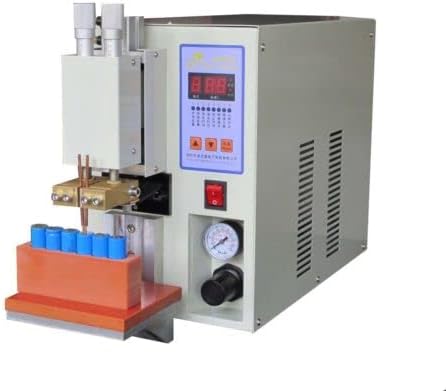
Figure 1: Canglan Technology PR30 Microcomputer Dual Pulse Pneumatic Battery Spot Welder, showing the main unit with a battery pack fixture. This image displays the overall machine, including the control panel, welding arms, and a fixture for holding battery cells.

Figure 2: Front view of the Canglan Technology PR30 Spot Welder, highlighting the control panel and welding electrodes. This image provides a closer look at the user interface and the welding mechanism.
4. Setup
Follow these steps to set up your PR30 spot welder:
- Unpacking: Carefully remove the welder from its packaging. Inspect for any shipping damage.
- Placement: Place the welder on a stable, level, and non-flammable surface in a well-ventilated area.
- Power Connection: Connect the power cord to the appropriate electrical outlet (110V or 220V, depending on your model and region). Ensure the main power switch on the welder is in the 'OFF' position before connecting.
- Air Supply Connection: Connect a compressed air source to the pneumatic inlet on the machine. Ensure the air pressure regulator is set to a maximum of 6 KG.
- Foot Switch Connection: Plug the foot switch into its designated port on the welder.
- Welding Head Adjustment: Adjust the height of the welding head using the table's stepless lifting mechanism and secure it with the hand screw type locking. Ensure the electrodes are clean and properly aligned.
5. Operating Instructions
Operating the PR30 spot welder involves setting parameters and executing the weld:
- Power On: Flip the main power switch to the 'ON' position. The LED digital display will illuminate.
- Parameter Adjustment:
- Pulse Energy (0-999): Use the control panel buttons to adjust the welding energy. Start with lower settings and gradually increase as needed for your material thickness.
- Pulse Frequency (0-8): Adjust the number of pulses. Dual pulse welding typically uses two pulses for better results.
- Preloading Time (0-8): Set the preloading time, which controls the duration the electrodes apply pressure before the weld current is applied.
- Parameter Locking: Utilize the parameter locking function to prevent accidental changes during operation.
- Material Placement: Place the nickel strip and battery cell (or other materials to be welded) securely on the welding platform. Ensure good contact between the materials and the electrodes.
- Welding Process: Depress the foot switch to initiate the welding cycle. The electrodes will descend, apply pressure, and then the welding current will flow according to the set parameters. Release the foot switch once the weld is complete.
- Inspection: After each weld, inspect the joint for strength and consistency. Adjust parameters as necessary.
- Power Off: When finished, turn off the main power switch and disconnect the air supply.
Note: Welding pure nickel sheet and copper may be more challenging due to their higher conductivity and melting points. Adjust parameters accordingly.
6. Maintenance
Regular maintenance ensures the longevity and optimal performance of your PR30 spot welder:
- Electrode Cleaning: Regularly clean the welding electrodes to remove any buildup or oxidation. Replace worn electrodes promptly to ensure consistent weld quality.
- General Cleaning: Keep the machine clean and free of dust and debris. Use a dry cloth for cleaning.
- Air System Check: Periodically check the air lines and connections for leaks or damage. Ensure the air filter (if present) is clean.
- Cable Inspection: Inspect all power and control cables for signs of wear, cuts, or damage. Replace damaged cables immediately.
- Storage: Store the welder in a dry, clean environment when not in use.
7. Troubleshooting
This section addresses common issues you might encounter:
- No Power:
- Check if the power cord is securely plugged in.
- Verify the main power switch is 'ON'.
- Check the circuit breaker or fuse in your electrical panel.
- Poor Weld Quality (Weak or Inconsistent Welds):
- Electrode Condition: Clean or replace worn electrodes.
- Parameter Settings: Adjust pulse energy, pulse frequency, and preloading time. Increase energy for thicker materials.
- Material Contact: Ensure good contact between the electrodes and the materials being welded.
- Air Pressure: Verify sufficient air pressure is supplied and regulated correctly.
- Electrodes Not Moving:
- Check air supply connection and pressure.
- Ensure the foot switch is properly connected and functioning.
- Overheating:
- Allow the machine to cool down.
- Ensure adequate ventilation around the machine.
- Reduce the duty cycle or welding frequency if operating continuously at high power.
If problems persist, contact Canglan Technology customer support.
8. Specifications
| Parameter | Value |
|---|---|
| Power | 15 KVA |
| Secondary Side Welding Current | 2500 A |
| Secondary Floating Voltage | 5.5 V |
| Input Voltage | 110V / 220V |
| Input Frequency | 50 Hz / 60 Hz |
| Max Working Air Pressure | 6 KG |
| Welding Control | Foot Switch |
| Weight | 30 kg |
| Dimensions (L x W x H) | 400 mm x 220 mm x 360 mm |
| Welding Capability (Normal) | 0.1 - 0.2 mm |
| Welding Capability (Bump Thickness) | 0.15 - 0.3 mm |
9. Warranty and Support
The Canglan Technology PR30 Microcomputer Dual Pulse Pneumatic Battery Spot Welder is manufactured to high-quality standards. For specific warranty information, please refer to the documentation provided at the time of purchase or contact Canglan Technology directly. For technical support, troubleshooting assistance, or spare parts, please visit the Canglan Technology Store or contact their customer service department.