
1. Introduction
Thank you for choosing the RYOBI ONE+ 18V Cordless Compact Power Scrubber Kit. This powerful and versatile tool is designed to simplify various cleaning tasks around your home, car, and outdoor spaces. Its cordless design offers portability, while the IPX7 water resistance rating ensures durability in wet environments. This manual provides detailed instructions for safe operation, proper maintenance, and troubleshooting to ensure optimal performance and longevity of your power scrubber.
2. Safety Information
Always read and understand all safety warnings and instructions before operating this product. Failure to follow the warnings and instructions may result in electric shock, fire, and/or serious injury.
General Safety
- Keep work area clean and well lit. Cluttered or dark areas invite accidents.
- Do not operate power tools in explosive atmospheres, such as in the presence of flammable liquids, gases or dust. Power tools create sparks which may ignite the dust or fumes.
- Keep children and bystanders away while operating a power tool. Distractions can cause you to lose control.
Battery Safety
- Only use the specified battery pack and charger for this tool.
- Do not immerse the battery pack in water or allow water to enter the battery compartment.
- Store battery packs away from metal objects that could short the terminals.
- The scrubber's battery enclosure is IPX7 Water Resistance Rated, meaning it can be submerged in up to 3 feet of water for 30 minutes. Ensure the battery compartment is securely sealed before use in wet conditions.
3. Package Contents
Your RYOBI ONE+ 18V Cordless Compact Power Scrubber Kit includes the following items:
- ONE+ 18V Cordless Compact Power Scrubber
- 2.0 Ah Battery
- Charger
- 7" VORTEX Medium Bristle Brush (Triangular Shape)

Figure 1: Components of the RYOBI ONE+ 18V Cordless Compact Power Scrubber Kit.
4. Setup
4.1 Battery Installation
- Ensure the battery is fully charged using the provided charger.
- Open the clear, water-resistant battery compartment cover on the scrubber.
- Align the 18V ONE+ battery with the terminals inside the compartment.
- Slide the battery into place until it clicks securely.
- Close the battery compartment cover firmly, ensuring the seal is tight to maintain water resistance.

Figure 2: RYOBI ONE+ 18V 2.0 Ah Lithium-Ion Battery.

Figure 3: RYOBI ONE+ 18V Battery Charger.
4.2 Brush Attachment
- To attach a brush, align the triangular connector of the brush head with the scrubber's drive shaft.
- Push the brush head onto the shaft and twist clockwise until it locks securely into place.
- To remove a brush, twist counter-clockwise and pull the brush head off.

Figure 4: Key features of the RYOBI ONE+ 18V Cordless Compact Power Scrubber.

Figure 5: Underside of the 7-inch VORTEX Medium Bristle Brush.
5. Operating Instructions
5.1 Powering On/Off
Press the power button located on the handle to turn the scrubber on. Press it again to turn it off. The scrubber features a lock-on button for continuous operation, reducing user fatigue.
5.2 Usage Tips
- Apply light to moderate pressure. The power of the scrubber does most of the work.
- For optimal cleaning, use appropriate cleaning solutions for the surface being cleaned.
- The included 7" VORTEX Medium Bristle Brush is suitable for cleaning tile, fiberglass, siding, and more.
- Additional RYOBI Triangle Connector accessories (sold separately) are available for various cleaning needs, from gentle microfiber to hard bristles for heavy-duty tasks.
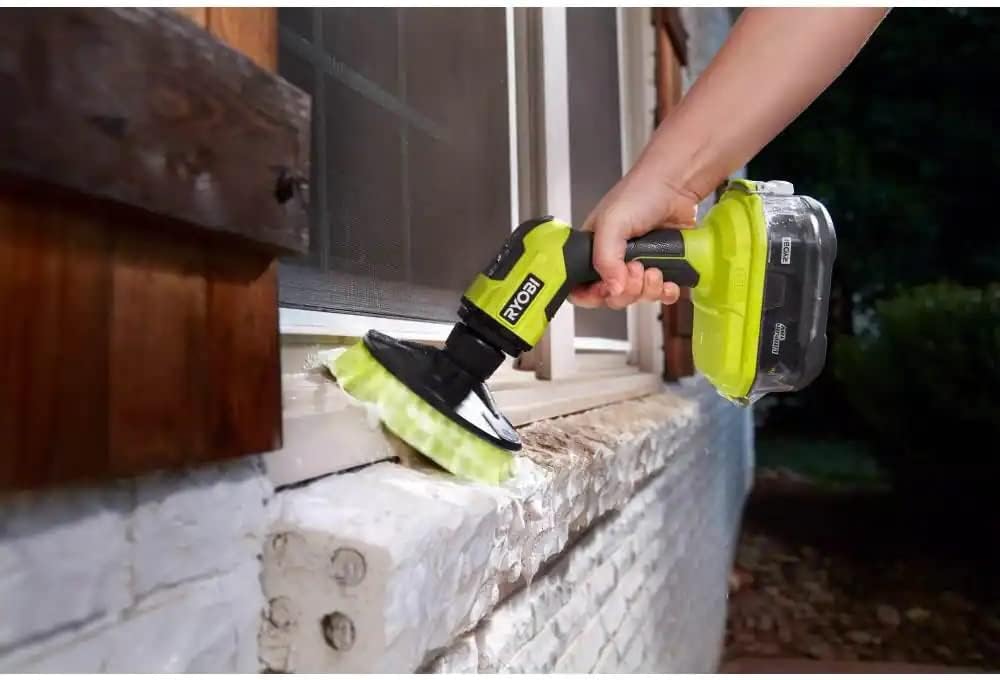
Figure 6: Power Scrubber in action, cleaning a window sill.
5.3 Demonstration Videos
Video 1: Overview of the RYOBI Scrubber Tool and its water-sealed battery compartment.
Video 2: Demonstrates the ease of use for cleaning outdoor furniture, tubs, and floors.
Video 3: An honest review showcasing the automatic scrubber's performance.
Video 4: A review of the scrubber kit, highlighting its features and benefits.
6. Maintenance
6.1 Cleaning the Brush Head
After each use, remove the brush head and rinse it thoroughly with clean water to remove any cleaning solution residue or debris. Allow the brush to air dry completely before storing.
6.2 Battery Care
Store the battery in a cool, dry place away from direct sunlight and extreme temperatures. Do not store the battery in a discharged state for extended periods. Always charge the battery before long-term storage.
6.3 General Cleaning
Wipe the body of the power scrubber with a damp cloth. Do not use harsh chemicals or abrasive cleaners. Ensure the battery compartment is clean and dry before closing.
7. Troubleshooting
| Problem | Possible Cause | Solution |
|---|---|---|
| Scrubber does not turn on. | Battery is not installed correctly or is discharged. | Ensure battery is fully charged and properly seated in the compartment. Check battery charge level. |
| Brush head stops spinning during use. | Excessive pressure applied or battery is low. | Reduce pressure on the brush. Check battery charge level and recharge if necessary. |
| Water enters the battery compartment. | Battery compartment cover not sealed properly. | Immediately remove the battery and allow the compartment to dry. Ensure the cover is securely latched before next use. |
8. Specifications
| Feature | Specification |
|---|---|
| Brand | RYOBI |
| Model Number | P4510K |
| Item Weight | 2.7 Pounds |
| Battery Type | 18V Lithium-Ion (2.0 Ah included) |
| Water Resistance Rating | IPX7 (Submersible up to 3 feet for 30 minutes) |
| Brush Head Included | 7" VORTEX Medium Bristle Brush |
| Compatible Accessories | All RYOBI Triangle Connector accessories |
| UPC | 033287197460 |
9. Warranty and Support
9.1 Warranty Information
This RYOBI product comes with a 6-year replacement warranty. Online registration is required within 30 days of purchase to activate the full warranty. Please refer to the warranty card included in your package for complete details and terms.
9.2 Customer Support
For technical assistance, replacement parts, or any questions regarding your RYOBI ONE+ 18V Cordless Compact Power Scrubber Kit, please contact RYOBI customer support. Contact information can typically be found on the product packaging or the official RYOBI website.


