
MasterPRO BGMP-9137
Masterpro by Carlo Cracco PastiAmo Pasta Machine BGMP-9137 User Manual
Model: BGMP-9137
Introduction
Thank you for choosing the Masterpro by Carlo Cracco PastiAmo Automatic Pasta Machine. This appliance is designed to simplify homemade pasta preparation, offering convenience and versatility. Please read this manual carefully before using the machine to ensure safe and optimal operation. Keep this manual for future reference.

Image: The Masterpro PastiAmo pasta machine positioned on a kitchen counter, surrounded by fresh pasta ingredients like flour, eggs, and vegetables, highlighting its integration into a home cooking environment.
Important Safety Instructions
- Read all instructions before use.
- Do not immerse the motor unit in water or other liquids.
- Keep the appliance out of reach of children.
- Always unplug the machine from the power outlet before cleaning or when not in use.
- Do not operate the machine with a damaged cord or plug.
- Avoid contact with moving parts during operation.
- Use only manufacturer-recommended attachments.
- This appliance is for household use only.
Product Components
Familiarize yourself with the parts of your PastiAmo pasta machine:
- Main Unit: Houses the motor and control panel.
- Mixing Chamber: Transparent container for ingredients.
- Lid: Covers the mixing chamber.
- Control Panel: With LED display and function buttons.
- Extrusion Head: Where pasta dies are attached.
- Pasta Dies: Various shapes for different pasta types.
- Water Measuring Cup: For precise liquid measurement.
- Flour Measuring Cup: For precise flour measurement.
- 2-in-1 Cutting and Cleaning Tool: For cutting pasta and cleaning dies.
- Pasta Drying Rack: For drying freshly made pasta.
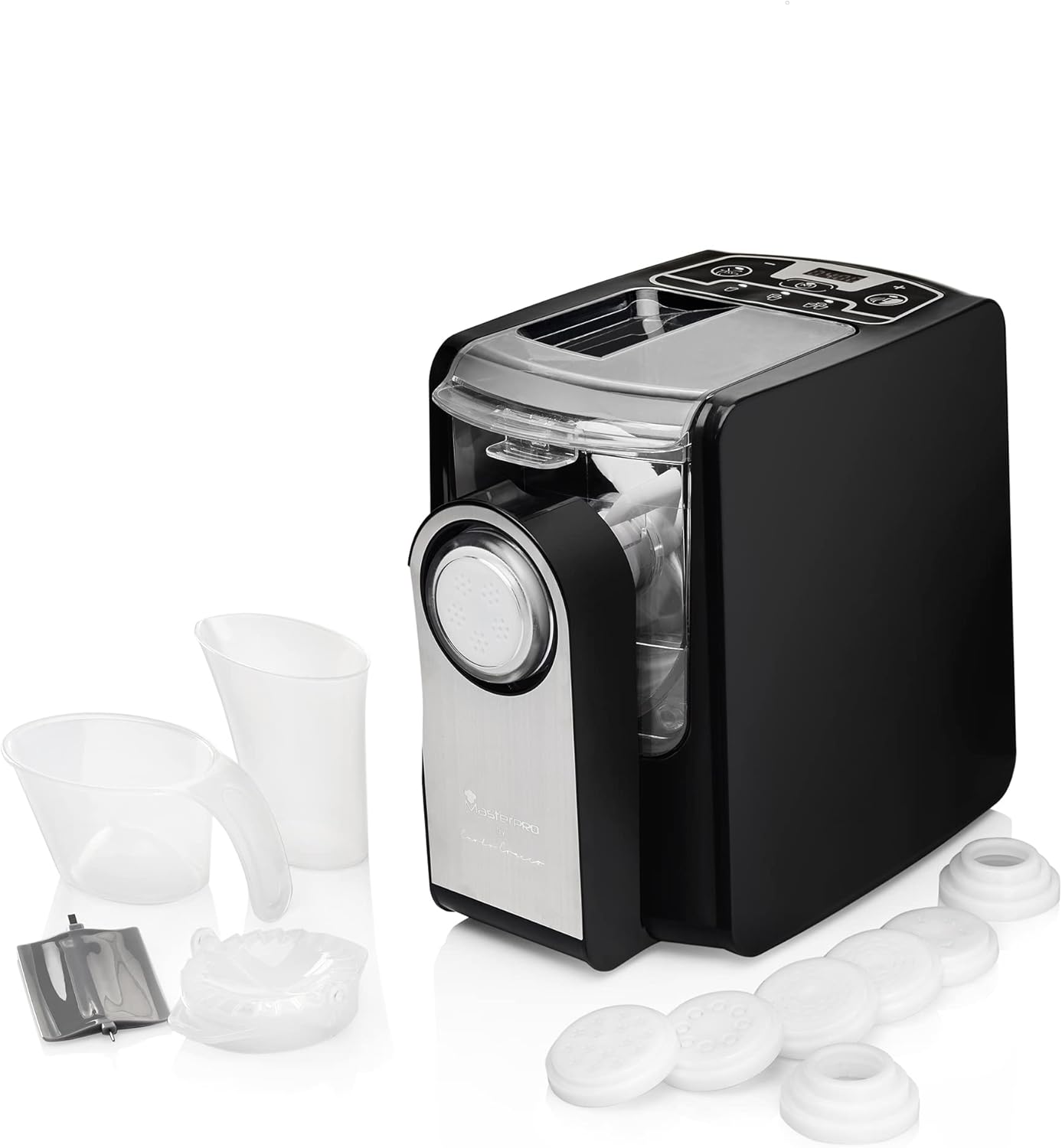
Image: The Masterpro PastiAmo pasta machine displayed alongside its complete set of accessories, including various pasta dies, measuring cups, and a cleaning tool, illustrating all included components.

Image: A detailed view of the Masterpro PastiAmo pasta machine's accessories, including the various pasta dies and measuring cups, highlighting their design and function.
Setup and First Use
Unpacking and Initial Cleaning
- Carefully remove all packaging materials.
- Wash all removable parts (mixing chamber, lid, pasta dies, measuring cups, cleaning tool) with warm, soapy water. Rinse thoroughly and dry completely.
- Wipe the main unit with a damp cloth. Do not immerse the main unit in water.
Assembly
- Place the main unit on a stable, flat surface.
- Insert the mixing chamber into the main unit.
- Attach the desired pasta die to the extrusion head, then secure the extrusion head to the front of the mixing chamber.
- Place the lid onto the mixing chamber.
- Ensure all parts are correctly assembled and locked into place before plugging in the machine.
Operating Instructions
Making Pasta
- Prepare Ingredients: Use the provided measuring cups for precise flour and liquid (water/egg) ratios. A common ratio is 250g flour to 90-100ml liquid. Adjust based on flour type and desired consistency.
- Add Flour: Pour the measured flour into the mixing chamber.
- Start Kneading: Close the lid. Select the automatic kneading function on the control panel. The machine will begin mixing the flour.
- Add Liquid: Slowly pour the liquid through the opening in the lid while the machine is kneading. This allows for gradual absorption and proper dough formation. The kneading process typically takes about 3 minutes. The dough should appear crumbly, like small peas.
- Extrusion: Once kneading is complete, the machine will automatically switch to extrusion mode. Pasta will begin to emerge from the die.
- Cut Pasta: Use the 2-in-1 cutting tool to cut the pasta to your desired length as it extrudes.
- Dry Pasta: Place the freshly cut pasta on the provided drying rack to prevent sticking.
- Cook Pasta: Cook fresh pasta immediately in boiling water.

Image: The Masterpro PastiAmo pasta machine actively extruding fresh pasta, which is collecting on a plate, with a pasta drying rack visible in the background, demonstrating the pasta making process.
Using Different Pasta Dies
The PastiAmo machine comes with various dies to create different pasta shapes:
- Fettuccine Disc
- Macaroni Disc
- Angel Hair Disc
- Pappardelle Disc
- Sheet Disc (for lasagna or ravioli)
- Linguine Disc
- Ravioli Mold (requires sheet pasta)
To change a die, ensure the machine is unplugged and cooled. Remove the extrusion head, replace the die, and reattach the head securely.
Note: The product title mentions a video tutorial. For detailed visual instructions on operation and specific recipes, please refer to the official Masterpro video tutorials available online.
Cleaning and Maintenance
Regular cleaning ensures the longevity and hygiene of your pasta machine.
Cleaning Steps
- Unplug: Always unplug the machine from the power outlet before cleaning.
- Disassemble: Remove the lid, mixing chamber, extrusion head, and pasta die.
- Remove Dough Residue: Allow any remaining dough to dry slightly. This makes it easier to remove. Use the cleaning tool to scrape off dried dough from the mixing chamber, extrusion head, and especially the small holes in the pasta dies.
- Wash Parts: Wash all removable parts (mixing chamber, lid, dies, measuring cups, cleaning tool) with warm, soapy water. Rinse thoroughly.
- Dry Completely: Ensure all parts are completely dry before reassembling or storing to prevent mold or damage.
- Clean Main Unit: Wipe the main unit with a damp cloth. Do not use abrasive cleaners or immerse it in water.
Important: The Masterpro PastiAmo Pasta Machine is NOT dishwasher safe. Hand wash all removable parts.
Storage
Store the clean and dry pasta machine and its accessories in a cool, dry place, away from direct sunlight and moisture.
Troubleshooting
| Problem | Possible Cause | Solution |
|---|---|---|
| Machine does not start. | Not plugged in; lid not properly closed; parts not assembled correctly. | Ensure power cord is securely plugged in. Check that the lid is fully closed and all components are correctly assembled. |
| Dough is too wet or too dry. | Incorrect flour to liquid ratio. | Adjust liquid amount. For too wet, add a small amount of flour. For too dry, add a small amount of liquid. The dough should be crumbly, not sticky. |
| Pasta does not extrude or extrudes poorly. | Dough consistency is wrong; die is clogged; extrusion head not properly secured. | Check dough consistency (should be crumbly). Clean the pasta die thoroughly. Ensure the extrusion head is securely attached. |
| Machine stops during operation. | Overload protection activated; lid opened during operation. | Unplug the machine, wait a few minutes for it to cool down, then restart. Ensure the lid remains closed during operation. Reduce the amount of dough if consistently overloading. |
Specifications
- Brand: MasterPRO
- Model Number: BGMP-9137
- Color: Black
- Material: Alloy Steel
- Operating Mode: Automatic
- Power: 260 W
- Number of Discs: 6 (plus ravioli mold)
- Dishwasher Safe: No
- Manufacturer: Bergner
Warranty and Support
For warranty information and customer support, please refer to the documentation provided at the time of purchase or contact MasterPRO customer service directly. Keep your proof of purchase for any warranty claims.
For additional assistance, including recipes and video tutorials, please visit the official MasterPRO website or contact their support channels.
Related documentsBGMP-9137


Ask a question about this manual
Ask about setup, troubleshooting, compatibility, parts, safety, or missing instructions. Manuals+ will review the question and use this page’s manual context to help answer it.