
1. Introduction
The Profile Design Supersonic Ergo 50 SLC Aerobar is designed to enhance the aerodynamic efficiency and comfort of your bicycle. By providing an optimized riding position, these aerobars allow cyclists to maintain speed with reduced effort, particularly beneficial for time trials and triathlon events. This manual provides detailed instructions for the proper installation, use, and maintenance of your new aerobars.

Figure 1: Front view of the Profile Design Supersonic Ergo 50 SLC Aerobar.
2. Included Components
Please ensure all components are present before beginning installation:
- Aerobar Extensions (2)
- Armrest Brackets (2)
- Armrest Pads (2) with Velcro attachment
- Handlebar Clamps (2)
- Mounting Hardware (screws, washers)
- End Plugs (2)
- Allen Wrenches (for installation)

Figure 2: Top-down view of the aerobar components, including extensions and armrests.
3. Setup and Installation
Proper installation is crucial for safety and performance. If you are unsure about any step, consult a professional bicycle mechanic.
3.1 Mounting the Clamps
- Identify the desired position on your bicycle's handlebars for the aerobar clamps. Ensure there is sufficient space and that the clamps will not interfere with brake levers or shifters.
- Loosen the bolts on the handlebar clamps using the provided Allen wrench.
- Carefully place each clamp onto the handlebar, ensuring they are symmetrically positioned.
- Lightly tighten the clamp bolts to hold them in place, allowing for minor adjustments. Do not fully tighten at this stage.
3.2 Attaching Extensions and Armrests
- Insert the aerobar extensions into the designated holes on the armrest brackets.
- Attach the armrest brackets to the handlebar clamps using the provided hardware.
- Adjust the angle and reach of the extensions to your preferred riding position. The extensions feature measurement markings for precise adjustments.
- Once the desired position is achieved, securely tighten all bolts on the handlebar clamps and armrest brackets. Refer to the manufacturer's torque specifications if available, or tighten firmly without over-tightening.
- Affix the armrest pads to the armrest brackets using the Velcro attachments. Ensure they are centered and secure.
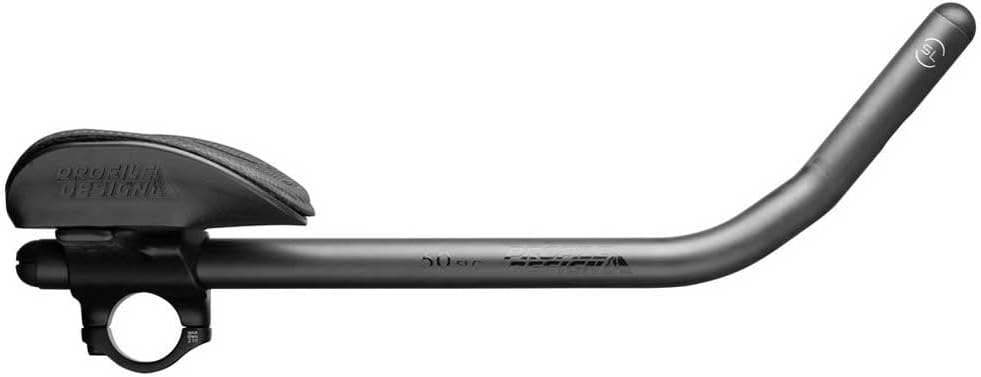
Figure 3: Side view of the aerobar, showing the extension and armrest assembly.
3.3 Installing End Plugs
- Insert the provided end plugs into the open ends of the aerobar extensions. These plugs are a critical safety feature to prevent injury.
- Ensure the end plugs are firmly seated and secure.

Figure 4: Front view of the aerobar, highlighting the end plugs for safety.
4. Operating the Aerobars
The aerobars are designed to provide an aerodynamic tuck position. To use them:
- Place your forearms onto the armrest pads.
- Grip the aerobar extensions with your hands.
- Maintain a stable and controlled position. Practice in a safe, open area before riding in traffic.
- Always be prepared to quickly return your hands to the main handlebars for braking and steering.
5. Maintenance
Regular maintenance ensures the longevity and safe operation of your aerobars:
- Cleaning: Wipe down the aerobars and pads with a damp cloth after each ride. The armrest pads can be removed for more thorough cleaning or replacement.
- Bolt Check: Periodically check all mounting bolts for tightness. Vibrations from riding can cause bolts to loosen over time.
- Pad Inspection: Inspect armrest pads for wear and tear. Replace them if they become excessively worn or damaged to maintain comfort and support.
- Structural Integrity: Regularly inspect the aerobar extensions and clamps for any signs of cracks, bends, or other damage. Discontinue use and replace damaged components immediately.
6. Troubleshooting
- Aerobars feel loose: Ensure all mounting bolts are tightened to the correct torque. Check for proper clamp fit on the handlebars.
- Discomfort during use: Adjust the position of the armrests and extensions. Experiment with different angles and reach to find a comfortable and sustainable aerodynamic position. Ensure armrest pads are correctly installed.
- Difficulty maintaining control: Practice using the aerobars in a safe, controlled environment. Ensure your bike fit is appropriate for aerobar use.
7. Specifications
- Brand: Profile Design
- Model: Supersonic Ergo 50 SLC Aerobar
- Length: 400mm
- Color: Black
- Item Weight: 1.67 pounds
- Package Dimensions: 18.98 x 12.95 x 7.91 inches
- Item Model Number: 1037830001
- Manufacturer Part Number: 1037830001
- OEM Part Number: RHCSNC502
- UPC: 723660010683
- First Available: June 15, 2022
8. Warranty Information
For specific warranty details and terms, please refer to the official Profile Design website or contact their customer support directly. Keep your proof of purchase for any warranty claims.
9. Customer Support
If you have any questions, require assistance with installation, or need to report an issue, please visit the official Profile Design website for contact information and support resources.


