
1. Overview and Safety Information
The AZZUNO MIG 130F is a portable 130 Amp, 110V MIG welding machine designed for gas-free flux core welding. It features inverter IGBT technology for efficient and stable performance, suitable for various light to medium welding tasks. This manual provides essential information for safe and effective operation, setup, and maintenance of your welder.
1.1 Important Safety Precautions
Always adhere to the following safety guidelines to prevent injury or damage:
- Electric Shock Hazard: Welding equipment can cause electric shock. Do not touch live electrical parts. Ensure the machine is properly grounded. Always wear dry welding gloves.
- Fumes and Gases: Welding produces fumes and gases that can be hazardous to your health. Work in a well-ventilated area or use local exhaust ventilation.
- Arc Rays: Arc rays can burn eyes and skin. Use a welding helmet with appropriate shade filter and wear protective clothing, including long sleeves, pants, and leather gloves.
- Fire and Explosion: Welding sparks and hot metal can cause fires. Keep flammable materials away from the welding area. Have a fire extinguisher readily available.
- Hot Parts: Welded materials and machine parts can remain hot for a significant time after welding. Allow them to cool before handling.
- Maintenance: Disconnect power from the welding machine before performing any maintenance, inspection, or changing parts.
2. Package Contents
Verify that all items listed below are included in your package:
- AZZUNO MIG 130F Welder Unit
- Integrated MIG Torch
- Flux Cored Wire (small spool, typically 2.2 lbs / 0.030"-0.035")
- Contact Tips (various sizes)
- Brush / Chipping Hammer
- Ground Clamp with Cable

Image: The AZZUNO MIG 130F welder unit shown with its standard accessories, including the MIG torch, flux cored wire, contact tips, brush, and ground clamp.
3. Product Components and Controls
Familiarize yourself with the main components and controls of the AZZUNO MIG 130F welder:

Image: Front panel of the AZZUNO MIG 130F welder, highlighting key controls and connections.
- Voltage Adjustment Knob: Used to control the output voltage for welding.
- Choose Button: Selects different welding modes or material thickness settings. Press and hold for 3 seconds for synergistic control.
- Wire Feed Adjustment Knob: Controls the speed at which the welding wire is fed through the torch.
- Torch Output Connection: Point where the MIG torch cable connects to the machine.
- Earth Clamp Connection: Point where the ground clamp cable connects to the machine.
4. Setup
4.1 Wire Spool Installation
Proper installation of the welding wire spool is crucial for consistent wire feeding:
- Open the wire spool compartment cover on the top of the welder.
- Place the flux cored wire spool onto the spindle, ensuring it rotates freely and the wire unwinds from the bottom.
- Thread the wire through the automatic wire feed mechanism, ensuring it passes through the wire pressing wheel and the wire feeding wheel.
- Secure the wire spool and close the compartment cover.
- Ensure the contact tip on the MIG torch matches the diameter of your welding wire.
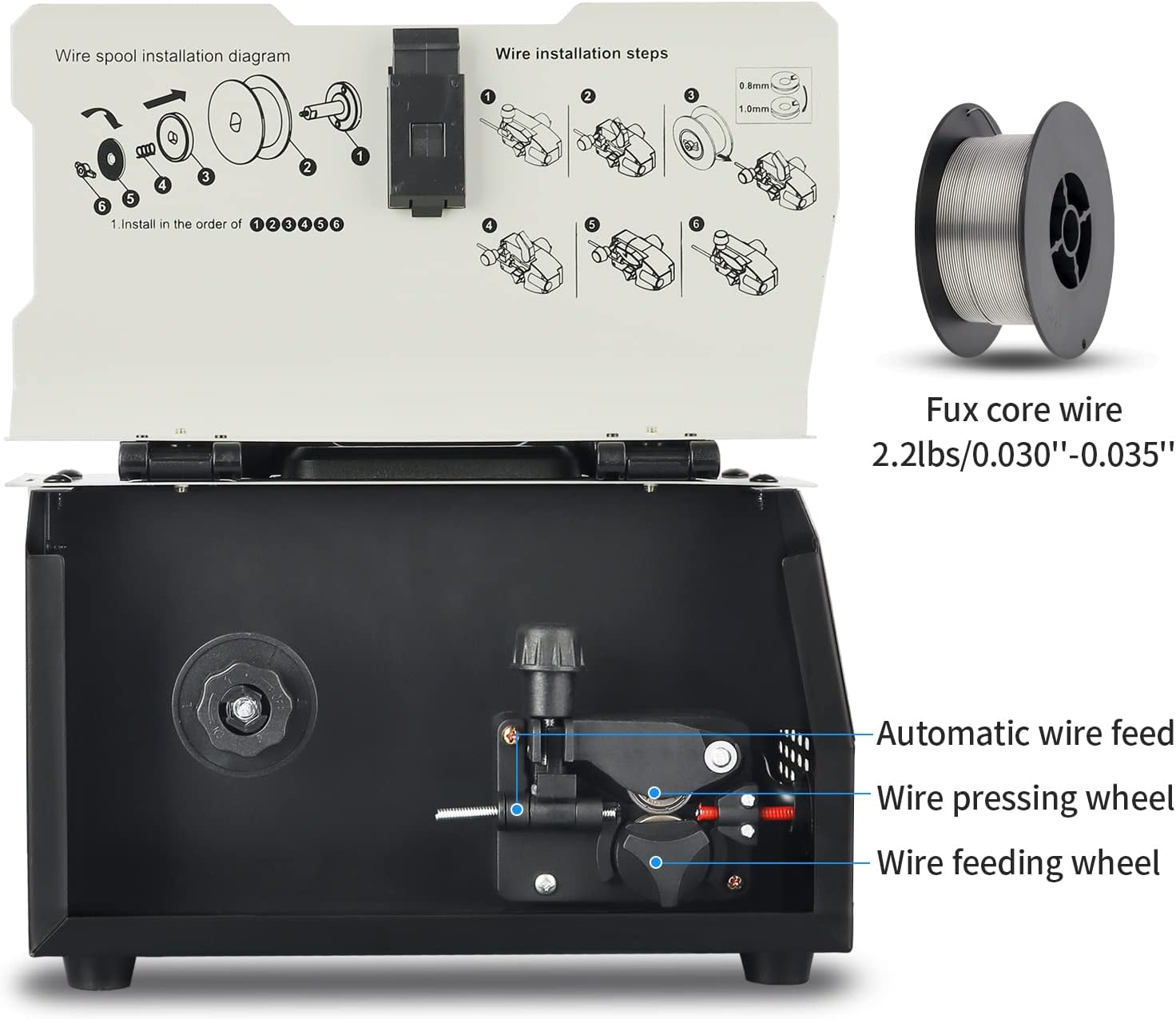
Image: Detailed diagram illustrating the correct steps for installing the wire spool inside the AZZUNO MIG 130F welder.
4.2 Connecting Cables
- Connect the ground clamp cable to the Earth Clamp Connection (5) on the front panel.
- Connect the MIG torch cable to the Torch Output Connection (4) on the front panel.
- Plug the welder's power cord into a suitable 110V power outlet.
5. Operating Instructions
The AZZUNO MIG 130F is designed for ease of use, even for beginners, with synergistic control for automatic parameter adjustment.
5.1 Basic Operation
- Ensure all safety precautions are followed and protective gear is worn.
- Connect the ground clamp securely to the workpiece, ensuring good electrical contact.
- Turn on the welder.
- Adjust the Voltage Adjustment Knob (1) and Wire Feed Adjustment Knob (3) according to the thickness of the material you are welding. For synergistic control, press and hold the 'Choose' button (2) for 3 seconds; the machine will automatically adjust voltage and wire feed speed based on the amperage or selected thickness.
- Position the MIG torch at the starting point of your weld.
- Press the torch trigger to initiate the arc and begin welding. Maintain a consistent arc length and travel speed for optimal results.
- The machine is equipped with overload and overheat protection systems for safe operation.
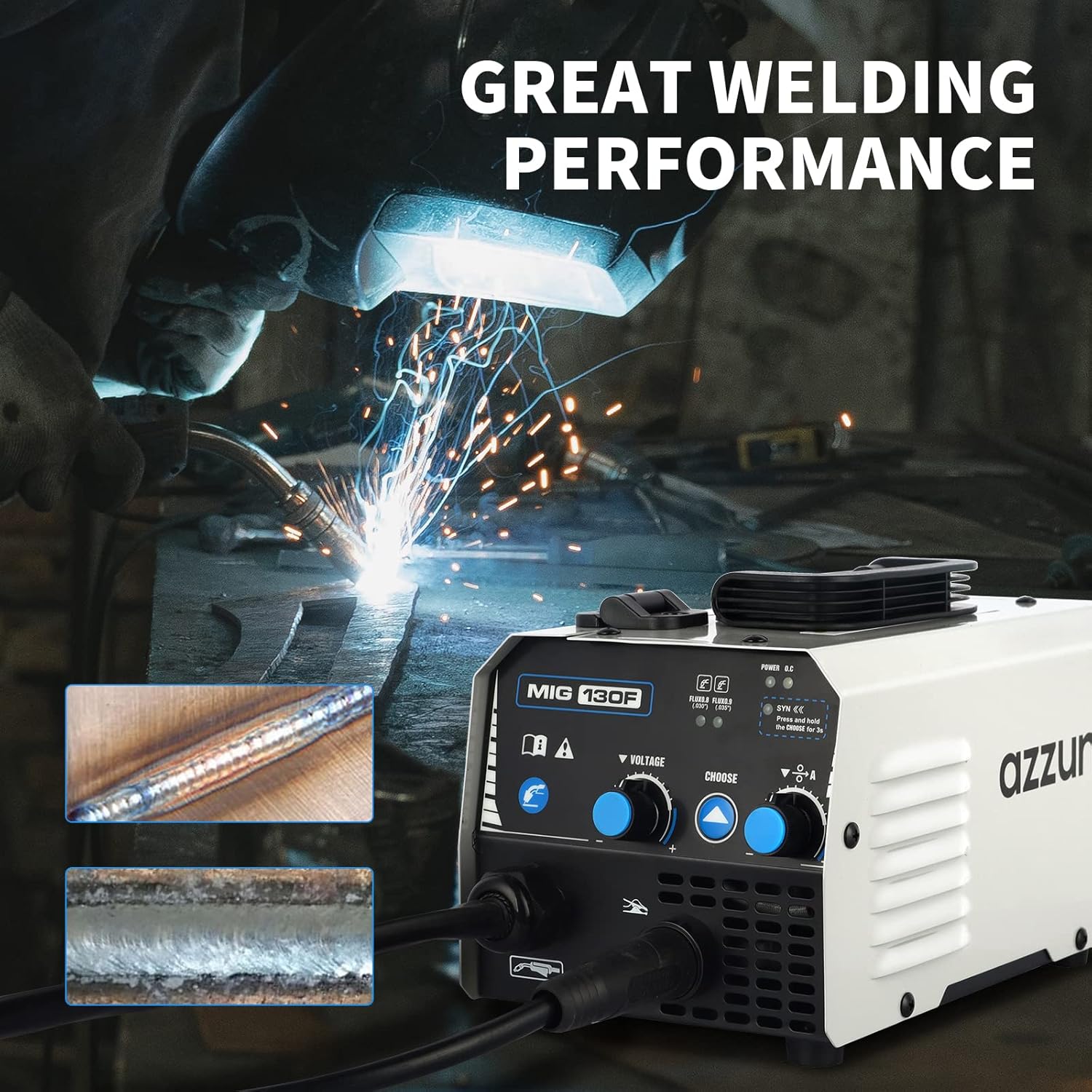
Image: The AZZUNO MIG 130F welder in operation, showcasing its capability to produce clean and strong welds on various materials.
5.2 Rapid Heat Dissipation System
The AZZUNO MIG 130F features a rapid heat dissipation system with a high-speed cooling fan, ensuring quiet operation and enabling extended welding sessions without overheating.

Image: Illustration of the AZZUNO MIG 130F welder's internal cooling system, highlighting the high-speed fan and efficient heat dissipation for continuous operation.
6. Maintenance
Regular maintenance ensures the longevity and optimal performance of your welding machine:
- Cleaning: Periodically clean the exterior of the machine with a dry cloth. Use compressed air to blow out dust and debris from the cooling vents, ensuring the cooling fan operates efficiently.
- Torch Maintenance: Regularly inspect and clean the MIG torch nozzle and contact tip. Replace worn or damaged contact tips to ensure good electrical contact and consistent wire feeding.
- Cable Inspection: Check all cables (power, ground, torch) for cuts, abrasions, or loose connections. Repair or replace damaged cables immediately.
- Storage: Store the welder in a dry, clean environment, away from excessive dust and moisture, when not in use.
7. Troubleshooting
Refer to the table below for common issues and their potential solutions:
| Problem | Possible Cause | Solution |
|---|---|---|
| Welder does not power on | No power supply; Power switch off; Internal fuse blown | Check power cord connection; Turn on power switch; Consult qualified technician for fuse replacement |
| No welding arc | Poor ground connection; Wire feed issue; Incorrect settings; Worn contact tip | Ensure ground clamp is clean and secure; Check wire spool and feed mechanism; Adjust voltage/wire speed; Replace contact tip |
| Inconsistent wire feed | Wire tangled; Incorrect tension on wire feed roller; Dirty liner | Untangle wire; Adjust wire feed roller tension; Clean or replace torch liner |
| Poor weld quality (porosity, weak welds) | Improper settings; Dirty workpiece; Incorrect stick-out; Drafts | Adjust voltage and wire speed; Clean workpiece thoroughly; Maintain proper stick-out; Shield welding area from drafts |
| Overheat indicator on / Machine shuts down | Exceeded duty cycle; Blocked cooling vents; High ambient temperature | Allow machine to cool down; Clear cooling vents; Ensure adequate ventilation in workspace |
8. Specifications
Key technical specifications for the AZZUNO MIG 130F Welder:
| Feature | Detail |
|---|---|
| Manufacturer | AZZUNO |
| Model Number | MIG 130F |
| Part Number | MIG130F |
| Voltage | 110 Volts |
| Max Amperage | 130 Amp |
| Welding Type | Flux Core (Gas Free) MIG |
| Technology | Inverter IGBT |
| Item Weight | 5.86 kg (8.7 pounds) |
| Parcel Dimensions | 35 x 27.3 x 19.99 cm |
| Color | Multicolored |
9. Warranty and Support
AZZUNO products are manufactured to high-quality standards. For specific warranty details, including coverage period and terms, please refer to the warranty card included with your product or contact AZZUNO customer support directly.
9.1 Customer Support
If you encounter any issues or have questions regarding your AZZUNO MIG 130F Welder, please contact our customer support team. Have your model number and purchase information ready for faster service.
For the most up-to-date contact information, please visit the official AZZUNO website or refer to your product packaging.


