
BCXY CS-JUP700XL
Contents
BCXY Battery Replacement for Sokkia SHC5000 25260 User Manual
Brand: BCXY
1. Introduction
This manual provides essential information for the safe and effective use of your BCXY Battery Replacement, model CS-JUP700XL, compatible with Sokkia SHC5000 devices and part number 25260. Please read this manual thoroughly before installation and operation to ensure optimal performance and safety.
2. Important Safety Information
Failure to follow these safety instructions may result in fire, electric shock, injury, or damage to the battery or device.
- CAUTION: Warranty void if label is removed.
- Do not attempt to disassemble, open, or service the battery pack.
- Replace only with the battery pack designated for this product.
- Do not crush, puncture, short external contacts, or dispose of in fire or water.
- Do not store above 60°C (140°F).
- ATTENTION: New battery pack must be fully charged before use. To reduce risk of fire or burns, read instructions in operating guide before using the battery. Limited charge voltage: 4.2V ± 0.05V. Standard: GB 31241-2014.
- Our batteries are designed with overcharge, over discharge, over voltage, and short circuit protection for enhanced battery life and safety.

Image: Top view of the BCXY battery, clearly displaying important safety warnings and technical specifications such as model number, part number, rating, and lithium-ion battery pack details.
3. Product Overview
The BCXY Battery Replacement (Model: CS-JUP700XL) is a high-quality lithium-ion battery designed to meet the exact specifications of the original Sokkia SHC5000 25260 battery. It provides reliable power with a capacity of 13600mAh and a voltage of 3.7V.
Key Features:
- Exact specifications matching the original battery for seamless compatibility.
- Built-in protection against overcharge, over discharge, over voltage, and short circuit.
- Certifications: ISO9001, RoHS, CE, UN38.3, and MSDS for quality assurance and safety.
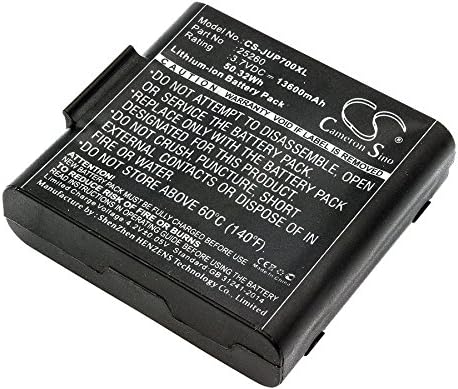
Image: Front view of the BCXY battery replacement, showcasing its compact design and branding.

Image: Side view of the BCXY battery replacement, highlighting its profile and connection points.
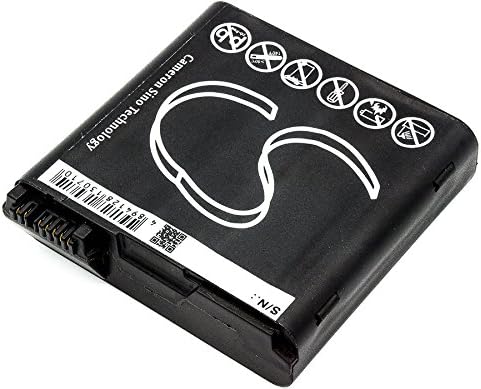
Image: Bottom view of the BCXY battery replacement, showing the serial number and manufacturing details.
4. Setup and Installation
- Verify Compatibility: Before installation, confirm that the battery model CS-JUP700XL and part number 25260 are compatible with your Sokkia SHC5000 device. Refer to your device's original manual for specific battery requirements.
- Power Off Device: Ensure your Sokkia SHC5000 device is completely powered off and disconnected from any power source before attempting to replace the battery.
- Remove Old Battery: Carefully open the battery compartment of your device and remove the old battery. Follow the instructions in your device's manual for proper removal.
- Insert New Battery: Insert the BCXY replacement battery into the compartment, ensuring the contacts align correctly. Do not force the battery into place.
- Secure Compartment: Close and secure the battery compartment cover.
- Initial Charge: For optimal performance, fully charge the new battery before its first use. Connect your device to its charger and allow it to charge until the charging indicator shows a full charge.
5. Operation
Once installed and fully charged, the BCXY battery operates seamlessly with your Sokkia SHC5000 device. The battery is designed to provide consistent power output for extended periods.
Charging Guidelines:
- Always use the original charger or a certified compatible charger for your Sokkia SHC5000 device.
- Avoid overcharging the battery by disconnecting the charger once the battery is full, although the battery has built-in overcharge protection.
- Charge the battery in a well-ventilated area, away from direct sunlight or extreme temperatures.
Discharging Guidelines:
- It is generally recommended to avoid completely draining lithium-ion batteries to 0% frequently, as this can reduce their overall lifespan.
- Recharge the battery when the device indicates low power.
6. Maintenance and Storage
General Care:
- Keep the battery contacts clean and free from dust or debris. Use a dry, soft cloth to wipe them if necessary.
- Avoid exposing the battery to extreme temperatures, humidity, or direct sunlight.
- Do not drop, puncture, or subject the battery to strong impacts.
Storage:
- If storing the battery for an extended period, charge it to approximately 50-70% before storage.
- Store the battery in a cool, dry place, ideally between 0°C and 25°C (32°F and 77°F).
- Avoid storing the battery in temperatures above 60°C (140°F) as this can significantly degrade battery performance and safety.
- Periodically check the battery during long-term storage and recharge it to 50-70% every few months to prevent deep discharge.
7. Troubleshooting
If you encounter issues with your BCXY replacement battery, consider the following common troubleshooting steps:
- Battery Not Charging:
- Ensure the charger is properly connected to both the device and a working power outlet.
- Check the battery contacts on both the battery and the device for any obstructions or corrosion.
- Try using a different compatible charger to rule out a charger issue.
- Verify that the device itself is functioning correctly with another known-good battery, if available.
- Short Battery Life:
- Ensure the battery has been fully charged before use.
- Check for any background applications or settings on your device that might be consuming excessive power.
- Review the operating environment; extreme temperatures can affect battery performance.
- If the battery is new, it might require a few charge/discharge cycles to reach its full capacity.
- Device Not Powering On:
- Confirm the battery is correctly installed and fully charged.
- Ensure the device's power button is functioning.
- If possible, test the device with its original battery or another compatible battery to isolate the issue.
If these steps do not resolve the issue, please contact customer support for further assistance.
8. Technical Specifications
| Feature | Specification |
|---|---|
| Model Number | CS-JUP700XL |
| Compatible Part Number | 25260 |
| Compatible Device Model | Sokkia SHC5000 |
| Battery Cell Composition | Lithium Ion |
| Voltage | 3.7V |
| Capacity | 13600mAh |
| Watt-Hours (WH) | 50.32Wh |
| Product Dimensions (L x W x H) | 76.14 x 75.32 x 20.36mm (3 x 2.97 x 0.8 inches) |
| Item Weight | 265.4g (9.4 ounces) |
| Certifications | ISO9001, RoHS, CE, UN38.3, MSDS |
| Manufacturer | BCXY |
9. Warranty and Support
BCXY batteries are manufactured under strict quality control standards and are certified with ISO9001, RoHS, CE, UN38.3, and MSDS, ensuring high quality and safety.
For any questions regarding compatibility, installation, or performance, please contact the seller directly. Providing details about your battery or device, along with pictures if applicable, will help our support team offer professional suggestions and assistance.
Ask a question about this manual
Ask about setup, troubleshooting, compatibility, parts, safety, or missing instructions. Manuals+ will review the question and use this page’s manual context to help answer it.