
1. Introduction
Thank you for choosing the Waring Commercial WMO120 Heavy Duty Microwave Oven. This appliance is designed for commercial use, offering robust performance and durability. With 1.2 cubic feet of capacity, 1800 watts of power, and advanced programming features, it is engineered to meet the demands of a busy kitchen environment. Please read this manual thoroughly before operation to ensure proper use, maintenance, and safety.
2. Important Safety Instructions
When using electrical appliances, basic safety precautions should always be followed to reduce the risk of fire, electrical shock, injury to persons, or exposure to excessive microwave energy.
- Read all instructions before using the appliance.
- Do not attempt to operate this oven with the door open, as this can result in harmful exposure to microwave energy.
- Do not place any object between the oven front face and the door, or allow soil or cleaner residue to accumulate on sealing surfaces.
- Do not operate the oven if it is damaged. Ensure the oven door closes properly and there is no damage to the door, hinges, latches, or door seals.
- Only qualified service personnel should adjust or repair this appliance.
- Do not heat liquids or other foods in sealed containers as they are liable to explode.
- Do not use corrosive chemicals or vapors in this appliance.
- This appliance must be grounded. Connect only to a properly grounded outlet.
3. Product Overview and Features
The Waring Commercial WMO120 microwave oven is constructed from durable stainless steel and features a user-friendly control panel. Key features include:
- 1.2 Cubic Feet Capacity
- 1800 Watts of Power with Dual Magnetrons
- 10 Programmable Memory Pads and 100 Programmable Settings
- 5 Power Levels for versatile cooking
- 3-Stage Cooking Functionality
- Touch-Control Keypad with Braille for accessibility
- Cleanable/Replaceable Air Filter
- Stackable Design for space efficiency

Figure 1: Front view of the Waring Commercial WMO120 Microwave Oven, showcasing its stainless steel exterior and control panel.

Figure 2: The stackable design of the WMO120 microwave oven, allowing for efficient use of kitchen space.
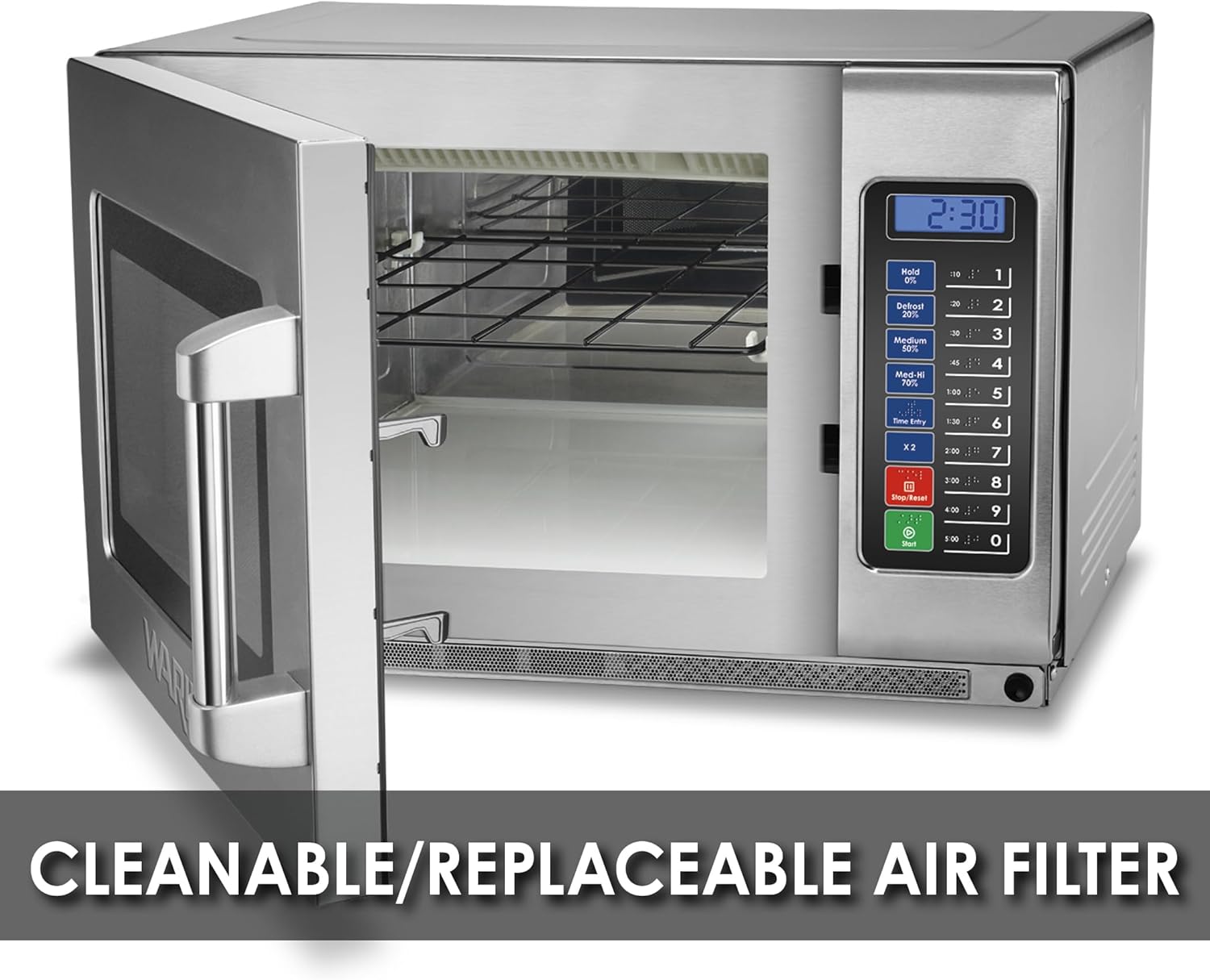
Figure 3: Interior view of the microwave with the door open, indicating the location of the cleanable/replaceable air filter for easy maintenance.

Figure 4: Detailed view of the touch control keypad, featuring Braille markings for enhanced accessibility.
4. Setup and Installation
4.1 Unpacking
Carefully remove the microwave oven from its packaging. Retain all packaging materials for future transport or service needs. Inspect the oven for any signs of damage. If damage is present, do not operate the appliance and contact your supplier immediately.
4.2 Placement
- Place the oven on a flat, stable, heat-resistant surface.
- Ensure adequate ventilation around the oven. Maintain a minimum clearance of 4 inches (10 cm) on the top, sides, and rear for proper airflow.
- Do not block any ventilation openings.
- Keep the oven away from heat sources, water, or high humidity.
4.3 Electrical Connection
This appliance requires a 208/230V, 1800W electrical supply with a 6-15 Phase Plug. Ensure the electrical outlet is properly grounded and matches the specifications of the oven. Do not use extension cords or adapters.
5. Operating Instructions
5.1 Basic Heating
- Place food in a microwave-safe container inside the oven.
- Close the oven door securely.
- Enter the desired cooking time using the numeric keypad (e.g., '1' for 10 seconds, '1:00' for 1 minute).
- Press the Start button to begin cooking.
5.2 Using Power Levels
The WMO120 offers 5 power levels. The default power level is 100% (High). To adjust:
- Enter the desired cooking time.
- Press the desired power level button (e.g., 'Defrost 20%', 'Medium 50%', 'Med-Hi 70%', 'Hold 0%').
- Press the Start button.
5.3 3-Stage Cooking
This feature allows you to program up to three consecutive cooking stages with different times and power levels.
- Enter the time and power level for the first stage.
- Enter the time and power level for the second stage.
- Enter the time and power level for the third stage (optional).
- Press the Start button.

Figure 5: The control panel highlighting the 3-stage cooking capability and the five distinct power levels available.
6. Programming Memory Settings
The WMO120 allows you to store up to 10 frequently used cooking programs for quick access.
- Press the Program button (if available, or follow specific model instructions for programming mode).
- Select a memory pad number (1-10) to store the program.
- Enter the desired cooking time and power level for each stage of the program.
- Press the Program button again to save.
To use a stored program, simply press the corresponding memory pad number.

Figure 6: Close-up of the control panel, illustrating the 10 programmable memory pads for quick access to frequently used settings.
7. Maintenance and Cleaning
7.1 General Cleaning
- Always unplug the oven before cleaning.
- Clean the interior and exterior surfaces with a damp cloth and mild detergent. Avoid abrasive cleaners or scouring pads.
- Wipe the door seals and adjacent parts frequently to remove any spills or splatters.
- Do not immerse the appliance in water.
7.2 Air Filter Maintenance
The WMO120 features a cleanable/replaceable air filter. Regularly check and clean the filter to ensure optimal performance and prevent overheating.
- Locate the air filter, typically behind a removable panel or grille.
- Remove the filter and clean it with warm, soapy water. Rinse thoroughly and allow to air dry completely before reinserting.
- Replace the filter if it shows signs of damage or excessive wear.
8. Troubleshooting
If you encounter issues with your microwave oven, refer to the following common problems and solutions:
| Problem | Possible Cause | Solution |
|---|---|---|
| Oven does not start | Door not closed properly; Power cord unplugged; Blown fuse/tripped circuit breaker | Ensure door is securely closed; Check power cord connection; Check household fuse/circuit breaker |
| Food not heating | Incorrect cooking time/power level; Microwave-safe container not used | Adjust time/power; Use appropriate cookware |
| Unusual noise during operation | Foreign object inside; Improper placement | Remove any objects; Ensure stable placement |
If the problem persists after attempting these solutions, contact qualified service personnel.
9. Specifications
| Feature | Specification |
|---|---|
| Model Number | WMO120 |
| Capacity | 1.2 Cubic Feet |
| Wattage | 1800 watts |
| Voltage | 208/230 Volts |
| Product Dimensions (D x W x H) | 20.75" x 22.6" x 14.5" |
| Item Weight | 73.1 Pounds |
| Material | Stainless Steel |
| Special Features | Auto Cook, Braille Keypad, Defrost, Programmable, Shortcut Keys |
| Certifications | CULUS, ETL Sanitation, FCC |

Figure 7: Dimensional overview of the Waring Commercial WMO120 Microwave Oven.
10. Warranty and Support
For warranty information and customer support, please refer to the documentation provided with your purchase or visit the official Waring Commercial website. Ensure you have your model number (WMO120) and purchase date available when contacting support.


