
1. Introduction
Thank you for choosing the Salter SA00300 GGFEU16 Bathroom Scale. This scale is designed for accurate personal weighing and features a convenient tare function, allowing you to weigh additional items such as babies, pets, or luggage. Please read this instruction manual carefully before use to ensure proper operation and to maintain the longevity of your scale.

Image: The Salter SA00300 GGFEU16 Bathroom Scale, a sleek grey digital scale with an LCD display.
2. Safety Information
- Always use the scale on a firm, flat surface. Using it on carpet or uneven floors may affect accuracy. Carpet feet are included for use on soft surfaces.
- Do not use the product if the battery compartment cannot be closed safely. Keep batteries away from children. If a battery has been ingested, seek immediate medical attention.
- Avoid standing on the edge of the scale, as this may cause it to tip.
- Keep the scale dry. Do not immerse it in water or use abrasive cleaning agents.
- This scale is for domestic use only.
3. Package Contents
Your Salter SA00300 GGFEU16 Bathroom Scale package should include:
- 1 x Salter SA00300 GGFEU16 Bathroom Scale
- 1 x C Battery (pre-installed or included separately)
- Carpet Feet (for use on soft surfaces)
- Instruction Manual
4. Setup
4.1 Battery Installation
The scale requires one C battery. If the battery is not pre-installed, or if you need to replace it:
- Locate the battery compartment on the underside of the scale.
- Open the battery compartment cover.
- Insert the C battery, ensuring the correct polarity (+ and - terminals).
- Close the battery compartment cover securely.

Image: Underside of the Salter scale showing the battery compartment, typically for a CR2032 coin cell battery (note: product description states 'C battery', but image shows CR2032. Please verify battery type).
4.2 Initial Use and Unit Selection
Before first use, or after moving the scale, ensure it is placed on a hard, flat surface. If using on carpet, attach the included carpet feet.
- Gently tap the center of the scale with your foot to activate it. The display will show '0.0'.
- To change the weight unit (kg, st, lb), look for a unit button on the underside of the scale. Press it to cycle through the available units.
5. Operating Instructions
5.1 Basic Weighing
- Place the scale on a firm, flat surface.
- Step onto the scale with bare feet and stand still.
- Your weight will be displayed on the LCD screen.
- Step off the scale. The display will hold your weight for a few seconds before turning off automatically.
5.2 Tare Function (Weighing Babies, Pets, or Luggage)
The tare function allows you to accurately weigh items that cannot stand on the scale alone, such as babies, pets, or luggage, by first weighing yourself.
- Weigh Yourself: Step onto the scale and wait for your weight to be displayed and stabilized.
- Clear to Zero: Step off the scale. The scale will automatically reset to '0.0' while internally storing your weight.
- Weigh Another: Carefully pick up the item you wish to weigh (e.g., baby, pet, luggage) and step back onto the scale.
- The display will now show only the weight of the item you are holding.
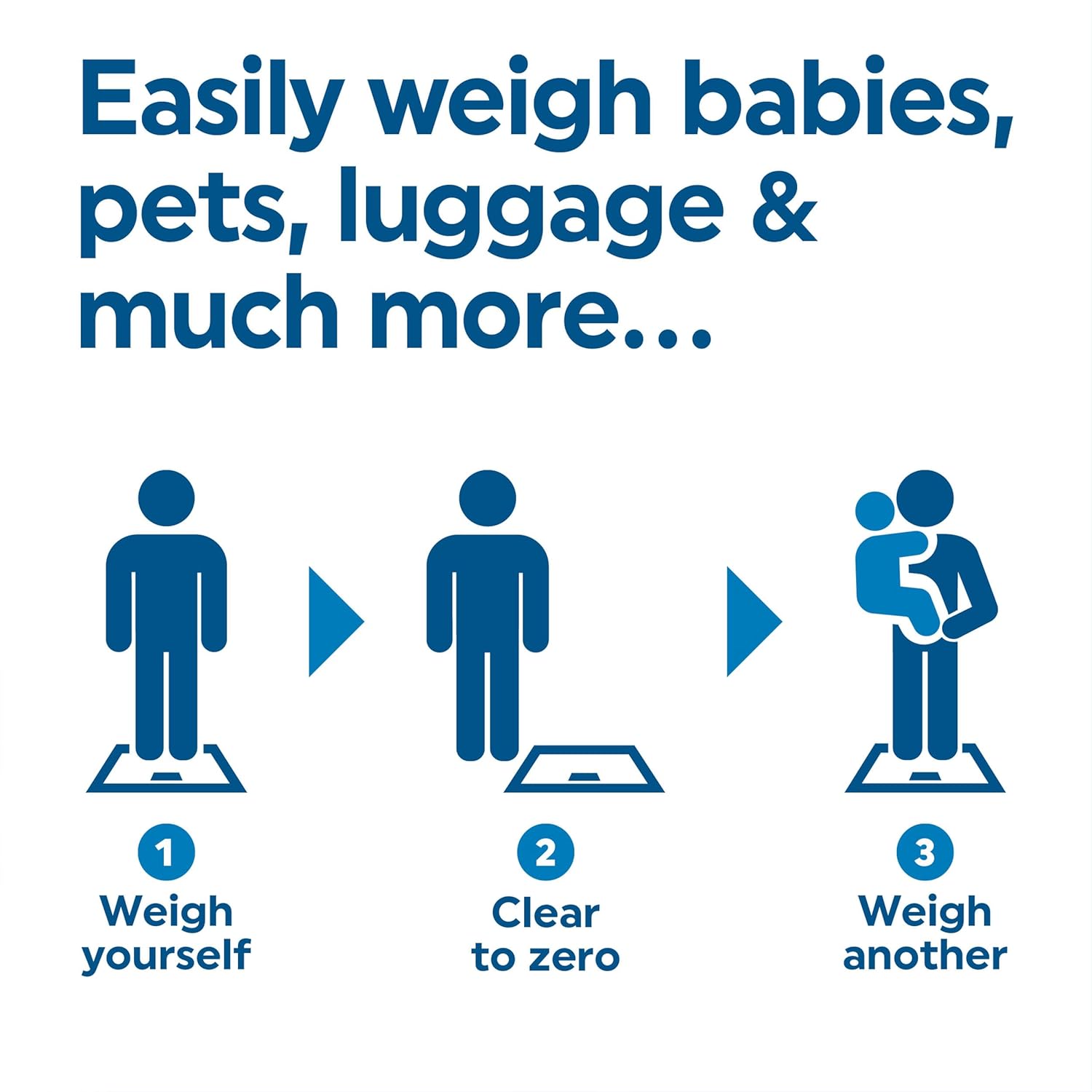
Image: A three-step diagram illustrating the tare function: 1. Weigh yourself, 2. Clear to zero (step off), 3. Weigh another (step on with item).
Example: Weighing a Baby

Image: A mother holding a baby while standing on the Salter scale, demonstrating the tare function for weighing infants.
Example: Weighing a Pet

Image: A woman holding a small white dog while standing on the Salter scale, illustrating how to weigh pets.
Example: Weighing Luggage

Image: A person standing on the Salter scale while holding a piece of luggage, demonstrating the tare function for baggage.
6. Maintenance and Care
- Clean the scale with a damp cloth and mild detergent. Do not use abrasive cleaners or immerse the scale in water.
- Store the scale in a dry place at room temperature.
- If the scale is not to be used for a long period, remove the battery to prevent leakage.
7. Troubleshooting
- 'Lo' or 'Err' on Display: This usually indicates a low battery. Replace the battery as described in Section 4.1.
- Inaccurate Readings: Ensure the scale is on a hard, flat surface. If on carpet, ensure carpet feet are installed. Avoid moving the scale between readings.
- No Display: Check if the battery is correctly installed and not depleted. Tap the scale gently to activate it.
- 'O-Ld' or 'Err' (Overload): The weight on the scale exceeds its maximum capacity. Step off immediately to prevent damage.
8. Specifications
| Feature | Specification |
|---|---|
| Model Number | SA00300 GGFEU16 |
| Maximum Weight Capacity | 180 kg (400 lb / 28 st 8 lb) |
| Readout Accuracy | ±100g (0.1 kg / 0.25 lb) |
| Display Type | LCD |
| Dimensions (L x W x H) | 32 x 32 x 1.7 cm |
| Power Source | 1 x C Battery (included) |
| Special Features | Tare Function, Carpet Feet |
| Material | Kolstål (Steel) |

Image: A graphic displaying the maximum weight capacities and accuracy for single, additional, and combined weights in kilograms, stones, and pounds.
9. Warranty and Support
The Salter SA00300 GGFEU16 Bathroom Scale comes with a 15-year guarantee, ensuring quality and reliability. For warranty claims or technical support, please refer to the contact information provided with your purchase or visit the official Salter website.


