
COOAU P4
Contents
COOAU P4 2K Outdoor/Indoor Surveillance Camera User Manual
Model: P4
Introduction
Thank you for choosing the COOAU P4 2K Outdoor/Indoor Surveillance Camera. This manual provides essential information for setting up, operating, and maintaining your camera to ensure optimal performance and security. The P4 camera is designed for versatile indoor and outdoor use, offering high-resolution monitoring, intelligent detection features, and robust weather resistance.

Figure 1: COOAU P4 2K Outdoor/Indoor Surveillance Camera. This image shows the white camera unit with two antennas, mounted on a wall, with a smartphone screen displaying a live feed of a child and a dog in a yard.
Product Features
The COOAU P4 camera is equipped with a range of features to enhance your security monitoring:
- 2K High-Definition Resolution: Captures clear and detailed video footage, providing superior image quality compared to 1080P cameras.
- 130° Wide-Angle View: Offers a broad field of view to cover larger areas with a single camera.
- Color Night Vision: Equipped with 4 white lights and 3 infrared lights to provide clear, full-color images even in low-light conditions.
- Intelligent Human Detection: Advanced algorithms differentiate human movement from other objects, reducing false alarms. Supports motion and noise detection.
- Two-Way Audio: Allows for real-time communication through the camera, enabling you to speak with visitors or deter intruders.
- IP66 Weather Resistance: Designed to withstand various weather conditions, making it suitable for both indoor and outdoor installation.
- Flexible Storage Options: Supports encrypted local storage via SD card (up to 128GB) and secure cloud storage for continuous or event-triggered recording.
- 24/7 Continuous Recording: Ensures constant monitoring and recording of your property.
- Smart Home Integration: Compatible with Amazon Alexa, allowing voice control for monitoring your home. PC application support is also available.
- Durable Construction: Made from high-quality ABS plastic, resistant to high temperatures and corrosion.

Figure 2: Overview of COOAU P4 camera features, highlighting 2K FHD resolution, human detection, audio and light alarm, and 24/7 video recording.

Figure 3: Visual comparison illustrating the clarity of 2K FHD resolution, showing a child and a dog in a yard, with a magnified inset of the dog's face.

Figure 4: Comparison of night vision capabilities, showing a car in a garage. The top image depicts standard night vision, while the bottom image, labeled "COOAU," shows enhanced color night vision with visible white and infrared lights on the camera.
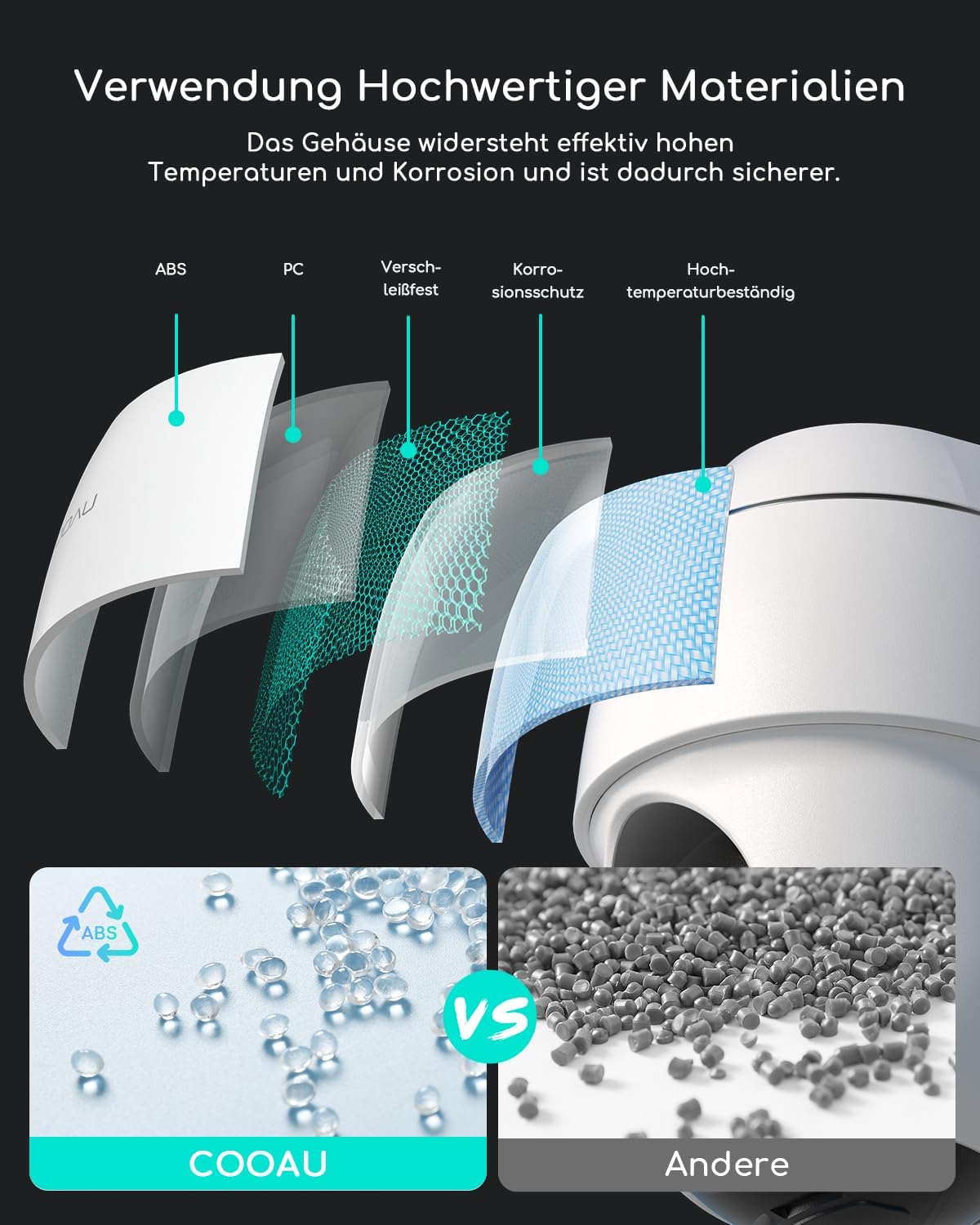
Figure 5: Diagram illustrating the layered construction of the camera's housing, emphasizing the use of ABS and PC materials for wear resistance, corrosion protection, and high-temperature resistance. Also shows a comparison of COOAU's high-quality plastic pellets versus generic ones.

Figure 6: Infographic depicting 24/7 recording capability, showing various scenes throughout a day (home interior, backyard, car, delivery person, child walking) and icons for 128GB SD card and Cloud Storage.

Figure 7: Image showing three children playing in a yard, with green arrows indicating movement paths and blue human icons representing detected individuals. An inset shows the camera's pan (355°) and tilt (90°) range.

Figure 8: The camera mounted outdoors, covered in water droplets, with icons representing cloud, rain, and sun, indicating its IP66 waterproof rating and suitability for outdoor use in various weather conditions.

Figure 9: A delivery person standing at a door with a package, while the camera is mounted above. Speech bubbles indicate a two-way conversation: "Hello, you have a delivery." and "OK, please wait."
Package Contents
Please check the package for the following items:
- COOAU P4 Surveillance Camera
- Power Adapter
- Mounting Screws and Wall Plugs
- User Manual
If any items are missing or damaged, please contact customer support.
Setup Guide
1. Physical Installation
- Choose a Location: Select a suitable location for your camera, considering the desired viewing angle and Wi-Fi signal strength. The camera is IP66 rated for outdoor use, but ensure it is within reach of a power outlet.
- Mounting: Use the provided screws and wall plugs to securely mount the camera to a wall or ceiling. The camera's bracket allows for flexible positioning.
- Power Connection: Connect the power adapter to the camera and plug it into a power outlet. The camera will power on and initiate its startup sequence.
2. App Installation and Account Creation
- Download the App: Search for the "COOAU Cam" or "CloudEdge" app (common for COOAU cameras) in your smartphone's app store (App Store for iOS, Google Play Store for Android).
- Register an Account: Open the app and follow the on-screen instructions to register a new account using your email address.
3. Connecting the Camera to Wi-Fi
- Add Device: In the app, tap the "+" icon to add a new device. Select "Smart Camera" or the appropriate camera type.
- Reset Camera: If prompted, press and hold the reset button on the camera until you hear a voice prompt indicating it's ready for connection. The reset button is typically located under a rubber cap near the SD card slot.
- Enter Wi-Fi Details: Ensure your phone is connected to a 2.4 GHz Wi-Fi network. Enter your Wi-Fi password in the app.
- Scan QR Code: The app will generate a QR code. Hold your phone with the QR code in front of the camera lens (approx. 15-20 cm away) until you hear a confirmation sound from the camera.
- Connection Confirmation: Once connected, the camera's indicator light will change, and the app will confirm successful pairing. You can then name your camera.
4. SD Card Installation (Optional)
For local storage, insert a microSD card (up to 128GB, Class 10 or higher) into the camera's SD card slot. Ensure the camera is powered off before inserting or removing the card. You may be prompted to format the SD card via the app. For security, you will need to set a password for viewing recorded videos from the SD card.
5. Amazon Alexa Integration
- Enable Skill: Open the Amazon Alexa app, go to "Skills & Games," and search for the "COOAU Cam" or "CloudEdge" skill. Enable the skill.
- Link Account: Link your COOAU camera app account with your Alexa account.
- Discover Devices: Ask Alexa to "Discover devices" or manually discover them in the Alexa app. Your camera should appear in the device list.
- Voice Commands: You can now use voice commands like "Alexa, show me the [camera name]" on compatible Echo Show devices.
Operating Instructions
1. Live View
Open the app and tap on your camera's name to access the live video feed. From here, you can:
- View real-time footage.
- Take screenshots or record video manually.
- Access two-way audio.
- Adjust camera settings (e.g., night vision mode, motion detection sensitivity).
2. Recording and Playback
The camera supports two recording modes:
- 24/7 Continuous Recording: If an SD card is inserted or cloud storage is active, the camera can record continuously.
- Event-Triggered Recording: Records only when motion, human, or sound detection is triggered.
To view recorded footage, navigate to the "Playback" or "History" section within the app. Select the date and time to review events.
3. Two-Way Audio
While in live view, tap the microphone icon to activate two-way audio. Hold the button to speak, and release to listen. Ensure your phone's microphone is enabled for the app.
4. Alarm and Siren Functions
In the camera settings, you can enable and customize alarm functions. This includes:
- Push Notifications: Receive alerts on your phone when motion or human detection is triggered.
- Siren: Activate an audible siren from the camera to deter intruders.
- Spotlight: Turn on the camera's white lights to illuminate the area and enhance color night vision.
Maintenance
- Cleaning: Regularly wipe the camera lens with a soft, dry cloth to ensure clear image quality. Do not use harsh chemicals.
- Firmware Updates: Check the app periodically for firmware updates. Keeping your camera's firmware up-to-date ensures optimal performance, new features, and security enhancements.
- Storage Management: If using an SD card, regularly back up important footage and consider formatting the card periodically to maintain performance. Cloud storage typically manages itself.
- Wi-Fi Signal: Ensure your camera maintains a strong Wi-Fi connection for uninterrupted operation. Relocate your router or camera if signal strength is consistently low.
Troubleshooting
| Problem | Possible Cause | Solution |
|---|---|---|
| Camera fails to connect to Wi-Fi. | Incorrect Wi-Fi password; 5GHz network used; weak signal; camera too far from router. | Ensure correct 2.4 GHz Wi-Fi password. Move camera closer to router. Reset camera and try pairing again. |
| Frequent false alarms. | Motion detection sensitivity too high; environmental factors (e.g., moving branches, insects). | Adjust motion detection sensitivity in the app. Enable human detection only. Adjust detection zones. |
| No recording or playback issues. | SD card full/corrupted; cloud storage subscription expired; recording settings incorrect. | Check SD card status, format if necessary. Verify cloud storage subscription. Ensure recording mode is enabled. |
| Alexa integration not working. | Skill not enabled; account not linked; device not discovered. | Ensure "COOAU Cam" or "CloudEdge" skill is enabled and accounts are linked. Ask Alexa to "Discover devices." Try resetting and re-adding the camera in the app, then re-linking with Alexa. |
| Poor image quality at night. | Lens obstruction; night vision mode not optimal. | Clean the camera lens. Ensure night vision mode is set to "Color Night Vision" or "Auto" in the app. |
Specifications
| Feature | Detail |
|---|---|
| Model Number | P4 |
| Brand | COOAU |
| Resolution | 2K (1440p) |
| Viewing Angle | 130 degrees |
| Connectivity Technology | Wireless (2.4 GHz Wi-Fi) |
| Power Source | Corded Electric (5 Watts) |
| Material | Plastic (ABS) |
| Weather Resistance | IP66 |
| Dimensions (L x W x H) | 16 x 15 x 10 cm |
| Weight | 680 grams |
| Controller Type | Amazon Alexa |
| Storage Support | MicroSD Card (up to 128GB), Cloud Storage |
| Usage | Outdoor, Indoor |
Warranty and Support
COOAU products typically come with a limited warranty. Please refer to the warranty card included in your package or visit the official COOAU website for detailed warranty terms and conditions. For technical support, troubleshooting assistance, or any inquiries regarding your COOAU P4 camera, please contact COOAU customer service through their official website or the contact information provided in the product packaging.
Note: Information regarding spare parts availability is currently unavailable.
Documents and downloads
Ask a question about this manual
Ask about setup, troubleshooting, compatibility, parts, safety, or missing instructions. Manuals+ will review the question and use this page’s manual context to help answer it.