
CAMBOFOTO E168
CAMBOFOTO E168 168cm Tripod User Manual
Model: E168 | Brand: CAMBOFOTO
Introduction
Thank you for choosing the CAMBOFOTO E168 Tripod. This manual provides essential information for the safe and effective use of your tripod. Please read it thoroughly before use and retain it for future reference.
Product Overview
The CAMBOFOTO E168 is a versatile and portable tripod designed for smartphones and small cameras. It features adjustable height, a high load capacity, and a retractable phone holder, making it suitable for various photography and videography needs.
Key Features:
- Adjustable Height: Extends up to 168 cm (66.14 inches).
- Compact Design: Folds down to 43 cm (16.9 inches) for easy portability.
- Retractable Phone Holder: Securely holds smartphones.
- Universal Compatibility: Features a 1/4-inch screw for various devices including mirrorless cameras, fill lights, and action cameras.
- Ball Head: Allows for 360-degree rotation and 180-degree tilt for flexible positioning.
Package Contents
Upon unpacking, please ensure all items are present and in good condition.
- CAMBOFOTO E168 Tripod
- Retractable Phone Holder
- User Manual

Image: The CAMBOFOTO E168 tripod, its retractable phone holder, and the user manual, displayed next to its packaging box.
Setup Instructions
1. Unfolding the Tripod Legs
- Place the tripod on a flat, stable surface.
- Gently pull the tripod legs outwards until they are fully extended and stable. The legs are designed to spread for maximum stability.
- Ensure the legs are locked into position to prevent accidental collapse.

Image: Close-up views of the tripod's leg locking mechanisms and rubber feet, showing how to twist to lock and unlock the segments, and how to open the tripod legs.
2. Attaching the Phone Holder or Camera
- Locate the 1/4-inch screw on the top of the tripod's ball head.
- For Phone Holder: Screw the retractable phone holder onto the 1/4-inch screw until it is secure.
- For Camera/Other Devices: Directly screw your camera, mirrorless camera, fill light, or action camera onto the 1/4-inch screw. Ensure it is tightened firmly to prevent wobbling.

Image: A diagram illustrating the retractable phone holder's dimensions and its 360-degree rotation and 180-degree tilt capabilities. Below, it shows the 1/4-inch screw compatibility with a mobile phone, mirrorless camera, fill light, and action camera.
3. Inserting Your Phone (if using phone holder)
- Gently pull apart the spring-loaded clamps of the phone holder.
- Insert your smartphone between the clamps, ensuring it is centered and held securely.
- Release the clamps slowly to grip the phone.
Operating Instructions
1. Adjusting Tripod Height
- To extend a leg segment, twist the locking mechanism counter-clockwise to loosen it.
- Pull the leg segment outwards to the desired height.
- Twist the locking mechanism clockwise to tighten and secure the segment.
- Repeat for all segments and legs until the desired height is achieved. Ensure all locks are firmly tightened before use.
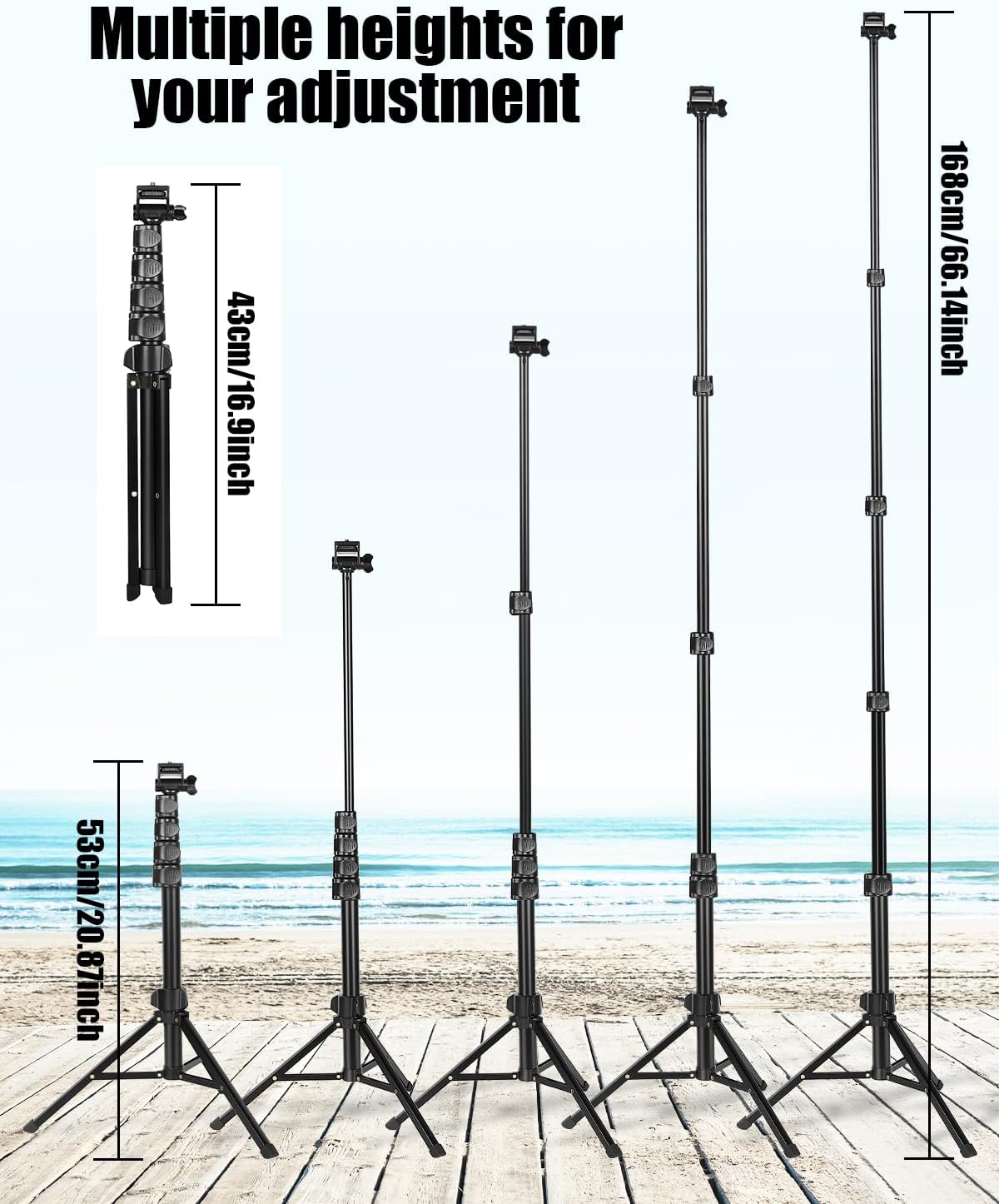
Image: The CAMBOFOTO E168 tripod displayed at multiple heights, ranging from its minimum folded height of 43cm to its maximum extended height of 168cm, demonstrating its adjustable capabilities.
2. Adjusting Device Angle (Ball Head)
- Loosen the knob on the ball head to allow movement.
- Adjust your device to the desired angle (360-degree rotation, 180-degree tilt).
- Tighten the knob firmly to secure the device in position.
3. Using as a Selfie Stick
- Fold the tripod legs together to form a handle.
- Extend the central column to the desired length.
- Hold the folded legs as a grip and use the device for selfies or handheld shots.

Image: A person hiking with the CAMBOFOTO E168 tripod attached to their backpack, highlighting its compact and portable design with dimensions of 43cm (16.9 inches) folded and a weight of 0.48kg.

Image: A collage showing the CAMBOFOTO E168 tripod being used in different scenarios: as a full-height tripod for a "landing shot", as a tripod for a "live broadcast", and as a "selfie stick" held by hand.
Maintenance
- Cleaning: Wipe the tripod with a soft, dry cloth after each use to remove dust and dirt. For stubborn grime, use a slightly damp cloth and then dry thoroughly.
- Storage: Store the tripod in a cool, dry place, away from direct sunlight and extreme temperatures.
- Inspection: Periodically check all screws, locks, and joints for tightness. Tighten any loose components to ensure stability and safety.
- Avoid Overloading: Do not exceed the recommended load capacity of the tripod to prevent damage.
Troubleshooting
| Problem | Possible Cause | Solution |
|---|---|---|
| Tripod is unstable. | Legs not fully extended or locked. Uneven surface. Overloaded. | Ensure all leg segments are fully extended and their locks are tightened. Place on a flat, stable surface. Reduce load if exceeding capacity. |
| Device wobbles on the ball head. | Ball head knob not tightened. Device not securely attached to 1/4-inch screw. | Tighten the ball head knob firmly. Ensure the device is screwed tightly onto the 1/4-inch screw. |
| Leg segments slide down. | Leg locks are not tightened sufficiently. | Twist the leg locking mechanisms clockwise until they are firmly secured. |
Specifications
| Feature | Detail |
|---|---|
| Model Number | E168 |
| Brand | CAMBOFOTO |
| Folded Dimensions (L x W x H) | 43 x 6.5 x 7.5 cm (16.9 x 2.5 x 2.9 inches) |
| Item Weight | 570 Grams (1.26 lbs) |
| Minimum Height | 45.5 Centimeters (17.9 inches) |
| Maximum Height | 168 Centimeters (66.14 inches) |
| Tripod Head Type | Ball Head |
| Compatible Devices | Smartphones, Mirrorless Cameras, Fill Lights, Action Cameras |
| Special Features | Adjustable height, high load capacity, portable phone holder, camera compatible. |
| UPC | 742703744507 |
Warranty and Support
For warranty information or technical support, please refer to the contact details provided with your purchase or visit the official CAMBOFOTO website. Keep your proof of purchase for any warranty claims.
Ask a question about this manual
Ask about setup, troubleshooting, compatibility, parts, safety, or missing instructions. Manuals+ will review the question and use this page’s manual context to help answer it.