Download PDFFree PDF. The Save button below keeps a bookmark and private notes in your account.
Lamicall Magnetic Air Vent Car Phone Mount (Model STCV02-EU-B) Instruction Manual
Brand: Lamicall | Model: STCV02-EU-B
Product Overview
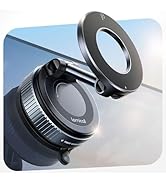
The Lamicall Magnetic Air Vent Car Phone Mount is designed to provide a secure and convenient way to hold your smartphone in your vehicle. Featuring 20 powerful N52 magnets, it ensures a firm grip on your device, even during strong braking, sharp turns, or rough road conditions. The mount's L-shaped aluminum support arm allows for a wide range of motion without obstructing the air vent, and its 360-degree joint ball enables easy adjustment to your preferred viewing angle. It includes a robust 4-lock protection system for stable attachment to most car air vents.
Package Contents
1 x Lamicall Magnetic Phone Holder
1 x Air Vent Clip with Ball Joint
2 x Metal Rings (for non-MagSafe devices/cases)
2 x Clear Protective Films (for metal ring application)
2 x Cleaning Wipes (wet and dry)
1 x User Manual
Image: All components included in the Lamicall Magnetic Phone Holder package.
Setup and Installation
Step 1: Assemble the Mount
Unscrew the nut from the air vent clip.
Press the ball joint of the air vent clip into the socket of the magnetic suction cup.
Tighten the nut securely to fix the magnetic head to the air vent clip.
Video: Demonstrates how to assemble the magnetic phone holder by connecting the ball joint to the magnetic head and securing it with the nut.
Step 2: Attach to Car Air Vent
Unscrew the vent clip to extend the hook.
Hook the extended clip onto an air vent blade in your car.
Tighten the vent clip to firmly secure the mount to the air vent. Ensure the 4-lock protection system is engaged for maximum stability.
Image: The air vent clip securely attached to a car's air vent, demonstrating the L-shaped aluminum support arm.
Step 3: Prepare Your Phone for Magnetic Attachment
For MagSafe-compatible iPhones (iPhone 12 series and newer) or MagSafe cases: Your device or case has built-in magnets and can be directly attached to the Lamicall mount. No additional metal rings are needed.
For other phone models or non-magnetic phone cases: You must use the included metal rings to enhance magnetism.
Clean the back of your phone or phone case thoroughly using the provided wet and dry cleaning wipes.
Apply one of the clear protective films to the cleaned area where the metal ring will be placed. This protects your phone/case surface.
Using the alignment guide (if provided in your package), carefully position and stick a metal ring onto the protective film on the back of your phone or case. Ensure it is centered for optimal magnetic connection.
Image: Illustration of applying the metal ring to a phone case for non-MagSafe compatibility.
Operating Instructions
Attaching and Removing Your Phone
Simply bring your MagSafe-compatible iPhone (or phone with the attached metal ring) close to the magnetic surface of the mount. The strong magnets will automatically snap your phone into place.
To remove your phone, gently pull it away from the magnetic surface. The one-hand operation design makes it easy to attach and detach your device.
Image: Demonstrates the ease of one-hand operation for attaching a phone to the magnetic mount.
Adjusting Viewing Angle
The mount features a 360-degree rotatable ball joint, allowing you to easily adjust your phone to any desired viewing angle (portrait or landscape).
The L-shaped aluminum support arm provides flexibility to position your phone without blocking the air vent, ensuring optimal airflow.
Image: The phone mount adjusted to provide a clear view and maintain airflow from the vent.
Specifications
Brand
Lamicall
Model Number
STCV02-EU-B
Product Dimensions
5 x 4 x 1 inches
Item Weight
5.6 ounces
Special Features
20 Strong N52 Magnets, L-shaped Aluminum Alloy Support Arm, Does Not Block Airflow, 4-Lock Protection
Compatible Devices
iPhone 16 Pro, iPhone 16 Pro Max, iPhone 16, iPhone 15 Pro, iPhone 15 Pro Max, iPhone 15, iPhone 14 Pro, iPhone 14 Pro Max, iPhone 14, 14 Plus, iPhone 13 Mini, 13, 13 Pro, 13 Pro Max, iPhone 12 mini, 12, 12 pro, 12 pro max (and other phones with included metal rings)
Mounting Type
Air Vent
Maintenance and Care
Regularly check the tightness of the air vent clip to ensure secure attachment.
Clean the magnetic surface with a soft, dry cloth to maintain optimal magnetic grip.
Avoid exposing the mount to extreme temperatures for prolonged periods.
Troubleshooting
Phone not holding securely:
Ensure the air vent clip is tightened sufficiently.
If using a non-MagSafe phone, verify the metal ring is correctly positioned and securely attached to your phone or case.
Check for any obstructions or debris on the magnetic surface of the mount or your phone/case.
Mount feels wobbly:
Re-tighten the nut connecting the magnetic head to the air vent clip.
Ensure the air vent clip is fully tightened onto the air vent blade.
Warranty and Support
For warranty information or customer support, please refer to the official Lamicall website or contact their customer service directly. Keep your purchase receipt for warranty claims.
Ask about setup, troubleshooting, compatibility, parts, safety, or missing instructions. Manuals+ will review the question and use this page’s manual context to help answer it.